
1. Introducció
The Havit MS966SE is a high-performance tri-mode gaming mouse designed for versatility, precision, and comfort. It features a PixArt PMW3325 optical sensor, offering exceptional tracking accuracy and adjustable DPI settings up to 10,000. With its tri-mode connectivity, you can seamlessly switch between 2.4GHz wireless, Bluetooth 5.3, and USB-C wired modes to suit your gaming or work environment. The lightweight and ergonomic design ensures comfortable use during extended sessions, complemented by dynamic RGB lighting for a personalized aesthetic.

Figure 1: Havit MS966SE Gaming Mouse with USB-C cable.
2. Configuració
2.1 Desembalatge
Carefully remove the mouse and all accessories from the packaging. Ensure all components are present:
- Ratolí per a jocs Havit MS966SE
- Cable USB-C a USB-A
- Receptor USB de 2.4 GHz
- Manual d'usuari (aquest document)
2.2 Connexió del ratolí
The MS966SE offers three connectivity options:
2.2.1 Mode sense fil de 2.4 GHz
- Insert the 2.4GHz USB receiver into an available USB-A port on your computer.
- Locate the mode switch on the bottom of the mouse and slide it to the 2.4G posició.
- The mouse will automatically connect to your computer.
2.2.2 Mode Bluetooth 5.3
- Locate the mode switch on the bottom of the mouse and slide it to the BT posició.
- A l'ordinador o al dispositiu mòbil, obriu la configuració de Bluetooth i cerqueu dispositius nous.
- Select "Havit MS966SE" from the list of available devices to pair.
2.2.3 Mode amb cable USB-C
- Connect one end of the provided USB-C cable to the mouse and the other end to an available USB-A port on your computer.
- El ratolí canviarà automàticament al mode amb cable i començarà a carregar-se.
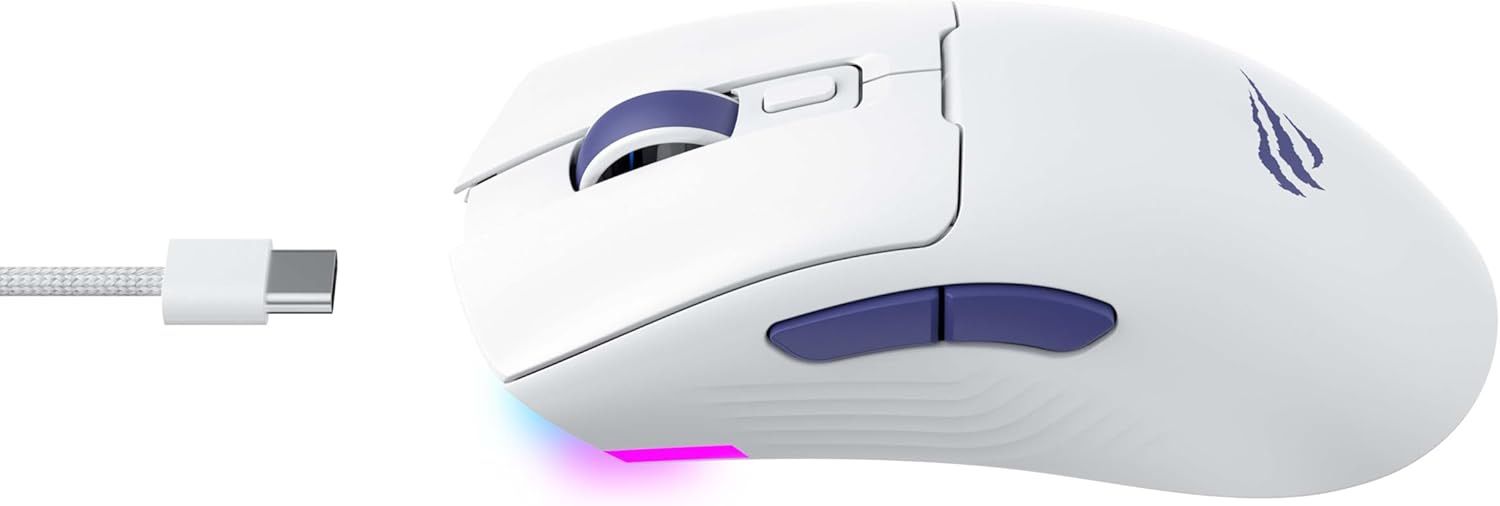
Figura 2: lateral view of the mouse, highlighting the USB-C port.
2.3 Càrrega del ratolí
To charge the mouse, connect it to your computer using the USB-C cable. The mouse can be used in wired mode while charging. An indicator light on the mouse will show the charging status (refer to the manufacturer's website or product packaging for specific light behaviors).
3. Instruccions de funcionament
3.1 Funcions dels botons
The Havit MS966SE features several programmable buttons for enhanced control:
- Botó esquerre de clic: Funció de clic principal estàndard.
- Botó dret: Funció de clic secundari estàndard.
- Roda de desplaçament: Scrolls up/down, and acts as a middle click button.
- Botó de cicle de DPI: Located behind the scroll wheel, this button cycles through preset DPI sensitivity levels.
- Botons laterals (endavant/enrere): Normalment s'utilitza per a la navegació en web browsers or can be programmed for in-game actions.

Figure 3: Side buttons and ergonomic design.
3.2 Ajust de DPI
The PixArt PMW3325 sensor allows for adjustable DPI settings up to 10,000. Press the DPI cycle button (located behind the scroll wheel) to switch between different sensitivity levels. Each press will cycle to the next preset DPI, allowing you to quickly adapt to various tasks or game scenarios.
3.3 Connectivity Mode Switching
To switch between 2.4GHz wireless, Bluetooth, and wired modes, use the physical switch located on the bottom of the mouse. Ensure the correct mode is selected based on your connection preference.
Il·luminació RGB 3.4
The mouse features dynamic RGB lighting. Specific controls for RGB lighting effects, colors, and brightness may be available through dedicated software provided by Havit. Please visit the official Havit website for software downloads and further customization options.
4. Manteniment
4.1 Neteja
- Desconnecteu el ratolí de l'ordinador abans de netejar-lo.
- Feu servir un drap suau, sec i sense borrissol per netejar la superfície del ratolí.
- Per a la brutícia persistent, lleugerament dampNetegeu el drap amb aigua o una solució de neteja suau. Eviteu productes químics agressius.
- Feu servir un bastonet de cotó o aire comprimit per netejar els voltants dels botons i la roda de desplaçament.
- No submergiu el ratolí en aigua ni en cap líquid.
4.2 Emmagatzematge
When not in use for extended periods, store the mouse in a cool, dry place away from direct sunlight and extreme temperatures. If storing for a long time, ensure the mouse is fully charged to maintain battery health.
5. Solució De Problemes
5.1 El ratolí no respon
- Comproveu la potència: Assegureu-vos que el ratolí estigui encès i que tingui prou bateria.
- Comproveu la connectivitat:
- Mode per cable: Ensure the USB-C cable is securely connected to both the mouse and the computer. Try a different USB port.
- Sense fil de 2.4 GHz: Ensure the USB receiver is properly inserted and the mouse is set to 2.4G mode. Try a different USB port for the receiver.
- Mode Bluetooth: Ensure Bluetooth is enabled on your device and the mouse is paired. Try unpairing and re-pairing the mouse.
- Reinicia: Reinicieu l'ordinador i el ratolí.
5.2 DPI sense canvis
- Ensure you are pressing the correct DPI cycle button.
- If using custom software, check the DPI settings within the software.
5.3 Lag or Disconnections in Wireless Mode
- Interferència: Move the mouse closer to the receiver/device. Avoid obstacles between the mouse and receiver.
- Nivell de bateria: Low battery can affect wireless performance. Charge the mouse.
- Port USB: Try connecting the 2.4GHz receiver to a different USB port, preferably a USB 2.0 port if available, as some USB 3.0 ports can cause interference.
6. Especificacions
| Marca | Havit |
| Model | MS966SE |
| Tecnologia de connectivitat | Tri-Mode: 2.4GHz Wireless, Bluetooth 5.3, USB-C Wired |
| La tecnologia de sensors | Òptic (PixArt PMW3325) |
| Nivells de DPI | Up to 10,000 adjustable DPI |
| Característiques especials | Ergonomic Design, Dynamic RGB Lighting |
| Sistemes operatius compatibles | Windows, macOS, Linux |
| Dispositius compatibles | Notebook, Personal Computer, Tablet, Smartphone |
| Pes del ratolí | Aproximadament 68 grams |
| Tipus de bateria | Ió de liti |
7. Garantia i Suport
7.1 Informació de la garantia
This Havit MS966SE Gaming Mouse comes with a 1 anys de garantia del fabricantSi us plau, conserveu el comprovant de compra per a reclamacions de garantia. La garantia cobreix defectes de materials i fabricació en condicions d'ús normal.
7.2 Atenció al client
For technical assistance, troubleshooting beyond this manual, or warranty inquiries, please contact Havit customer service directly. You can find the most up-to-date contact information and support resources on the official Havit weblloc (www.havit.com).