
1. Introducció
Welcome to the COROS PACE 4 Running and Sports Watch user manual. This guide provides essential information for setting up, operating, maintaining, and troubleshooting your new device. The COROS PACE 4 is designed to enhance your training and daily activities with its advanced features, including an AMOLED display, high-precision GPS, and extensive activity tracking capabilities.

Figure 1: COROS PACE 4 Running and Sports Watch
2. Producte acabatview i Característiques
The COROS PACE 4 is equipped with a range of features to support your athletic performance and daily well-being:
-
Pantalla AMOLED: The 1.2-inch AMOLED touchscreen delivers vibrant colors and sharp visuals. Brightness automatically adjusts to ambient light, ensuring high visibility in any environment. A new action button has been added, allowing for quick information checks and smooth operations during training via touch.

Figure 2: AMOLED Display Quality
-
Llarga vida útil de la bateria: Despite featuring an AMOLED display, a large-capacity battery and superior algorithms provide up to 19 days of normal use and up to 31 hours in dual-frequency all-system GPS mode, extending battery life by 16 hours compared to COROS PACE 3. Use it without battery concerns during long training sessions or expeditions.

Figure 3: Extended Battery Performance
-
Ultralight Technology: Achieves an astonishingly light weight of just 32g when worn with the nylon band. Provides a fit so comfortable you'll forget it's there, even during long wear or intense training. The sophisticated 11.8mm thin design looks stylish not only in sports but also in all daily situations.

Figure 4: Ultralight Design
-
Micròfon integrat: Using the COROS PACE 4's voice recording tool, you can record training sessions by voice at the end of an activity, which can then be transcribed in the app, allowing you to accurately recall session details. The voice pin feature allows you to save locations, sights, and emotions from moments during your training.

Figure 5: Voice Recording Functionality
-
High-Precision GPS & Route Navigation: With all-system and dual-frequency satellite modes, accurate location information can be obtained instantly in any environment. Easily create custom routes by setting destinations on the COROS app's route page and quickly sync them to your COROS PACE 4. Utilize the navigation function to run with your companions without getting lost!

Figure 6: High-Precision GPS and Route Navigation
-
Extensive Activity Modes: Supports a wide range of activity modes. In addition to running, cycling, swimming, and strength training, it includes over 30 sports modes such as trail running and skiing.
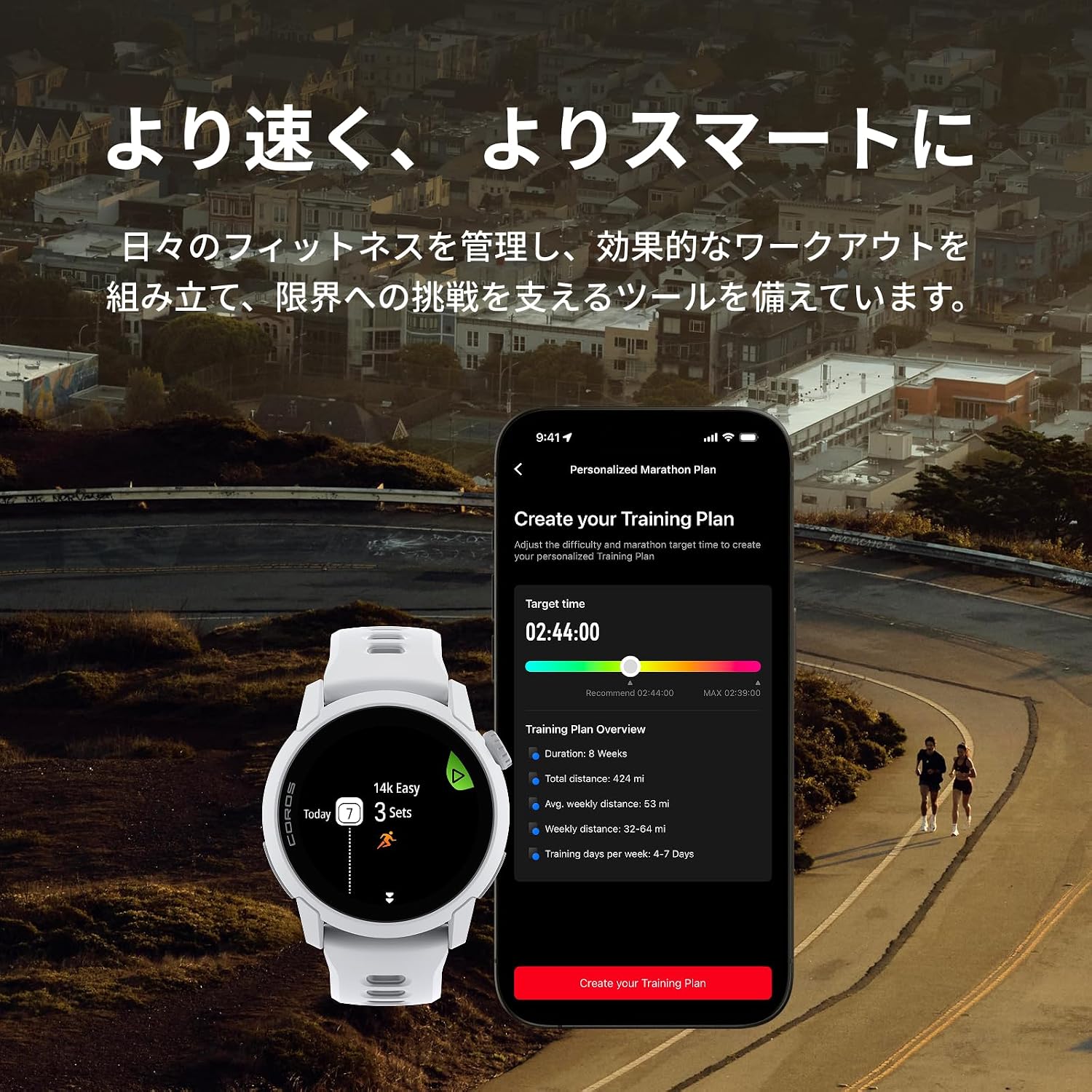
Figure 7: Training Plan and Activity Modes
-
USB Type-C Charging Supported: The COROS PACE 4 features an improved charging port, allowing charging with a USB Type-C cable via the included keychain adapter. This offers compatibility with other gadgets and smartphones, helping to reduce your luggage. Note: A Type-C charging cable is not included. Original COROS charging cables are not compatible with COROS PACE 4. Compatible charging cable standard: USB Type-C 2.0/3.0 charging cable. USB Type-C 1.1 charging cables are not compatible.

Figure 8: Box Contents with USB Type-C Adapter
3. Configuració
3.1 Càrrega inicial
Before first use, fully charge your COROS PACE 4. Connect the included keychain adapter to a USB Type-C 2.0/3.0 charging cable (not included) and then to a power source. Attach the adapter to the charging port on the back of your watch. A full charge typically takes approximately 2 hours.
3.2 Emparellament amb el telèfon intel·ligent
- Baixeu l'aplicació COROS des de la botiga d'aplicacions del vostre telèfon intel·ligent (iOS o Android).
- Obre l'aplicació COROS i crea un compte o inicia la sessió.
- Turn on your COROS PACE 4 by pressing and holding the power button.
- A l'aplicació COROS, navegueu fins a la pestanya "Dispositiu" i seleccioneu "Afegeix un dispositiu nou".
- Follow the on-screen instructions to pair your watch. This usually involves confirming a code displayed on both your watch and phone.
3.3 Basic Watch Setup
After pairing, the app will guide you through initial settings such as language, time format, and personal profile information. Ensure all settings are accurate for optimal performance tracking.
4. Instruccions de funcionament
4.1 Navegació
- Pantalla tàctil: Llisca cap amunt, cap avall, cap a l'esquerra o cap a la dreta per navegar pels menús i els widgets. Toca per seleccionar elements.
- Esfera digital: Rotate the digital dial to scroll through lists and adjust settings. Press the dial to confirm selections or return to the previous screen.
- Botó d'acció: The dedicated action button provides quick access to frequently used functions or can be customized for specific actions during workouts.
4.2 Seguiment d'activitat
The COROS PACE 4 supports over 30 sports modes. To start an activity:
- From the watch face, press the digital dial to access the main menu.
- Scroll to and select 'Activity'.
- Choose your desired sport mode (e.g., Run, Bike, Swim, Trail Run).
- Wait for GPS signal acquisition (if applicable).
- Press the digital dial or action button to start the activity.
4.3 GPS and Route Navigation
The watch utilizes dual-frequency GPS for high accuracy. You can create and sync routes from the COROS app to your watch for guided navigation during activities. During a navigation activity, the watch will display your path and provide turn-by-turn directions.
4.4 Voice Recording and Music
Use the built-in microphone to record voice notes during or after activities. These recordings can be transcribed in the COROS app. The watch also supports music playback, allowing you to store and listen to music directly from your device via Bluetooth headphones.
4.5 Vigilància de la salut
The COROS PACE 4 continuously monitors various health metrics, including heart rate, sleep stages, and recovery status. Access these insights through the watch widgets or the COROS app to track your progress and optimize your training.

Figure 9: Recovery and Health Tracking
5. Manteniment
5.1 Neteja del rellotge
- Netegeu regularment el rellotge i la corretja amb un drap suau i sec.amp tela.
- Avoid using harsh chemicals or abrasive materials, as these can damage the device.
- Esbandiu el rellotge amb aigua fresca després de l'exposició a la suor, l'aigua salada o el clor.
- Assegureu-vos que el port de càrrega estigui sec abans de carregar.
5.2 Cura de la bateria
- To prolong battery life, avoid fully discharging the watch frequently.
- Guardeu el rellotge en un lloc fresc i sec quan no l'utilitzeu durant períodes prolongats.
- Eviteu exposar el rellotge a temperatures extremes.
6. Solució De Problemes
6.1 El rellotge no s'encén
- Assegura't que el rellotge estigui completament carregat. Connecta'l al carregador durant almenys 30 minuts.
- Perform a soft reset by pressing and holding the digital dial for 15 seconds.
6.2 Problemes amb el senyal GPS
- Assegureu-vos que esteu en una zona oberta a l'aire lliure amb una vista clara view del cel.
- Update the watch firmware via the COROS app to ensure the latest GPS satellite data.
- Wait a few minutes for the watch to acquire a stable GPS signal before starting an activity.
6.3 Problemes d'aparellament
- Assegureu-vos que el Bluetooth estigui habilitat al vostre telèfon intel·ligent.
- Reinicia tant el rellotge com el telèfon intel·ligent.
- Try unpairing and re-pairing the device through the COROS app.
For further troubleshooting, please refer to the official COROS support weblloc o contacteu amb el servei d'atenció al client.
7. Especificacions
| Característica | Especificació |
|---|---|
| Número de model | W335 |
| Tipus de visualització | AMOLED |
| Mida de la pantalla | 1.2 polzades |
| Pes del producte | 32 grams |
| Amplada de banda | 22 mil·límetres |
| Capacitat d'emmagatzematge de memòria | 4 GB |
| Tecnologia de connectivitat | Bluetooth |
| Sistemes de satèl·lit compatibles | GLONASS, GPS, Galileo, BeiDou |
| Average Battery Life (Normal Use) | 19 dies |
| Average Battery Life (Dual-Frequency GPS) | 31 hores |
| Port de càrrega | USB Type-C (2.0/3.0 compatible) |
| Característiques | Voice pin function, Route navigation supported, Touchscreen |
| UPC | 810005784993 |
8. Garantia i Suport
For detailed warranty information, please refer to the warranty card included with your product or visit the official COROS website. COROS provides customer support for product inquiries, technical assistance, and warranty claims.
COROS oficial Weblloc: www.coros.com
Please ensure you have your product model and serial number ready when contacting support.


