
Introducció
This manual provides detailed instructions for the installation, operation, and maintenance of your MekedeTech Android Car Radio. This 13-inch touchscreen unit is designed to upgrade your vehicle's infotainment system with advanced features like wireless CarPlay, Android Auto, 4G LTE connectivity, and GPS navigation. Please read this manual thoroughly before installation and use to ensure proper function and longevity of your device.
Models de vehicles aplicables
This Android car radio is specifically designed for the following vehicle models:
- Mercedes Benz Sprinter Freightliner W907 VS30 MK3 (2019-2023)
Important: If your vehicle is a low-end model with an OEM navigation touch screen, you may need an extra wiring harness. Please contact support for clarification before installation.

Image: The MekedeTech Android Car Radio seamlessly integrated into the dashboard of a compatible Mercedes Benz Sprinter. The image also illustrates the appearance of the dashboard before and after the installation of the unit, highlighting the upgrade.
Funcions acabadesview
- Sistema operatiu: SO Android
- Processador: 8-Core A53 1.8GHz CPU
- Memòria: 8 GB de RAM, 128 GB de ROM
- Visualització: 13-inch IPS Touch Screen (1024*600 resolution)
- Connectivitat: Built-in 4G LTE, WiFi, Bluetooth, USB
- Navegació: Built-in GPS navigation with worldwide map support
- Integració del telèfon intel·ligent: CarPlay sense fil i Android Auto
- Àudio: Built-in DSP sound system, AM/FM radio, 4*50W power output
- Control: Support for factory steering wheel controls, Touchscreen, App control
Configuració i instal·lació
1. Comprovacions prèvies a la instal·lació
Before beginning installation, ensure your vehicle's ignition is off and the battery is disconnected. Verify all included components against the packing list. For vehicles with OEM navigation touch screens, confirm if an additional wiring harness is required.
2. Instal·lació física
The unit is designed for a plug-and-play installation for most compatible models. Carefully remove the factory radio and dashboard trim. Connect the provided wiring harness to the vehicle's existing connectors. Ensure all connections are secure before mounting the new head unit.
3. Cooling Fan Setup
The unit includes a cooling fan to manage internal temperatures, especially during prolonged use or in hot climates. Proper setup of the cooling fan is crucial for optimal performance and longevity.
- Connect the cooling fan cable to the designated port on the main unit.
- Access the device settings on the car radio.
- Navigate to "Device" -> "Sound" -> "AMP ON" to activate the ampmés viu.
- The cooling fan will automatically start operating when needed.

Image: An illustration detailing the internal architecture of the car radio, including the 8-core CPU, 8GB RAM, and 128GB ROM. The image also visually demonstrates the effectiveness of the cooling fan in maintaining optimal operating temperatures compared to units without one, alongside a step-by-step guide for enabling the cooling fan feature.
4. Engegada inicial
Reconnect the vehicle battery. Turn on the ignition. The unit should power on automatically. Follow any on-screen prompts for initial setup, such as language selection and time zone.
Instruccions de funcionament
1. Touch Screen and Basic Navigation
The 13-inch IPS touch screen allows for intuitive control. Swipe left/right to navigate between home screens, tap icons to open applications, and use pinch-to-zoom gestures in maps or image viewers
2. Comandaments del volant
The unit supports your vehicle's factory steering wheel controls. This allows you to adjust volume, change tracks, and answer calls without taking your hands off the wheel. Configuration may be required in the settings menu under "Steering Wheel Control" or similar.
3. CarPlay sense fil i Android Auto
Connect your smartphone wirelessly to access CarPlay (for iOS devices) or Android Auto (for Android devices). This feature allows you to use navigation, make calls, send messages, and listen to music directly from your phone's interface displayed on the car radio screen.
Passos de connexió:
- Assegureu-vos que el Bluetooth estigui activat al telèfon intel·ligent i a la ràdio del cotxe.
- On the car radio, go to the "CarPlay" or "Android Auto" application.
- Select "Connect BT" and pair your phone via Bluetooth.
- Once paired, select "Car Link" and wait for the connection to establish.
- Nota: A USB cable connection can also be used for initial setup or if wireless connection issues occur.
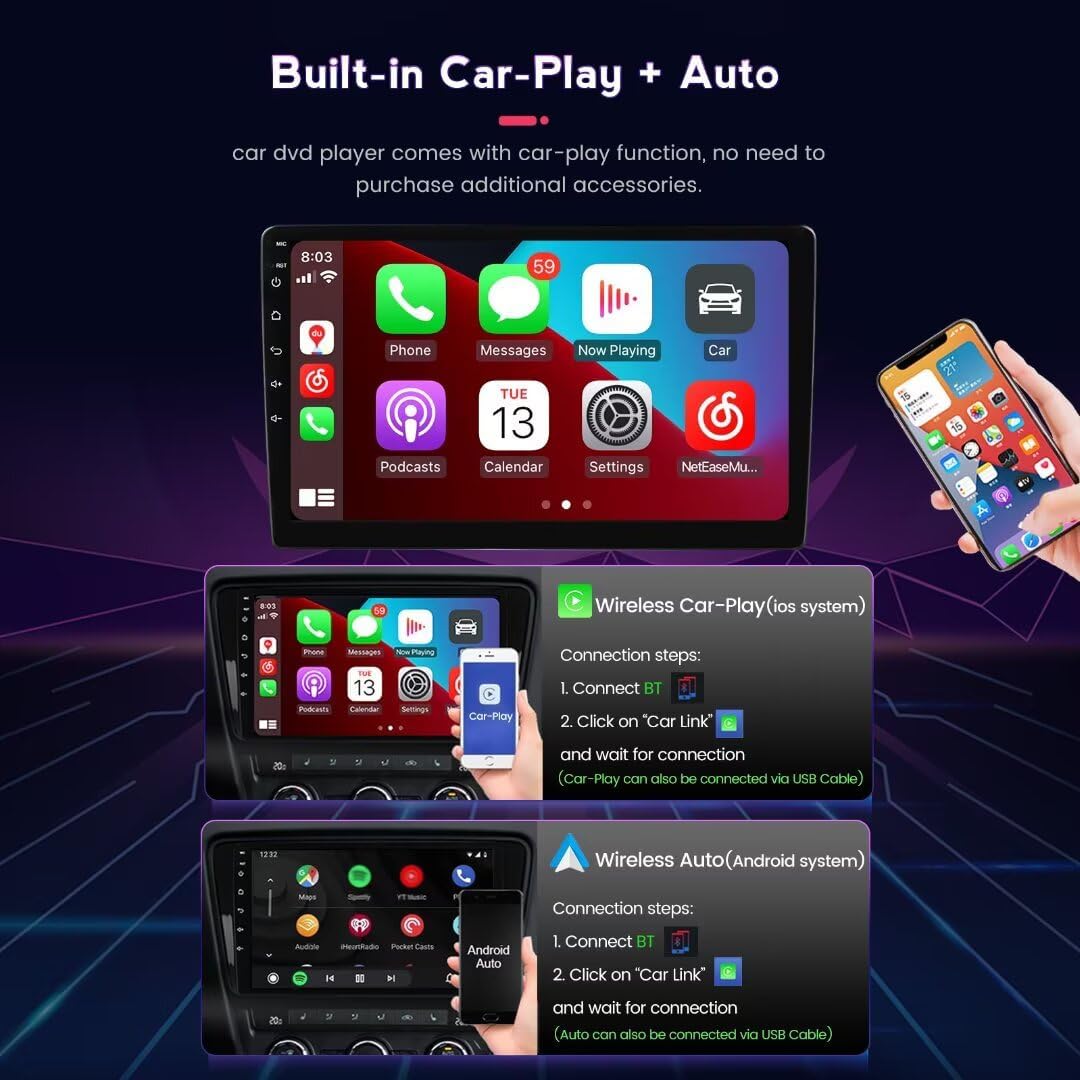
Image: Visual representation of the Wireless CarPlay and Android Auto functionalities on the car radio's 13-inch screen. The image details the user interface for both systems and provides a guide for connecting a smartphone wirelessly.
4. 4G LTE and WiFi Connectivity
The unit features built-in 4G LTE and WiFi modules for internet access. You can insert a SIM card into the dedicated slot for 4G data or connect to a WiFi hotspot.
4G LTE Setup:
- Locate the 4G SIM card slot (one on the back of the main unit, one on the RCA cable).
- Insert a compatible 4G SIM card.
- Access network settings on the device to configure APN settings if necessary.
Configuració WiFi:
- Go to "Settings" -> "Network & Internet" -> "Wi-Fi".
- Activa el Wi-Fi i selecciona la xarxa que vulguis.
- Introduïu la contrasenya si se us demana.

Imatge: Una imatge detallada view of the unit's 4G LTE module, including the SIM card slot for cellular data access. Additionally, an illustration of the Digital Sound Processor (DSP) is provided, indicating its role in delivering high-quality audio.
5. Navegació GPS
The built-in GPS module provides accurate navigation. Pre-installed maps are available, and you can download additional navigation apps from the Google Play Store once connected to the internet.
6. Audio and Video Playback
The unit supports various audio (APE, FLAC, WAV, MP3, WMA) and video (MKV, RMVB, AVI, MP4, MDV) formats. Play media from USB drives, internal storage, or streaming apps. The built-in DSP sound system enhances audio quality, offering multi-dimensional surround sound effects.
7. Descàrregues d'aplicacions
With internet connectivity, you can download and install various applications from the Google Play Store, expanding the functionality of your car radio.
Manteniment
- Neteja de pantalla: Utilitzeu un drap suau i sense pelusa lleugerament dampened with water or a screen cleaner. Avoid harsh chemicals or abrasive materials.
- Actualitzacions de programari: Periodically check for software updates in the system settings to ensure optimal performance and access to new features.
- Atenció general: Avoid exposing the unit to extreme temperatures, direct sunlight for extended periods, or excessive moisture.
Resolució de problemes
| Problema | Causa possible | Solució |
|---|---|---|
| La unitat no s'encén. | Cablejat incorrecte, fusible fundit, bateria del vehicle desconnectada. | Check all wiring connections. Inspect vehicle fuses. Ensure battery is connected and charged. |
| Sense so. | Volume too low, incorrect audio source, speaker wiring issues, ampmés viu. | Increase volume. Select correct audio source. Check speaker connections. Ensure AMP is enabled in settings. |
| El CarPlay/Android Auto sense fil no es connecta. | Bluetooth not paired, "Car Link" not selected, phone compatibility. | Ensure Bluetooth is paired. Re-attempt "Car Link" connection. Try connecting via USB cable. Check phone compatibility. |
| Senyal GPS feble o imprecis. | Obstrucció de l'antena, mala recepció del satèl·lit. | Assegureu-vos que l'antena GPS tingui una visió clara view del cel. Mou-te a una zona oberta. |
| Unit is slow or unresponsive. | Too many apps running, low memory, software glitch. | Close unnecessary applications. Restart the unit. Check for software updates. |
| Installation difficulties (as per customer review). | Complex wiring, specific vehicle requirements. | Refer to the detailed wiring diagram provided with the product. Contact MekedeTech support for specific vehicle wiring guidance. Consider professional installation if unsure. |
Especificacions
| Marca | MekedeTech |
| Model | 8-Core 8+128G |
| Sistema operatiu | SO Android |
| CPU | 8-Core A53 1.8GHz |
| RAM | 8 GB |
| ROM | 128 GB |
| Mida de la pantalla | 13 polzades |
| Resolució de pantalla | IPS de 1024 * 600 |
| Potència de sortida | 4 * 50W |
| Connectivitat | 4G LTE, WiFi, Bluetooth, USB |
| Navegació | Built-in GPS (Worldwide Map Type) |
| Integració del telèfon intel·ligent | Wireless CarPlay, Wireless Android Auto |
| Suport de format d'àudio | APE/FLAC/WAV/MP3/WMA, etc. |
| Suport de format de vídeo | MKV/RMVB/AVI/MP4/MDV, etc. |
| Característiques especials | Built-in DSP, Steering Wheel Control Support, App Download |
Informació de la garantia
This MekedeTech Android Car Radio comes with a 1 anys de garantia from the date of purchase. This warranty covers manufacturing defects and malfunctions under normal use. It does not cover damage caused by improper installation, misuse, accidents, or unauthorized modifications. Please retain your proof of purchase for warranty claims.
Atenció al client
For technical assistance, troubleshooting, or warranty inquiries, please contact MekedeTech customer support. Refer to the contact information provided with your product packaging or visit the official MekedeTech weblloc de recursos de suport.
Recursos en línia: MekedeTech Amazon Store