
1. Introducció
Thank you for choosing the iGarden Pool Cleaner K40. This robotic pool vacuum is designed to provide efficient and autonomous cleaning for both inground and above-ground pools. It features advanced navigation, multiple cleaning modes, and user-friendly controls to ensure a sparkling clean pool with minimal effort. Please read this manual thoroughly before operating the device to ensure proper usage and maintenance.
2. Què hi ha a la caixa
Carefully unpack the contents and ensure all items are present and undamaged. If any items are missing or damaged, please contact iGarden customer support.
- iGarden Pool Cleaner K40 Unit
- Adaptador de corrent alterna
- Manual d'usuari (aquest document)
- Retrieval Hook (pole not included, compatible with standard 1¼" (32 mm) poles)

Image: The iGarden Pool Cleaner K40 unit, AC power adapter, user manual, and retrieval hook as packaged in the box.
3. Configuració i ús inicial
3.1 Càrrega de la unitat
- Ensure the pool cleaner is dry before charging.
- Connect the AC power adapter to the charging port on the cleaner.
- Connecteu l'adaptador a una presa de corrent estàndard.
- The indicator lights on the cleaner will show the charging status. A full charge can provide up to 4 hours of runtime for floor cleaning or 2.5 hours for full pool coverage.
3.2 Connexió a l'aplicació (opcional)
For enhanced control and features, download the iGarden Robotics App from your device's app store. Connect the cleaner via 2.4GHz Wi-Fi or Bluetooth before placing it in the water. App setup works only when the unit is on land, as there is no signal underwater.

Image: A smartphone showing the iGarden Robotics App, which allows for mode control, OTA updates, and access to live support.
3.3 Col·locació del netejador a la piscina
Once charged, gently lower the iGarden K40 into the pool. Ensure it is fully submerged and air bubbles have escaped before starting a cleaning cycle.
4. Operating the Pool Cleaner
4.1 Control de pantalla tàctil
The iGarden K40 features an intuitive full-screen touchscreen interface. Use it to select cleaning modes, set AI timers, and initiate cleaning cycles.
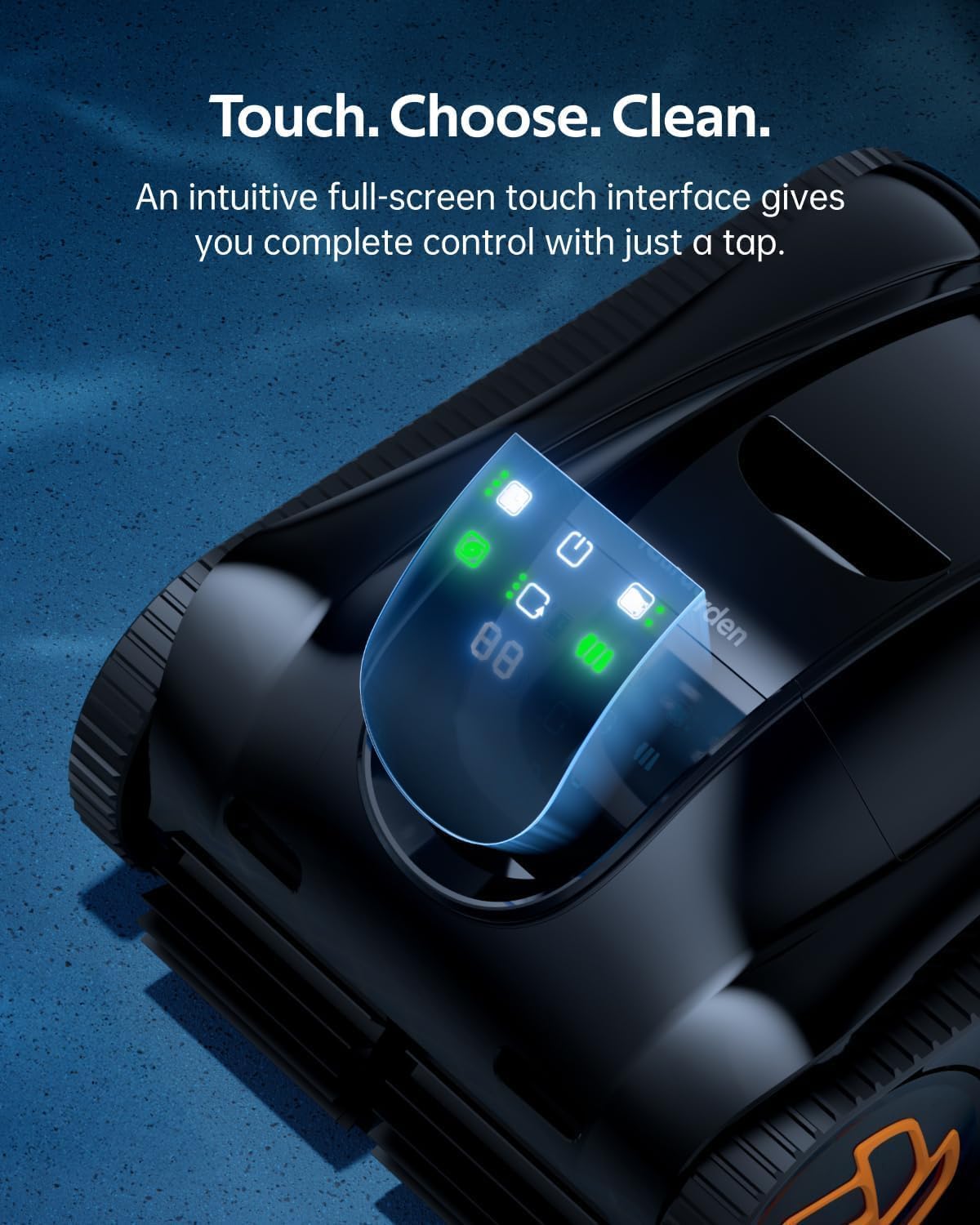
Image: The touchscreen on the iGarden K40, showing options for selecting cleaning modes and activating features.
4.2 modes de neteja
The K40 offers various cleaning modes to suit your pool's needs:
- Neteja de sòls: Centrat en la neteja del terra de la piscina.
- Full Pool Coverage: Cleans the floor, walls, and waterline.
- Turbo 200% Mode: Activates peak suction for dense debris, leaves, and stains.
The cleaner utilizes advanced 3D S-shaped path planning technology for comprehensive coverage, adapting to pool shapes and terrains including steps and slopes.

Image: The iGarden K40 robotic pool cleaner navigating and climbing a pool wall, illustrating its pathfinding technology.
4.3 Auto-Parking and Retrieval
When the battery is low, the K40 automatically parks itself along the pool wall for easy retrieval. Use the provided hook (attached to a standard pole, not included) to lift the cleaner out of the water. The unit automatically drains water for lighter handling.

Image: The iGarden K40 being lifted from the pool using the retrieval hook, showcasing its auto-parking and easy handling design.
5. Manteniment
5.1 Neteja de la cistella de deixalles
The iGarden K40 is equipped with a 4L top-load debris basket with a 180µm mesh, designed to trap fine debris, leaves, and hair. Regular cleaning of the basket is essential for optimal performance.
- Després de cada cicle de neteja, traieu el netejador de la piscina.
- Open the top cover and remove the debris basket.
- Buideu les restes recollides en un contenidor d'escombraries.
- Rinse the basket thoroughly with a hose to remove any remaining particles.
- Ensure the basket is clean and dry before reinserting it into the cleaner.

Image: The large 4L debris basket of the iGarden K40, shown removed from the unit and filled with various pool debris like leaves, hair, twigs, gravel, and sand.
5.2 Emmagatzematge a llarg termini
If storing the cleaner for an extended period, ensure it is fully charged, clean, and dry. Store it in a cool, dry place away from direct sunlight.
6. Solució De Problemes
If you encounter issues with your iGarden Pool Cleaner K40, refer to the following common solutions:
| Problema | Causa possible | Solució |
|---|---|---|
| Cleaner does not start | Low battery; Power button not pressed; Unit not fully submerged. | Charge the unit; Press and hold the power button; Ensure unit is fully underwater. |
| Mal rendiment de neteja | Debris basket full; Impeller blocked; Brushes worn. | Clean debris basket; Check and clear impeller; Inspect and replace brushes if necessary. |
| Cleaner gets stuck or doesn't climb walls | Low battery; Excessive algae on pool surface; Obstruction. | Recharge the unit; Brush pool walls manually; Remove any large obstructions. |
| Problemes de connectivitat de l'aplicació | Wi-Fi/Bluetooth off; Unit underwater; Incorrect network. | Ensure Wi-Fi/Bluetooth is on; Connect app only when unit is on land; Verify 2.4GHz Wi-Fi network. |
If the problem persists, please contact iGarden customer support for assistance.
7. Especificacions
| Característica | Detall |
|---|---|
| Nom del model | K40 (K Series) |
| Marca | iGarden |
| Dimensions del producte | 19.25" de llargada x 15.31" d'amplada x 9.45" d'alçada (48.9 x 38.9 x 24 cm) |
| Pes de l'article | 28.7 lliures (13 kg) |
| Font d'alimentació | Funciona amb bateria |
| Tipus de bateria | Nonstandard Battery (1 included) |
| Contingut d'energia de la bateria de liti | 192 watts-hora |
| Nombre de cel·les de liti-ió | 21 |
| Pes de la bateria | 1.8 quilos |
| Temps d'execució (netja de terres) | Fins a 4 hores |
| Runtime (Full Pool Coverage) | Fins a 2.5 hores |
| Potència d'aspiració | Fins a 5810 GPH |
| Capacitat de la cistella de deixalles | 4 Liters (180µm mesh) |
| Fabricant | YITUO ELECTRIC CO., LTD |
8. Garantia i Suport
The iGarden Pool Cleaner K40 comes with a 3-year full replacement warranty, ensuring peace of mind. iGarden is committed to providing reliable after-sales service.
- Garantia: 3-Year Full Replacement Warranty.
- Política de devolució: 30-day free return guarantee for any reason.
- Atenció al client: 24/7 in-app support via email, phone, and live chat.
- Actualitzacions de programari: Lifetime OTA (Over-The-Air) updates to enhance performance and features.
For any questions or assistance, please utilize the in-app support features or visit the official iGarden weblloc.

Image: A graphic illustrating iGarden's commitment to customer care, highlighting a 3-year full replacement warranty and 24/7 call center support.