
1. Introducció
Thank you for choosing the Brookstone Fixed TV Wall Mount. This mount is designed to securely hold most flat and curved TVs ranging from 26 to 85 inches, with VESA patterns from 50x50mm to 600x400mm, and supporting up to 99 lbs. Its slim profile of 1.1 inches from the wall provides a clean and modern aesthetic. This manual provides detailed instructions for safe installation and proper use of your TV wall mount.
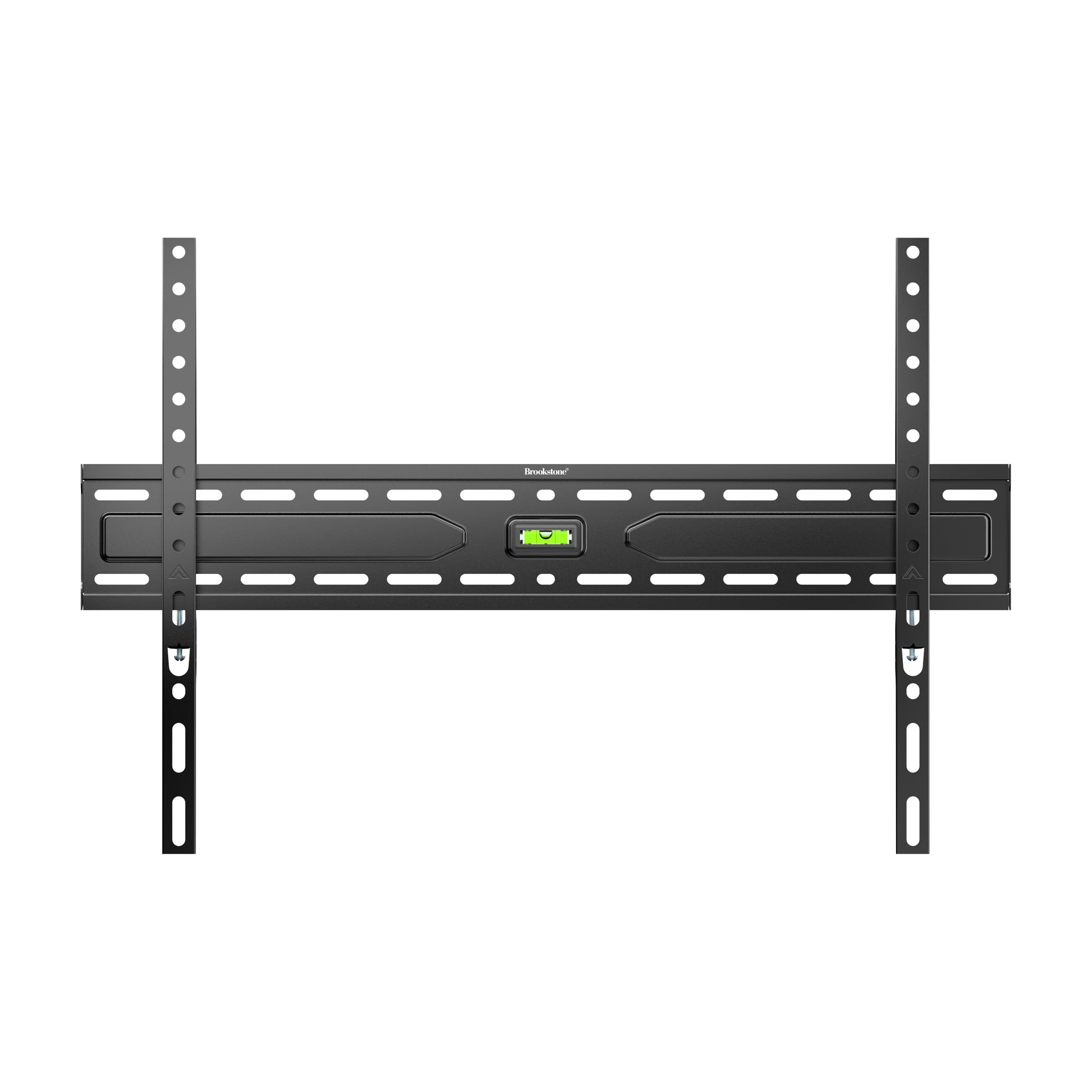
Figura 1: Frontal view of the Brookstone Fixed TV Wall Mount, showing the main wall plate and TV brackets, with an integrated bubble level.
2. Informació de seguretat
ADVERTIMENT: Failure to read and follow all instructions may result in personal injury, property damage, or voiding of warranty. Improper installation can lead to serious injury or damage.
- Do not install this product on walls made of drywall alone. The wall must be capable of supporting the combined weight of the mount and the TV.
- Ensure the mounting surface is structurally sound. If mounting to wood studs, ensure studs are solid and located accurately. If mounting to concrete or brick, use appropriate anchors (not always included).
- No supereu la capacitat màxima de pes de 99 lliures (45 kg).
- Do not exceed the maximum VESA pattern of 600x400mm.
- Feu servir sempre un localitzador de muntants de fusta per localitzar-los amb precisió.
- Utilitzeu l'equip de seguretat adequat, inclosa la protecció ocular, durant la instal·lació.
- Mantingueu els nens i les mascotes allunyats durant la instal·lació.
- Si teniu dubtes sobre alguna part del procés d'instal·lació, consulteu un instal·lador professional qualificat.
- Check all connections and fasteners periodically to ensure they remain secure.
3. Contingut del paquet
Verify that all components are present and undamaged before installation. If any parts are missing or damaged, contact customer support.
- Wall Plate Assembly (with integrated level)
- Suports per a TV (2x)
- Kit de maquinari (diversos cargols, volanderes, separadors per a TV i muntatge a la paret)
- Manual d'instruccions (aquest document)
4. Eines necessàries (no incloses)
- Llapis
- Tornavís Phillips
- Trepant
- Drill Bits (appropriate for wall material and lag bolts)
- Cercador de muntants (per a la instal·lació de muntants de fusta)
- Level (optional, as mount has integrated level)
- Cinta mètrica
- Socket Wrench (for lag bolts)
5. Configuració i instal·lació
Carefully follow these steps for a secure installation. Two people are recommended for safe installation, especially when lifting the TV.
Pas 1: connecteu els suports del televisor al televisor
- Lay your TV face down on a soft, clean surface to prevent scratches.
- Identifiqueu els forats de muntatge VESA a la part posterior del vostre televisor.
- Select the correct diameter and length screws from the hardware kit that fit your TV's mounting holes. Use washers if necessary.
- Attach the two TV brackets to the back of your TV, ensuring they are centered and aligned vertically. The hooks on the brackets should face downwards. Do not overtighten screws.

Figure 2: Illustration of TV brackets being attached to the rear VESA mounting points of a television.
Step 2: Determine Wall Plate Position
- Determine the desired height for the top of your TV.
- Measure the distance from the top of your TV to the top of the attached TV brackets.
- Mark the wall where the top of the wall plate should be, considering the measurement from the previous step to achieve your desired TV height.
- Use a stud finder to locate the center of two adjacent wood studs (for wood stud installation) or the desired drilling locations for concrete/brick. Mark these locations.
Pas 3: Muntar la placa de paret a la paret
- Hold the wall plate against the wall at the marked height, aligning the mounting holes with the stud centers or marked concrete/brick locations.
- Use the integrated bubble level on the wall plate to ensure it is perfectly horizontal. Adjust as needed.
- Marqueu els punts de perforació a través dels forats de la placa de paret.
- Drill pilot holes at the marked locations. The drill bit size will depend on your wall material and the lag bolts provided. Consult the hardware kit instructions for specific drill bit sizes.
- Insert the lag bolts with washers through the wall plate and into the pilot holes.
- Tighten the lag bolts firmly with a socket wrench until the wall plate is securely fastened to the wall. Do not overtighten.
Pas 4: Pengeu el televisor a la placa de paret
- Amb ajuda, aixequeu amb cura el televisor amb els suports adjunts.
- Alineeu els ganxos dels suports del televisor amb la vora superior de la placa de paret.
- Gently lower the TV, ensuring the brackets engage securely with the wall plate. The TV should hang freely and feel stable.
- Visually inspect that both TV brackets are properly seated on the wall plate.
Step 5: Secure TV to Wall Plate
- Locate the safety screws or locking mechanisms at the bottom of the TV brackets.
- Tighten these screws or engage the locking mechanisms to prevent the TV from accidentally lifting off the wall plate.
- Perform a final check to ensure all connections are secure and the TV is level.

Figura 3: Pro lateralfile view of the mounted TV, illustrating the minimal distance from the wall.
6. Ús
Once installed, the Brookstone Fixed TV Wall Mount provides a stable and secure platform for your television. As this is a fixed mount, there are no moving parts for adjustment. Ensure all cables are properly managed and not pinched between the TV and the wall.
7. Manteniment
- Neteja: Netegeu el suport amb un drap suau i sec. No utilitzeu productes de neteja abrasius ni dissolvents.
- Comprovacions periòdiques: Every 6-12 months, inspect all mounting hardware and connections to ensure they remain tight and secure. Check for any signs of wear or damage.
- Reubicació: If you need to move the TV or mount, carefully reverse the installation steps. Do not reuse wall anchors or lag bolts if they show signs of wear or damage.
8. Solució De Problemes
| Problema | Causa possible | Solució |
|---|---|---|
| El televisor no està anivellat després de la instal·lació. | La placa de paret no estava perfectament anivellada durant la instal·lació. | Carefully remove the TV. Loosen the lag bolts slightly, adjust the wall plate using a level, then re-tighten and re-mount the TV. |
| El suport sembla fluix a la paret. | Els cargols de fixació no estan completament ajustats o s'han utilitzat ancoratges de paret inadequats. | Remove TV. Re-tighten lag bolts. If still loose, ensure correct pilot hole size was used and wall material is suitable. Consult a professional if unsure. |
| TV screws do not fit the TV brackets. | Incorrect screw size selected from hardware kit. | Refer to your TV's manual for correct VESA screw specifications. Try different screw sizes and lengths from the provided hardware kit. Use spacers if screws are too long. |
9. Especificacions
- Número de model: BKS-720-369-FBM
- Marca: Brookstone
- Tipus de muntatge: Muntatge de paret fix
- Material: Acer inoxidable
- Color: Negre
- Mides de TV compatibles: 26" - 85"
- Capacitat de pes: 99 lliures (45 kg)
- Compatibilitat VESA: 50x50mm a 600x400mm
- Profile de Wall: 1.1 polzades (2.8 cm)
- Fabricant: Maragda
- UPC: 850060744631
10. Garantia i assistència
Per obtenir informació sobre la garantia o assistència tècnica, consulteu la documentació inclosa amb la compra o visiteu el lloc web oficial de Brookstone. weblloc web. Conserveu el comprovant de compra per a reclamacions de garantia.
Atenció al client: Please contact your retailer or the manufacturer directly for assistance.