
DOOGEE FIRE7PRO
DOOGEE Fire 7 Pro Rugged Smartphone 5G User Manual
Model: FIRE7PRO | Brand: DOOGEE
Introducció
This manual provides essential information for setting up, operating, and maintaining your DOOGEE Fire 7 Pro Rugged Smartphone. Please read it carefully to ensure proper use and to maximize the device's capabilities.

Imatge: Un cop mésview of the DOOGEE Fire 7 Pro Rugged Smartphone, highlighting its key features like camping lights, POC intercom, large battery, night vision camera, and storage.
Configuració
1. Unboxing i Inspecció Inicial
Upon opening the package, verify that all components are present and undamaged. The package typically includes the DOOGEE Fire 7 Pro smartphone, a charger, a USB cable, and a SIM ejector tool.

Image: Contents of the DOOGEE Fire 7 Pro package, including the phone, charger, cable, and documentation.
2. Instal·lació de la targeta SIM i l'emmagatzematge
Locate the SIM card tray on the side of the device. Use the provided SIM ejector tool to open the tray. Insert your Nano-SIM card(s) and/or a TF (microSD) card for expandable storage into the designated slots. Ensure the tray is securely closed to maintain water and dust resistance.
3. Engegada i configuració inicial
Press and hold the power button until the DOOGEE logo appears. Follow the on-screen prompts to select your language, connect to Wi-Fi, set up your Google account, and configure security features like Face ID or fingerprint unlock.
Funcionament del vostre dispositiu
Vídeo: Un overview of the DOOGEE Fire 7 Pro, showcasing its rugged design, dual camping lights, POC intercom, fast charging, large battery, powerful processor, and camera capabilities including night vision.
POC Intercom Function
The DOOGEE Fire 7 Pro supports Push-to-Talk (PTT) intercom functionality, enabling long-distance communication even without internet access. To use this feature, download the "POCSTAR" intercom app from Google Play. With one-click PTT, you can make nationwide calls quickly, and the system includes automatic reconnection to prevent dropped communications.

Image: Illustration of the POC Intercom feature, showing global coverage and clear voice communication.
Doble Camping Lights
The device features a powerful 1200-lumen camping light with three modes: Illumination, Bright Light, and SOS. These lights provide enhanced visibility and safety in dark or outdoor environments. Access and control the light modes and brightness through the dedicated app or quick settings panel.
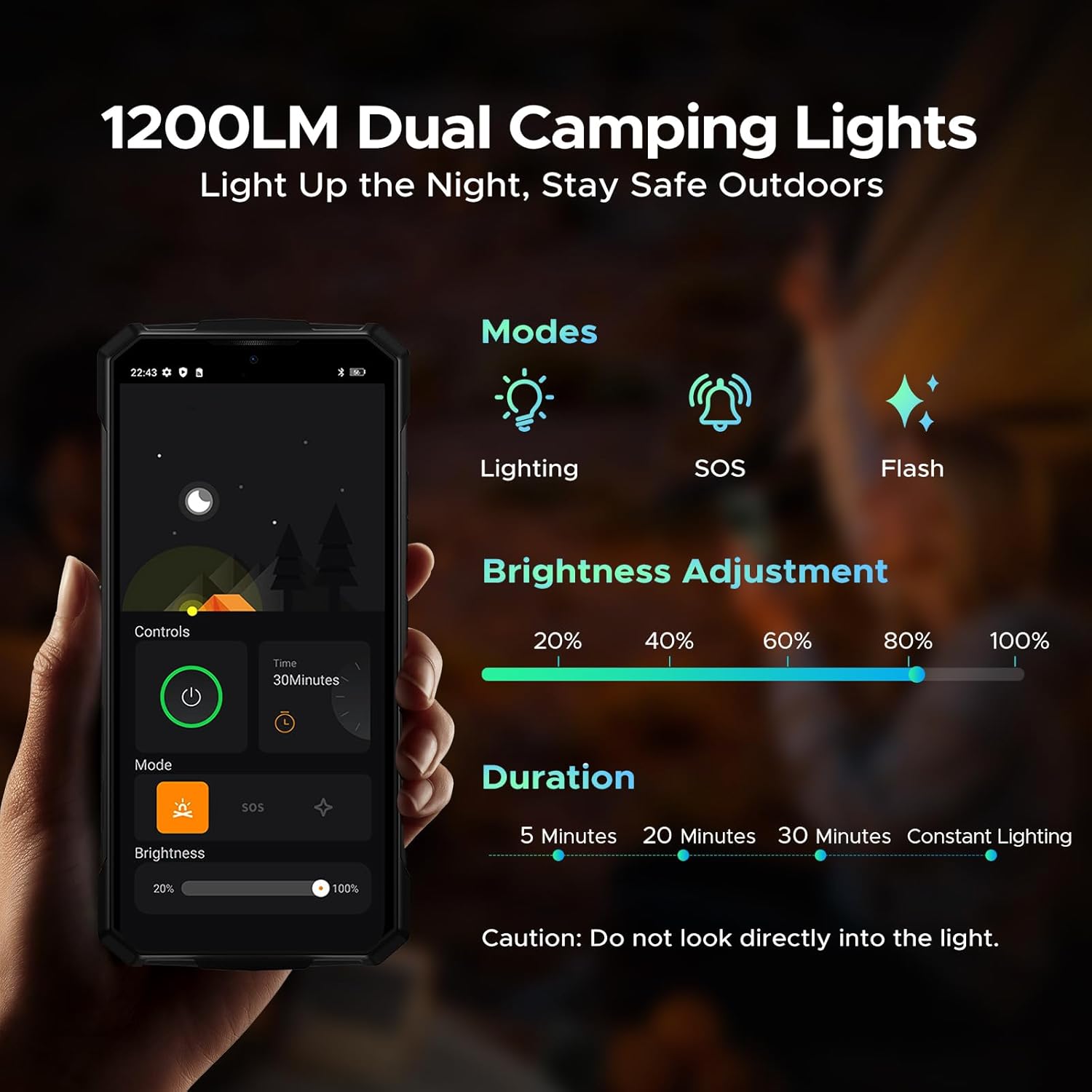
Image: Screenshot of the camping light control interface on the phone, showing modes and brightness adjustment.
Bateria i càrrega
The Fire 7 Pro is equipped with a 13000mAh battery, offering extended usage times. It supports 33W fast charging for quick power-ups and OTG (On-The-Go) reverse charging, allowing the phone to act as a power bank for other devices.
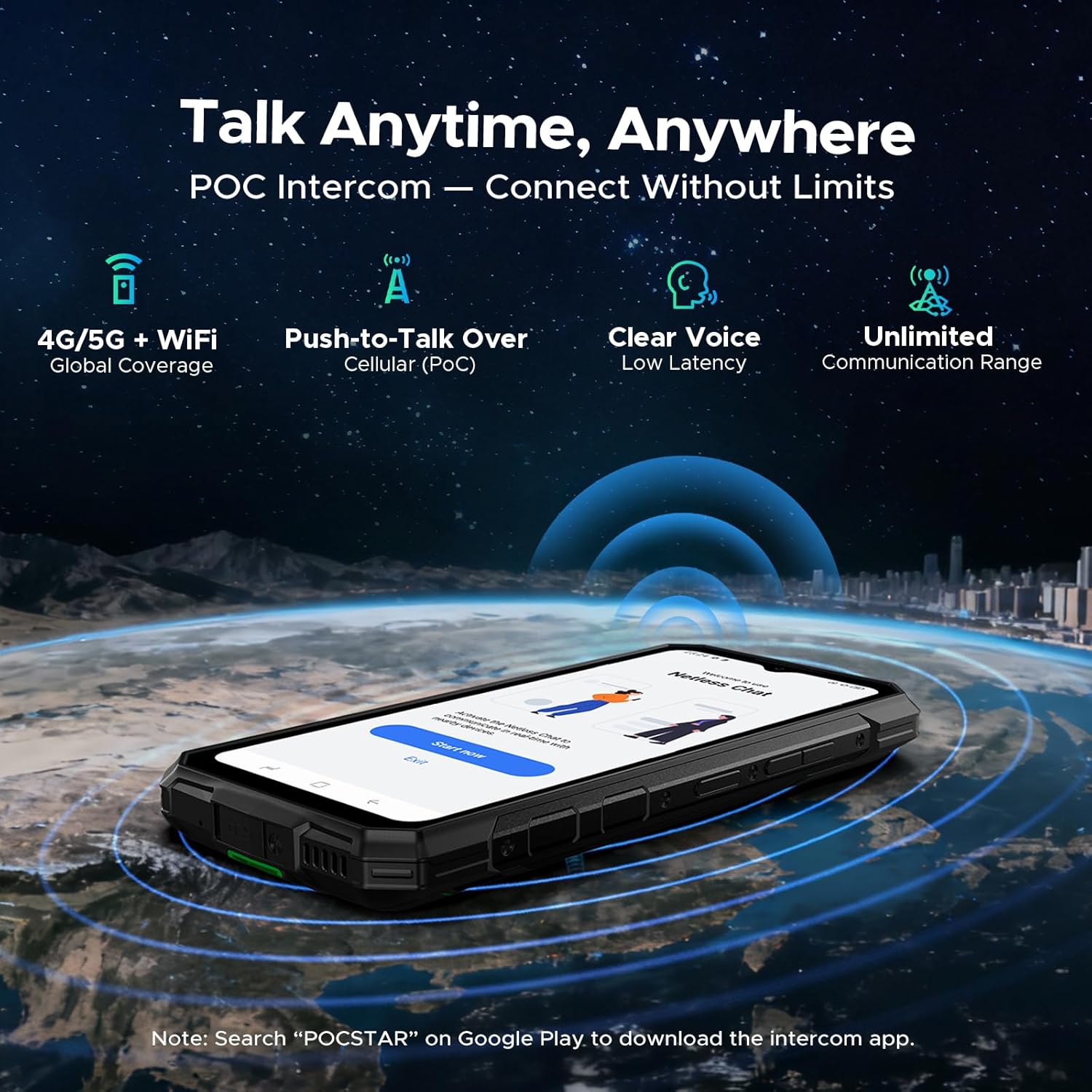
Image: Visual representation of the 13000mAh battery and its long-lasting performance metrics.
Rendiment i emmagatzematge
Powered by the 6nm MTK Dimensity 6300 processor, the device offers efficient performance. It features 8GB of physical RAM, expandable with 24GB of virtual RAM, for smooth multitasking. Internal storage is 256GB, with support for up to 2TB via a TF card (sold separately). The phone runs on Android 15, providing a secure and fluid user experience.

Image: Diagram illustrating the 5G Dimensity 6300 chipset and its specifications.
Sistema de càmeres
The Fire 7 Pro features a versatile camera system:
- Càmera principal amb IA de 64 MP: Captures detailed, high-quality photos with AI enhancements.
- Càmera de visió nocturna de 20MP: Provides clear images in low-light or dark conditions, suitable for outdoor or security use.
- Càmera frontal de 16MP: Delivers vivid and clear selfies.

Imatge: Més deview of the camera system, showing the 64MP AI main camera, 20MP night vision, and 16MP front camera.
Display and AI Features
The device features a 6.6-inch IPS HD+ waterdrop display with a 90Hz refresh rate for smooth visuals. It also integrates Gemini AI for intelligent assistance, including quick image editing, smart text extraction, and outdoor travel guidance.
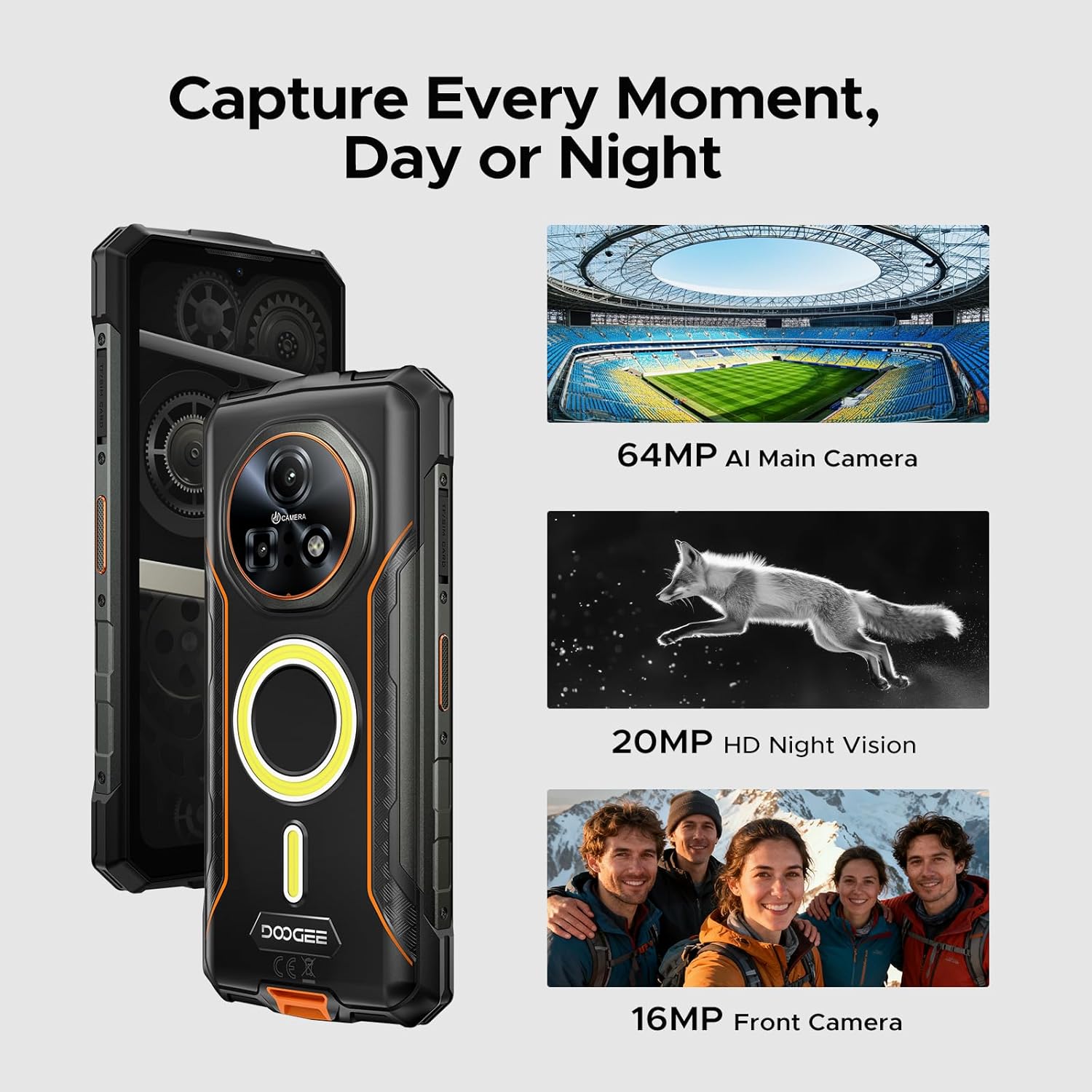
Image: Shows the 6.6" Full HD+ display with 90Hz refresh rate and mentions Gemini AI features.
Durabilitat i protecció
The DOOGEE Fire 7 Pro is built to withstand harsh environments, featuring IP68/IP69K dustproof and waterproof ratings, and MIL-STD-810H military certification. This provides reliable protection against drops, shocks, dust, and extreme temperatures.

Image: The DOOGEE Fire 7 Pro submerged in water, demonstrating its waterproof capabilities.
Característiques addicionals
- Seguretat: Side fingerprint sensor and Face Unlock for convenient and secure access.
- Connectivitat: Triple slots for dual SIM and expandable storage.
- Navegació: Accurate GPS, Glonass, Galileo, and Beidou support for reliable positioning.
- NFC: Convenient Near Field Communication for contactless payments and data exchange.
Manteniment
- Neteja: Utilitzeu un suau, damp drap per netejar el dispositiu. Eviteu productes químics agressius o materials abrasius.
- Resistència a l'aigua i a la pols: Ensure all port covers are securely closed to maintain IP68/IP69K ratings. Do not intentionally submerge the device in water for extended periods or beyond specified depths.
- Temperatura: Avoid exposing the device to extreme temperatures (very hot or very cold) for prolonged periods.
- Port de càrrega: Keep the charging port clean and free of debris. Ensure it is dry before charging.
Resolució de problemes
- El dispositiu no s'encén: Assegureu-vos que la bateria estigui carregada. Connecteu el carregador i espereu uns minuts abans d'intentar tornar-lo a engegar.
- Problemes de connectivitat de xarxa: Check if your SIM card is correctly inserted. Verify that mobile data is enabled in settings. If using AT&T, you may need to manually configure APN settings; contact your carrier or DOOGEE support for specific instructions.
- Les aplicacions es bloquegen/es bloquegen: Try restarting the app or clearing its cache and data in the phone's settings. If the issue persists, consider uninstalling and reinstalling the app.
- Rendiment lent: Close unnecessary background apps. Clear cache regularly. Consider reducing the number of widgets or live wallpapers.
- Exposició a l'aigua/pols: If the device has been exposed to water, ensure all ports are dry before charging. If functionality is affected, contact customer support.
Especificacions
| Característica | Detall |
|---|---|
| Nom del model | FIRE7 PRO |
| Sistema operatiu | Android 15 |
| Model de CPU | Mediatek Dimensity 6300 |
| Mida instal·lada de la memòria RAM | 8 GB (ampliable amb 24 GB de RAM virtual) |
| Capacitat d'emmagatzematge de memòria | 256 GB (ampliable fins a 2 TB amb targeta TF) |
| Mida de la pantalla | 6.6 polzades |
| Resolució | 720 x 1520 |
| Freqüència d'actualització | 90 Hz |
| Capacitat de la bateria | 13000 milionsamp Hores |
| Potència nominal de la bateria | 13000 mAh |
| Càrrega ràpida | 33W |
| Càrrega inversa | OTG supported |
| Càmera principal | 64MP AI |
| Càmera de visió nocturna | 20MP HD |
| Càmera frontal | 16MP |
| Classificacions de durabilitat | IP68/IP69K, MIL-STD-810H |
| Operador sense fil | Desbloquejat per a tots els transportistes |
| Pes de l'article | 9.2 unces (262 grams) |
| Dimensions del paquet | 7 x 4 x 2 polzades |
Garantia i Suport
Your DOOGEE Fire 7 Pro Rugged Smartphone comes with the following:
- Garantia de devolució de 30 dies i devolució gratuïta: For initial purchase satisfaction.
- Garantia limitada de 2 anys: Covers manufacturing defects for a period of two years from the date of purchase.
- 24/7 One-on-One Online Support: For technical assistance and inquiries.
For further assistance, please visit the official DOOGEE support weblloc o poseu-vos en contacte amb el seu servei d'atenció al client.
Ask a question about this manual
Ask about setup, troubleshooting, compatibility, parts, safety, or missing instructions. Manuals+ will review the question and use this page’s manual context to help answer it.