
Introducció
The Ray-Ban Meta (Gen 1) Wayfarer Smart AI Glasses combine classic style with advanced technology, allowing you to capture photos and videos, listen to audio, make calls, and interact with Meta AI hands-free. This manual provides essential information for setting up, operating, maintaining, and troubleshooting your smart glasses.
Què hi ha a la caixa
Verifiqueu que tots els elements estiguin presents a l'embalatge del producte:
- Ray-Ban Meta (Gen 1) Wayfarer Smart AI Glasses
- Estoig de càrrega
- Drap de neteja
- Guia de referència
- USB-C charging cable (not included, sold separately)

Image: Contents of the Ray-Ban Meta Smart Glasses box. Includes the glasses, a brown charging case, a cleaning cloth, and a reference guide. Note that the USB-C charging cable is not included.
Configuració
1. Càrrega de les ulleres
Before first use, fully charge your Ray-Ban Meta glasses. Place the glasses in the charging case. Connect the charging case to a power source using a compatible USB-C cable (not included). A full charge takes approximately 75 minutes. The glasses can last up to four hours with moderate use, and the charging case provides an additional 32 hours of charge.

Image: A hand holding the brown charging case, emphasizing the battery life of the glasses and case.
2. Initial Pairing and App Installation
- Descarrega la Meta View app on your smartphone (compatible with Android and iOS devices).
- Open the app and follow the on-screen instructions to create or log in to your Meta account.
- Assegureu-vos que el Bluetooth estigui habilitat al vostre telèfon intel·ligent.
- Place the glasses in pairing mode (refer to the included reference guide for specific steps, usually involves holding a button).
- Select your Ray-Ban Meta glasses from the list of available devices in the Meta View aplicació per completar el procés d'emparellament.
Instruccions de funcionament
1. Captura de fotos i vídeos
Your glasses feature an ultra-wide 12 MP camera for hands-free capture.
- Comandament de veu: Digues "Hey Meta, take a photo" or "Hey Meta, start recording".
- Toqueu Control: Tap the control area on the temple of the glasses to initiate photo or video capture.

Image: A woman demonstrating the tap control on the temple of the glasses to use the built-in HD camera.
2. Audio Playback and Calls
The open-ear speakers allow you to listen to music and take calls while remaining aware of your surroundings.
- Música: Connect to your smartphone via Bluetooth to stream audio. Use voice commands like "Hey Meta, play my workout playlist on Spotify".
- Trucades: Make and receive calls hands-free. The five-mic system ensures clear audio for conversations.

Image: A man listening to music through the open-ear speakers of the smart glasses, highlighting the ability to hear ambient sounds.
3. Using Meta AI
Activate Meta AI to get real-time suggestions, answers, and reminders. Meta AI can analyze your surroundings and provide context-rich information.
- Activació: Digues "Hey Meta" followed by your query.
- Traducció en directe: Hear real-time translations between French, Italian, Spanish, and English without Wi-Fi.
- Contextual Assistance: Ask questions about what you see, scan QR codes, or note information for later recall.

Image: A person using Meta AI on their smart glasses, demonstrating how to get real-time suggestions and answers.
4. Livestreaming
Share your point of view by livestreaming directly from your glasses to Instagram and Facebook. Refer to the Meta View app for detailed instructions on setting up livestreaming.
Manteniment
1. Neteja
Per mantenir un rendiment i un aspecte òptims:
- Use the provided cleaning cloth to gently wipe lenses and frames.
- For stubborn smudges, use a lens cleaning solution specifically designed for eyewear.
- Avoid using abrasive materials or harsh chemicals, as these can damage the lenses and frame materials (Polycarbonate, TR90, Injected BTR600 and 80).
2. Resistència a l'aigua
The Ray-Ban Meta glasses are no resistent a l'aigua. Avoid exposure to water, rain, or excessive moisture to prevent damage to internal components.
3. Emmagatzematge
When not in use, store your glasses in the charging case to protect them from scratches and impacts, and to keep them charged.
Resolució de problemes
| Problema | Causa possible | Solució |
|---|---|---|
| Glasses not turning on/charging | Low battery; improper connection. | Ensure glasses are correctly seated in the charging case. Connect the case to a working power source with a functional USB-C cable. |
| No es pot emparellar amb el telèfon intel·ligent | Bluetooth off; app issue; glasses not in pairing mode. | Verify Bluetooth is enabled on your phone. Restart the Meta View app. Ensure glasses are in pairing mode (refer to reference guide). Try restarting both devices. |
| Audio quality issues / No sound | Volume too low; poor Bluetooth connection; ambient noise. | Adjust volume. Reconnect Bluetooth. Move to a quieter environment. |
| Meta AI not responding or glitching | Poor network connection; unclear voice command; software bug. | Ensure stable internet connection. Speak clearly. Update the Meta View app and glasses firmware. |
| Glasses getting hot during use | Extended recording; high ambient temperature. | Reduce continuous recording time. Avoid use in direct sunlight or hot environments for prolonged periods. |
Especificacions
- Nom del model: Ray-Ban Meta Wayfarer
- Número de model: 899-00599-01
- Capacitat d'emmagatzematge de memòria: 32 GB
- Càmera: 12 MP Ultra-Wide
- Àudio: Open-ear speakers, Five-mic system
- Connectivitat: 2.4/5GHz Wi-Fi, Bluetooth 5 GHz Radio Frequency
- Durada de la bateria: Up to 4 hours (glasses), additional 32 hours (charging case)
- Temps de càrrega de la bateria: 75 minuts
- Pes: 49 grams
- Dimensions (Regular Fit): Band Width: 146.1 mm, Band Length: 129 mm, Lens Width: 50 mm, Bridge: 22 mm, Lens Height: 40.6 mm (approximate, based on image)
- Materials: Lens: Polycarbonate, Class 3; Temple Arms: TR90; Frame: Injected BTR600 and 80
- Resistència a l'aigua: No resistent a l'aigua
- Entrada de la interfície humana: Buttons, Microphone, On-device cap-touch control, Voice commands
- Dispositius compatibles: Smartphone, Tablet (Android Devices, iOS Devices)
- Franja d'edat: For ages 13+ only
- País d'origen: Xina
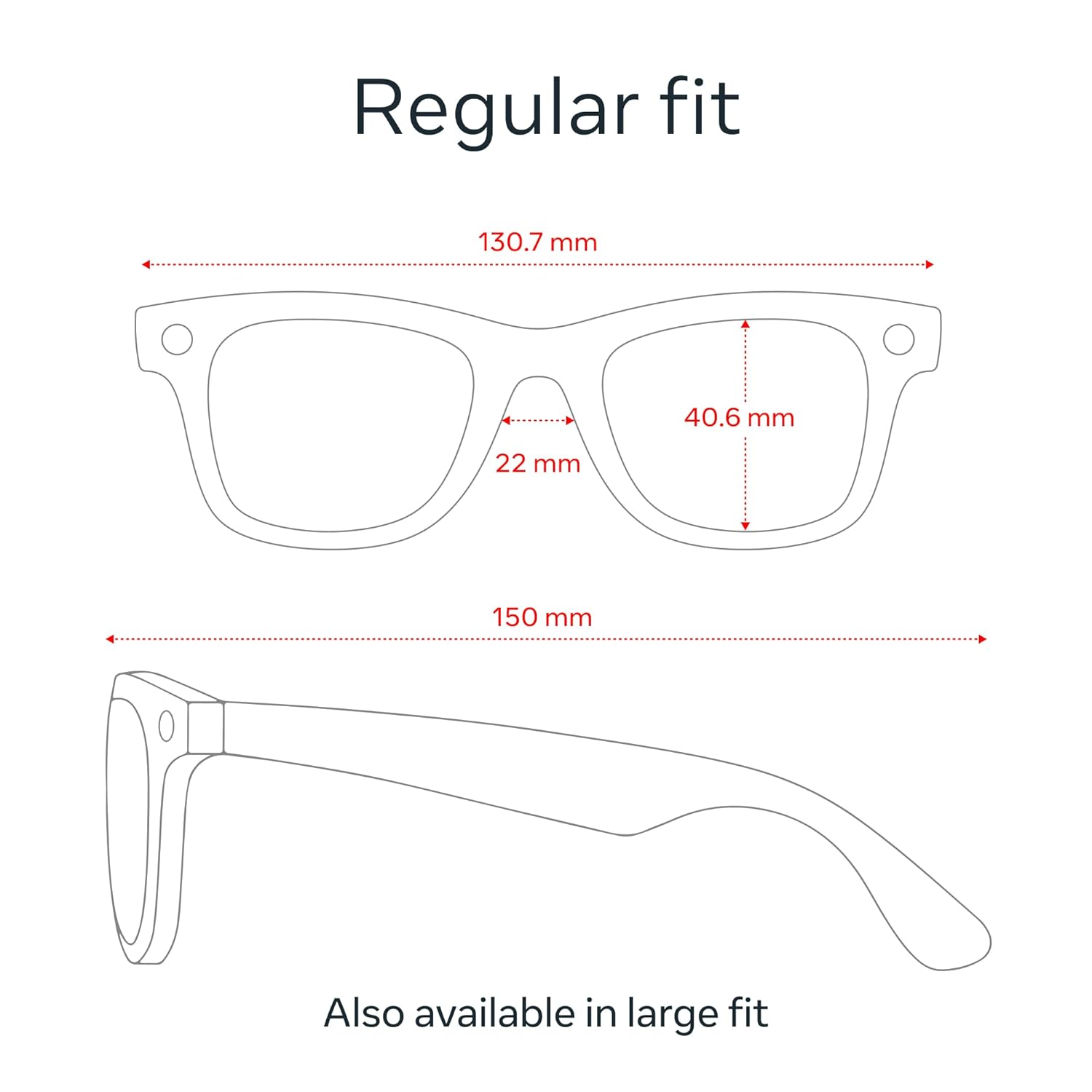
Image: Dimensional diagram for the Ray-Ban Meta Wayfarer glasses, indicating measurements for regular fit.
Garantia i Suport
Your Ray-Ban Meta Smart AI Glasses come with a 1-year (12 months) limited warranty from the date of purchase. This warranty covers manufacturing defects and hardware malfunctions not caused by misuse, accidents, or unauthorized modifications.
La garantia no cobreix:
- Accidental damage (e.g., drops, impacts, water damage)
- Cosmetic damage from normal use
- Damage from misuse, neglect, or unauthorized repairs
- Prescription lenses (unless the defect is due to manufacturing)
Per a reclamacions de garantia i assistència:
- Warranty claims are handled by EssilorLuxottica (Ray-Ban), not Meta.
- You can initiate a claim via the Ray-Ban After Sales Portal: luxotticacustomercare.com/raybanaftersales. You will need your purchase receipt and device serial number.
- Alternatively, contact customer support:
- Número gratuït: 1800-1200-625
- Correu electrònic: Inaftersales@in.luxottica.com
- Horari de treball: De 10:00 a 5:30 (de dilluns a divendres)
- If a replacement is needed and available, it will be shipped free of charge. If not, a credit for a new device at an EL affiliated store will be provided.