
1. Instruccions de seguretat importants
Please read all safety instructions carefully before using the WANBO Cube 1 Projector. Keep this manual for future reference.
- Font d'alimentació: Feu servir només l'adaptador de corrent proporcionat. Assegureu-vos que el volumtage coincideix amb els requisits del projector.
- Ventilació: No bloquegeu les obertures de ventilació. Assegureu-vos que hi hagi un flux d'aire adequat al voltant del projector per evitar el sobreescalfament.
- Exposició líquida: Keep the projector away from water or other liquids. Do not operate with wet hands.
- Neteja: Unplug the projector before cleaning. Use a soft, dry cloth. Do not use liquid or aerosol cleaners.
- Col·locació: Place the projector on a stable, flat surface. Avoid placing it in direct sunlight or near heat sources.
- Protecció ocular: Do not look directly into the projector lens when the device is on.
- Desmuntatge: No intenteu desmuntar ni reparar el projector vosaltres mateixos. Poseu-vos en contacte amb personal de servei qualificat per obtenir ajuda.
2. Producte acabatview
The WANBO Cube 1 is a compact and versatile smart projector designed for home entertainment. Featuring Android TV 11.0, a 360-degree rotating stand, and a built-in 8W HiFi speaker, it delivers an immersive viewing experience with ease of use.
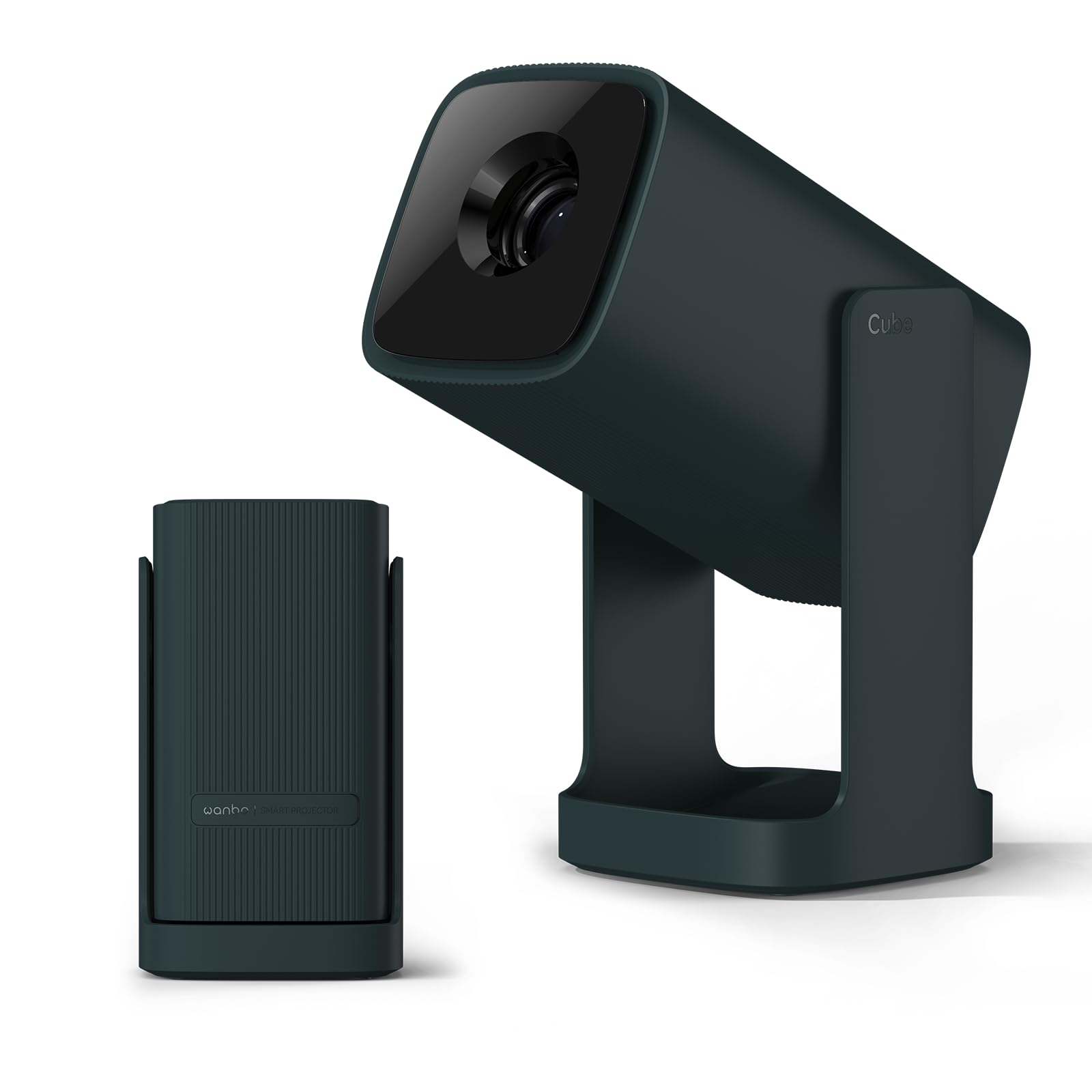
Image: The WANBO Cube 1 Projector in its dark green finish.

Imatge: Un primer pla view of the WANBO Cube 1, highlighting its compact and sleek design.
Vídeo: Un overview of the WANBO Cube 1 Projector's features, including its design, automatic adjustments, and smart capabilities.
Característiques principals:
- Android TV 11.0: Access popular streaming apps directly from Google Play Store, including Netflix, Prime Video, YouTube, Disney+, and more.
- Suport giratori de 360°: Project onto walls, ceilings, or any surface with flexible angle adjustments. The integrated stand also protects the lens when folded.
- Compacte i portàtil: Weighing approximately 0.9kg, its small size makes it easy to carry for various uses.
- Projecció d'alta qualitat: 200 ISO lumens brightness and a 1.2:1 throw ratio allow for a 100-inch screen from approximately 2.7 meters.
- Àudio immersiu: Built-in 8W HiFi speaker delivers rich sound without the need for external speakers.
- Smart Image Adjustment: Features electric focus, automatic vertical keystone correction, and 4-point manual correction for a perfectly rectangular image.
- Connectivitat versàtil: Supports HDMI (ARC), USB, 3.5mm audio jack, 5GHz/2.4GHz dual-band Wi-Fi, and Bluetooth 5.0 for seamless connection to various devices.
- Funcionament silenciós: Operates at a low noise level of 28dB, ensuring an undisturbed viewexperiència.
3. Contingut del paquet
Verifiqueu que tots els elements estiguin inclosos al vostre paquet:
- WANBO Cube 1 Projector
- Control remot
- Cable d'alimentació
- Manual d'usuari (aquest document)
4. Introducció: Configuració
4.1 Encès inicial
- Connecteu el cable d'alimentació al projector i després a una presa de corrent.
- Premeu el botó d'encesa del projector o del comandament a distància per encendre-lo.
4.2 Emparellament del control remot
If the remote control is not responsive, it may need to be paired:
- Ensure the projector is on.
- Apunteu el comandament a distància cap al projector.
- Press and hold the indicated pairing button (refer to remote control diagram in the physical manual if available) until the pairing indicator appears on screen.
4.3 Connexió de xarxa
- From the Android TV home screen, navigate to Configuració.
- Seleccioneu Xarxa i Internet.
- Trieu la vostra xarxa Wi-Fi i introduïu la contrasenya.
4.4 Ajust de la imatge
The WANBO Cube 1 offers several ways to achieve a perfect image:
- Enfocament elèctric: Use the remote control to fine-tune the image sharpness.
- Correcció trapezoidal vertical automàtica: The projector automatically adjusts the image to be rectangular when placed at an angle vertically.
- 4-Point Manual Keystone Correction: For precise adjustments, especially when projecting from a side angle, use the manual 4-point correction feature in the settings.
- Funció de zoom: Adjust the screen size from 50% to 100% to fit your projection surface without moving the projector.

Image: Illustration of the one-touch adjustment capabilities, including electric focus and keystone correction.

Image: Visual representation of the short-throw lens, showing different screen sizes at various distances.
5. Funcionament
5.1 Interfície d'Android TV 11.0
The projector runs on official Android TV 11.0, providing a user-friendly interface for navigating content and apps.

Image: The Android TV 11.0 home screen displaying various streaming applications.
5.2 App Installation and Streaming
Access a wide range of entertainment by installing apps directly from the Google Play Store:
- Navigate to the Google Play Store icon on the home screen.
- Cerca your desired apps (e.g., Netflix, Prime Video, YouTube, Disney+, Hulu, U-NEXT, AbemaTV, TVer).
- Install and open the apps to start streaming.

Image: The Netflix interface projected by the WANBO Cube 1, demonstrating high-quality streaming.
5.3 Google Cast and Voice Assistant
- Google Cast: Easily mirror content from your smartphone or PC to the projector. Ensure both devices are connected to the same Wi-Fi network.
- Assistent de veu: Use the built-in voice assistant by pressing the dedicated button on your remote and speaking commands for search, playback, and more.

Image: A user interacting with the Google Assistant feature on the WANBO Cube 1 Projector.
5.4 Sortida d'àudio
The projector features an integrated 8W HiFi speaker for clear and powerful audio. No additional speakers are required for a complete audio-visual experience.

Image: The WANBO Cube 1 Projector highlighting its powerful 8W HiFi speaker for immersive sound.
5.5 Temporitzador de repòs
Utilize the sleep timer function to automatically power off the projector after a set period, ideal for watching content before sleep.

Image: The projector operating quietly, with a visual of the sleep timer function on the screen.
6. Connectivitat
The WANBO Cube 1 offers multiple wired and wireless connection options:
- HDMI (ARC compatible): Connect gaming consoles, TV sticks, laptops, and other HDMI-enabled devices.
- USB: Connect USB drives for media playback or other peripherals.
- Conector d'àudio de 3.5 mm: Connecteu auriculars o altaveus externs.
- Dual-band Wi-Fi (5GHz/2.4GHz): For fast and stable internet connection and wireless mirroring.
- Bluetooth 5.0: Pair with wireless speakers, headphones, or other Bluetooth devices.

Image: A close-up of the projector's rear panel, showing the HDMI, USB, and audio ports.
7. Manteniment
7.1 Neteja del projector
- Assegureu-vos que el projector estigui apagat i desendollat abans de netejar-lo.
- Use a soft, dry, lint-free cloth to wipe the exterior.
- For the lens, use a specialized lens cleaning cloth or brush. Do not use abrasive materials or harsh chemicals.
7.2 Lens Protection
The integrated 360° rotating stand doubles as a lens cover. When the stand is folded, it protects the lens from dust and scratches, eliminating the need for a separate lens cap.

Image: The WANBO Cube 1's minimalist design, showing how the integrated stand protects the lens when closed.
8. Solució De Problemes
If you encounter issues with your WANBO Cube 1 Projector, refer to the following table for common problems and solutions:
| Problema | Causa possible | Solució |
|---|---|---|
| No power/Does not turn on | Power cord not connected properly; Power outlet issue; Projector fault. | Check power cord connection. Try a different outlet. Contact support if issue persists. |
| Imatge borrosa | Focus not adjusted; Keystone not corrected; Projector too far/close to screen. | Use electric focus to sharpen. Apply automatic or manual keystone correction. Adjust projection distance. |
| Sense so ni amb una mala qualitat de so | Volume too low; Muted; External audio device not connected correctly; Source audio issue. | Increase volume. Unmute. Check external audio connections. Verify audio output from source device. |
| El comandament a distància no funciona | Batteries low/dead; Not paired; Obstruction. | Replace batteries. Re-pair the remote control (see Section 4.2). Ensure no obstructions between remote and projector. |
| No es pot connectar a la Wi-Fi | Contrasenya incorrecta; Problema amb el router; Fora de l'abast. | Double-check Wi-Fi password. Restart router. Move projector closer to router. |
9. Especificacions
| Característica | Detall |
|---|---|
| Marca | WANBO |
| Número de model | Cub 1 |
| Ús recomanat | Home Cinema |
| Sistema operatiu | Android TV 11.0 |
| Brillantor | 200 lúmens ISO |
| Resolució nativa | 1280 x 720 píxels |
| Relació de llançament | 1.2:1 (Turn Curt) |
| Altaveu | 8W HiFi Built-in Speaker |
| Connectivitat | HDMI (ARC), USB, 3.5mm Audio, Infrared |
| Connectivitat sense fil | 5GHz/2.4GHz Dual-band Wi-Fi, Bluetooth 5.0, Chromecast |
| Pes | Aprox. 0.9 kg |
| Nivell de soroll | 28 dB |
| Característiques especials | Internet compatible, Built-in speaker, Short throw, Automatic Keystone Correction, Electric Focus, 360° Rotating Stand |
| País d'origen | Xina |
10. Garantia i Suport
For warranty information and technical support, please refer to the warranty card included with your product or visit the official WANBO weblloc web. Conserveu el rebut de compra com a comprovant de compra.
If you require further assistance, please contact WANBO customer service.