
FREEZE2TRIM furthrive gps dog fence
FREEZE2TRIM Furthrive GPS Dog Collar Wireless Dog Fence User Manual
Model: furthrive gps dog fence
Introducció
The Furthrive GPS Dog Collar Wireless Dog Fence provides a portable and reliable solution for outdoor pet containment. This system uses satellite-based positioning to establish a circular boundary, offering your dog freedom within a defined safe zone without the need for physical fences, Wi-Fi, or complex installations. It features adjustable boundary ranges, customizable training modes (beep, vibration, and static), and a durable, waterproof design suitable for various outdoor environments.
Informació important de seguretat
Si us plau, llegiu totes les instruccions de seguretat abans d'utilitzar el producte.
- Do not use the static correction mode on puppies under 6 months of age or dogs weighing less than 10 lbs (4.5 kg).
- Never leave the collar on your dog for more than 12 hours per day.
- Check your dog’s neck daily for any signs of irritation, redness, or sores. If irritation occurs, discontinue use and consult a veterinarian.
- Do not use this product indoors or in dense urban areas. GPS signals may be inaccurate due to obstacles like buildings or metal structures, leading to inconsistent boundary performance.
- This product is not suitable for aggressive dogs without professional training.
- Always begin training with sound and/or vibration modes before introducing static correction.
- Keep the charger and small parts (contact pins and covers) out of reach of children.
- This collar is a training aid, not a substitute for responsible pet care. Always supervise your dog, especially during initial use and training.
Què hi ha a la caixa
Verifiqueu que tots els components siguin presents al vostre paquet:
- 1x GPS Dog Collar Fence
- 1x cable de càrrega
- 2 Large Contact Pins
- 2 Small Contact Pins
- 2 Large Silicon Caps
- 2 Small Silicon Caps
- 1x llum de prova
- Manual d'usuari (aquest document)

Image: All components included in the Furthrive GPS Dog Collar package.
Configuració
1. Charge the Collar
Connect the magnetic USB charging cable to the charging port on the back of the collar. Plug the other end into a standard USB power adapter (not included). A full charge typically takes 2-3 hours and provides up to 48 hours of use. The collar uses a rechargeable Li-Polymer battery (Model 902025, 3.7V, 400mAh, 1.48Wh).
Video: This video demonstrates the product overview, including how to charge the collar.
2. Attach Contact Pins and Covers
Choose the appropriate contact pins (long for thick coats, short for thin coats) and screw them into the ports on the back of the collar. Place the silicone covers over the pins to ensure comfort and prevent irritation. Use the included test light to verify the static correction function if you plan to use it.

Image: Detailed instructions for attaching contact pins and covers to the collar unit.
3. Encendre/apagar
To power on the collar, long-press the power button (marked with a power symbol). The GPS icon will blink while it acquires a satellite signal. For optimal performance, ensure the collar has a clear view of the sky and is used outdoors. To power off, long-press the power button again.
4. Adjust Collar Fit
Adjust the collar strap to ensure a snug but comfortable fit on your dog's neck. The contact pins should touch the skin, not just the fur. The adjustable strap fits dogs weighing 10-110+ lbs with neck sizes up to 24.5 inches (62 cm).
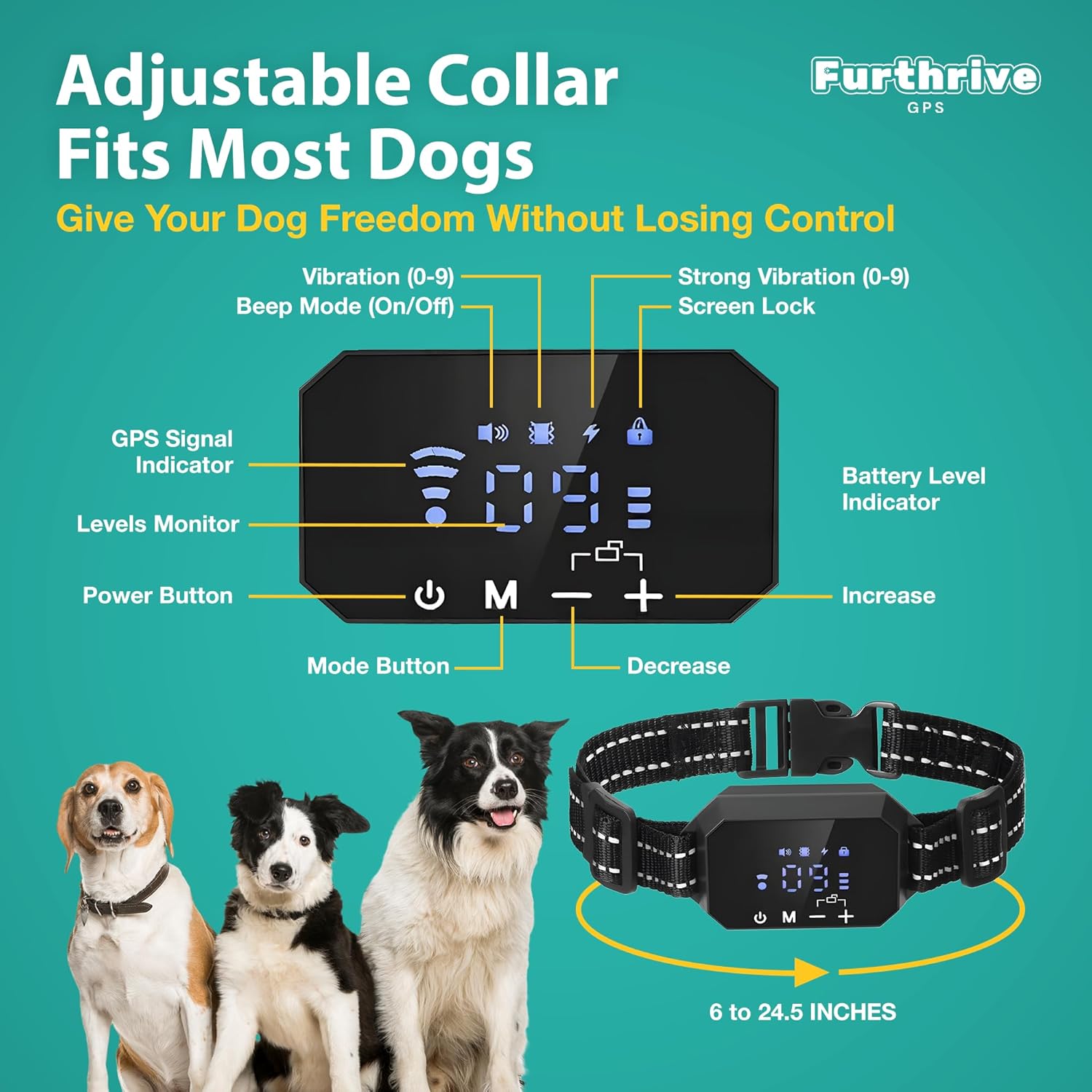
Imatge: Més deview of the collar's display and controls, demonstrating its adjustable fit for various dog sizes.
Instruccions de funcionament
1. Setting the Circular Boundary
The Furthrive GPS Dog Collar creates a circular safe zone. To set the boundary radius:
- Ensure the collar is outdoors and has a clear GPS signal.
- Long-press the "M" button to enter boundary setup mode.
- Use the "+" and "-" buttons to adjust the desired radius. The display value represents meters (e.g., "30" for 300 meters). The adjustable range is from 100 ft (30m) to 3280 ft (1000m).
- Once the desired radius is set, the collar will save the setting automatically. The center point of the circular boundary is where the collar is initially set.

Image: Visual representation of the adjustable circular boundary and correction zone.
2. Selecting Training Modes and Levels
The collar offers three training modes: Beep, Vibration, and Static Correction. You can customize the intensity levels for vibration and static correction.
- Short-press the "M" button to cycle through the available modes: Beep (0-1 level), Vibration (0-9 levels), and Static Correction (0-9 levels).
- Once a mode is selected, use the "+" and "-" buttons to adjust the intensity level. Start with lower levels and gradually increase if necessary.
- The display will show the current mode and level.
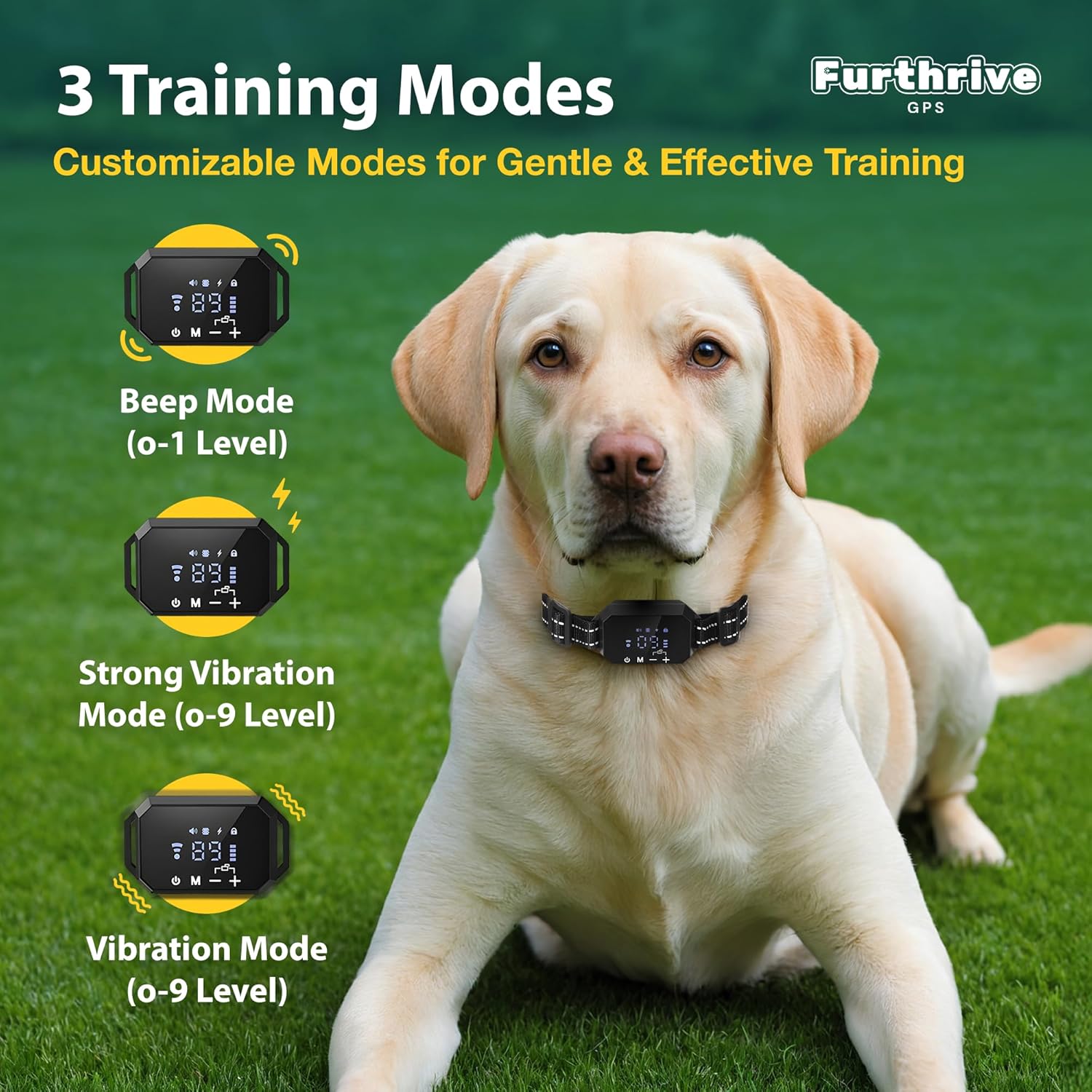
Image: Visual guide to the three customizable training modes and their intensity levels.
Manteniment
- Neteja: Regularly clean the collar and contact pins with a damp cloth. Ensure the contact pins are free of dirt or debris to maintain proper function.
- Cura de la bateria: Charge the collar fully before first use and whenever the battery indicator is low. Avoid completely draining the battery for extended periods to prolong its lifespan.
- Classificació impermeable: The collar has an IP67 waterproof rating, meaning it can withstand rain, splashes, and temporary immersion. However, prolonged submersion or high-pressure water jets should be avoided. Always ensure the charging port cover is securely closed when not charging.
- Emmagatzematge: When not in use for an extended period, store the collar in a cool, dry place.
Resolució de problemes
- El collaret no es carrega:
Ensure the magnetic charging cable is securely connected to both the collar and the power source. Check if the power adapter is functioning correctly. If the issue persists, the battery may be faulty.
- Inconsistent GPS signal or boundary:
GPS performance can be affected by environmental factors. Ensure the collar has a clear, unobstructed view of the sky. Dense foliage, tall buildings, or cloudy weather can interfere with satellite reception. Avoid using the system indoors or in areas with many metal structures. Re-establish the boundary in an open area if you experience inconsistencies.
- Collar not delivering corrections:
Check if the collar is powered on and has a GPS signal. Verify that the contact pins are properly attached and making good contact with your dog's skin. Use the included test light to confirm the static correction function is working. Ensure the chosen training mode and level are appropriate.
- Dog not responding to corrections:
Ensure the collar is fitted correctly and the contact pins are making proper contact. Increase the intensity level of the vibration or static correction gradually. Some dogs may require more intensive training or professional guidance to adapt to the system.
- Collar beeps continuously:
This may indicate the dog is near or has crossed the boundary. If the dog is within the safe zone and the collar is still beeping, the GPS signal might be weak or inaccurate. Move to an open area and re-establish the boundary. If the issue persists, power cycle the collar.
Especificacions
| Característica | Detall |
|---|---|
| Dimensions del producte | 26.5 x 1.6 x 1.5 polzades |
| Pes de l'article | 5.29 unces |
| Número de model | furthrive gps dog fence |
| Bateries | 1 bateria de polímer de liti (inclosa) |
| Classificació impermeable | IP67 |
| Adjustable Boundary Range | 100-3280 ft (30-1000 meters) |
| Modes d’entrenament | Beep, Vibration (0-9 levels), Static Correction (0-9 levels) |
| Collar Fit (Neck Size) | Fins a 24.5 polzades (62 cm) |
| Pes recomanat per a gossos | 10-110+ lliures |
| Material | Niló |
| Marca | FREEZE2TRIM |
| UPC | 850058961965 |
Garantia i Suport
This product is covered by the Amazon Return Policy. For specific details regarding returns, replacements, or warranty claims, please refer to your Amazon purchase history or contact Amazon customer service directly.
For product-related inquiries or technical assistance, you may also contact the manufacturer, FREEZE2TRIM, through the seller contact options available on the Amazon product page.
Ask a question about this manual
Ask about setup, troubleshooting, compatibility, parts, safety, or missing instructions. Manuals+ will review the question and use this page’s manual context to help answer it.