1. Introducció
The ATORCH BW-600W-DK is a high-precision DC electronic load tester designed for comprehensive analysis of various power sources and batteries. This device supports a wide range of applications, including battery capacity testing, mobile power source discharge testing, and performance/aging tests for DC power supplies. With its advanced features like Bluetooth, Wi-Fi, and PC software connectivity, it offers flexible control and detailed data logging capabilities. This manual provides essential information for the safe and effective use of your BW-600W-DK electronic load tester.
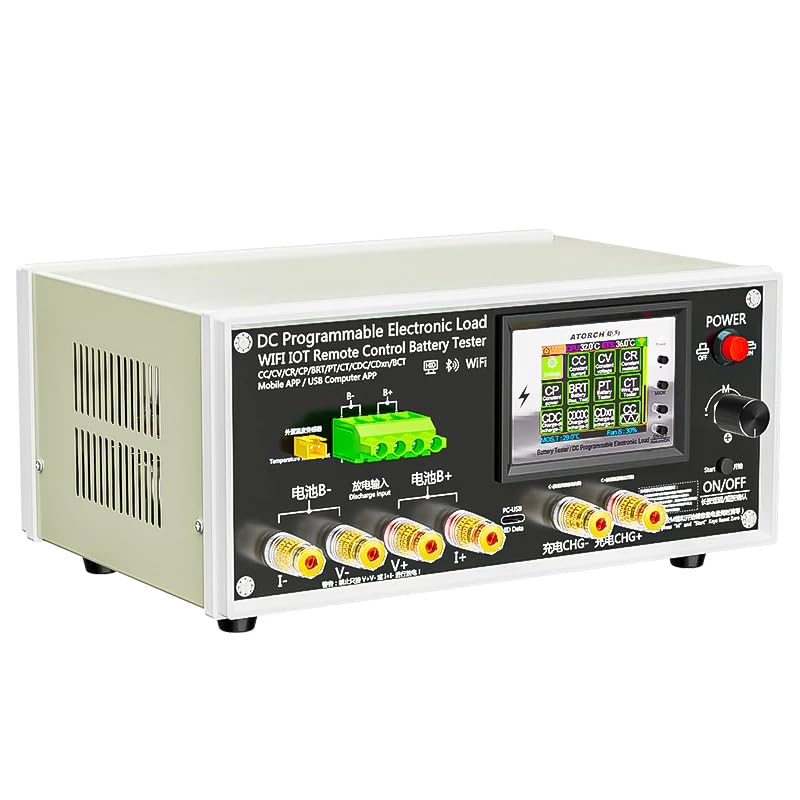
Figure 1.1: ATORCH BW-600W-DK DC Electronic Load Tester Overview. This image shows the front panel of the device with its display, control knobs, and various input/output terminals, along with an overlay demonstrating mobile app connectivity.
2. Informació de seguretat
To ensure safe operation and prevent damage to the device or injury, please read and adhere to the following safety guidelines:
- Always connect the device to a stable DC power source within the specified voltage and current limits (DC 12V/3A for the device itself).
- Ensure correct polarity when connecting batteries or power supplies to be tested. The device features reverse polarity protection, but incorrect connections should still be avoided.
- Do not exceed the maximum discharge voltage (200V) or current (50A) or power (600W) ratings of the device.
- Operate the device in a well-ventilated area to prevent overheating. The device generates heat during discharge.
- Keep the device away from moisture, dust, and direct sunlight.
- No intenteu desmuntar ni modificar el dispositiu. Encarregueu tot el manteniment a personal qualificat.
- Mantenir fora de l'abast dels nens.
3. Contingut del paquet
Verifiqueu que tots els elements que s'enumeren a continuació s'inclouen al vostre paquet:
- BW-600W-DK Battery Tester (1 unit)
- DC 12V 3A Power Supply (1 unit)
- 10A Red/Black Alligator Clip Cable (1 set)
- Temperature Probe (1 unit)
- Adapter Board (1 unit)
- US-EU Adapter (1 unit)
Nota: A charger for the battery products you intend to test is not included and must be provided separately.
4. Característiques clau
- Model: BW-600W-DK
- Tipus: Electronic Battery Tester / DC Electronic Load
- Voltage Interval de mesura: 2V a 200V
- Interval de mesura actual: 3mA a 50A
- Maximum Discharge Power: 600W
- Discharge Modes: Constant Current (CC), Constant Power (CP)
- Connectivitat: Bluetooth, Wi-Fi, PC Software (WIN7/WIN10 compatible)
- Suport de l'aplicació: Tuya APP, Smart Life APP (iOS, Android)
- Visualització: IPS display showing voltage, current, time, capacity, power, and energy.
- Cablejat: Supports both 2-wire and 4-wire connections for high accuracy.
- Seguretat: Built-in reverse polarity protection for charger input.
- Integrated Charging Control Module: Enables charging and testing of battery products.
- Funció de temporitzador: Adjustable charge/discharge timer from 00H:01S to 99H:59S.
5. Especificacions
| Paràmetre | Valor |
|---|---|
| Model | BW-600W-DK |
| Potència d'entrada per al dispositiu | DC 12V/3A |
| Voltage Rang | 0 - 200.00V (0.01V step) |
| Interval actual | 0.010 - 50.00A (0.01A step, auto-adjusted by power limit) |
| Potència de descàrrega | 600 W (màx.) |
| Modes de descàrrega | Constant Current (CC), Constant Power (CP) |
| Mètode de cablejat | 2-wire and 4-wire |
| Mostra | IPS (Voltage, Current, Time, Capacity, Power, Energy) |
| Suport de programari de PC | WIN7, WIN10 systems (via Bluetooth) |
| Suport d'aplicacions | Tuya APP, Smart Life APP (Android 8.0+, iOS 8.0+) |
| Pes del producte | 3.13 quilos |
| Mida del paquet | 34 x 34 x 17 cm |
Note on Discharge Current: The discharge current is limited by the maximum power. For voltages above 200V, the current will be less than 3A. For voltages around 12V, the current will be less than 50A.
6. Configuració
6.1 Alimentació del dispositiu
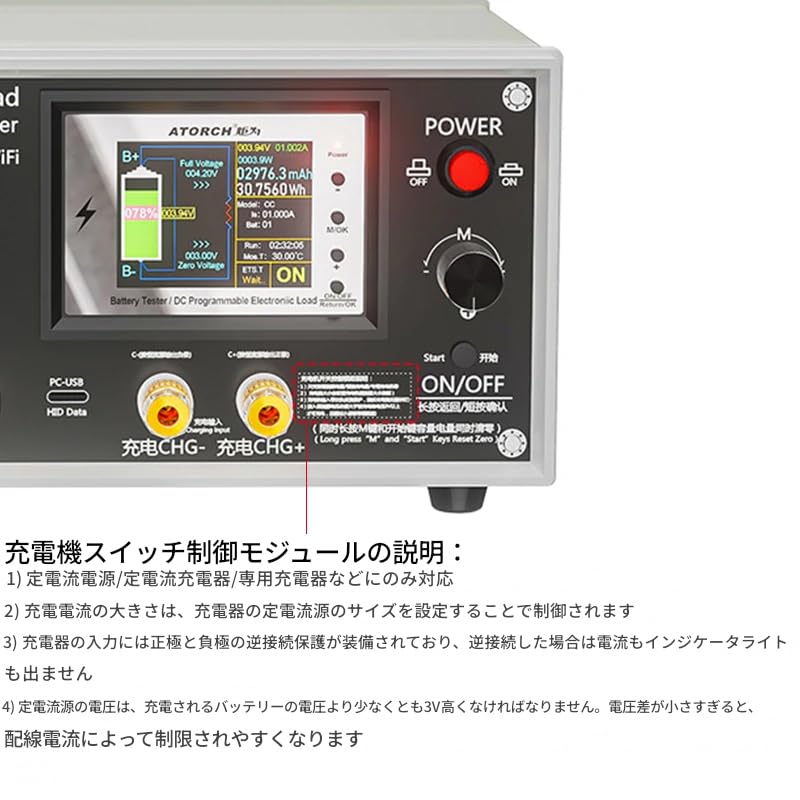
Connect the provided DC 12V/3A power supply to the device's power input port. Ensure the power switch on the device is in the OFF position before connecting. Once connected, you can turn the device ON using the power switch.
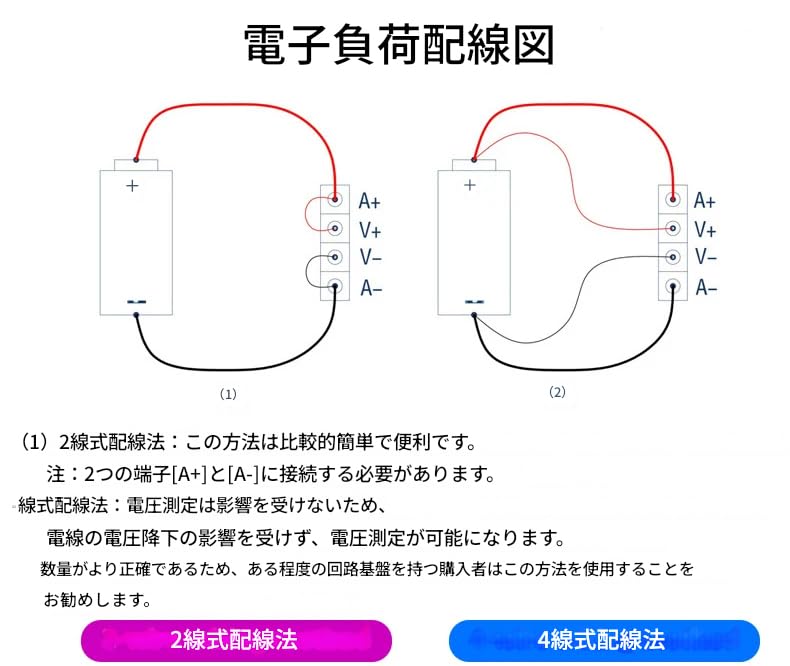
Figure 6.1: Power Control and Display. This image highlights the ON/OFF switch and the main display interface of the BW-600W-DK.
6.2 Connecting the Load/Battery
The BW-600W-DK supports both 2-wire and 4-wire connection methods. The 4-wire method provides higher measurement accuracy by separating voltage and current sensing lines, minimizing the impact of cable resistance.

Figure 6.2: 2-Wire and 4-Wire Connection Diagrams. Diagram (1) illustrates the simpler 2-wire connection, while Diagram (2) shows the more accurate 4-wire connection, separating voltage (V+, V-) and current (A+, A-) lines, located at the bottom of the image.
- Connexió de 2 fils: Connect the positive terminal of the battery/power supply to the A+ and V+ terminals, and the negative terminal to the A- and V- terminals. This method is simpler but may have slightly lower accuracy due to voltage drop across the current wires.
- Connexió de 4 fils: Connect the positive terminal of the battery/power supply to the A+ terminal and the negative terminal to the A- terminal for current flow. Separately, connect the positive terminal to the V+ terminal and the negative terminal to the V- terminal for voltage sensing. This method ensures that voltage measurements are not affected by current-carrying wires, providing higher precision.
The device features high-conductivity gold-plated terminals for reliable connections. Ensure all connections are secure before starting any test.
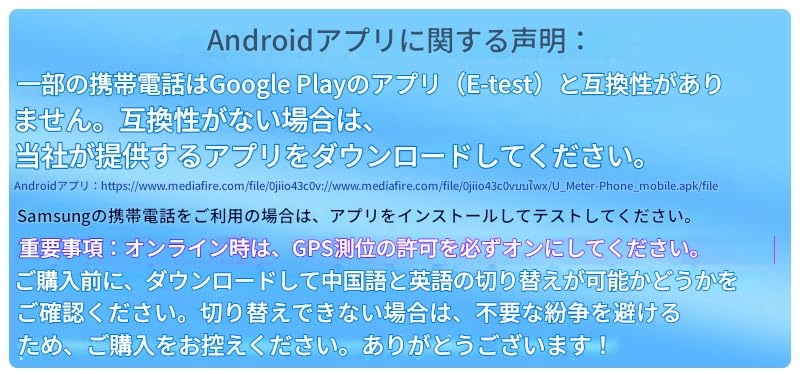
Figure 6.3: High Conductivity Gold-Plated Terminals. This image details the structure of the gold-plated terminals, designed for optimal electrical contact.
For connecting to the device, you may use banana plugs or alligator clips. Please note that while banana head accessories are shown for reference, they are not included in the standard package. Select appropriate banana heads and alligator clips for your testing needs.

Figure 6.4: Banana Plug and Alligator Clip Cable Specifications. This image provides guidance on selecting appropriate cables based on wire gauge and current capacity, showing examples of 4mm banana plug to alligator clip cables (not included).
6.3 App and PC Software Connection
The BW-600W-DK supports control and data logging via mobile apps (Tuya APP, Smart Life APP) and PC software.
6.3.1 Mobile App Connection (Wi-Fi/Bluetooth)
Download the "Smart Life" or "Tuya" app from your mobile app market (Google Play Store for Android, Apple App Store for iOS). Follow the in-app instructions to connect your device via Wi-Fi or Bluetooth. For Wi-Fi connection, ensure your device's red light is blinking, indicating it's in network distribution mode. During online operation, ensure GPS location permission is enabled on your mobile device.
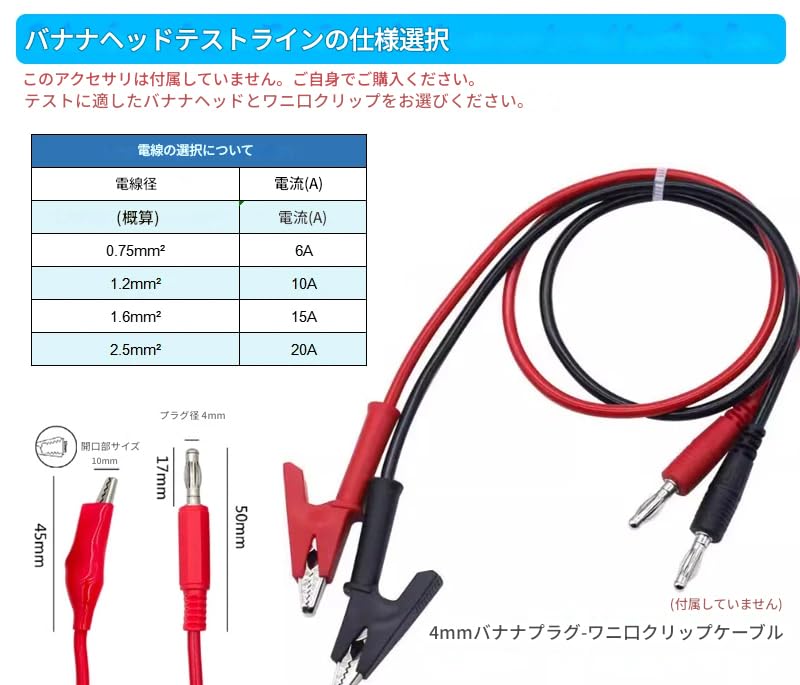
Figure 6.5: BW-600W-DK with Mobile App Interface. This image demonstrates the device being controlled and monitored via a smartphone application.
Important Note for Android Users: Some mobile phones may not be compatible with the "E-test" app from Google Play. If you experience compatibility issues, please download the alternative app provided by the manufacturer. For Samsung phones, install and test the app. Before purchasing, confirm if language switching between Chinese and English is possible to avoid unnecessary disputes if switching is not supported.

Figure 6.6: Android App Compatibility Information. This image provides details regarding Android app compatibility and alternative download options.
6.3.2 Connexió de programari de PC
The tester can connect to a computer via Bluetooth. The PC software supports WIN7 and WIN10 systems and offers advanced functions such as graphical data display, calibration, firmware upgrades, and test cycle management.