1. Introducció
This manual provides detailed instructions for the Generic H12 Smart Watch, Model UC7960144. Please read this manual thoroughly before using your device to ensure proper operation and to maximize its features.
The H12 Smart Watch features a 2.01-inch AMOLED HD display, magnetic charging, heart rate monitoring, multiple sports modes, Bluetooth calling, and SOS functionality.
2. Contingut del paquet
Assegureu-vos que tots els elements siguin presents al paquet:
- H12 Smart Watch (Model UC7960144)
- Cable de càrrega magnètica
- Manual d'usuari
3. Dispositiu acabatview
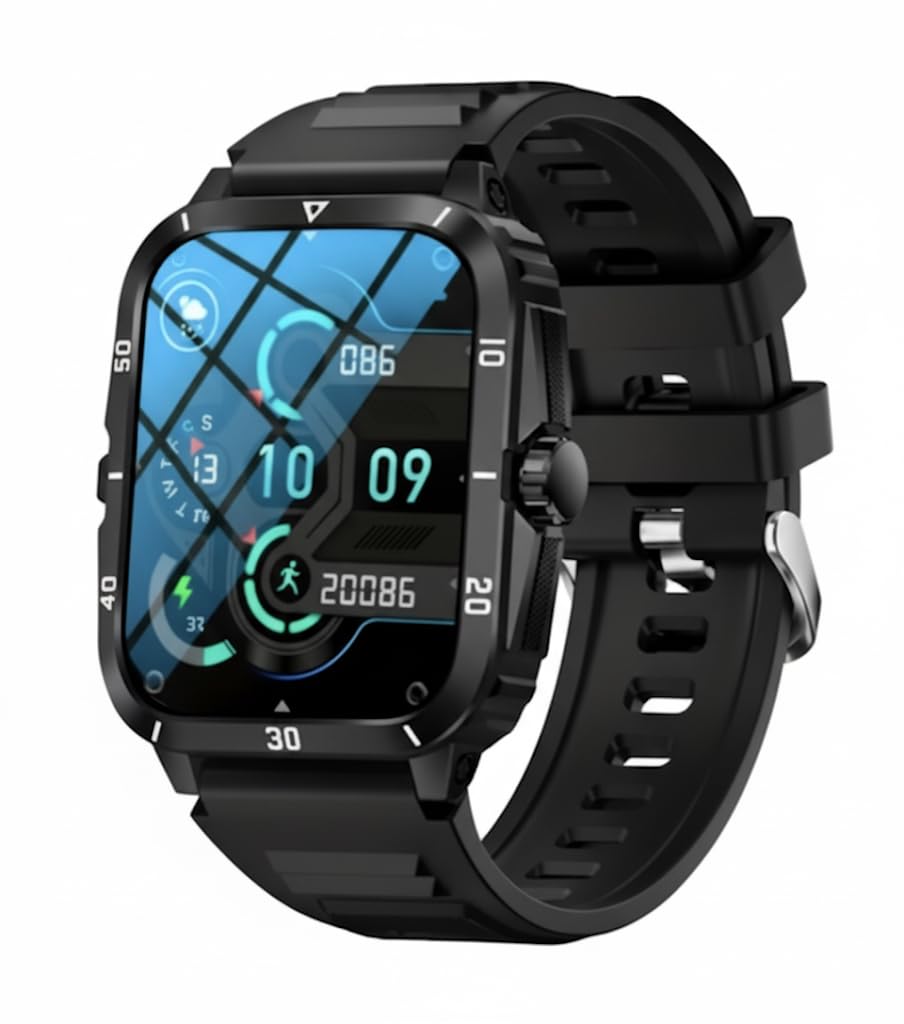
Figura 3.1: The H12 Smart Watch displaying its 2.01-inch AMOLED HD screen with 240x296 pixel resolution. This image highlights the clear visual experience and the watch's interface.

Figura 3.2: Three H12 Smart Watches showcasing different strap color options (black, khaki, and army green) and the magnetic charging feature.

Figura 3.3: Un detallat view of the H12 Smart Watch's zinc alloy case, emphasizing its robust and lightweight design.
4. Configuració
4.1 Càrrega inicial
Before first use, fully charge your H12 Smart Watch.
- Connecteu el cable de càrrega magnètic als punts de càrrega de la part posterior del rellotge.
- Connecteu l'extrem USB del cable a un adaptador de corrent USB estàndard (no inclòs) o al port USB d'un ordinador.
- The watch display will indicate charging status. Allow approximately 2 hours for a full charge.
4.2 Engegada/apagada
- Per encendre: Premeu i manteniu premut el botó lateral fins que la pantalla s'il·lumini.
- Per apagar: Mantingueu premut el botó lateral i, a continuació, seleccioneu "Apagar" a la pantalla.
4.3 Instal·lació i emparellament de l'aplicació
To unlock the full functionality of your H12 Smart Watch, download the companion app on your smartphone (compatible with Android and iOS).
- Scan the QR code in the watch's settings or search for the app name (refer to watch display or packaging for specific app name) in your phone's app store.
- Instal·leu i obriu l'aplicació.
- Follow the on-screen instructions in the app to create an account and pair your watch via Bluetooth. Ensure Bluetooth is enabled on your smartphone.
- Grant necessary permissions to the app for full feature access (e.g., notifications, health data).
5. Instruccions de funcionament
5.1 Navegació bàsica
- Llisca cap amunt/avall: Desplaça't pels menús i les notificacions.
- Llisca cap a l'esquerra/dreta: Accediu a funcions ràpides o a diferents widgets.
- Toca: Selecciona un element o confirma una acció.
- Botó lateral: Press to return to the home screen or wake the display. Press and hold for power options or SOS function.
Trucades Bluetooth 5.2
Once paired with your smartphone, the H12 Smart Watch supports Bluetooth calling.

Figura 5.1: The watch interface showing options for making and receiving calls, including SOS, contacts, call history, and a dialpad.

Figura 5.2: Un example of answering an incoming call directly from the H12 Smart Watch, allowing hands-free communication.
- Contestar trucades: Quan rebeu una trucada entrant, toqueu la icona verda de resposta a la pantalla del rellotge.
- Fer trucades: Access the "Phone" or "Dialpad" app on the watch to dial a number or select from your synced contacts.
- Funció SOS: Press and hold the side button to activate the SOS emergency feature, which can be configured in the companion app to contact pre-set emergency numbers.
5.3 Vigilància de la salut
The H12 Smart Watch provides comprehensive health tracking features.
- Monitorització de la freqüència cardíaca: Access the Heart Rate app on the watch to measure your current heart rate. For continuous monitoring, enable the feature in the companion app.
- Seguiment del son: Wear the watch to bed for automatic sleep analysis. View detailed sleep patterns (deep sleep, light sleep, awake time) in the companion app.
- Seguiment de l'activitat: The watch tracks steps, distance, and calories burned throughout the day.
Nota: This device is not a medical device. Data obtained during the use of this app is for reference only, and should not be used for clinical diagnosis, medical research, diagnostic, or treatment purposes.
5.4 modes esportius
The watch supports over 100 sports modes to track various physical activities.

Figura 5.3: The H12 Smart Watch tracking a cycling activity, showing metrics like calories, distance, and steps. The image also illustrates the variety of sports modes available.
- Començar un entrenament: Navigate to the "Sports" or "Workout" app on your watch. Select your desired activity (e.g., Outdoor Running, Cycling, Rowing Machine).
- Tracking Data: The watch will display real-time metrics such as duration, heart rate, calories burned, and distance.
- Ending a Workout: Swipe right or press the side button to pause or end the workout. Save the data to view a summary in the companion app.
6. Càrrega
The H12 Smart Watch uses a magnetic charging system.
- Ensure the magnetic pins on the charging cable align correctly with the charging contacts on the back of the watch.
- Una càrrega completa sol trigar unes 2 hores.
- Eviteu utilitzar cables o adaptadors de càrrega danyats.
7. Manteniment
- Neteja: Netegeu el rellotge i la corretja regularment amb un drap suau i sec.amp tela. Eviteu productes químics agressius o materials abrasius.
- Resistència a l'aigua: Refer to the product specifications for water resistance ratings. Avoid prolonged submersion or exposure to hot water/steam unless specified.
- Emmagatzematge: Guardeu el rellotge en un lloc fresc i sec quan no l'utilitzeu.
- Actualitzacions de programari: Regularly check the companion app for firmware updates to ensure optimal performance and new features.
8. Solució De Problemes
- El rellotge no s'encén: Assegura't que el rellotge estigui completament carregat. Connecta'l al carregador durant almenys 30 minuts.
- No es pot emparellar amb el telèfon intel·ligent:
- Assegureu-vos que el Bluetooth estigui habilitat al vostre telèfon intel·ligent.
- Assegureu-vos que el rellotge estigui dins de l'abast del telèfon.
- Reinicieu tant el rellotge com el vostre telèfon intel·ligent.
- Try unpairing and re-pairing through the companion app.
- Dades de salut inexactes:
- Assegureu-vos de portar el rellotge ben ajustat al canell, però no massa ajustat.
- Netegeu el sensor de la part posterior del rellotge.
- Environmental factors and individual physiology can affect accuracy.
- Autonomia curta de la bateria:
- Redueix la brillantor de la pantalla.
- Desactiveu el monitoratge continu de la freqüència cardíaca si no és necessari.
- Limit frequent notifications.
- Assegureu-vos que l'actualització de l'aplicació en segon pla estigui optimitzada.
9. Especificacions

Figura 9.1: Product dimensions of the H12 Smart Watch, including strap length (265mm / 10.4 inches) and strap width (22mm / 0.866 inches).
| Característica | Detall |
|---|---|
| Número de model | UC7960144 |
| Mostra | 2.01-inch AMOLED HD, 240x296 pixels |
| Connectivitat | Bluetooth |
| Compatibilitat de sistemes operatius | Android, iOS |
| Capacitat de la bateria | 180 milionsamp Hores (polímer de liti) |
| Mètode de càrrega | Càrrega magnètica |
| Emmagatzematge de memòria | 128 MB |
| Pes de l'article | 3.2 unces |
| Material de la caixa | Aliatge de zinc |
| Característiques especials | 100+ Sports Modes, HD Bluetooth Calling, SOS Function, Heart Rate Monitor, Sleep Tracking |
10. Garantia i Suport
For warranty information and customer support, please refer to the documentation included with your purchase or contact the retailer.
Manufacturer: TeKnic