
1. Introducció
The Yaregelun XY-BT13L is a 30A fully automatic battery charge and discharge management module designed for bidirectional current detection. It integrates advanced protection features to safeguard your battery system. This manual provides essential information for the proper installation, operation, and maintenance of your XY-BT13L module.
2. Informació de seguretat
Please read and understand all safety instructions before installing or operating the module. Failure to do so may result in damage to the device, battery, or personal injury.
- Ensure all power sources are disconnected before making any wiring connections.
- Verify correct polarity for all connections (positive to positive, negative to negative). Incorrect wiring can cause severe damage.
- Do not exceed the maximum current rating of 30A or the voltagrang de 10-110V.
- Install the module in a well-ventilated area, away from flammable materials and moisture.
- This device is intended for use by qualified personnel or under their supervision.
3. Producte acabatview i Característiques
The XY-BT13L module offers comprehensive battery management with several key features:
- Fully Automatic Charge and Discharge Management: Prevents overcharging and under-voltage condicions.
- Bidirectional Current Detection: Monitors current flow in both charging and discharging directions.
- Protecció avançada: Inclou overvoltage, minvartage, overcurrent, low battery alarm, over-temperature protection, and delayed conduction.
- UPS Uninterruptible Power Supply Mode: Ensures continuous power during outages.
- Precision Coulometer: Provides accurate battery capacity measurement.
- Calibració automàtica: For battery capacity.
- Comunicació en sèrie: Supports standard Modbus protocol.

Figura 1: Yaregelun XY-BT13L module highlighting its main features and capabilities, including precision coulometer, overcharge/overdischarge protection, and bidirectional current detection.

Figura 2: Detallada view of the module's internal components, showing the precision external clock crystal oscillator, 10A bidirectional current sampling chip, and the 48-pin powerful MCU controller.
4. Especificacions
| Paràmetre | Valor |
|---|---|
| Model de producte | XY-BT13L |
| Voltage Rang | 10-110V |
| Entrada de l'adaptador Voltage Rang | 10-110V |
| Corrent màxima | 30A |
| Voltage Precisió | ±0.5%+1 digit |
| Precisió actual | ±0.5%+3 dígits |
| Resolució actual | 0.01A |
| Voltage Resolució | 0.01 V |
| Temperatura de funcionament | -10 °C a 60 °C |
| Dimensions del paquet | 5.12 x 3.54 x 1.57 polzades |
| Pes de l'article | 4.9 unces |
5. Configuració i instal·lació
Proper wiring is crucial for the safe and effective operation of the XY-BT13L module. Refer to the wiring diagram below for connections.

Figura 3: Wiring diagram for the XY-BT13L module. Connect the charger, battery, and load according to the labels. Note the 10A charging relay switch, 10A discharge relay switch, buzzer, SET key, UP/DOWN buttons, STOP emergency stop button, and serial port communication interface.
5.1 Instruccions de cablejat
- Input Power (IN+/IN-): Connect your charger or power adapter to these terminals. Ensure the voltage està dins del rang de 10-110 V.
- Battery Connection (BT+/BT-): Connect your rechargeable battery to these terminals. Observe correct polarity.
- Load Connection (OUT+/OUT-): Connect your electrical load to these terminals.
- K485X Module (Optional): If using the K485X communication module, connect it to the serial port communication interface (GND, RX, TX) for Modbus protocol communication.
- Relay Switches: The module features internal 10A charging and discharge relay switches. Ensure your current does not exceed this rating for direct control.
After all connections are made, double-check for any loose wires or incorrect polarity before applying power.
6. Modes de funcionament
The XY-BT13L module supports various operating modes for battery management. The display provides real-time information on voltage, current, and battery capacity.
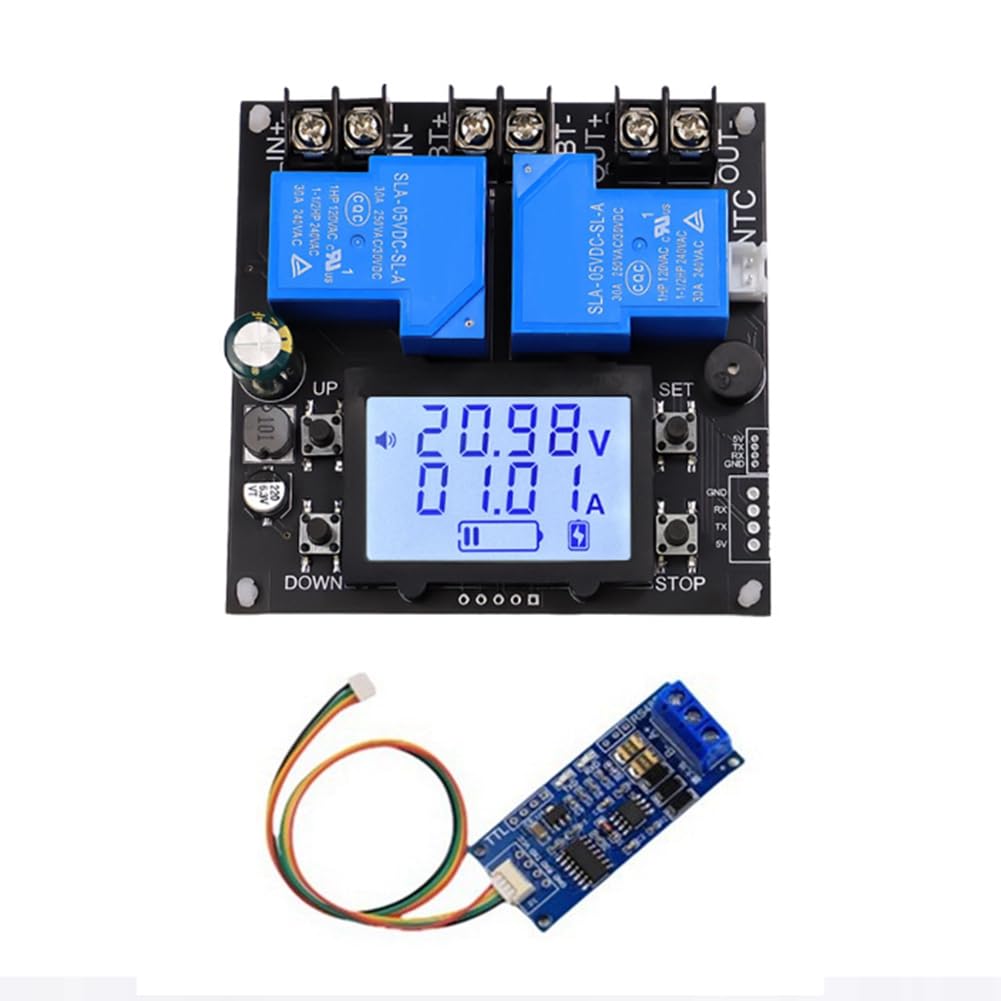
Figura 4: Visual guide to the operating modes: Charging, Discharge, and UPS Uninterruptible Power Supply. The display icons and current readings indicate the active mode.
6.1 Mode de càrrega
- When entering the charging state, the charging relay closes.
- The charging icon flashes, indicating the battery capacity.
- The icon will dynamically display charging progress.
- Charging mode button instructions: Premeu el botó STOP button briefly to stop charging. Long press the STOP button to force switch to discharge mode.
6.2 Mode de descàrrega
- When entering the discharge state, the discharge relay closes.
- The discharge icon flashes, and the battery capacity chart appears.
- The indicator will dynamically display the discharge progress.
- Discharge mode key instructions: Premeu el botó STOP button briefly to stop discharging. Long press the STOP button to force switch to charging mode.
6.3 UPS Uninterruptible Power Supply Mode
In UPS mode, the charging relay and discharge relay are always in the same state. When the charger is connected, it charges the battery and supplies power to the load. When the battery is fully charged, the charge current cuts off, but the electrical relay does not disconnect. When the charger is powered off, or the pool power has been exhausted, the module automatically switches to supply power to the load from the battery.
- Nota: This mode must ensure the output of the charger is greater than the charging power plus the load power.
- The simultaneous flashing of the charging and discharging icons represents the UPS mode.
- Current description in UPS mode: When the charger charges the battery and supplies power to the load, the current displayed is the charging current for the battery. When the charger is disconnected (or the charger malfunctions), the charging icon will enter a rapid flashing mode to prompt charging. When an electrical appliance malfunctions, the battery will automatically supply power to the load, and the current displayed is the battery's discharge current.
How to turn on or off the UPS mode:
Premeu llargament el botó SET button to enter the Settings. If the FUC parameter is set to UPS, the UPS mode will be activated. Set it to other values to turn off the UPS mode.
UPS uninterruptible power supply mode button instructions: Premeu el botó STOP button briefly for emergency stop.
7. Manteniment
- Mantingueu el mòdul net i lliure de pols i deixalles.
- Ensure proper ventilation around the module to prevent overheating.
- Regularly check all wiring connections for tightness and signs of corrosion.
- Eviteu exposar el mòdul a temperatures o humitat extremes.
8. Solució De Problemes
If you encounter issues with your XY-BT13L module, consider the following common problems and solutions:
- El mòdul no s'encén: Comproveu el volum d'entradatage and polarity. Ensure connections are secure.
- Battery not charging/discharging: Verify battery connections and polarity. Check if the module is in the correct operating mode. Ensure the charger/load is functioning correctly.
- Lectures inexactes: Ensure all connections are tight. If issues persist, the module may require recalibration (refer to advanced settings if available, or contact support).
- Sobreescalfament: Ensure adequate ventilation. Reduce load if consistently overheating.
- Unexpected mode changes: Review button press sequences and settings, especially for UPS mode activation.
For persistent issues not covered here, please contact Yaregelun customer support.
9. Garantia i Suport
The Yaregelun XY-BT13L module is manufactured with quality and reliability in mind. For specific warranty details, please refer to the product packaging or contact your point of purchase. For technical support or inquiries, please reach out to Yaregelun customer service.