
1. Informació important de seguretat
Please read all instructions carefully before using this monitor. Keep this manual for future reference.
- No exposeu el monitor a la pluja, la humitat ni a temperatures extremes.
- Assegureu-vos d'una ventilació adequada al voltant del monitor per evitar el sobreescalfament.
- Use only the power adapter provided with the monitor.
- Eviteu col·locar objectes pesats sobre el cable d'alimentació o el monitor.
- Desconnecteu l'endoll de la presa de corrent si no heu d'utilitzar el monitor durant un període prolongat.
- No intenteu fer la reparació del monitor vosaltres mateixos. Encarregueu-vos de totes les tasques de manteniment a personal qualificat.
2. Contingut del paquet
Verifiqueu que tots els elements siguin presents al vostre paquet:
- 27-inch QHD 210Hz Monitor (1 unit)
- Monitor Stand (1 unit)
- Quick Start Guide (QSG) (1 unit)
- DP Cable (1 unit)
- Power Adaptor (1 unit)
- Cable d'alimentació (1 unitat)
- Shielding Hood (2 units)

Video: KTC 27M1 27 Inch 210Hz Gaming Monitor. This video provides a visual overview of the monitor and its features.
3. Instruccions de configuració
3.1 Muntatge del suport del monitor
- Traieu amb cura els components del monitor i del suport de l'embalatge.
- Attach the stand base to the stand arm using the provided screw.
- Align the stand arm with the mounting slot on the back of the monitor and push until it clicks into place.
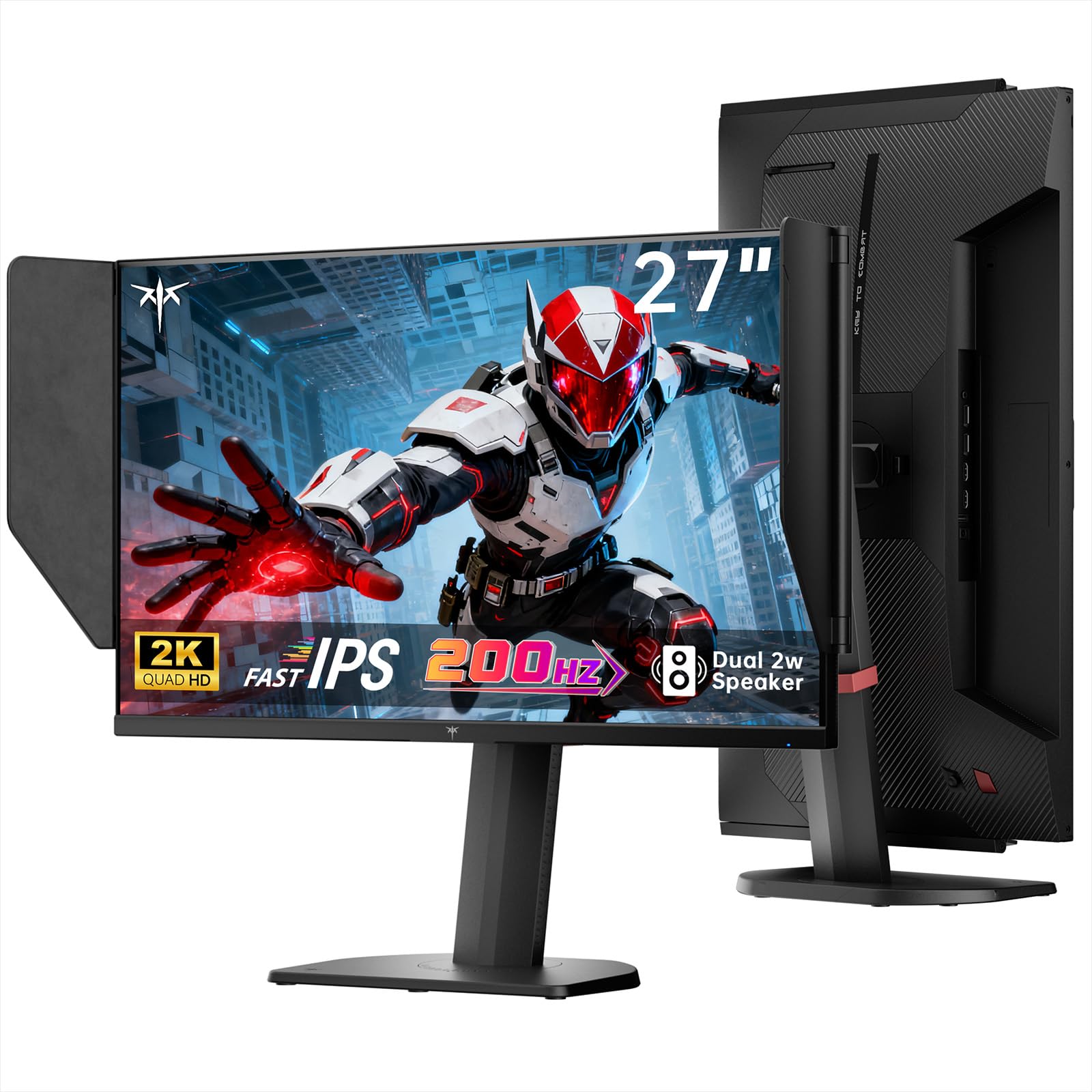
Image: The KTC 27M1 monitor with its stand fully assembled, ready for use.
3.2 Attaching the Shielding Hood
The shielding hood helps reduce glare and reflections for an optimal viewexperiència.
- Locate the two shielding hood pieces.
- Align each piece with the designated slots on the sides of the monitor and gently slide them into place until secure.

Image: The KTC 27M1 monitor shown with the shielding hood attached, designed to block reflected light.
3.3 Cables de connexió
Connecteu el monitor al vostre ordinador o a altres dispositius mitjançant els cables adequats:
- DisplayPort (DP): For 200Hz (overclockable to 210Hz) refresh rates, connect the DP cable from your graphics card to the monitor's DP 1.4 port.
- HDMI: For 144Hz refresh rates, connect an HDMI 2.0 cable from your device to one of the monitor's HDMI ports.
- Potència: Connect the power adapter to the DC input on the monitor, then plug the power cord into a wall outlet.
- Àudio: Connect headphones or external speakers to the 3.5mm earphone jack if desired.

Imatge: Primer pla view of the KTC 27M1 monitor's rear ports, including HDMI, DisplayPort, USB, and earphone jack.
4. Instruccions de funcionament
4.1 Encès/Apagat
Press the 5-way navigation joystick located on the back of the monitor to power it on or off.
4.2 Navegació pel menú OSD
The 5-way navigation joystick is used to access and navigate the On-Screen Display (OSD) menu:
- Premeu el joystick per obrir el menú OSD.
- Move the joystick Up/Down/Left/Right to navigate through menu options.
- Premeu el joystick de nou per seleccionar una opció o confirmar una configuració.
- Move the joystick Left to go back to the previous menu or exit the OSD.
4.3 Ajust de la configuració de la pantalla
Within the OSD menu, you can adjust various display settings:
- Brillantor/Contrast: Ajusta els nivells generals de luminància i contrast.
- Configuració de color: Modify color temperature (Warm, Cool, User), gamma, hue, and saturation. The monitor offers 130% sRGB color gamut and ΔE<2 for accurate color reproduction.
- Configuració del joc: Enable/disable Adaptive Sync (FreeSync/G-Sync Compatible), adjust Overdrive (Ultra Fast recommended for gaming), and activate Game Assist features.
- Configuració avançada: Toggle HDR (Auto/Off) and OverClock (to achieve 210Hz refresh rate).
- Entrada: Manually select the input source (DP, HDMI1, HDMI2).
- Conjunt del sistema: Change OSD language, LED indicator, audio volume, and other system preferences.
4.4 Ajustaments ergonòmics
The monitor stand supports multiple ergonomic adjustments for comfortable viewing:
- Ajust d'alçada: Adjust the monitor height by 150±5mm.
- Inclinació: Tilt the screen from -5° to 35°.
- Girar: Swivel the monitor ±60°.
- Pivot: Pivot the screen from -5° to 90° for vertical orientation.

Image: Visual representation of the KTC 27M1 monitor's tilt, swivel, elevate, and pivot adjustments.
5. Característiques
- Visualització: 27-inch QHD (2560x1440) Fast IPS panel.
- Freqüència d'actualització: 200Hz, overclockable to 210Hz.
- Temps de resposta: 1ms (MPRT) for sharp visuals.
- Precisió del color: 130% sRGB color gamut, 99% DCI-P3 coverage, ΔE<2, 450 cd/m² brightness, 1.07 Billion Colors, 1000:1 Contrast Ratio.
- Sincronització adaptativa: FreeSync and G-Sync Compatible to eliminate screen tearing.
- Cura dels ulls: Flicker-free and low blue light modes for extended comfortable viewing.
- Àudio: Built-in dual 2W speakers.
- Connectivitat: 2x HDMI 2.0 ports, 1x DisplayPort 1.4 port, 1x USB 2.0 port, 1x Earphone jack.
- Muntatge: 100x100mm VESA mount compatible.
- Disseny: Includes a detachable shielding hood to block reflected light.

Image: The KTC 27M1 monitor displaying vibrant colors, highlighting its color accuracy and brightness features.
6. Especificacions
| Característica | Especificació |
|---|---|
| Marca | CTC |
| Número de model | H27T8 (Marketed as 27M1) |
| Mida de la pantalla | 27 polzades |
| Resolució nativa | 2560 x 1440 (QHD) |
| Tecnologia de visualització | IPS ràpid |
| Freqüència d'actualització | 200 Hz (Overclockable to 210 Hz) |
| Temps de resposta | 1 Millisecond (MPRT) |
| Brillantor | 450 candeles (cd/m²) |
| Relació de contrast | 1000:1 |
| Gamma de colors | 130% sRGB, 99% DCI-P3 |
| Viewangle ing | 178 graus |
| Suport HDR | Sí |
| Sincronització adaptativa | FreeSync, G-Sync Compatible |
| Altaveus incorporats | 2x 2W Speakers |
| Connectivitat | 2x HDMI 2.0, 1x DisplayPort 1.4, 1x USB 2.0, 1x Earphone |
| Muntatge VESA | 100x100mm |
| Ergonomia | Height, Tilt, Swivel, Pivot Adjustment |
| Consum d'energia | 48 watts |
7. Manteniment i cura
- Neteja de la pantalla: Netegeu suaument la pantalla amb un drap suau i sense borrissol. Per a marques difícils, dampen the cloth with a mild, non-abrasive screen cleaner.
- Neteja de la Casing: Feu servir un drap suau i sec per netejar el monitor casing. Eviteu utilitzar detergents forts o productes de neteja abrasius.
- Ventilació: Ensure the ventilation openings on the monitor are clear and unobstructed to prevent overheating.
- Emmagatzematge: Si guardeu el monitor durant un període prolongat, desconnecteu-lo de l'alimentació i guardeu-lo en un lloc fresc i sec.
8. Solució De Problemes
8.1 Sense poder
- Comproveu si el cable d'alimentació està connectat correctament al monitor i a la presa de corrent.
- Verifiqueu que la presa de corrent funciona correctament connectant-hi un altre dispositiu.
- Assegureu-vos que l'adaptador d'alimentació estigui connectat correctament.
8.2 No Signal/Blank Screen
- Confirmeu que el cable de vídeo (DP o HDMI) estigui connectat correctament tant al monitor com a l'ordinador/dispositiu.
- Press the OSD joystick to open the menu and manually select the correct input source.
- Assegureu-vos que l'ordinador/dispositiu estigui encès i no estigui en mode de repòs.
- Try using a different video cable or port to rule out cable/port issues.
8.3 Flickering/Distorted Image
- Comproveu el cable de vídeo per veure si hi ha danys o connexions soltes.
- Adjust the refresh rate in your computer's display settings to match the monitor's native refresh rate (200Hz or 210Hz if overclocked).
- Enable Adaptive Sync (FreeSync/G-Sync Compatible) in the monitor's OSD menu and your graphics card settings.
- Assegureu-vos que els controladors de la vostra targeta gràfica estiguin actualitzats.
8.4 No Sound from Built-in Speakers/Earphone Jack
- Check the volume settings in the monitor's OSD menu and your computer's operating system.
- Assegureu-vos que el dispositiu de sortida d'àudio correcte estigui seleccionat a la configuració de so de l'ordinador.
- Verify that the audio cable (if using external speakers) or headphones are properly connected.
9. Garantia i Suport
KTC is committed to providing quality service and support for your monitor.
- Garantia: This product comes with a 3-year quality guarantee.
- Suport tècnic: Lifetime technical support is available for all KTC products.
- Contacta amb nosaltres: If you have any questions or encounter issues, please contact KTC customer support. Solutions will be provided within 24 hours.