
Producte acabatview
The Blaupunkt Bremen SQR 46 DAB Retro Car Stereo is a modern reinterpretation of the classic 1-DIN car radio from the 1980s. It combines vintage aesthetics with contemporary technology, offering a comprehensive in-car entertainment experience. This unit features Bluetooth connectivity, dual USB ports, SD card slot, AUX input, and AM/FM radio, along with DAB+ digital tuner capabilities. The package includes the receiver, a fully enclosed under-dash/overhead installation mounting kit, and a 22-inch radio antenna, providing a complete solution for various vehicle installations.
Què hi ha a la caixa
- Blaupunkt Bremen SQR 46 DAB Retro Car Stereo Receiver: The main head unit for audio playback and control.
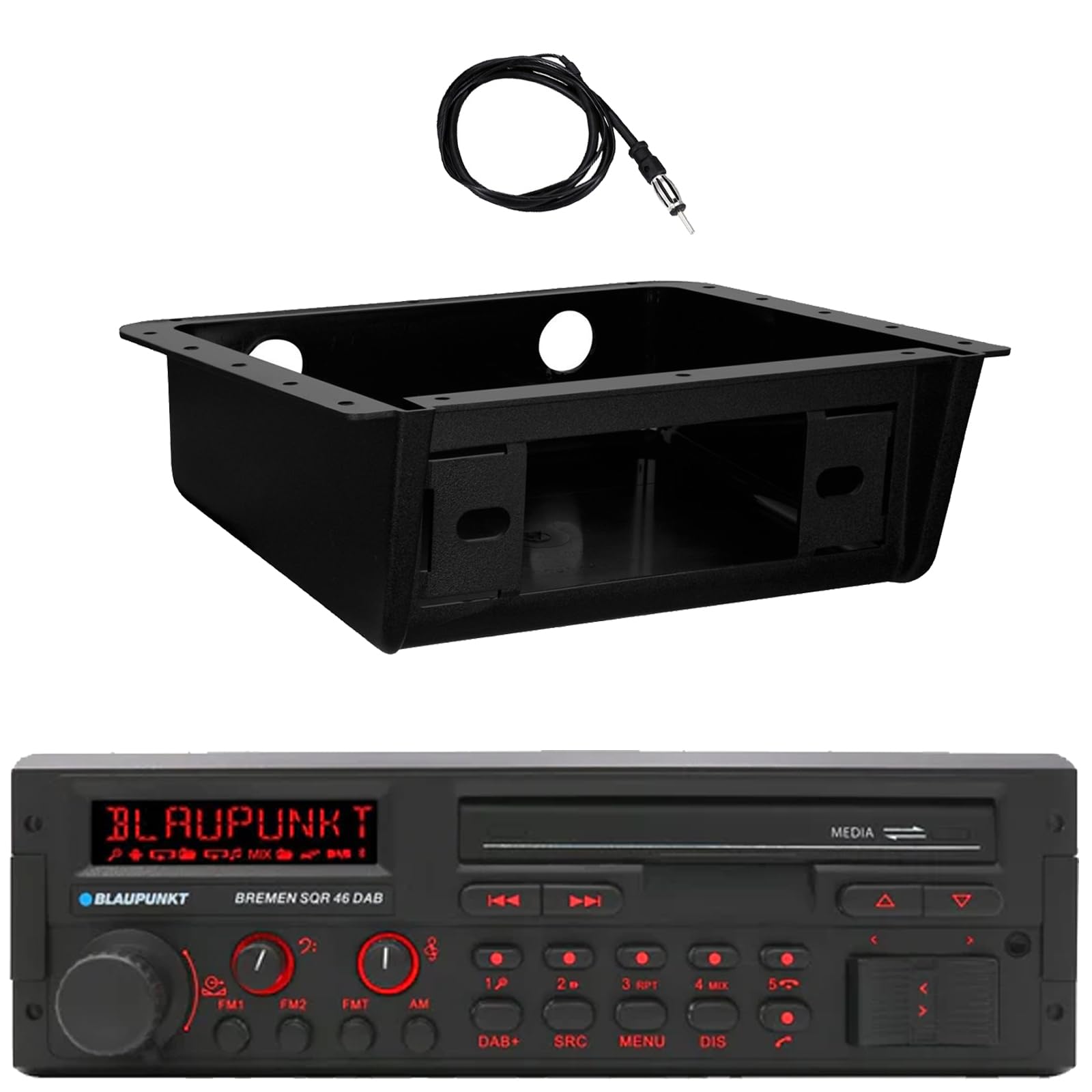
Imatge: Frontal view of the Blaupunkt Bremen SQR 46 DAB car stereo receiver, showing the display, control knobs, and buttons.
- Fully Enclosed Under Dash/Overhead Installation Mounting Kit: A premium housing designed for secure installation of the receiver under the dashboard or overhead.

Image: Black, rectangular under-dash/overhead mounting kit, designed to house a single DIN car stereo.
- 22" Radio Antenna: A flexible marine-grade antenna for improved AM/FM radio reception.

Image: Coiled black wire antenna with a silver connector at one end.
Configuració i instal·lació
Proper installation is crucial for optimal performance. It is recommended that installation be performed by a qualified professional. This section provides general guidelines.
1. Muntatge del receptor
- Under Dash/Overhead Installation: The included mounting kit is designed to fully enclose the single DIN receiver. Secure the kit to a suitable flat surface under the dashboard or overhead using appropriate fasteners (not included).
- Insert the Blaupunkt Bremen SQR 46 receiver into the mounting kit. Ensure it is securely seated and locked into place.
- Alternatively, the unit can be installed in a standard single DIN opening in your vehicle's dashboard.
2. Connexions de cablejat
- Connexió d'alimentació: Connect the yellow wire to a constant 12V power source, the red wire to a switched 12V accessory power source, and the black wire to a chassis ground.
- Connexions d'altaveus: Connect the speaker wires to your vehicle's speakers, ensuring correct polarity for each speaker.
- Connexió d'antena: Connect the 22" radio antenna to the antenna input on the rear of the receiver. Route the antenna cable away from other wiring to minimize interference.
- Entrades auxiliars: If using external devices, connect them to the AUX-in port.
- Sortides RCA: Per connectar externs amplifiers, use the RCA pre-outs.
3. Engegada inicial
- After all connections are made, turn on your vehicle's ignition.
- Premeu el botó d'encesa del receptor per encendre-lo.
- Follow any on-screen prompts for initial setup, such as language selection or clock setting.
Instruccions de funcionament
Controls bàsics
- Botó d'encesa: Premeu per encendre o apagar la unitat.
- Pom de volum: Rotate to adjust the volume level. Press to mute/unmute.
- Botó SRC (Font): Press to cycle through available audio sources: AM, FM, DAB+, Bluetooth, USB, SD, AUX.
- Botó MENÚ: Access system settings and audio adjustments.
- DIS (Display) Button: Change display information or dim the display.
- Track/Tune Buttons (<< / >>): Use to skip tracks in media modes or tune radio frequencies.
Radio Operation (AM/FM/DAB+)
- Premeu el botó SRC botó fins que AM, FM, o DAB+ està seleccionat.
- Utilitza el Track/Tune buttons to manually tune frequencies or seek for the next strong station.
- Estacions preseleccionades: Press and hold numbered buttons (1-6) to save the current station as a preset. Press briefly to recall a saved station.
Funcionament Bluetooth
- Maridatge:
- Assegureu-vos que el Bluetooth estigui habilitat al vostre dispositiu mòbil.
- Seleccioneu Bluetooth as the source on the receiver using the SRC botó.
- On your mobile device, search for available Bluetooth devices and select "Blaupunkt Bremen SQR 46".
- Confirma l'emparellament si se't demana.
- Transmissió d'àudio: Once paired, you can stream audio from your device. Use the Track/Tune buttons on the receiver to skip tracks.
- Trucades mans lliures: When a call comes in, the unit will display caller information. Press the green call button to answer, or the red call button to reject/end.
Reproducció de targetes USB/SD
- Insert a USB drive into one of the USB ports or an SD card into the SD card slot.
- The unit will automatically switch to the USB or SD source and begin playback. If not, press the SRC botó per seleccionar la font correcta.
- Utilitza el Track/Tune botons per navegar per les pistes.
Entrada AUX
- Connect an external audio device (e.g., MP3 player) to the AUX-in port using a 3.5mm audio cable.
- Seleccioneu AUX as the source using the SRC botó.
- Control playback from the connected device.
Configuració d'àudio
- Premeu el botó MENÚ button to access audio settings such as Bass, Treble, Balance, Fader, and Equalizer presets.
- Rotate the volume knob to adjust values and press it to confirm selections.
Manteniment
- Neteja de la unitat: Feu servir un drap suau i sec per netejar el panell frontal i la pantalla. Per a la brutícia persistent, netegeu lleugeramentampRenta el drap amb aigua. Evita fer servir productes químics agressius, netejadors abrasius o dissolvents.
- Ports USB/SD: Keep the USB and SD card slots free of dust and debris.
- Atenció general: Eviteu exposar la unitat a temperatures extremes, a la llum solar directa durant períodes prolongats o a una humitat excessiva.
Resolució de problemes
| Problema | Causa possible | Solució |
|---|---|---|
| Sense poder | Incorrect wiring; Blown fuse; Vehicle ignition off. | Check power and ground connections. Verify vehicle fuse and unit fuse. Ensure vehicle ignition is on. |
| Sense so | Volum massa baix; Silenciament activat; Cablejat incorrecte de l'altaveu; Font no seleccionada. | Augmenta el volum. Desactiva el silenci. Comprova les connexions dels altaveus. Selecciona la font d'àudio correcta. |
| Bluetooth no connectat | Device not in pairing mode; Unit not in Bluetooth source; Interference. | Ensure Bluetooth is enabled on device and unit. Put device in pairing mode. Try re-pairing. Move closer to the unit. |
| Mala recepció de ràdio | Antena no connectada; Antena danyada; Zona amb senyal feble. | Check antenna connection. Inspect antenna for damage. Try tuning to a stronger station or moving to a different location. |
| L'USB/SD no es reprodueix | Sense suport file format; Corrupted media; Incorrect source selected. | Assegureu-vos files are in a supported format (e.g., MP3, WMA). Try a different USB drive/SD card. Select USB/SD source. |
Especificacions
| Característica | Detall |
|---|---|
| Marca | BLAUPUNKT |
| Número de model | Bremen SQR 46 |
| Tecnologia de connectivitat | Auxiliar, Bluetooth |
| Tipus de controlador | Pulsador |
| Característiques especials | Built-In Bluetooth, USB, SD Card, AUX-in, DAB+ digital tuner |
| Dispositius compatibles | Amplifier, Smartphones, USB drives, SD cards |
| Mode de sortida d'àudio | estèreo |
| Tipus de sortida d'àudio | RCA (6 channels) |
| Recompte d'unitats | 1 (Receptor) |
| Components inclosos | Receiver, Stereo Install Kit, Radio Antenna |
Informació de la garantia
This Blaupunkt Bremen SQR 46 DAB Retro Car Stereo comes with a 1 anys de garantia del fabricant. This warranty covers defects in materials and workmanship under normal use. Please retain your proof of purchase for warranty claims. For detailed terms and conditions, refer to the warranty card included with your product or visit the official Blaupunkt weblloc.
Atenció al client
For further assistance, technical support, or warranty inquiries, please contact Blaupunkt customer service. You can typically find contact information on the official Blaupunkt weblloc web o a la documentació que s'inclou amb el producte.
Oficial Weblloc: www.blaupunkt.com (Please note: This link is a general placeholder. Refer to your product's specific documentation for the most accurate support contact information.)