
1. Introducció
This manual provides essential information for setting up, operating, and maintaining your FIREBAT A8 Mini PC. The FIREBAT A8 is a high-performance barebone mini computer designed for various applications, including office work, business, gaming, home theater, and educational purposes. It features an AMD Ryzen 7 8745HS processor with Radeon 780M Graphics, extensive connectivity options, and support for multiple displays.

Image: FIREBAT A8 Mini PC, showcasing its compact design and key specifications.
2. Contingut del paquet
Verifiqueu que tots els elements que s'enumeren a continuació s'inclouen al vostre paquet:
- 1 x A8 AMD Ryzen 7 8745HS Mini PC
- 1 x US Power Supply (19V 6.32A 120W)
- 1 x Muntatge VESA
- 1 x cable HDMI
- 1 x Manual d'usuari

Image: Illustration of the FIREBAT A8 Mini PC and its included accessories.
3. Producte acabatview i Característiques
The FIREBAT A8 Mini PC is engineered for robust performance and versatility. Key features include:
- AMD Ryzen 7 8745HS Processor: 8 cores/16 threads with Zen 4 architecture, operating at 3.8-4.9GHz frequency and 16MB L3 cache.
- Gràfics AMD Radeon 780M: Integrated graphics for powerful visual processing.
- OCuLink Port: High-bandwidth port (PCIe 4.0 x4) for connecting external graphics cards with minimal performance loss. Note: OCuLink port does not support hot-swapping.
- Modes de rendiment: One-click switching between Quiet (45W), Balanced (54W), and Performance (65W) modes.
- Quad-Screen Display Support: Connect up to four screens simultaneously via dual USB-C 4.0, DP 1.4, and HDMI 2.1 ports. Supports up to 8K@60Hz via HDMI 2.1 and 4K@144Hz via Type-C.
- Àmplia connectivitat: Includes 2x USB-C 4.0 (PD/DP/40Gbps), 4x USB 3.2 Gen2 (10Gbps), 2x USB 2.0 (5Gbps), 1x TF card slot, 2x 2.5Gbps RJ45 LAN, WiFi 6 (802.11ax), and Bluetooth 5.2.
- Capacitat ampliable: Barebone system allowing installation of DDR5 5600MHz RAM (up to 64GB across two slots) and M.2 2280 PCIe4.0x4 SSD (up to 2TB).
- Refrigeració eficient: Dual fan cooling system with thermal grease and heat pipes for stable performance.
- Micròfon integrat: The device includes an integrated microphone for audio input.
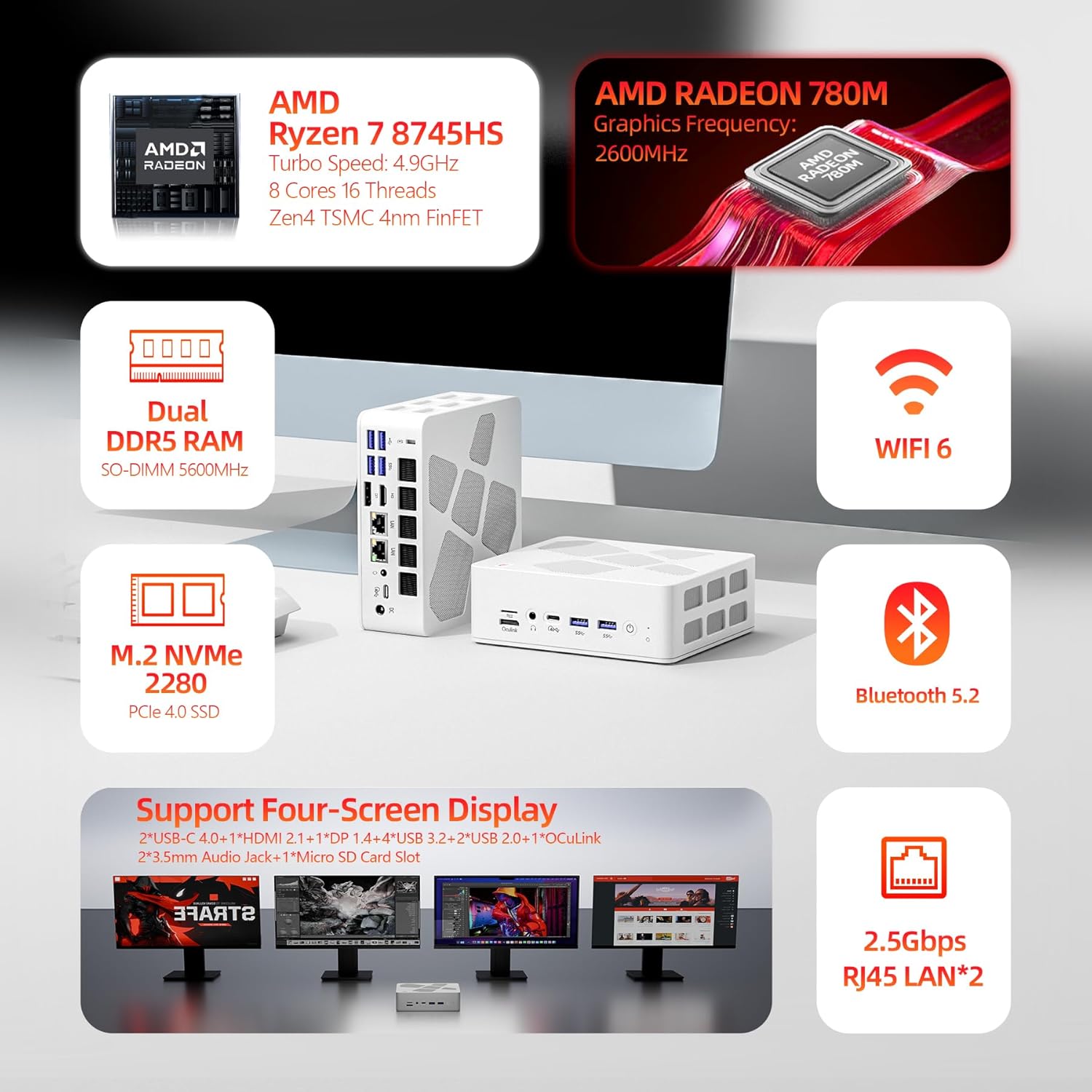
Image: Visual overview of the FIREBAT A8 Mini PC's key features including CPU, GPU, RAM, storage, and connectivity.
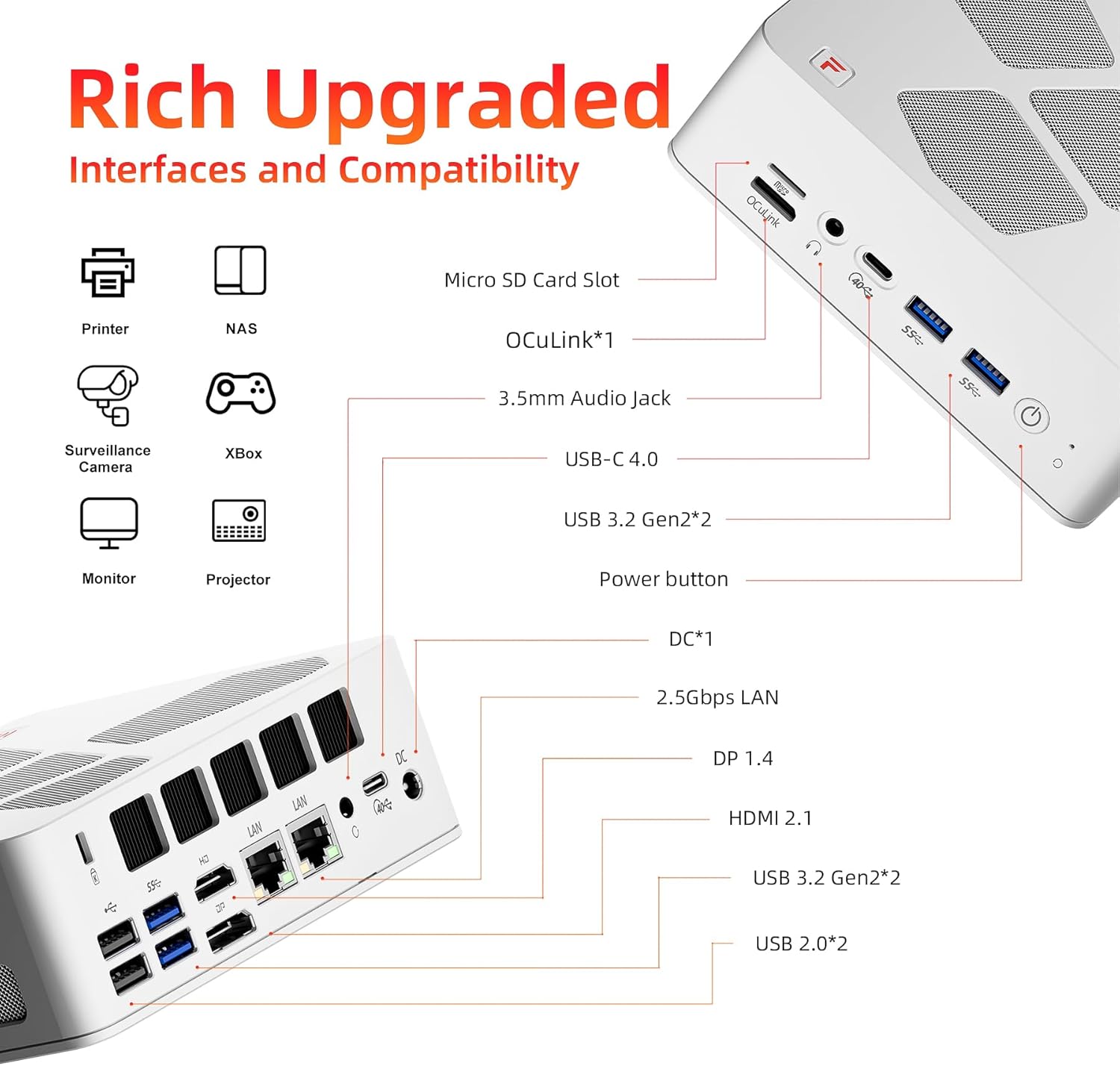
Image: Detailed diagram showing all available interfaces and ports on the FIREBAT A8 Mini PC.
4. Guia de configuració
Follow these steps to set up your FIREBAT A8 Mini PC:
- Connecteu els perifèrics: Connect your keyboard, mouse, and monitor(s) to the appropriate USB and display ports (HDMI, DisplayPort, or USB-C).
- Connectar l'alimentació: Plug the power adapter into the DC-in port on the mini PC, then connect the power cord to a wall outlet.
- Encès: Press the power button located on the front of the mini PC. The device will power on, and the RGB lights will illuminate.
- Configuració del sistema operatiu: If you are installing a new operating system, follow the on-screen prompts to complete the setup process.

Imatge: Anvers i revers views of the FIREBAT A8 Mini PC, highlighting port locations for setup.
5. Hardware Installation (RAM & SSD)
The FIREBAT A8 is a barebone system, meaning RAM and SSD are not pre-installed. You will need to install these components yourself. Ensure the device is powered off and unplugged before proceeding.
Installing RAM (DDR5 SO-DIMM)
- Carefully open the mini PC casing. Refer to the detailed instructions in the included user manual for safe opening procedures.
- Locate the two DDR5 SO-DIMM memory slots on the motherboard.
- Align the notch on the RAM module with the notch in the slot.
- Insert the RAM module firmly into the slot at a 45-degree angle.
- Gently push down on the module until the clips on both sides snap into place, securing the RAM.
- Repeat for the second RAM module if installing dual channel memory.
Installing M.2 SSD (PCIe 4.0x4)
- Locate the M.2 2280 SSD slot on the motherboard.
- Inseriu l'SSD M.2 a la ranura amb un lleuger angle.
- Premeu suaument l'SSD cap avall i fixeu-lo amb el cargol proporcionat.
- Close the mini PC casinamb cura.

Imatge: Interna view of the FIREBAT A8 Mini PC showing the locations for RAM and M.2 SSD installation.
6. Modes de funcionament
The FIREBAT A8 Mini PC offers three performance modes to optimize power consumption and performance based on your needs:
- Green (Quiet Mode - 45W): Ideal for office tasks, web browsing, and light applications where minimal noise is desired.
- Blue (Balanced Mode - 54W): Suitable for medium to low-load applications, offering a balance between performance and power efficiency.
- Red (Performance Mode - 65W): Designed for demanding tasks such as large games, video editing, and other high-load applications, maximizing the CPU and GPU performance.
You can switch between these modes using the dedicated button on the mini PC. The color of the indicator light will change to reflect the active mode.

Image: Diagram illustrating the three performance modes (Quiet, Balanced, Performance) and their corresponding power consumption.
7. Connectivity Guide
The FIREBAT A8 Mini PC offers a wide array of ports for diverse connectivity needs:
- Ports de visualització:
- 2x USB-C 4.0 (supports DisplayPort, up to 4K@144Hz)
- 1x DisplayPort 1.4 (DP 1.4)
- 1x HDMI 2.1 (supports up to 8K@60Hz)
- Ports de dades:
- 2x USB-C 4.0 (up to 40Gbps data transfer)
- 4x USB 3.2 Gen2 (up to 10Gbps data transfer)
- 2x USB 2.0 (up to 5Gbps data transfer)
- 1x ranura per a targetes TF
- Ports de xarxa:
- 2x 2.5Gbps RJ45 LAN ports for high-speed wired network connections.
- WiFi 6 (802.11ax) for fast wireless connectivity.
- Ports d'àudio:
- 2x 3.5mm audio jacks (Headphone & Microphone).
- Specialized Port:
- 1x OCuLink port for external graphics card support.
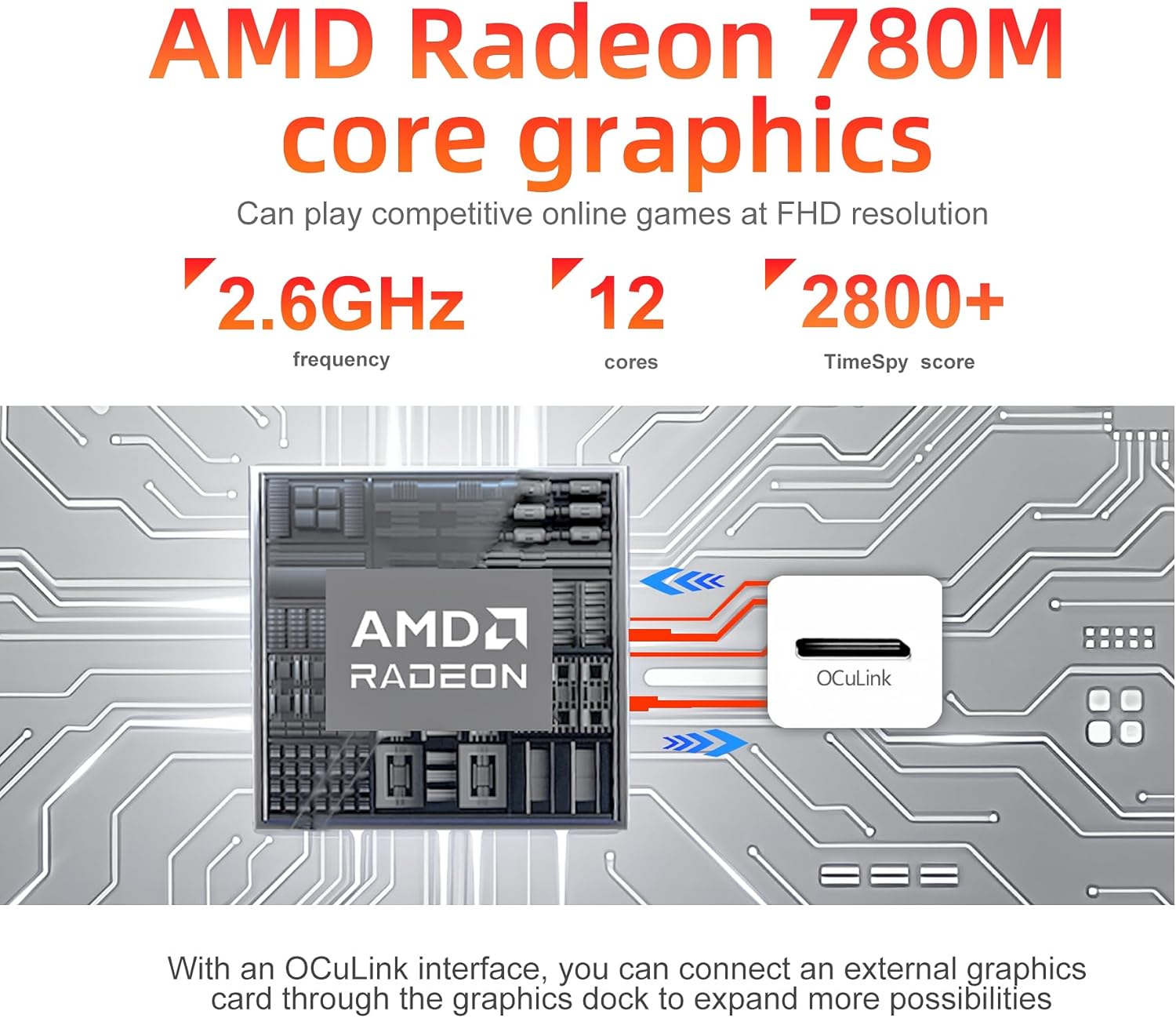
Imatge: Primer pla view highlighting the AMD Radeon 780M graphics and the OCuLink port for external GPU connections.
8. Sistema de refrigeració
The FIREBAT A8 Mini PC incorporates an advanced dual-fan cooling system to maintain optimal operating temperatures and ensure stable performance, even under heavy loads. This system includes:
- Two dedicated fans (one for the system, one for the CPU).
- High-quality thermal grease.
- Three heat pipes for efficient heat dissipation.
This design contributes to low temperature and low noise operation, creating a quiet computing environment.
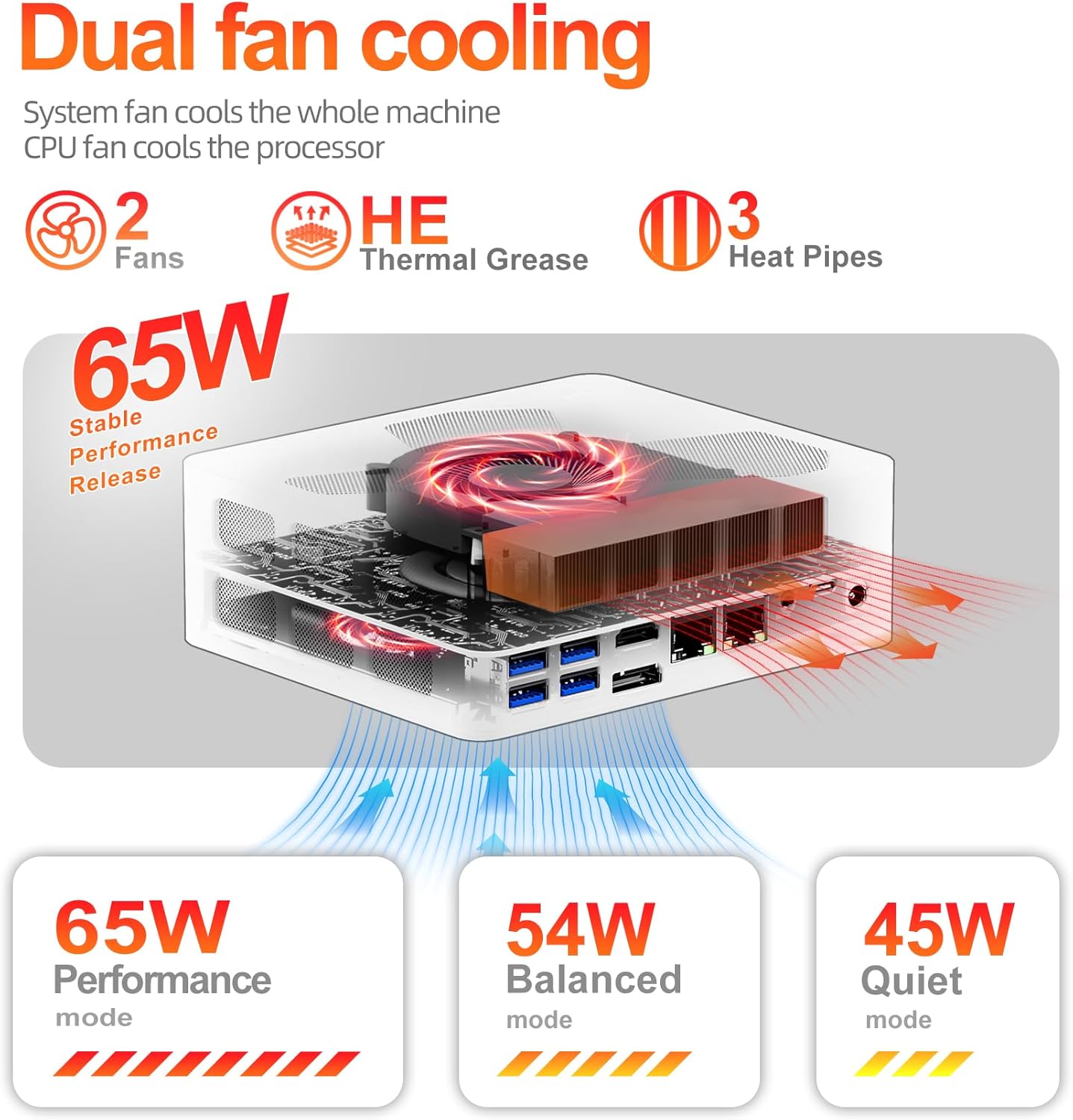
Image: Diagram illustrating the dual-fan cooling system with heat pipes and thermal grease inside the FIREBAT A8 Mini PC.
9. Solució De Problemes
This section addresses common issues you might encounter with your FIREBAT A8 Mini PC.
Sense sortida de visualització
- Comproveu els cables: Ensure all display cables (HDMI, DisplayPort, USB-C) are securely connected to both the mini PC and the monitor.
- Cicle d'alimentació: Turn off the mini PC, unplug the power adapter, wait 10 seconds, then plug it back in and power on.
- Entrada del monitor: Verify your monitor is set to the correct input source (e.g., HDMI 1, DisplayPort).
- RAM/SSD Installation: If this is a new barebone setup, ensure RAM and SSD are correctly installed and seated firmly.
Mal rendiment
- Mode de rendiment: Ensure the mini PC is set to the appropriate performance mode (Blue for Balanced, Red for Performance) for your task.
- Refrigeració: Check that the ventilation vents are not obstructed and the fans are operating. Excessive heat can lead to performance throttling.
- Conductors: Ensure all drivers, especially graphics drivers, are up to date.
- Processos de fons: Tanca les aplicacions innecessàries que s'executen en segon pla.
Sense àudio
- Comproveu les connexions: Ensure speakers or headphones are properly connected to the 3.5mm audio jack or via Bluetooth.
- Configuració d'àudio: Verify audio output settings in your operating system. Ensure the correct output device is selected and volume is not muted.
- Entrada de micròfon: If using the built-in microphone, check input volume and privacy settings in your operating system to ensure apps are allowed to access it.
10. Especificacions
Detailed technical specifications for the FIREBAT A8 Mini PC:
| Categoria | Especificació |
|---|---|
| Processador | AMD Ryzen 7 8745HS (8 Cores/16 Threads, 3.8-4.9GHz) |
| Gràfics | Gràfics AMD Radeon 780M (integrats) |
| Tipus de RAM | DDR5 SO-DIMM (5600MHz) |
| Capacitat màxima de RAM | 64GB (2 slots) |
| Tipus d'emmagatzematge | M.2 2280 PCIe 4.0x4 SSD |
| Capacitat màxima d'emmagatzematge | 2 TB |
| Sortides de visualització | 2x USB-C 4.0 (DP), 1x DP 1.4, 1x HDMI 2.1 |
| Resolució màxima | 8K@60Hz (HDMI 2.1), 4K@144Hz (USB-C) |
| Ports USB | 2x USB-C 4.0, 4x USB 3.2 Gen2, 2x USB 2.0 |
| Xarxa | 2x 2.5Gbps RJ45 LAN, WiFi 6 (802.11ax) |
| Sense fil | Bluetooth 5.2 |
| Àudio | 2x 3.5mm Audio Jack (HP & MIC) |
| Special Ports | 1x OCuLink, 1x TF Card Slot |
| Sistema operatiu | Default (Barebone, user installs OS) |
| Dimensions (LxWxH) | 5.7 x 5 x 2 polzades |
| Pes | 1.5 lliures |
11. Garantia i Suport
FIREBAT is committed to providing quality products and customer satisfaction. For any inquiries or support needs, please contact:
- Correu electrònic: suport@firebatpc.com
- Weblloc: www.firebatpc.com
Please refer to the official FIREBAT weblloc web o la documentació de compra per obtenir informació detallada sobre la garantia.