
1. Introducció
Thank you for choosing the Omnitronic DRS-95 Internet Radio. This device offers a comprehensive audio experience, combining Internet radio, DAB+, FM radio, Bluetooth connectivity, and UPnP/DLNA media streaming. This manual provides essential information for safe operation, setup, and use of your DRS-95.
2. Instruccions de seguretat
Please read these instructions carefully before operating the device. Keep this manual for future reference.
- Font d'alimentació: Connect the device only to a grounded mains socket with the specified voltage (AC 230V, 50Hz). Ensure the power cord is not damaged.
- Humitat i calor: Do not expose the device to rain, moisture, or excessive heat. Avoid placing it near heat sources or in direct sunlight.
- Ventilació: Assegureu-vos que hi hagi una ventilació adequada. No bloquegeu les obertures de ventilació.
- Neteja: Desconnecteu l'aparell de la xarxa elèctrica abans de netejar-lo. Feu servir un drap sec i suau. No utilitzeu productes de neteja líquids.
- Manteniment: No intenteu reparar el dispositiu vosaltres mateixos. Envieu totes les tasques de manteniment a personal qualificat.
- Col·locació: Place the device on a stable, level surface. If rack-mounting, ensure proper support.
3. Producte acabatview
3.1 Tauler frontal
The front panel provides access to the main controls and display.
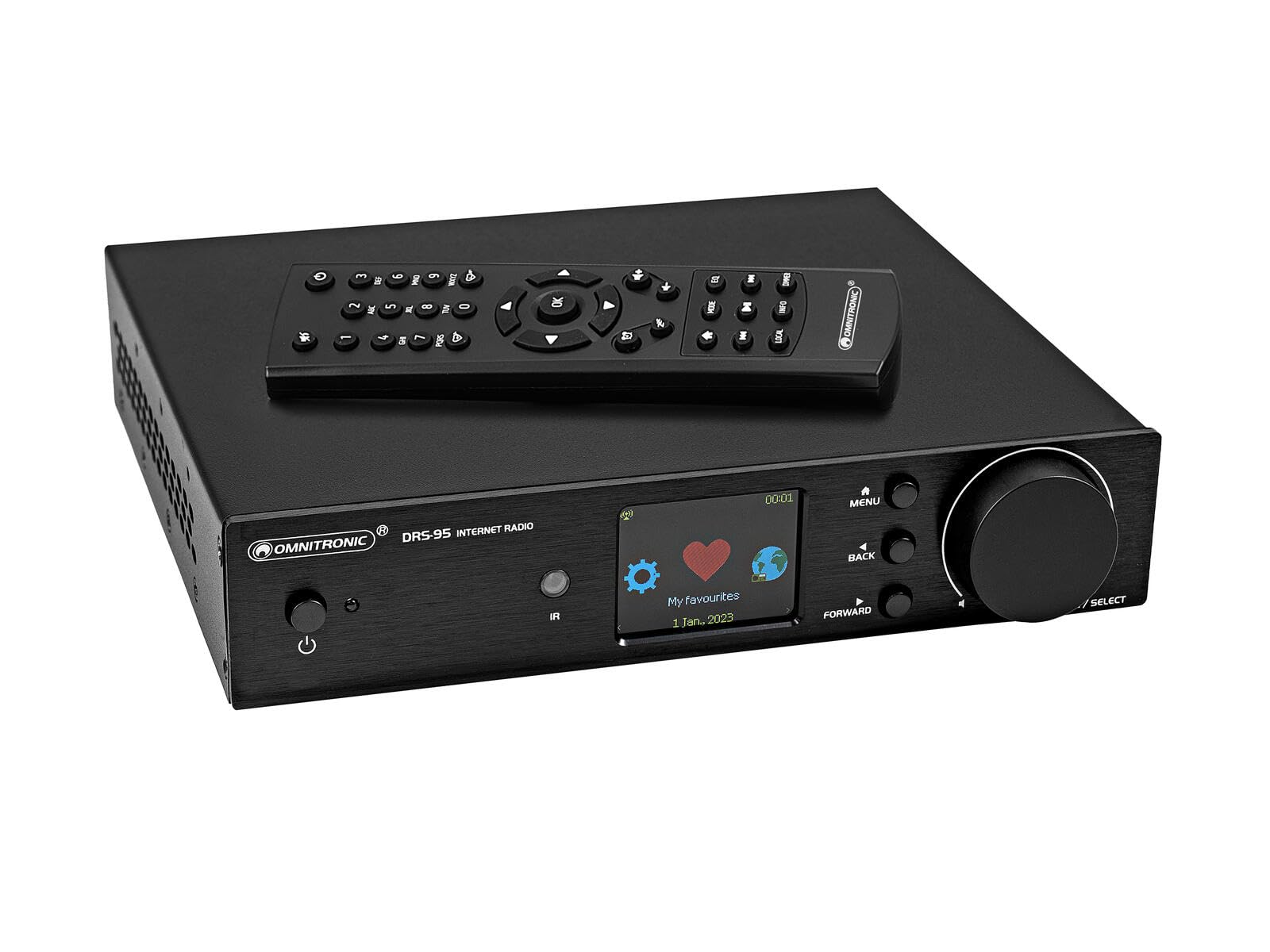
Imatge 1: Davant view of the Omnitronic DRS-95, showing the power button, IR sensor, color TFT display, menu navigation buttons (MENU, BACK, FORWARD), and the large TUNE/SELECT rotary dial.
- Botó d'encesa: Premeu per encendre o apagar la unitat.
- Sensor IR: Rep senyals del comandament a distància per infrarojos.
- Pantalla TFT: Multicolor display showing station information, menus, and settings.
- Botó MENÚ: Accesses the main menu or context-sensitive options.
- Botó TORNAR: Torna al menú o pantalla anterior.
- Botó ENDAVANT: Navigates forward in menus or lists.
- TUNE/SELECT Dial: Rotates to navigate through options or tune stations; press to select an item or confirm a setting.
3.2 Panell posterior
The rear panel houses all input and output connections.

Imatge 2: posterior view of the Omnitronic DRS-95, displaying the various connection ports including WiFi antenna, LAN, digital audio outputs (TOSLINK, Coaxial), analog line outputs (RCA), radio antenna, power switch, and AC input.
- WIFI ANTENNA: Connector for the included Wi-Fi antenna.
- LAN: Port Ethernet per a connexió de xarxa amb cable.
- TOSLINK (Digital Out): Optical digital audio output.
- COAXIAL (Digital Out): Sortida d'àudio digital coaxial.
- LINE OUT (RCA L/R): Analog stereo audio outputs for connecting to an amplifier o altaveus actius.
- RADIO ANTENNA: Connector for the included FM/DAB+ antenna.
- Interruptor d'alimentació: Interruptor d'alimentació principal de la unitat.
- ENTRADA CA: Power input for the mains cable.
4. Configuració
4.1 Desembalatge i col·locació
- Carefully remove the DRS-95 from its packaging.
- Place the unit on a stable, level surface or install it into a 19-inch rack. Ensure sufficient space for ventilation around the unit.
4.2 Connexions d'antena
- Antena Wi-Fi: Screw the supplied Wi-Fi antenna onto the 'WIFI ANTENNA' connector on the rear panel.
- Antena FM/DAB+: Connect the supplied FM/DAB+ antenna to the 'RADIO ANTENNA' connector. Extend the antenna for optimal reception.
4.3 Connexions d'àudio
Connect the DRS-95 to your audio system using one of the following methods:
- Sortida analògica: Connect the 'LINE OUT (RCA L/R)' jacks to the corresponding analog audio inputs on your ampamplificador o altaveus actius mitjançant cables RCA.
- Sortida òptica digital: Connect the 'TOSLINK' port to an optical digital input on your amplifier or DAC using an optical cable.
- Sortida coaxial digital: Connect the 'COAXIAL' port to a coaxial digital input on your amplifier or DAC using a coaxial cable.
4.4 Connexió d'alimentació
- Ensure the 'POWER' switch on the rear panel is in the OFF position.
- Connect the supplied power cord to the 'AC INPUT' on the rear panel and then to a grounded mains socket.
4.5 Connexió de xarxa
The DRS-95 requires an internet connection for Internet Radio and UPnP/DLNA features.
- Wi-Fi: After powering on, navigate to the network settings menu. Select 'Wireless Network' and follow the on-screen instructions to scan for available Wi-Fi networks, select yours, and enter the password.
- LAN (amb cable): Connect an Ethernet cable from your router or network switch to the 'LAN' port on the rear panel. The device will automatically attempt to establish a wired connection.
5. Funcionament
5.1 Engegada/apagada
Flip the 'POWER' switch on the rear panel to ON. Then, press the 'Power Button' on the front panel to turn the unit on. Press the 'Power Button' again to put it into standby mode. To fully power off, use the rear 'POWER' switch.
5.2 Navegació bàsica
Use the 'TUNE/SELECT' dial to scroll through menu options and lists. Press the dial to select an item. Use the 'MENU' button to access the main menu and the 'BACK' button to return to the previous screen. The 'FORWARD' button can be used for quick navigation in some menus.
5.3 Ràdio per Internet
Access thousands of radio stations and podcasts worldwide.
- From the main menu, select 'Internet Radio'.
- You can browse stations by genre, location, or search by name.
- Rotate the 'TUNE/SELECT' dial to highlight a station and press to play.
- To save a station as a favorite, navigate to the desired station and follow the on-screen prompt or remote control instructions.
Ràdio DAB+ 5.4
Gaudeix d'emissions de ràdio digital d'alta qualitat.
- From the main menu, select 'DAB+ Radio'.
- The unit will perform a scan for available DAB+ stations.
- Once scanning is complete, use the 'TUNE/SELECT' dial to browse the station list and press to select.
5.5 Ràdio FM
Sintonitza les emissores tradicionals d'FM.
- Al menú principal, seleccioneu "Ràdio FM".
- Use the 'TUNE/SELECT' dial to manually tune or initiate an auto-scan for stations.
5.6 Connectivitat Bluetooth
Reprodueix àudio en streaming sense fil des dels teus dispositius amb Bluetooth.
- From the main menu, select 'Bluetooth'. The DRS-95 will enter pairing mode.
- Al dispositiu mòbil (telèfon intel·ligent, tauleta), activeu el Bluetooth i cerqueu els dispositius disponibles.
- Select 'Omnitronic DRS-95' from the list to pair.
- Once paired, you can play audio from your device through the DRS-95.
5.7 UPnP/DLNA Media Streaming
Transmetre contingut multimèdia files from compatible devices on your local network.
- Ensure your media server (e.g., PC with media server software, NAS) is set up and running on the same network as the DRS-95.
- From the main menu, select 'Media Player' or 'UPnP/DLNA'.
- Browse your media server's content and select files per jugar.
5.8 Configuració del sistema
Access various settings to customize your DRS-95.
- Xarxa: Configure Wi-Fi, view estat de la xarxa.
- Hora/Data: Set time, date, and time zone, including summer/standard time.
- Visualització: Adjust brightness, backlight timeout.
- Equalitzador: Select from various preset equalizer modes.
- Alarm/Timer: Set alarms and sleep timers.
- Actualització de programari: Check for and install firmware updates.
- Restabliment de fàbrica: Restableix tots els paràmetres per defecte.
6. Manteniment
6.1 Neteja
Before cleaning, always disconnect the device from the mains power. Use a dry, soft cloth to wipe the exterior surfaces. Do not use abrasive cleaners, solvents, or chemical wipes, as these can damage the finish.
6.2 Actualitzacions de programari
Periodically check for software updates via the system settings menu to ensure optimal performance and access to new features.
7. Solució De Problemes
Si teniu problemes, consulteu els següents problemes i solucions habituals:
| Problema | Causa possible | Solució |
|---|---|---|
| Sense poder | Power cord disconnected; rear power switch off; front power button not pressed. | Check power cord connection; ensure rear power switch is ON; press front power button. |
| Sense so | Volume too low; audio cables disconnected; incorrect input selected on ampmés viu. | Increase volume; check audio cable connections; select correct input on your ampmés viu. |
| Sense connexió a Internet | Wi-Fi password incorrect; router issue; LAN cable disconnected. | Re-enter Wi-Fi password; restart router; check LAN cable connection; ensure Wi-Fi antenna is connected. |
| Mala recepció DAB+/FM | Antenna not properly connected or positioned; weak signal. | Ensure radio antenna is fully connected and extended; try repositioning the antenna for better signal. |
| Problemes de vinculació de Bluetooth | Device not in pairing mode; distance too far; other devices interfering. | Ensure DRS-95 is in Bluetooth pairing mode; move devices closer; disable Bluetooth on other nearby devices. |
8. Especificacions
- Model: DRS-95
- Fabricant: Omnitrònica
- Connectivitat: Wi-Fi, LAN (Ethernet), Bluetooth
- Sintonitzadors: Internet Radio, DAB+, FM
- Sortides d'àudio: TOSLINK (Optical Digital), Coaxial (Digital), RCA Line Out (Analog L/R)
- Visualització: Multicolor TFT
- Control: Front panel buttons, Jog dial, IR remote control
- Font d'alimentació: CA 230V, 50Hz
- Consum d'energia: 6W
- Pes: 5.5 kg
- Dimensions: 19-inch rack mountable, 1U height (48.3 cm)
- Rang Bluetooth: Fins a 20 m
- IR Remote Range: Fins a 10 m
9. Garantia i Suport
Omnitronic products are covered by a manufacturer's warranty. For specific warranty terms and conditions, please refer to the documentation provided with your purchase or contact your authorized dealer. For technical support or service inquiries, please contact your dealer or the Omnitronic customer service department.