
1. Introducció
Thank you for choosing the MINISFORUM MS-02 Ultra Mini Workstation. This powerful and compact barebone PC is designed for demanding tasks, featuring an Intel Core Ultra9 285HX processor, extensive memory and storage options, and high-speed networking. This manual provides essential information for setting up, operating, maintaining, and troubleshooting your device to ensure optimal performance and longevity.
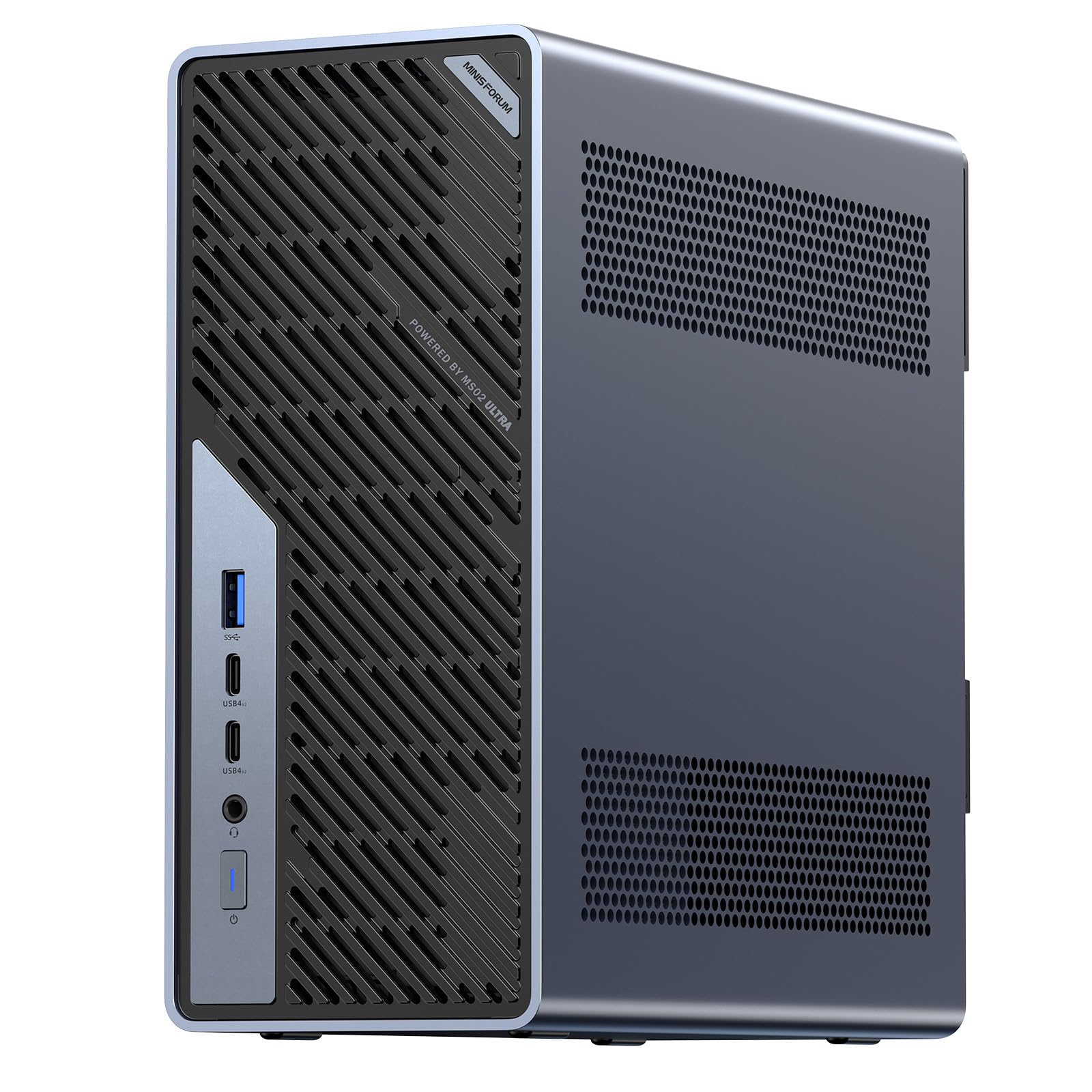
Figure 1: MINISFORUM MS-02 Ultra Mini Workstation
The MS-02 Ultra is a versatile system suitable for various applications, including video editing, AI development, enterprise IT, and power user scenarios. Its compact 4.8L design and robust internal components make it an ideal solution for space-constrained environments without compromising performance.
2. Informació de seguretat
Please read the following safety guidelines carefully before using the device:
- Always disconnect the power cable before performing any maintenance or installation procedures.
- No exposeu el dispositiu a l'aigua, la humitat ni a temperatures extremes.
- Assegureu-vos una ventilació adequada per evitar el sobreescalfament. No obstruïu les obertures de ventilació.
- Feu servir només l'adaptador de corrent proporcionat o un de recanvi compatible.
- Eviteu col·locar objectes pesats al dispositiu.
- Mantingueu el dispositiu allunyat de camps magnètics forts.
3. Contingut del paquet
Verifiqueu que tots els elements siguin presents al vostre paquet:
- MINISFORUM MS-02 Ultra Mini Workstation (Barebone Kit)
- Adaptador d'alimentació
- Manual d'usuari (aquest document)
- Cargols per a la instal·lació d'un SSD M.2
- Additional accessories may vary based on specific configuration.
4. Sobrecàrrega físicaview
Familiarize yourself with the ports and components of your MS-02 Ultra.

Figure 2: Front and Rear Port Layout
Panell frontal
- Port USB 3.2 tipus A. (10Gbps, Gen 2)
- USB4 V2 Ports x2 (80Gbps, DP 2.0 Alt Mode, 15W PD)
- Conector combinat de 3.5 mm
- Interruptor d'alimentació
Panell posterior
- PCIe x16 + PCIe x4 Slots
- Ranura de bloqueig de Kensington
- USB 3.2 Type-A Ports x3 (3.2 Gen 2 USB)
- Port RJ10 de 45 GbE (Realtek RTL8127)
- Port RJ2.5 de 45 GbE (Intel I226-LM, vPro compatible)
- HDMI 2.1 FRL Port
- Port USB 4 (40Gbps, DP 2.0 Alt Mode, 15W PD)
- 2x 25GbE SFP+ Ports (Intel E810)
- Entrada d’alimentació de CA.
5. Configuració
5.1 Hardware Installation (Barebone Kit)
As a barebone kit, the MS-02 Ultra requires installation of RAM and M.2 SSDs. Follow these steps:
- Accés a l'interior: The MS-02 Ultra features a slide-out chassis design for easy access. Refer to Figure 3 for visual guidance.
- Instal·lació de la memòria RAM: Locate the DDR5 SODIMM slots. Gently insert the RAM modules into the slots, ensuring they are correctly oriented, until the clips on both sides lock them into place. The system supports up to 256GB ECC DDR5 SODIMM memory.
- Instal·lació SSD M.2: The MS-02 Ultra supports four M.2 PCIe 4.0 SSD slots. Insert your M.2 SSDs into the available slots and secure them with the provided screws. Refer to Figure 4 for M.2 slot locations.
- Expansió PCIe: The system supports up to three PCIe slots, including an x16 dual-slot GPU. The primary slot supports PCIe 5.0. Install any additional PCIe cards as needed, securing them properly. Refer to Figure 5 for PCIe expansion slots.

Figure 3: Compact Form Factor and Slide-out Design

Figure 4: M.2 Storage Slots

Figure 5: PCIe Expansion Slots
5.2 Connexió de perifèrics
- Visualització: Connect your monitor(s) to the HDMI or USB4 ports. The device supports multiple displays.
- Teclat i ratolí: Connect your USB keyboard and mouse to the available USB Type-A ports.
- Xarxa: Connect an Ethernet cable to the 2.5GbE, 10GbE, or 25GbE SFP+ ports for wired network access.
- Potència: Connect the power adapter to the AC power input on the rear panel, then plug it into a power outlet.
5.3 Encès
Press the power switch on the front panel to turn on the device. The power indicator light will illuminate.
6. Instal·lació del sistema operatiu
Since the MS-02 Ultra is a barebone kit, an operating system (OS) is not pre-installed. You will need to install your preferred OS, such as Windows or Linux. Follow the standard OS installation procedures, typically involving creating a bootable USB drive and booting from it.
7. Instruccions de funcionament
7.1 Funcionament bàsic
- Encès/apagat: Press the power button to turn on. To turn off, use the OS shutdown function or press and hold the power button for 5 seconds.
- Reinicia: Use the OS restart function.
- Mode de repòs: Use the OS sleep function.
7.2 Funcions avançades
The MS-02 Ultra offers several advanced features for enhanced performance and connectivity:
- Xarxes d'alta velocitat: Utilize the dual 25GbE SFP+ ports and 2.5+10GbE RJ45 ports for ultra-fast network connections, ideal for large data transfers and parallel computing.
- Suport RAID: The four M.2 PCIe 4.0 SSD slots support RAID 0/1/5/10 configurations, providing scalable storage with high throughput and data redundancy.
- Tecnologia Intel vPro: For enterprise deployments, vPro support enables remote management and enhanced security features.
- Multi-Engine Core: The Intel Core Ultra 9 285HX processor with 24 cores (8P+16E) and 13 TOPS NPU delivers high performance for AI and media workloads.

Figure 6: Dual 25GbE SFP+ Ports

Figure 7: Intel Core Ultra 9 285HX Processor
8. Manteniment
8.1 Sistema de refrigeració
The MS-02 Ultra features a server-grade airflow design with 6 heat pipes and dual fans to ensure efficient and quiet cooling for the 350W internal power supply and CPU. Regular cleaning of dust from the vents is recommended.

Figura 8: Sistema de refrigeració eficient
8.2 Neteja
Use a soft, dry cloth to clean the exterior of the device. For dust accumulation in vents, use compressed air. Do not use liquid cleaners or solvents.
9. Solució De Problemes
If you encounter issues with your MS-02 Ultra, refer to the following common troubleshooting steps:
- Sense energia: Ensure the power cable is securely connected to both the device and the power outlet. Verify the power outlet is functional.
- Sense pantalla: Check that the monitor is properly connected and powered on. Try a different display cable or port.
- El sistema no arrenca: Verify that RAM and M.2 SSDs are correctly installed. If you recently made changes, revert them.
- Problemes de connectivitat de xarxa: Check Ethernet cable connections. Ensure network drivers are installed and updated in the OS.
- Sobreescalfament: Ensure the device has adequate ventilation. Clean any dust from the vents.
For further assistance, please contact MINISFORUM support.
10. Especificacions
| Característica | Especificació |
|---|---|
| Marca | MINISFÒRUM |
| Nom del model | MS-02U-285HX |
| Model de CPU | Intel Core Ultra 9 285HX |
| Velocitat de la CPU | 5.5 GHz |
| Coprocessador gràfic | Gràfics Intel UHD (integrats) |
| Tecnologia de memòria RAM | DDR5 SODIMM |
| Mida màxima de memòria | 256 GB (ECC Memory Support) |
| Descripció del disc dur | SSD |
| Ampliació d'emmagatzematge | 4x M.2 PCIe 4.0 SSD slots (RAID 0/1/5/10 support) |
| Ranures d'expansió | 3 (including 1x PCIe 5.0 x16 for dual-slot GPU) |
| Interfície de sortida de vídeo | HDMI 2.1 FRL, DisplayPort (via USB4) |
| Ports USB | 2x USB4 V2 (80Gbps), 1x USB4 (40Gbps), 4x USB 3.2 Type-A (10Gbps) |
| Interfícies de xarxa | 2x 25GbE SFP+, 1x 10GbE RJ45, 1x 2.5GbE RJ45 (vPro) |
| Font d'alimentació | 350W Internal PSU |
| Factor de forma | Mini PC (4.8L compact design) |
| Sistema operatiu | Windows (Barebone Kit, OS not included) |
| Ús del producte | Video Editing, AI Development, Enterprise IT |
11. Garantia i Suport
MINISFORUM products come with a standard warranty. Please refer to the warranty card included in your package or visit the official MINISFORUM website for detailed warranty terms and conditions. For technical support, driver downloads, or service inquiries, please contact MINISFORUM customer service through their official channels.
Assistència en línia: www.minisforum.com/support