
1. Introduction to iCarsoft JP V4.0
The iCarsoft JP V4.0 is a bidirectional diagnostic tool designed for Japanese and South Korean vehicles. It offers comprehensive system diagnostics, a wide range of reset functions, and full OBDII capabilities. This tool supports various car brands including Toyota, Lexus, Scion, Isuzu, Nissan, Infiniti, Mitsubishi, Honda, Acura, Mazda, Subaru, Suzuki, Kia, and Hyundai. Additionally, it allows users to add diagnostic software for two extra vehicle brands (e.g., Benz, Porsche, Land Rover). Featuring a 5-inch touchscreen, the JP V4.0 provides OE-level features and in-depth diagnostic functions for all vehicle systems and subsystems, helping to identify and resolve potential faults efficiently.
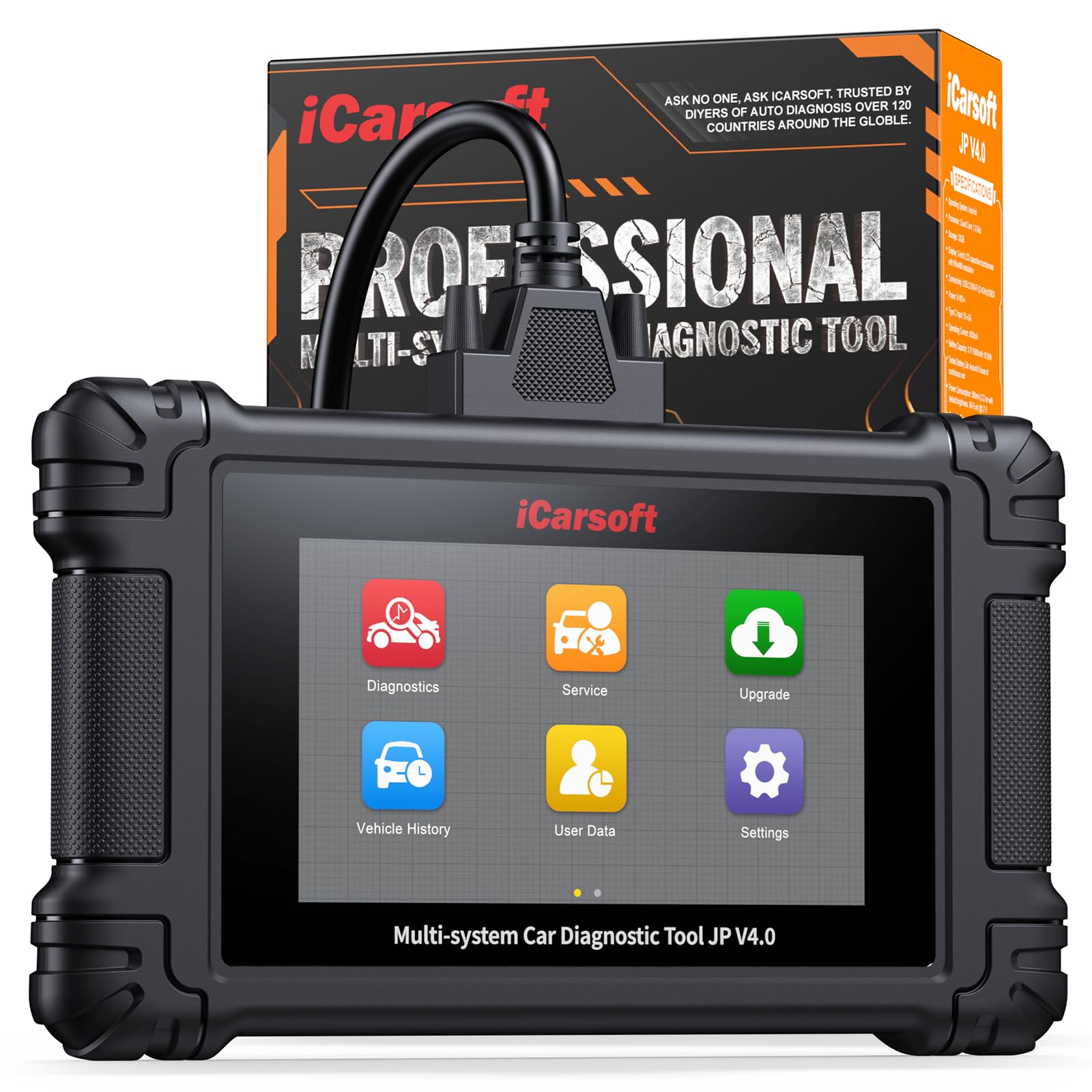
2. Què hi ha a la caixa
Upon opening your iCarsoft JP V4.0 package, you should find the following components:
- 1 x iCarsoft JP V4.0 SCANNER
- 1 x 16 PIN OBD2 Adapter
- 1 Manual d'usuari
- 1 x Nylon Carry Case
- 1 x cable de dades
- 1 x External Power Adaptor

3. Guia de configuració
- Encès: Connect the 16 PIN OBD2 Adapter to the iCarsoft JP V4.0 scanner. The device can be powered via the vehicle's OBD-II port or the external power adapter.
- Connexió del vehicle: Locate the OBD-II port in your vehicle (typically under the dashboard on the driver's side). Plug the 16 PIN OBD2 Adapter into the vehicle's port.
- Engegada inicial: The scanner will power on automatically once connected to the vehicle. Follow any on-screen prompts for initial setup, such as language selection.
- Actualitzacions de programari: It is recommended to perform a software update upon first use to ensure you have the latest features and vehicle compatibility. Connect the device to a computer via the data cable and visit the official iCarsoft website for update instructions.
- Compatibilitat de vehicles: For specific feature compatibility with your vehicle, refer to the iCarsoft official website's compatibility checker or contact their customer service.

4. Instruccions de funcionament
4.1. Diagnòstic complet del sistema
The JP V4.0 can perform in-depth diagnostics on all major vehicle systems. From the main menu, select "Diagnosis" to begin. The tool will automatically scan for fault codes and potential issues across systems such as Engine, ABS, SRS, Transmission, Brake System, SAS System, Diesel Particulate Filter, Instrument Cluster, Tire Pressure Monitoring, Electronic Parking Brake, Air System, Battery System, Electronic Stability Program, Suspension System, Oil System, Interior Monitoring, Gateway System, BCM System, EVAP System, Windows System, Seat, and WSP (Immobilizer System).
4.2. Funcions OBD2 completes
Access standard OBD2 functions for vehicles manufactured after 1996. These functions include:
- Lectura de codis: recuperació de codis de diagnòstic d'errors (DTC).
- Clear Codes: Erase DTCs and turn off the Check Engine Light (MIL).
- I/M Readiness: Check emission system status.
- Congelar fotograma: View vehicle parameters at the moment a DTC was set.
- O2 Sensor Test: Monitor oxygen sensor performance.
- On-Board Monitoring: Test specific components/systems.
- Evap System Test: Check the evaporative emission system.
- VIN/Vehicle Info: Retrieve vehicle identification number and other information.
- Read PCM Data: Access Powertrain Control Module data.
- Dades en directe: View real-time sensor data, including graphical display.
- Battery Test: Perform battery and alternator tests.
4.3. Multi Maintenance Services
The tool supports numerous maintenance and reset services. The availability of specific services may vary by car model and year. Examples inclouen:
- Restabliment d’oli
- Restabliment del fre d'estacionament electrònic (EPB)
- Restabliment del sistema de control de la pressió dels pneumàtics (TPMS)
- Calibració del sensor d'angle de direcció (SAS).
- Codificació d'injectors
- Restabliment del sistema de gestió de bateries (BMS)
- Regeneració del filtre de partícules dièsel (DPF)
- Sagnat de l’ABS
- Throttle Body Adjustment
- I molts més.

4.4. Bidirectional Actuation Test
The JP V4.0 features professional bidirectional testing capabilities, allowing you to perform active tests on various vehicle units. This is crucial for verifying component functionality after replacement, overhaul, or during routine maintenance. Examples of actuation tests include RF TCS Solenoid, Shift SOL A-D, Gear Box Self Test, MPIM Fan Drive for Honda, and numerous tests for Lexus, Infiniti, Toyota, and Benz series cars. The quantity of available test items depends on the specific units present in your car.

4.5. Live Data and Diagnostic Reports
The tool provides in-depth diagnosis with graphic data for checking the health of all available modules. You can view live data streams in real-time, which helps in analyzing and utilizing vehicle information for accurate maintenance. Additionally, the JP V4.0 can generate detailed diagnostic reports, helping you identify the most likely root cause of a fault. These reports can be customized and printed for your records.

5. Manteniment
To ensure the longevity and optimal performance of your iCarsoft JP V4.0 diagnostic tool, follow these maintenance guidelines:
- Neteja: Feu servir un drap suau i sec per netejar el dispositiu. Eviteu utilitzar productes de neteja abrasius o dissolvents que puguin danyar la pantalla o el dispositiu.asing.
- Emmagatzematge: Store the scanner in its nylon carry case when not in use to protect it from dust, moisture, and physical damage. Keep it in a cool, dry place away from direct sunlight.
- Actualitzacions de programari: Regularly check for and install software updates from the official iCarsoft website. Updates often include new vehicle models, features, and performance optimizations.
- Cura del cable: Handle the OBD2 adapter and data cables with care. Avoid bending or twisting them excessively, which can lead to internal damage.
- Cura de la bateria: If the device has an internal battery, ensure it is charged periodically, even when not in active use, to maintain battery health.
6. Resolució de problemes comuns
This section addresses common issues you might encounter with your iCarsoft JP V4.0 tool.
- El dispositiu no s'encén:
- Ensure the OBD2 adapter is securely connected to both the scanner and the vehicle's OBD-II port.
- Verify the vehicle's ignition is on (or engine running, depending on the function).
- If using the external power adapter, ensure it is properly connected to a power source.
- Error de comunicació amb el vehicle:
- Check that the OBD2 adapter is firmly connected.
- Confirm the vehicle's ignition is in the ON position.
- Ensure the vehicle is compatible with the iCarsoft JP V4.0. Refer to the compatibility list or contact support.
- Try the scanner on a different compatible vehicle to rule out a device issue.
- Inaccurate Readings or Functions Not Working:
- Perform a software update to ensure the latest vehicle protocols are installed.
- Verify that the specific function is supported for your vehicle's make, model, and year. Compatibility can vary.
- Ensure the vehicle's battery voltage is sufficient for accurate diagnostics.
- Screen Freezes or Slow Performance:
- Restart the device by disconnecting it from the vehicle and then reconnecting.
- Ensure there is sufficient internal memory if recording live data.
If you encounter persistent issues, please refer to the "Warranty & Support" section for assistance.
6.1. Vehicle Compatibility Information
It is important to understand that while diagnostic tools offer a range of features, compatibility can vary across different vehicle makes, models, and years. Older vehicles may have less coverage due to lacking the necessary computer systems to support certain functions. Additionally, some features may only work on unmodded vehicles.
For precise compatibility details, it is recommended to use the manufacturer's coverage checker tool or contact their customer service team. They can provide specific information on which features will function with your vehicle.
7. Especificacions tècniques
| Característica | Detall |
|---|---|
| Marca | iCarsoft |
| Model | JP V4.0-US |
| Pes de l'article | 1.5 lliures |
| Dimensions del paquet | 9.5 x 6.99 x 2 polzades |
| Bateries | 1 bateria no estàndard (inclosa) |
| Font d'alimentació | Funciona amb bateria |
| Sistema operatiu | Android 8.0 |
| Mida de la pantalla | 5 polzades |
| Tipus d'ajust d'automòbil | Ajuste universal |
8. Garantia i Suport
The iCarsoft JP V4.0 diagnostic tool comes with a 1 any de garantia. iCarsoft also provides lifetime free updates to add new features and support for the newest vehicle models, as well as optimize performance. Additionally, lifetime hardware free repair is offered if needed in the future.
For any questions or problems regarding the usage of your device, iCarsoft offers Suport tècnic 24/7. You can reach out to their tech team for timely assistance. It is recommended to contact iCarsoft directly or visit their official website to check compatibility for your specific car model, especially for newer models (2024-2025) which may still have non-factory diagnostic limitations.
Contact information for support is typically available in the user manual included with your product or on the official iCarsoft weblloc.