
1. Introducció
This manual provides essential information for the safe and efficient use of your DOOGEE Note56 Android 16 smartphone. Please read it thoroughly before using your device.

Imatge: Anvers i revers view of the DOOGEE Note56 smartphone, showcasing its design and key specifications like 6150mAh battery, Android 16, 6.56-inch display, and 90Hz refresh rate.
2. Configuració
2.1. Contingut del paquet
Comproveu que el vostre paquet contingui els elements següents:
- DOOGEE Note56 Smartphone
- Adaptador d'alimentació
- Cable USB
- Eina expulsora de SIM
- Funda protectora
- Guia d'inici ràpid (aquest manual)
2.2. Instal·lació de la targeta SIM i la targeta TF
The DOOGEE Note56 supports dual SIM cards and a TF (microSD) card for expandable storage.
- Localitza la safata de la targeta SIM al lateral del dispositiu.
- Introduïu l'eina d'expulsió de la SIM al forat petit que hi ha al costat de la safata i premeu suaument fins que la safata surti.
- Place your Nano-SIM cards and/or TF card into the designated slots on the tray. Ensure the gold contacts face downwards.
- Torneu a inserir la safata amb cura al telèfon fins que encaixi al seu lloc.
2.3. Engegada inicial i configuració bàsica
- Press and hold the Power button until the DOOGEE logo appears.
- Segueix les instruccions que apareixen a la pantalla per seleccionar l'idioma, connectar-te a una xarxa Wi-Fi i configurar el teu compte de Google.
- Configure security settings such as screen lock (PIN, pattern, password) and face recognition.
2.4. Càrrega del dispositiu
Connect the USB cable to the power adapter and then to the phone's charging port. Plug the adapter into a power outlet. The battery indicator will show charging status. For optimal battery life, use the provided charger.
3. Instruccions de funcionament
3.1. Sistema operatiu Android 16
The DOOGEE Note56 runs on the latest Android 16 system, offering an optimized and intuitive user experience. It features improved application launch speeds, enhanced responsiveness, and a refined user interface. A new Privacy Space function allows for hiding sensitive data and applications, ensuring secure usage.

Imatge: Més deview of the Android 16 operating system interface, displaying various applications, settings menus, and system information.
3.2. Característiques de la pantalla
The device is equipped with a 6.56-inch IPS waterdrop display, providing a smooth visual experience with a 90Hz high refresh rate. The 720x1612 HD+ resolution and 90% screen-to-body ratio enhance viewing of movies and videos. Two eye-friendly modes are included to reduce eye strain during prolonged use.

Imatge: Un primer pla view of the DOOGEE Note56's 6.56-inch IPS display, illustrating its vibrant colors and the smooth 90Hz refresh rate.
3.3. Funcions de la càmera
Capture vivid and beautiful photos with the 8MP main camera and take clear selfies with the 5MP front camera. The device utilizes AI functions for enhanced photography, including:
- Reconeixement d'escenes per IA: Automatically detects and optimizes settings for 12 different scenes.
- Mode nocturn: Millora la qualitat de les fotos en condicions de poca llum.
- Mode de retrat: Creates professional-looking photos with blurred backgrounds.
- HDR: Enhances dynamic range for balanced exposure.
- Mode professional: Offers manual control over camera settings.
- Captura de somriures: Automatically takes a photo when a smile is detected.
- panorama: Captures wide-angle scenic shots.
- Tret continu: Fa diverses fotos en una successió ràpida.
- Fun Filters: Apply various creative effects to your photos.

Image: Diagram illustrating the 8MP rear camera and 5MP front camera specifications, along with icons representing various AI scene recognition modes.

Image: The camera interface of the DOOGEE Note56, highlighting features like HDR, Pro Mode, Smile Capture, Panorama, Continuous Shooting, Night Mode, and Fun Filters, with a sample photo.

Image: The 5MP front camera's capabilities for selfies, demonstrating Beauty Mode and Portrait Effect for bright, natural, and shareable self-portraits.
3.4. Memòria i emmagatzematge
The DOOGEE Note56 is equipped with 24GB RAM (3GB physical RAM + 21GB extended RAM) and 64GB of internal storage (ROM). It supports TF card expansion up to 2TB, providing ample space for photos, videos, and applications. This powerful memory configuration ensures smooth multitasking and minimizes lag during gaming or heavy app usage.

Imatge: Una imatge interna view diagram highlighting the 64GB ROM and 24GB RAM (composed of 3GB physical and 21GB extended RAM) for seamless performance.
3.5. Connectivitat i navegació
The device supports Bluetooth 4.2 for stable wireless connections and 4G Dual SIM for broad network compatibility both domestically and internationally. For navigation, it integrates three major positioning systems: GPS, GLONASS, and Galileo, ensuring accurate location services from urban areas to remote locations.
3.6. Altres funcions intel·ligents
- Instant Face Recognition: Unlock your device quickly and securely using your face.
- Ràdio FM: Enjoy local radio stations without an internet connection.
- Presa d'auriculars de 3.5 mm: Connect your wired headphones for audio playback and calls.
- Smart Body Sensor: (Specific functionality not detailed, refers to general smart sensor capabilities).
- Mode de sistema dual: Allows for separate user environments.
- Superporta-retalls: Funcionalitat de porta-retalls millorada.
- Screen Optimization & Color Customization: Adjust display settings for personal preference.

Image: Visual representation of instant face recognition, accurate GPS navigation, and the FM radio interface on the DOOGEE Note56.

Imatge: Una mostra de collageasing various smart OS features of the DOOGEE Note56, including smart body sensor, dual system mode, super clipboard, RAM expansion, screen optimization, and screen color customization.
4. Manteniment
4.1. Gestió de la bateria
The DOOGEE Note56 features a 6150mAh large capacity battery, designed for extended use. It supports approximately 1000 charge/discharge cycles and offers up to 4 years of durable battery life. The device also supports 5W reverse charging, allowing it to act as a power bank for other devices.
- Per maximitzar la durada de la bateria, eviteu les temperatures extremes.
- No descarregueu completament la bateria regularment.
- Use the original charger for optimal charging performance.
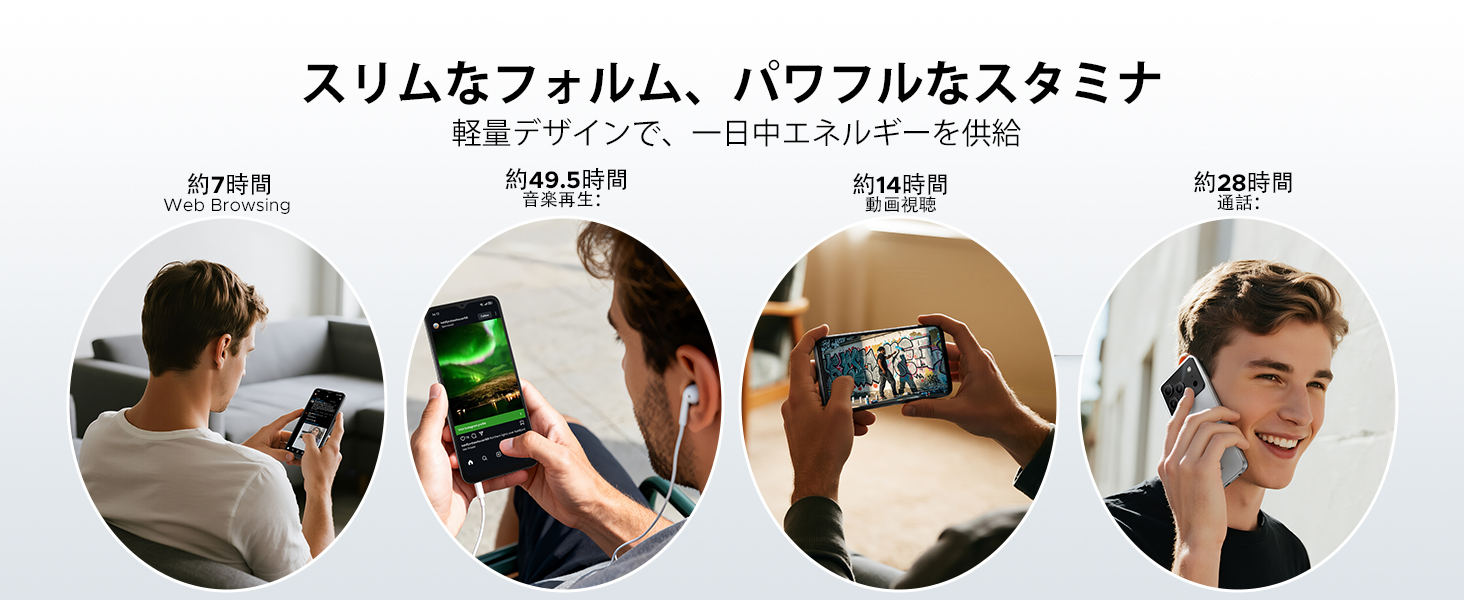
Image: Diagram illustrating the 6150mAh silicon-carbon battery, highlighting its features such as 1000 charge cycles, 4 years of durability, 20% smaller size, and 5W reverse charging capability.

Image: Infographic showing estimated battery life for different activities on the DOOGEE Note56: approximately 7 hours for web browsing, 49.5 hours for music playback, 14 hours for video watching, and 28 hours for calls.
4.2. Neteja i cura
- Utilitzeu un drap suau i sense pelusa per netejar la pantalla i el cos del dispositiu.
- Eviteu utilitzar productes químics o materials abrasius.
- Keep the device away from excessive dust and moisture.
4.3. Actualitzacions de programari
Regularly check for and install software updates to ensure your device has the latest features, security patches, and performance improvements. You can usually find this option in the device's settings under 'System' or 'About phone'.
5. Solució De Problemes
If you encounter issues with your DOOGEE Note56, refer to the following common troubleshooting steps:
- El dispositiu no s'encén: Assegureu-vos que la bateria estigui carregada. Premeu i manteniu premut el botó d'engegada durant almenys 10-15 segons per forçar un reinici.
- Les aplicacions es bloquegen o es bloquegen: Close and reopen the app. Clear the app's cache and data in Settings > Apps. If the issue persists, uninstall and reinstall the app.
- Problemes de connectivitat de xarxa: Check if Airplane Mode is off. Restart the device. Verify your SIM card is correctly inserted and your mobile data plan is active. For Wi-Fi, try forgetting the network and reconnecting.
- Problemes de càrrega: Ensure the charging cable and adapter are securely connected and undamaged. Try a different outlet or charger. Clean the charging port gently.
- Rendiment lent: Tanca les aplicacions en segon pla innecessàries. Esborra la memòria cau regularment. Considera alliberar espai d'emmagatzematge.
For more complex issues, please refer to the support section.
6. Especificacions
| Característica | Especificació |
|---|---|
| Mida de la pantalla | 6.56 polzades |
| Capacitat de la bateria | 6150 mAh |
| Color | Black (other variants available) |
| Nom de marca | DOOGEE |
| Fabricant | DOOGEE |
| Any de llançament | 2025 |
| Components inclosos | Adaptador d'alimentació |
| Sistema operatiu compatible | Android 16 |
| Altres característiques | SIM-free |
| Nom del model | NOTA 56 |
| Tipus de visualització | IPS |
| Dimensions del paquet | 19.3 x 10.5 x 5.1 cm; 410 g |
| Referència del fabricant | NOTA 56 |
| Mida de la RAM instal·lada | 24 GB |
| Capacitat d'emmagatzematge de memòria | 64 GB |
7. Garantia i Suport
7.1. Informació de la garantia
The DOOGEE Note56 comes with a 1 any de garantia from the date of purchase, ensuring peace of mind for your usage. This warranty covers manufacturing defects under normal use conditions.
7.2. How to Contact Support
In the unlikely event of a product defect or if you require technical assistance, please contact our support team through the following methods:
- Via Amazon Purchase History: Navigate to your Amazon purchase history and contact our store directly regarding your order.
- Via Product Page: On the product page, click on the store name located below the 'Add to Cart' button. Then, click the 'Ask a Question' button displayed in the upper right corner to send us an inquiry.