
1. Introducció
This manual provides essential information for the safe and effective operation of your Artilume U1 Laser Engraver 3000mW. Please read it thoroughly before using the device to ensure proper setup, usage, and maintenance. The Artilume U1 is designed for high-precision engraving and cutting on various materials, offering a large working area and flexible connectivity options.

Image 1.1: The Artilume U1 Laser Engraver with examples d'objectes gravats.
2. Informació de seguretat
WARNING: Laser radiation can cause eye damage and skin burns. Always wear protective eyewear and ensure proper ventilation during operation.
- Protecció ocular: Always wear the provided laser safety goggles when the machine is operating. Never look directly at the laser beam.
- Ventilació: Operate the laser engraver in a well-ventilated area to dissipate fumes and smoke produced during engraving and cutting.
- Seguretat del material: Només graveu o talleu materials especificats com a segurs per al processament làser. Eviteu materials altament reflectants, inflamables o desconeguts.
- Parada d'emergència: Familiarize yourself with the emergency shutdown procedure. The machine includes an emergency stop button.
- Supervisió: Never leave the laser engraver unattended while it is operating.
- Nens i animals de companyia: Mantingueu els nens i les mascotes lluny de la zona d'operacions.
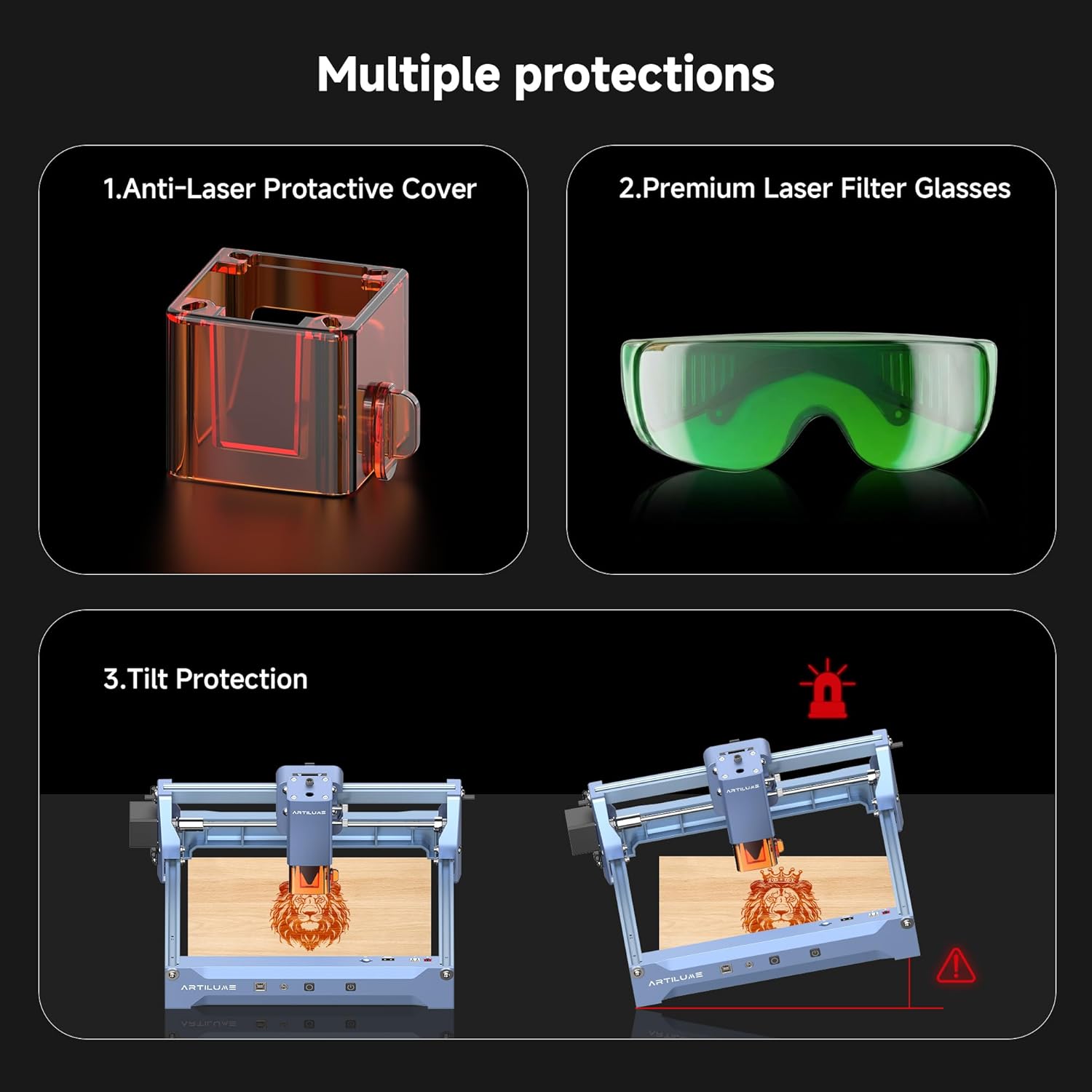
Imatge 2.1: acabatview of safety features including the protective cover, laser glasses, and tilt protection.
3. Contingut del paquet
Verifiqueu que tots els elements que s'enumeren a continuació s'inclouen al vostre paquet. Si falta algun element o hi ha algun malmès, poseu-vos en contacte amb l'atenció al client.

Image 3.1: All components included in the Artilume U1 Laser Engraver package.
- Artilume U1 Laser Engraver Machine × 1
- Manual d'usuari × 1
- Marker Pen × 1
- Raspall de neteja × 1
- Black Card (80×81.3×0.3mm) × 1
- Kraft Paper (80×80×0.46mm) × 2
- Plywood (100×100×3mm) × 2
- Type-B (2.0) USB Cable × 1
- Targeta TF de 4 GB × 1
- Laser Safety Goggles (151×57×55mm) × 1 pair
4. Producte acabatview
The Artilume U1 Laser Engraver is a compact yet powerful tool for creative projects. It features a 3000mW laser module, offering high precision and a generous working area.
4.1 Característiques clau
- Alta precisió: 0.04*0.04mm ultra-fine compressed spot laser technology with an engraving precision of up to 0.01mm.
- Àrea de treball gran: 150 × 200mm (approximately 6 × 8 inches).
- Pre-assembled Design: Arrives almost fully assembled and calibrated for quick setup.
- Compatibilitat versàtil de materials: Engraves wood, leather, acrylic, ceramics, stone, and more.
- Connectivitat flexible: Supports USB, TF card, WiFi, and App connections for offline use.
- Compatibilitat del programari: Works with LaserGRBL (Windows), LightBurn (Windows, macOS), and CutLabX (Windows, macOS, Android, iOS).
- Admet File Formats: NC, DXF, BMP, SVG, JPG, JPEG, PNG.
- Característiques de seguretat: Emergency shutdown, motion protection, overheating detection, protective covers, and safety goggles.

Image 4.1: The Artilume U1 features a 150x200mm working area, with overall dimensions of 340mm (13.4in) length, 290mm (11.4in) width, and 148mm (5.8in) height.
4.2 Interface and Ports
The Artilume U1 features several ports and controls for operation:
- Ranura per a targetes TF: For offline engraving using a pre-loaded TF card.
- Roller Port: For connecting an optional rotary roller attachment.
- Portada: Protective cover for the laser module.
- Ventilador: Integrated cooling fan.
- Type-B USB Port: Per connectar-se a un ordinador.
- Entrada d'alimentació de 24 V CC: Per connectar l'adaptador de corrent.
- Offline Engraving Button: Initiates engraving from the TF card.
- Botó d'encesa: Encén/apaga el dispositiu.

Image 4.2: Compatible software (LaserGRBL, LightBurn, CutLabX) and communication methods (USB, WiFi) for the Artilume U1.
5. Configuració
The Artilume U1 is largely pre-assembled, requiring minimal setup before first use.
5.1 Muntatge inicial
- Traieu amb cura el gravador làser i tots els accessoris de l'embalatge.
- Col·loqueu la màquina sobre una superfície estable i anivellada en una zona ben ventilada.
- Ensure the laser module is securely attached. If not, follow the instructions in the included user manual for attachment.
5.2 Connexió d'alimentació
- Connect the power adapter to the DC24V input port on the machine.
- Connecteu l'adaptador d'alimentació a una presa de corrent adequada.
- Press the Power button to turn on the device. The power indicator light will illuminate.
5.3 Instal·lació i connexió del programari
The Artilume U1 is compatible with several engraving software options:
- LaserGRBL: (Windows) Free and open-source software.
- LightBurn: (Windows, macOS) Paid software with advanced features.
- CutLabX: (Windows, macOS, Android, iOS) Software supporting various platforms.
Download and install your preferred software from the official websites. Refer to the software's documentation for detailed installation and setup instructions.
To connect the engraver to your computer:
- Connect the Type-B USB cable from the engraver to your computer.
- Open the engraving software. The software should detect the engraver. If not, check device manager for proper driver installation or consult the software's connection guide.
- Alternatively, connect via WiFi or use the TF card for offline engraving as per software instructions.
6. Funcionament
This section outlines the general steps for performing an engraving or cutting task.
6.1 Preparació del material
- Select a suitable material for engraving or cutting (e.g., wood, leather, acrylic).
- Place the material flat on the working surface of the engraver. Ensure it is stable and does not move during operation.
6.2 Enfocament del làser
Accurate laser focus is crucial for optimal engraving and cutting results. Consult your software's specific instructions for focusing. Typically, this involves adjusting the laser module's height until the laser spot is at its smallest point on the material surface.
6.3 Software Workflow
- Disseny d'importació: Open your chosen engraving software (e.g., LightBurn). Import your design file (NC, DXF, BMP, SVG, JPG, JPEG, PNG).
- Ajustar la configuració: Configure engraving parameters such as laser power, speed, and passes based on your material and desired effect. The included user manual may contain recommended settings for common materials.
- Posicionament: Use the software to preview and adjust the position of your design on the material.
- Comença el gravat: Once all settings are confirmed and safety goggles are worn, initiate the engraving process from the software.
Video 6.1: An official video demonstrating the unboxing and initial review of the Artilume U1 Laser Engraver, showing the setup and first engraving process.
6.4 Material Compatibility and Power Settings (3W Model)
The 3W diode laser model is ideal for detailed engraving. For cutting, higher power models (7W, 12W) are recommended. The infrared laser (1W) is specifically designed for engraving metals.

Imatge 6.2: Ex.amples of various materials suitable for engraving with the Artilume U1.
7. Manteniment
Regular maintenance ensures the longevity and optimal performance of your Artilume U1 Laser Engraver.
- Neteja de la lent: Periodically clean the laser lens with a soft, lint-free cloth and lens cleaning solution to prevent residue buildup that can affect laser performance.
- Neteja de la màquina: Use the provided brush or a soft cloth to remove dust and debris from the machine's frame, rails, and working area.
- Lubricació: Occasionally apply a small amount of lubricant to the guide rails to ensure smooth movement of the laser module.
- Actualitzacions de firmware: Check the Artilume official weblloc web per a qualsevol actualització de firmware disponible per millorar el rendiment o afegir noves funcions.
8. Solució De Problemes
If you encounter issues with your Artilume U1, refer to the following common problems and solutions:
| Problema | Causa possible | Solució |
|---|---|---|
| El làser no dispara o la sortida és feble | Loose cable connection, incorrect software settings, dirty lens, laser module malfunction. | Check all cable connections. Verify laser power and speed settings in software. Clean the laser lens. If problem persists, contact support. |
| El gravat és borrós o inconsistent | Incorrect laser focus, unstable material, incorrect speed/power settings. | Adjust laser focus. Ensure material is securely placed. Fine-tune speed and power settings. |
| La màquina no es connecta a l'ordinador/aplicació | USB cable issue, driver not installed, incorrect WiFi settings, software not recognizing device. | Try a different USB port or cable. Install necessary drivers. Reconfigure WiFi connection. Restart software and machine. |
| La màquina s'atura a mitjan funcionament | Power interruption, motion sensor triggered, overheating. | Check power supply. Ensure machine is on a stable surface. Allow machine to cool down if overheating. |
For issues not covered here, please refer to the comprehensive troubleshooting guide on the Artilume support weblloc o contacteu amb el servei d'atenció al client.
9. Especificacions
| Característica | Detall |
|---|---|
| Número de model | U1 |
| Potència làser | 3000mW (3W) Diode Laser |
| Gravat de precisió | 0.01 mm |
| Mida del punt | 0.04*0.04 mm |
| Àrea de treball | 150 x 200 mm (6 x 8 polzades) |
| Dimensions del producte | 11 x 13 x 6 polzades (aprox. 279 x 330 x 152 mm) |
| Pes de l'article | 5.44 lliures (aprox. 2.47 kg) |
| Connectivitat | USB, TF Card, WiFi, App |
| Compatibilitat de programari | LaserGRBL (Windows), LightBurn (Windows, macOS), CutLabX (Windows, macOS, Android, iOS) |
| Admet File Formats | NC, DXF, BMP, SVG, JPG, JPEG, PNG |
| Laser Module Lifespan | > 10,000 hores |
| Fabricant | Artilume |
10. Garantia i Suport
Artilume products are designed for quality and reliability. For specific warranty details, including coverage period and terms, please refer to the warranty card included with your product or visit the official Artilume weblloc.
For technical support, troubleshooting assistance, or to inquire about replacement parts, please contact Artilume customer service through their official channels. Contact information can typically be found on the Artilume weblloc o a l'embalatge del producte.