
1. Introducció
Gràcies per la compraasing the ULTIMEA Aura A60 U2621 7.1ch Dolby Atmos Soundbar System. This manual provides essential information for setting up, operating, and maintaining your new sound system. Please read this manual thoroughly before use to ensure proper functionality and to maximize your audio experience.

Figure 1.1: Immersive audio experience with the ULTIMEA Aura A60 system.
2. Informació de seguretat
To reduce the risk of electric shock, fire, or damage to your device, please observe the following safety precautions:
- No exposeu aquest aparell a la pluja o la humitat.
- No col·loqueu objectes plens de líquids, com ara gerros, a l'aparell.
- Assegureu-vos que hi hagi una ventilació adequada. No bloquegeu cap obertura de ventilació.
- No instal·leu a prop de cap font de calor com ara radiadors, registres de calor, estufes o altres aparells (inclosos amplificadors) que produeixen calor.
- Eviteu que el cable d'alimentació sigui trepitjat o pessigat, especialment als endolls, els endolls i el punt on surten de l'aparell.
- Utilitzeu només accessoris/accessoris especificats pel fabricant.
- Desendolleu aquest aparell durant les tempestes amb llamps o quan no l'utilitzeu durant llargs períodes de temps.
- Demaneu tot el servei a personal de servei qualificat.
3. Contingut del paquet
Si us plau, comproveu que tots els elements siguin presents i en bon estat:
- ULTIMEA Aura A60 Soundbar
- Wireless Subwoofer (4-inch, BassMX Technology)
- 4 x Surround Speakers (2 front, 2 rear)
- Control remot
- Cable HDMI
- Power Adapter/Cables
- Manual d'usuari (aquest document)
4. Producte acabatview
The ULTIMEA Aura A60 U2621 is a 7.1ch Dolby Atmos soundbar system designed to deliver an immersive home theater audio experience. It features a main soundbar unit, a powerful wireless subwoofer with BassMX technology, and four surround speakers.
Unitat de barra de so principal 4.1
The main soundbar unit houses 3 main channels for clear dialogue and primary audio. It serves as the central hub for all audio connections.

Figure 4.1: Main soundbar unit with front surround speakers.
4.2 Subwoofer sense fil
The dedicated 4-inch wireless subwoofer incorporates BassMX technology to enhance low frequencies, providing deep and resonant bass for a more impactful audio experience.

Figure 4.2: Wireless subwoofer with BassMX technology.
4.3 altaveus envoltants
The system includes four surround speakers: two front and two rear. The rear speakers connect wirelessly to the soundbar, minimizing cable clutter and allowing flexible placement to create an expansive acoustic space.

Figure 4.3: Diagram of 7.1ch sound distribution.
4.4 Ports d'entrada/sortida
The soundbar features multiple input options for versatile connectivity:
- EARC HDMI: For high-quality audio transmission and seamless TV integration.
- Òptic: Entrada d'àudio digital.
- AUX: Entrada d'àudio analògic.
- USB: Per a la reproducció de contingut multimèdia.
- Bluetooth: Wireless audio streaming.

Figure 4.4: Rear panel connections, including HDMI eARC.
5. Configuració
5.1 Col·locació física
La col·locació òptima dels components del sistema de so és crucial per a una experiència d'àudio òptima.
- Barra de so: Place the soundbar centrally below your television. Ensure it is not obstructed.
- subwoofer: Position the wireless subwoofer on the floor near the soundbar. Experiment with placement to find the best bass response for your room.
- Altaveus envoltants frontals: Place the two wired front surround speakers to the left and right of your TV, ideally at ear level when seated.
- Altaveus envoltants posteriors: Position the two wireless rear surround speakers behind your primary listening position, to the left and right. These speakers will automatically connect wirelessly to the soundbar once powered on.

Figure 5.1: Recommended speaker placement for Dolby Atmos.
5.2 Connexions
Segueix aquests passos per connectar el sistema de barra de so:
- Connexió d'alimentació: Connect the power cables to the soundbar, subwoofer, and surround speakers, then plug them into a power outlet.
- HDMI eARC (recomanat): Connect one end of the provided HDMI cable to the HDMI eARC port on your soundbar and the other end to the HDMI eARC/ARC port on your TV. This connection supports Dolby Atmos and allows for TV remote control of the soundbar.
- Connexió òptica (alternativa): If your TV does not have an HDMI eARC/ARC port, connect an optical cable (not included) from your TV's optical output to the OPTICAL input on the soundbar.
- AUX Connection (Alternative): For analog audio sources, connect a 3.5mm AUX cable (not included) from your device's audio output to the AUX input on the soundbar.
- Connexió USB: Insert a USB drive into the USB port on the soundbar for direct media playback.
- Emparellament Bluetooth: To connect a Bluetooth device, select the Bluetooth input on the soundbar. On your device, search for 'ULTIMEA Aura A60' and pair.
6. Instruccions de funcionament
6.1 Encès/Apagat
Premeu el botó d'engegada de la barra de so o del comandament a distància per encendre o apagar el sistema.
6.2 Selecció d'entrada
Use the 'Input' button on the remote control or the soundbar to cycle through available input sources: HDMI eARC, Optical, AUX, USB, and Bluetooth.

Figure 6.1: Remote control for easy operation.
6.3 Control de volum
Adjust the master volume using the 'Volume Up' and 'Volume Down' buttons on the remote control or the soundbar. You can also adjust subwoofer and surround speaker levels independently.
6.4 Sound Modes and EQ Presets
The Aura A60 offers various sound modes and EQ presets to optimize audio for different content and preferences.
- Dedicated Modes: Select from 6 specialized modes: Movie, Music, Voice, Sports, Game, and Night.
- Preajustos d'EQ: Access 121 professional EQ presets for genres like Bass, Pop, Classical, and Rock via the ULTIMEA app.

Figure 6.2: 121 preset EQ matrix for customized audio.
6.5 Control d'aplicacions
Download the ULTIMEA app to your smartphone for advanced control and customization options, including a 10-band EQ and access to all EQ presets.
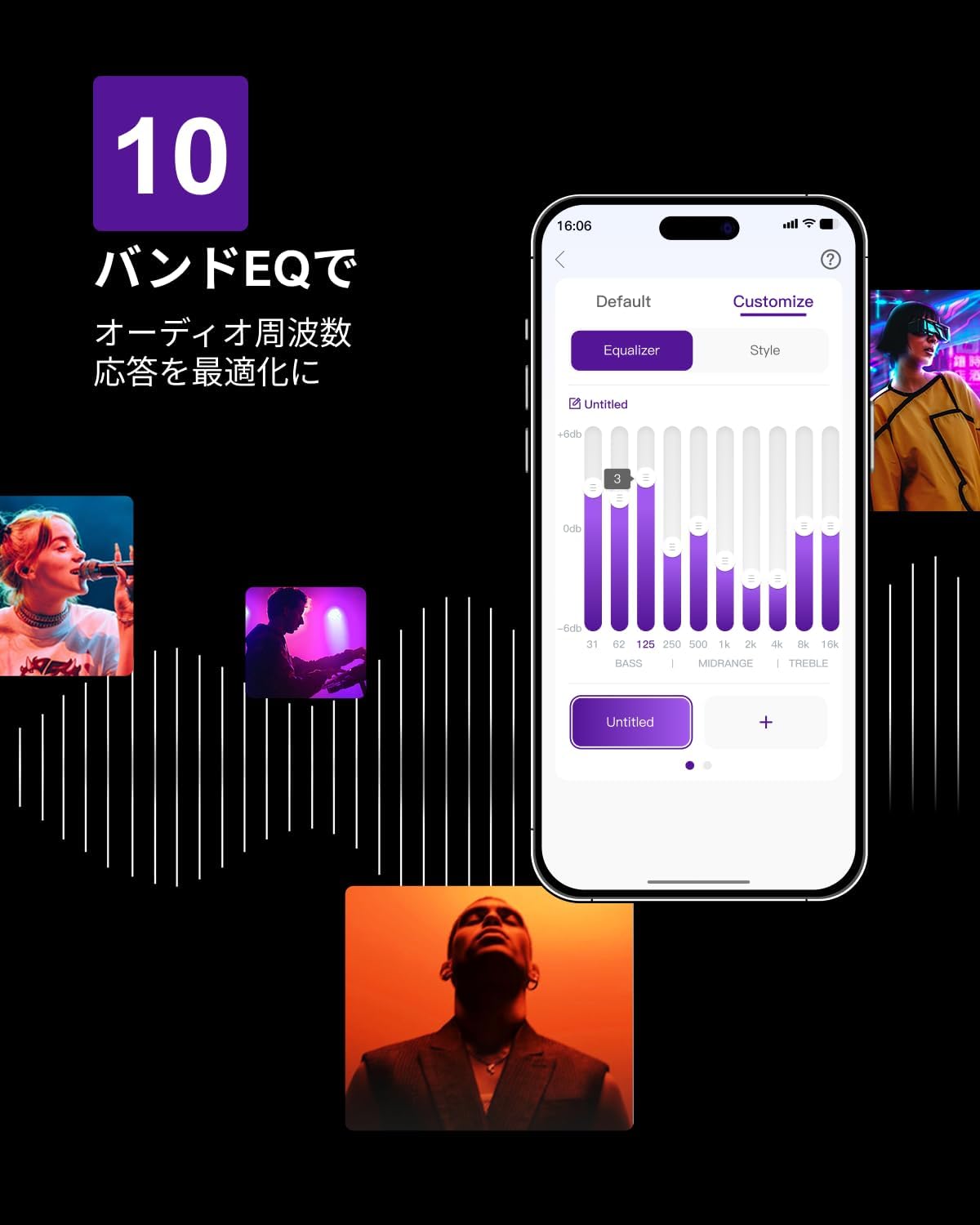
Figure 6.3: ULTIMEA mobile application interface.
7. Manteniment
To ensure the longevity and optimal performance of your ULTIMEA Aura A60 soundbar system, follow these simple maintenance guidelines:
- Neteja: Use a soft, dry cloth to wipe the surfaces of the soundbar, subwoofer, and speakers. Do not use liquid cleaners or abrasive materials, as they may damage the finish.
- Ventilació: Assegureu-vos que totes les obertures de ventilació estiguin lliures i sense obstruccions per evitar el sobreescalfament.
- Emmagatzematge: Si guardeu el sistema durant un període prolongat, desconnecteu-lo de l'alimentació i guardeu-lo en un lloc fresc i sec, allunyat de la llum solar directa i de temperatures extremes.
8. Solució De Problemes
Si teniu problemes amb el sistema de la barra de so, consulteu els problemes i solucions més comuns següents:
| Problema | Causa possible | Solució |
|---|---|---|
| No hi ha so de la barra de so. | Entrada incorrecta seleccionada, volum massa baix, cables no connectats correctament. | Verify the correct input source. Increase volume. Check all cable connections (HDMI, Optical, AUX). Ensure the soundbar is powered on. |
| No hi ha so dels altaveus de subwoofer/envoltants. | Subwoofer/speakers not paired or powered on, volume too low. | Ensure subwoofer and surround speakers are powered on. They should automatically pair. If not, refer to the pairing instructions in the full manual (if available) or contact support. Increase their individual volume levels. |
| So distorsionat o de mala qualitat. | Incorrect audio settings, poor source quality, interference. | Adjust EQ settings or try different sound modes. Ensure the audio source is high quality. Check for nearby electronic devices causing interference. |
| Problemes de connexió Bluetooth. | Device out of range, not in pairing mode, interference. | Ensure the soundbar is in Bluetooth pairing mode. Move your device closer to the soundbar. Disconnect and re-pair the device. |
Si el problema persisteix després de provar aquestes solucions, poseu-vos en contacte amb el servei d'atenció al client d'ULTIMEA.
9. Especificacions
| Característica | Detall |
|---|---|
| Marca | DEFINITIVA |
| Nom del model | Aura A60 |
| Número de model | U2621 |
| Tipus d'altaveu | Soundbar with 7.1ch Surround Sound |
| Tecnologia d'àudio | Dolby Atmos, BassMX Technology |
| Connectivitat | HDMI eARC, Bluetooth, Optical, AUX, USB |
| Subwoofer | 4-inch Wired Subwoofer (integrated BassMX) |
| Altaveus envoltant | 4 (2 wired front, 2 wireless rear) |
| Control | Remote Control, ULTIMEA App |
| Color | Negre |
| Dimensions (P x A x A) | 9 cm x 40 cm x 7 cm (Soundbar, approximate) |
| País d'origen | Xina |
10. Garantia i Suport
ULTIMEA is committed to providing high-quality products and customer satisfaction. Your Aura A60 U2621 soundbar system comes with comprehensive support.
10.1 Informació de la garantia
Specific warranty details may vary by region. Please refer to the warranty card included with your product or visit the official ULTIMEA weblloc web per consultar els termes i condicions de garantia més actualitzats.
10.2 Atenció al client
For any questions, technical assistance, or troubleshooting not covered in this manual, please contact our dedicated support team:
- 365-Day Support: Our expert staff is available year-round to assist you.
- Xat en directe: Instant responses are available via live chat on our weblloc.
- Devolucions: We offer a 30-day return policy with free shipping for your peace of mind.

365-Day Expert Support

Instant Live Chat

Devolució gratuïta de 30 dies
Per obtenir més ajuda, visiteu el ULTIMEA Brand Store.