
Introducció
El Negreview XPLORE X1 is a rugged smartphone designed for durability and high performance. It features advanced camera capabilities, a powerful processor, a large battery, and a secondary display for enhanced functionality. This manual provides essential information for setting up, operating, maintaining, and troubleshooting your device.
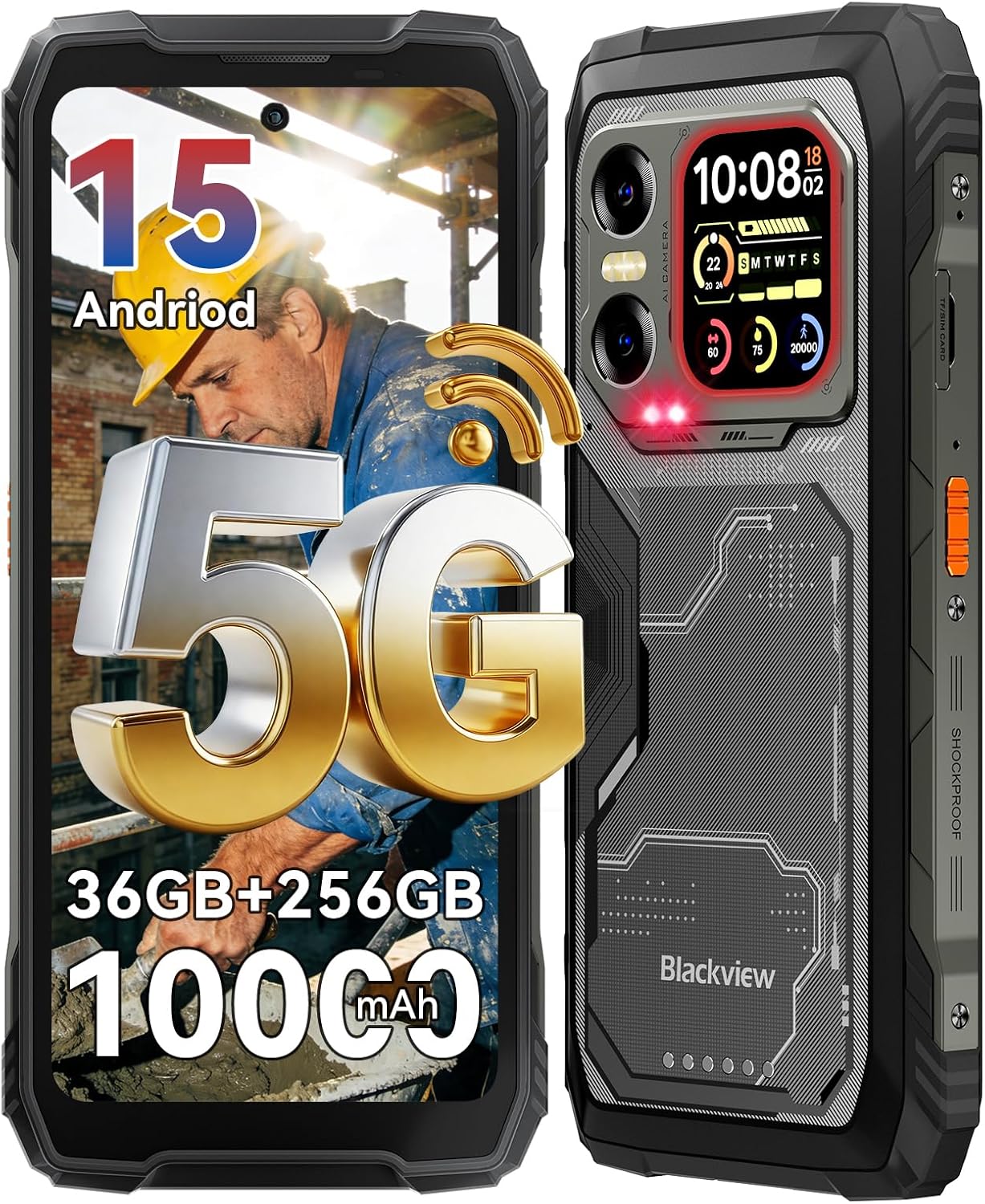
Image: The Blackview XPLORE X1 rugged smartphone, showcasing its robust design and main display.
Què hi ha a la caixa
Verifiqueu que tots els elements siguin presents al paquet:
- Telèfon robust
- Cable de càrrega (USB tipus C)
- Adaptador d'alimentació
- Expulsor de la safata SIM
- Corretja desmuntable
- Manual d'usuari

Image: A visual representation of the Blackview XPLORE X1 phone and its included accessories, such as the charging cable, power adapter, SIM ejector tool, and user manual.
Configuració
1. Instal·lació de la targeta SIM
- Localitza la safata de la targeta SIM al lateral del dispositiu.
- Introduïu l'eina d'expulsió de la safata de la SIM al forat petit que hi ha al costat de la safata i premeu suaument fins que la safata surti.
- Col·loqueu la targeta (o targetes) nano-SIM i/o la targeta microSD a les ranures designades de la safata. Assegureu-vos que estiguin orientades correctament.
- Torneu a inserir la safata amb cura al dispositiu fins que quedi alineada amb el lateral.
2. Engegada inicial
Press and hold the Power button located on the side of the phone until the Blackview logo appears. Follow the on-screen instructions to complete the initial setup, including language selection, Wi-Fi connection, and Google account setup.
3. Càrrega del dispositiu
Connect the USB Type-C charging cable to the phone's charging port and the other end to the provided 55W power adapter. Plug the adapter into a wall outlet. The phone supports 55W fast charging for quick power replenishment. The 10000mAh battery provides extended usage time.
Video: An official Blackview video demonstrating the 55W fast charging capability and the 10,000mAh mega battery of the XPLORE X1 phone.

Image: A graphic illustrating the 10000mAh mega battery and 55W fast charging features of the Blackview XPLORE X1, highlighting its long-lasting power and quick recharge time.
Funcionament del dispositiu
Pantalla principal
El Negreview XPLORE X1 features a 6.78-inch FHD+ display with a 120Hz refresh rate, providing a smooth visual experience. It offers a resolution of 1080*2408 pixels and 700 nits brightness for clear visibility even in direct sunlight. The display includes eye-care modes such as Reading Mode, Night Light, and Dark Mode.

Image: The Blackview XPLORE X1's 6.78-inch FHD+ 120Hz main display, illustrating its high resolution, refresh rate, and brightness for an immersive viewexperiència.

Image: A graphic detailing the eye-care features of the Blackview XPLORE X1's main screen, including Reading Mode, Night Light, and Dark Mode, designed to reduce eye strain.
Pantalla secundària
The device includes a 2.01-inch customizable secondary display on the back. This screen can show important information, notifications, and reminders. It also supports functions like compass, call answering, music control, weather updates, and selfie assistance.

Image: The Blackview XPLORE X1's 2.01-inch multi-functional rear sub-screen, displaying various widgets such as time, date, heart rate, and notifications.

Imatge: Una imatge detallada view del Negreview XPLORE X1's 2.01-inch multi-functional rear sub-screen, showcasing its various customizable widgets and utility for quick access to information.
Característiques de la càmera
The XPLORE X1 is equipped with a versatile camera system:
- Càmera posterior: 108MP main camera for high-resolution photos.
- Càmera de visió nocturna: 20MP for clear imaging in low-light conditions.
- Càmera frontal: 50MP for selfies and video calls, supporting panorama, portrait, and beauty modes.
- Gravació de vídeo: Supports cinema-grade 4K video recording.

Image: A visual representation of the Blackview XPLORE X1's camera system, highlighting the 108MP main camera, 50MP front camera, and 20MP night vision camera with examples fotos.

Imatge: Una mostra gràficaasing the 108MP AI main camera and 50MP selfie camera of the Blackview XPLORE X1, emphasizing its capability to capture high-quality images.

Image: A demonstration of the Blackview XPLORE X1's 20MP Sony Night Vision camera, showing its ability to capture clear details in total darkness for wildlife observation, night patrol, and emergency search.

Image: A comparison illustrating the superior detail of 4K video recording on the Blackview XPLORE X1 compared to 2K, highlighting its cinema-grade video capabilities.
Característiques d'IA
The XPLORE X1 integrates Gemini AI assistant for daily tasks and offers various AI-powered functionalities:
- AI Voice wake-up & Voiceprint Recognition
- AI Full-screen Assistance
- AI Real-time Interaction
- AI Global Smart Control

Imatge: Una mostra gràficaasing the AI features of the Blackview XPLORE X1, including AI Voice wake-up, AI Full-screen Assistance, AI Real-time Interaction, and AI Global Smart Control for hands-free operation.
Connectivitat
The phone supports 5G cellular technology, Wi-Fi 6, NFC for contactless payments, and USB Type-C for data transfer and charging. It is compatible with GSM carriers like T-Mobile, Speedtalk, Mint Mobile, BTC, MetroPCS, H2O, Movistar, Telcel, Tigo, Claro, Ultra Mobile, Tello, Bell Wireless, Rogers Wireless, Chatr, Telus, Fido, and FIZZ. Note: Not compatible with CDMA carriers such as AT&T, Cricket Wireless, Verizon, Straight Talk, or U.S.Cellular.
Característiques especials
- 170LM Super-bright Dual LED Flashlight: Features two camping lights with illumination and SOS modes, and adjustable brightness.
- Control IR: Allows the phone to control home appliances with infrared functionality (e.g., TV, air conditioner).
- Bossa d'eines: Includes 10 practical tools such as Compass, HeightMeasure, Torch, SoundMeter, Protractor, Alarm bell, Pic Hanging, Mirror, Magnifier, and Plumb Bob.
- Mode Guant 2.0: Provides 8% more sensitive touch for use with gloves.
- Dual-frequency 5-in-1 Navigation: Supports GPS, GLONASS, Beidou, Galileo, and QZSS for precise positioning.
Image: A graphic demonstrating the infrared remote control function of the Blackview XPLORE X1, showing how it can be used to control various home appliances like TVs, air conditioners, and projectors.

Imatge: Una anàlisi completaview del Negreview XPLORE X1's additional features, including dual-frequency 5-in-1 navigation, customizable side key, Glove Mode 2.0, a built-in ToolBag, precision gyroscope, and multifunctional NFC.
Sistema operatiu
The XPLORE X1 runs on Android 15 with Blackview's DokeOS 5.0 interface. This combination offers enhanced privacy and data security, regional preference settings, customized action sharing, and a smoother user experience with features like System Manager 2.0, Game Mode 2.0, and Intelligent Deep Power-Saving Mode.

Image: The Blackview XPLORE X1 displaying the Android 15 operating system interface, surrounded by various application icons and user interface elements.
Manteniment
Ruggedness and Protection
El Negreview XPLORE X1 is built to withstand harsh environments, certified with IP68/IP69K and MIL-STD-810H standards. This means it is:
- Impermeable: Can withstand immersion and high-pressure water jets.
- A prova de pols: Totalment protegit contra l'entrada de pols.
- Resistent a les caigudes: Dissenyat per resistir caigudes de fins a 6 metres.
- Funcionament a temperatures extremes: Functional in temperatures ranging from -20°C to +60°C.
- Resistent a l'aixafament: Can withstand up to 500kg of pressure.

Image: The Blackview XPLORE X1 showcasing its military-grade MIL-STD-810H certification, highlighting its shockproof, dustproof, waterproof, and pressure-proof capabilities through various scenarios like underwater photography and crush resistance.

Image: A graphic illustrating the MIL-STD-810H certification of the Blackview XPLORE X1, detailing its resistance to extreme temperatures, 6m drops, high-temp water, and dust.

Image: A visual explanation of the Blackview XPLORE X1's IP69K and IP68 protection, demonstrating its ability to withstand underwater photography, high-pressure jets, multi-angle spray, and prolonged immersion.
Neteja i cura
To maintain your device, wipe it with a soft, damp cloth. Avoid using harsh chemicals or abrasive materials. Ensure all port covers are securely closed to maintain water and dust resistance, especially after charging or using the headphone jack.
Cura de la bateria
To prolong battery life, avoid exposing the phone to extreme temperatures. Use only the provided charger and cable. Do not fully discharge the battery frequently. The phone supports OTG function for charging other devices.
Resolució de problemes
- El dispositiu no s'encén: Ensure the battery is charged. Connect the phone to the charger for at least 15 minutes before attempting to power it on again.
- Problemes de càrrega: Check if the charging cable and adapter are securely connected. Try a different outlet. Ensure the charging port is clean and free of debris.
- Problemes de connectivitat de xarxa: Verify that your SIM card is correctly inserted and activated. Check your network settings and ensure mobile data is enabled. If issues persist, contact your carrier.
- Rendiment lent: Close unnecessary background applications. Clear cache regularly. Consider performing a factory reset if performance issues are severe (back up your data first).
- Camera lens smudges: Due to the rugged design, fingers may inadvertently touch the camera lens. Clean the lens with a soft, lint-free cloth before taking photos for optimal clarity.
Especificacions
| Característica | Especificació |
|---|---|
| Marca | Negreview |
| Nom del model | XPLORE X1 |
| Sistema operatiu | Android 15 |
| Mida instal·lada de la memòria RAM | 36 GB |
| Capacitat d'emmagatzematge de memòria | 256 GB (ampliable fins a 2 TB amb targeta TF) |
| Mida de la pantalla | 6.78 Inches (Main), 2.01 Inches (Secondary) |
| Freqüència d'actualització | 120 Hz |
| Compatibilitat amb operadors sense fil | T-Mobile (GSM carriers) |
| Tecnologia cel·lular | 5G |
| Tecnologia de connectivitat | NFC, USB Type C, Wi-Fi |
| Color | Negre |
| Nombre de ranures per a targetes SIM | Doble SIM |
| Nivell de resistència a l'aigua | Waterproof (IP68/IP69K) |
| Conector d'auriculars | 3.5 mm |
| Front Photo Sensor Resolution | 50 MP |
| Rear Facing Camera Photo Sensor Resolution | 108 MP (Main), 20 MP (Night Vision) |
| Capacitat de la bateria | 10000 milionsamp Hores |
| Temps de conversa telefònica | 84 hores |
| UPC | 810199729237 |
Garantia i Suport
El Negreview XPLORE X1 comes with a Garantia del fabricant de 2 anys. Negreview also offers lifetime technical support for the device. For any inquiries or assistance, please refer to the contact information provided in your warranty documentation or visit the official Blackview suport weblloc.
Image: A graphic detailing Blackview's comprehensive after-sales service, including 3-year Android version updates, call center support, 24/7 online assistance, and a reliable offline repair center.