
1. Introducció
This manual provides detailed instructions for the installation, operation, and maintenance of the ACTi A950 8MP 4K Ultra HD Outdoor PTZ Security Camera. The A950 is designed for professional surveillance applications, offering high-resolution video, advanced pan-tilt-zoom capabilities, and robust outdoor performance.
2. Informació de seguretat
Please read all safety instructions carefully before installation and operation. Failure to follow these instructions may result in injury, damage to the product, or voiding of the warranty.
- Seguretat elèctrica: Ensure all power connections are made by qualified personnel and comply with local electrical codes. Disconnect power before servicing.
- Entorn d'instal·lació: Install the camera in a stable location that can support its weight. Avoid installing near heat sources or in areas with excessive vibration.
- Ús exterior: The camera is IP66-rated for outdoor use. Ensure all cable glands and seals are properly secured to maintain weather resistance.
- Gestió de cables: Protect cables from damage and ensure they do not pose a tripping hazard.
3. Contingut del paquet
Verify that all items are present in the package. If any items are missing or damaged, contact your supplier immediately.
- ACTi A950 PTZ Security Camera
- Suport de muntatge i maquinari
- Kit de connectors impermeables
- Guia d'inici ràpid
- Software CD (or download link)
- Power Adapter (if not PoE)
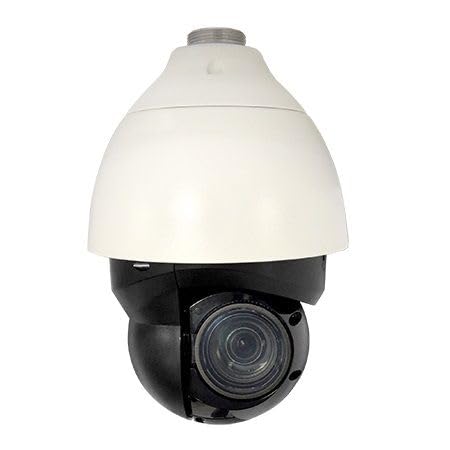
Note: No additional product images or videos were provided in the source data to embed. The image above is the main product image.
4. Producte acabatview
The ACTi A950 is an advanced 8 Megapixel PTZ network camera designed for high-performance outdoor surveillance. Key features include:
- Resolució 4K Ultra HD: Delivers 3840 x 2160 video at 30 frames per second.
- Zoom òptic 22x: Motorized zoom lens (f6.4-138.5mm) with auto-focus.
- Funcionalitat PTZ: 360° endless pan, extensive tilt range, and high-speed movement up to 300°/second.
- Visió nocturna superior: Built-in IR LEDs provide illumination up to 100 meters (328 feet) with adaptive power adjustment.
- Extreme WDR (120 dB): Garanteix imatges nítides en condicions de llum difícils.
- Resistent a la intempèrie IP66: Durable metal housing for reliable operation in extreme temperatures (-40°F to 122°F).
- H.265 Compression: Efficient video encoding for reduced bandwidth and storage requirements.
- Gyro-based Image Stabilization: For steady video capture.
5. Configuració
5.1. Ubicació d'instal·lació
Select a wall mount location that provides the desired field of view and is structurally sound to support the camera's weight. Ensure the location is within reach of power and network cabling.
5.2. Muntatge de la càmera
- Attach the mounting bracket to the chosen surface using appropriate screws and anchors.
- Fixeu la càmera al suport de muntatge.
- Adjust the camera's initial orientation as needed before final tightening.
5.3. Connexions de cablejat
- Connexió de xarxa: Connect an Ethernet cable from your network switch (preferably PoE-enabled) to the camera's Ethernet port. Use the provided waterproof connector kit to ensure IP66 integrity.
- Connexió d'alimentació: If Power over Ethernet (PoE) is not used, connect a compatible 12V DC power adapter (not always included) to the camera's power input.
5.4. Configuració inicial de la xarxa
After connecting the camera to the network and power, use the ACTi IP Utility software (or similar network discovery tool) to locate the camera on your network. Assign a static IP address or configure DHCP settings as required by your network infrastructure. Access the camera's web interfície mitjançant a web browser using its IP address for further configuration.
6. Instruccions de funcionament
6.1. Accés a la càmera
Obre a web browser and enter the camera's IP address. Log in using the default credentials (refer to the Quick Start Guide for initial username and password, which should be changed immediately for security).
6.2. Control PTZ
Dins del web interface or compatible NVR/VMS software, you can control the camera's Pan, Tilt, and Zoom functions:
- pa: Rotate the camera horizontally up to 360° endlessly.
- Inclinació: Adjust the camera vertically within its specified range.
- Zoom: Use the 22x optical zoom to magnify or widen the field of view. The auto-focus feature will automatically adjust for clarity.
- Presets & Tours: Configure preset positions and automated tour sequences for routine surveillance.
6.3. Configuració de vídeo
Configure video stream settings, including resolution (up to 4K), frame rate (30 fps), and compression (H.265). Adjust image parameters suchs as brightness, contrast, and WDR settings for optimal image quality in various lighting conditions.
6.4. Visió nocturna
The camera automatically switches to night vision mode in low-light conditions, activating its IR LEDs. The adaptive IR technology adjusts LED power based on zoom level to prevent overexposure of close objects and ensure uniform illumination up to 100 meters.
6.5. Enregistrament i emmagatzematge
The ACTi A950 is compatible with Network Video Recorders (NVRs) for continuous or event-triggered recording. Configure recording schedules and motion detection zones within the camera's web interface or your NVR/VMS software.
Note: No official product videos with "creator_type":"Seller" were provided in the source data to embed.
7. Manteniment
- Neteja: Periodically clean the camera lens and dome cover with a soft, damp tela. Eviteu els netejadors abrasius.
- Actualitzacions de firmware: Comproveu el del fabricant weblloc web per a les darreres actualitzacions de firmware. L'actualització regular del firmware garanteix un rendiment i una seguretat òptims.
- Inspecció del cable: Periodically inspect all cables and connections for signs of wear or damage, especially waterproof seals.
8. Solució De Problemes
| Problema | Causa possible | Solució |
|---|---|---|
| Sense poder | Power adapter disconnected; PoE not active; faulty cable. | Check power connections; verify PoE switch functionality; test cables. |
| Sense canal de vídeo | Network connectivity issue; incorrect IP address; camera not configured. | Verify network connection; confirm IP address; check camera settings in web interfície. |
| PTZ no respon | Software issue; motor malfunction; power insufficient. | Restart camera; check for firmware updates; contact support if issue persists. |
| Poor Image Quality | Dirty lens; incorrect video settings; insufficient lighting. | Clean lens; adjust resolution, WDR, and exposure settings; ensure adequate lighting or IR activation. |
9. Especificacions
| Característica | Detall |
|---|---|
| Nom del model | ACTi A950 |
| Resolució de fixes efectius | 8 MP |
| Resolució de captura de vídeo | 4K (3840 x 2160) at 30 fps |
| Zoom òptic | 22x (f6.4-138.5mm) |
| Pan Range | 360° sense fi |
| Velocitat pan / inclinació | Up to 300°/second |
| Gamma de visió nocturna | 100 metres (328 peus) |
| Classificació impermeable | IP66 |
| Temperatura de funcionament | -40 °F a 122 °F (-40 °C a 50 °C) |
| Tecnologia de connectivitat | Ethernet (amb cable) |
| Codificació de vídeo | H.265, MJPEG |
| Característiques especials | Extreme WDR (120 dB), Extreme Low Light Sensitivity (ELLS), Gyro-based Image Stabilization, Auto Focus |
| Material de tancament | Metall |
| Font d'alimentació | Wired (PoE or 12V DC) |
| Dimensions de l'article | 11.8 x 5 x 12 polzades |
| Pes de l'article | 2.5 lliures |
10. Garantia i Suport
For warranty information and technical support, please refer to the documentation included with your purchase or visit the official ACTi weblloc web. Conserveu el comprovant de compra per a reclamacions de garantia.
La informació de contacte per a l'assistència normalment es pot trobar a la fitxa del fabricant weblloc o a l'embalatge del producte.