
1. Introducció
The ELECROW ThinkNode M6 is an outdoor solar-powered LoRa node repeater designed for reliable communication in off-grid and remote areas. It integrates a 6W monocrystalline solar panel, a 7000mAh lithium battery, GPS, and the nRF52840 core processor with an nRFLR1262 LoRa transceiver module. This device supports both Bluetooth and LoRa dual-mode connectivity, offering stable signal coverage and high-precision positioning for various IoT applications.

Image 1.1: The ELECROW ThinkNode M6 Solar Powered LoRa Node Repeater.
2. Què hi ha a la caixa
Verifiqueu que tots els components siguin presents en desembalar:
- 1x ThinkNode M6 Outdoor Solar Power Unit
- 1x LoRa Antenna (915MHz)
- 1 x Antena GPS
- 1x Universal Bracket (Wall Mounted)
- 1x Screw Package for mounting
- 1x Manual d'usuari (aquest document)
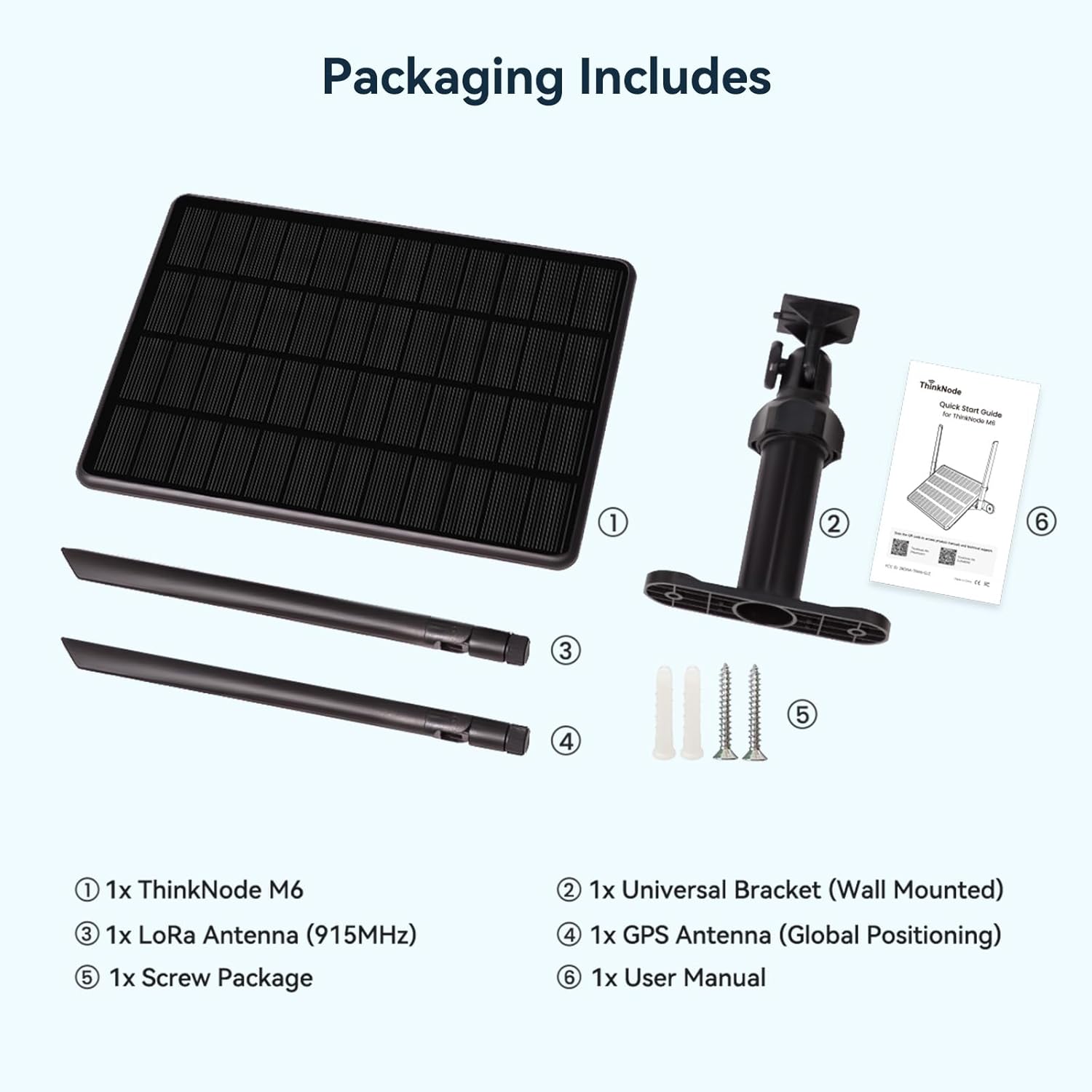
Image 2.1: Packaging contents of the ThinkNode M6.
3. Configuració
3.1 Maquinari acabatview
Familiarize yourself with the device's ports and indicators.

Imatge 3.1: Detallada view of the ThinkNode M6 hardware, including USB-C, antenna ports, and indicator lights.
3.2 Instal·lació física
- Col·loca les antenes: Carefully screw the LoRa Antenna (915MHz) and GPS Antenna into their respective ports on the ThinkNode M6. Ensure they are finger-tight.
- Muntatge: Use the provided universal bracket and screw package to securely mount the ThinkNode M6 in an outdoor location. Choose a spot with direct sunlight exposure for optimal solar charging and minimal obstructions for LoRa signal transmission.
3.3 Encès
The ThinkNode M6 is equipped with a 6W solar panel and a 7000mAh battery for continuous operation.
- Càrrec inicial: For first-time use or after prolonged storage, it is recommended to charge the device via the USB-C port for a few hours, or place it in direct sunlight.
- Botó d'encesa: Press and hold the function button for 5 seconds to power on the device.
- Indicadors: Upon power-on, the red Power LED will blink at 1Hz, and the blue Data LED will show a breathing effect, indicating successful startup.

Image 3.2: The 6W solar panel and 7000mAh battery provide all-day power.
3.4 Actualització del microprogramari
It is crucial to ensure your device runs the latest firmware for optimal performance and to resolve potential issues. The manufacturer provides firmware updates on their GitHub page.
- Descarrega el firmware: Visit the official GitHub repository for the ThinkNode M6 firmware: bit.ly/46SxjgT. Download the latest factory firmware file.
- Introduïu el mode de programació: Connect the device to your computer via the USB-C cable. Double-click the 'Reset' button on the device to enter programming mode. A new disk drive (e.g., 'ThinkNodeM6') should appear on your computer.
- Copy Firmware: Copieu el firmware descarregat file (e.g., .uf2 file) to the 'ThinkNodeM6' disk drive. The disk will automatically eject upon successful transfer.
- Reinicieu el dispositiu: After the firmware transfer, restart the device. The Power LED will blink at 1Hz, and the Data LED will show a breathing effect if the upgrade is successful.
Video 3.1: Instructions on how to update the M6 LoRaWAN version firmware.
4. Operating the ThinkNode M6
4.1 Connectivitat
The ThinkNode M6 supports both Bluetooth and LoRa for communication.
- Bluetooth (BLE): Use a compatible mobile application (e.g., Meshtastic APP) to connect to the ThinkNode M6 via Bluetooth for configuration and monitoring.
- LoRaWAN Network: The device operates on the 915 MHz frequency band, enabling long-range data transmission within a LoRaWAN network. It can function as a repeater to extend network coverage.
4.2 Funcionalitat del GPS
The integrated L76K GPS module provides real-time, accurate location data. This data can be shared through the LoRaWAN network, making it suitable for asset tracking and outdoor IoT applications.

Image 4.1: The ThinkNode M6 features high-precision GPS for location tracking.
4.3 Sensor and Interface Expansion
The ThinkNode M6 offers waterproof connector interfaces for IIC and UART expansion, allowing connection of external sensors and modules. This flexibility supports various customizable edge data projects, such as environmental sensing, agriculture monitoring, and industrial IoT.
4.4 LoRa Communication Range Test
The ThinkNode M6 demonstrates superior long-range communication stability. In tests comparing it with other solar nodes, the M6 consistently delivered zero packet loss across distances up to 10 KM, while other devices experienced packet loss at shorter ranges.
Video 4.1: LoRa communication range test demonstrating the ThinkNode M6's performance.
5. Manteniment
5.1 Outdoor Protection
The ThinkNode M6 features an IP65-rated waterproof and dustproof enclosure, allowing it to operate reliably in extreme temperatures ranging from -20°C to 60°C. This design makes it suitable for continuous outdoor deployment.

Image 5.1: The IP65 rating ensures the ThinkNode M6 withstands various weather conditions.
5.2 Cura de la bateria i del panell solar
To ensure optimal battery life and solar charging efficiency:
- Panell solar net: Periodically clean the solar panel surface to remove dust, dirt, or debris that may hinder charging efficiency. Use a soft, damp tela.
- Col·locació òptima: Ensure the solar panel remains in a location with maximum direct sunlight exposure throughout the day.
- Interval de temperatura: While designed for extreme temperatures, avoid prolonged exposure to temperatures outside the specified operating range (-20°C to 60°C) if possible, to maximize component lifespan.
6. Solució De Problemes
6.1 Device Unresponsive or No Power
- Comproveu el botó d'engegada: Ensure the function button was pressed and held for 5 seconds to power on.
- Càrrega de la bateria: Connect the device to a USB-C power source or place it in direct sunlight for several hours to ensure the 7000mAh battery is charged.
- Problema del firmware: If the device remains unresponsive, indicator lights do not function, or it does not charge, perform a firmware update as described in Section 3.4. Outdated or corrupted firmware can cause these issues.
6.2 Problemes amb el senyal GPS
- Commutador GPS: Verify that the GPS function is enabled in your device's settings via the connected mobile application.
- Col·locació exterior: The device must be placed outdoors with a clear view of the sky to acquire a GPS signal. Indoor or obstructed locations will prevent GPS functionality.
- Últim firmware: Ensure your device has the latest firmware installed, as updates often include GPS performance improvements.
- Restaura la configuració de fàbrica: If issues persist, try restoring factory settings through the mobile application and then re-enabling the GPS switch.
6.3 LoRa Communication Problems
- Connexió d'antena: Ensure the LoRa antenna is securely attached and oriented vertically for optimal signal.
- Línia de visió: LoRa performance is best with a clear line of sight between devices. Minimize physical obstructions.
- Banda de freqüència: Confirm that all communicating devices are operating on the correct 915 MHz frequency band.
7. Especificacions
| Característica | Detall |
|---|---|
| Marca | ELECROW |
| Model | ThinkNode M6 |
| LoRa Transceiver | nRFLR1262 |
| Core Processor | nRF52840 |
| Panell solar | Monocristal·lí de 6 W |
| Capacitat de la bateria | 7000 mAh de liti |
| Mòdul GPS | L76K |
| Banda de freqüència | 915 MHz |
| Connectivitat | Bluetooth, LoRa |
| Classificació de protecció | IP65 impermeable i a prova de pols |
| Temperatura de funcionament | -20 °C a 60 °C |
| Components inclosos | 1x ThinkNode M6, 1x LoRa Antenna, 1x GPS Antenna, 1x Universal Bracket, 1x Screw Package |
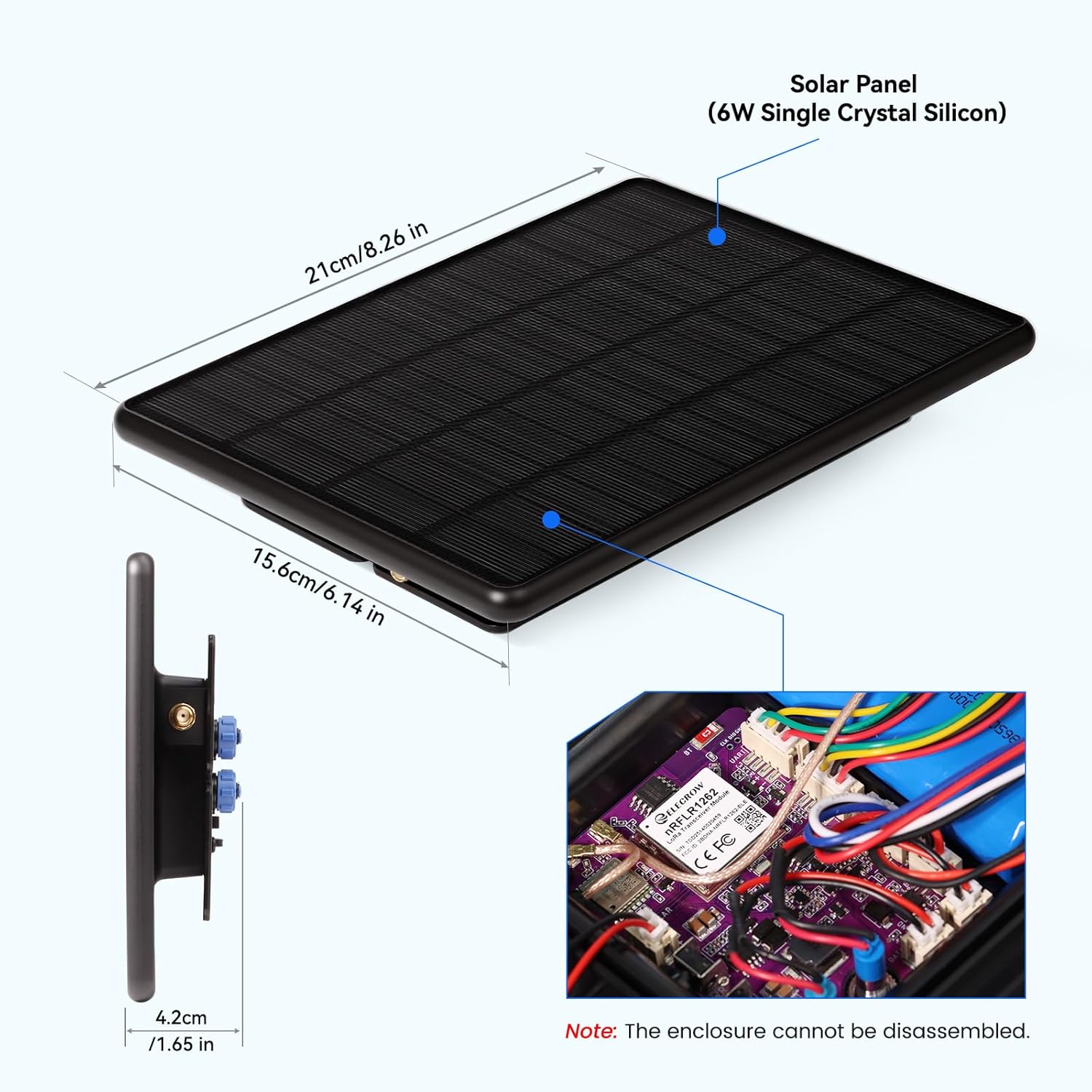
Image 7.1: Physical dimensions of the ThinkNode M6 solar panel.
8. Garantia i Suport
The ELECROW ThinkNode M6 comes with a 1 any de garantia del fabricant. For technical support, troubleshooting assistance, or warranty claims, please contact ELECROW customer service through their official website or the platform where the product was purchased. Refer to the provided documentation for additional support resources.