
1. Introducció
This manual provides detailed instructions for the installation, operation, and maintenance of your Ninetom 12.3-inch Touchscreen Car Radio. This advanced stereo system is designed to upgrade your vehicle's infotainment experience, offering features such as Apple CarPlay, Android Auto, Mirrorlink, and integrated navigation. Please read this manual thoroughly before installation and use to ensure proper functionality and to maximize your product's potential.
2. Compatibilitat
This Ninetom 12.3-inch Touchscreen Car Radio is specifically designed for BMW X3 F25 and X4 F26 models manufactured between 2016 and 2017, provided they are equipped with the EVO system. Ho és no compatible with NBT or CIC systems. Verifying your car's system type before installation is crucial.

Image: Compatibility chart illustrating which BMW systems (CIC, NBT, EVO) are compatible with the Ninetom 12.3-inch touchscreen radio. The EVO system is marked as compatible, while CIC and NBT are not.

Image: A detailed visual guide showing different BMW car radio interfaces, indicating which ones are compatible (EVO system) and which are not (NBT, CCC, CIC systems) with the new touchscreen unit.
If you are unsure about your vehicle's system, please consult your BMW owner's manual or contact Ninetom customer support for assistance before proceeding with the purchase or installation.
3. Configuració
3.1. Què hi ha a la caixa
Desembaleu amb cura tots els components i verifiqueu que heu rebut els articles següents:
- 1 x Ninetom 12.3-inch Upgraded Car Radio
- 1 x cable d'alimentació
- 1 x cable USB
- 1 x cable AUX
- 1 x Mounting Bracket (Note: Back bracket may vary depending on model)
- 1 x Tool Kit (for installation)
- 1 x Manual d'usuari (aquest document)
- All other necessary accessories for installation

Image: A visual representation of all components included in the package, such as the main unit, various cables (power, USB, AUX), mounting bracket, installation tools, and the user manual.
3.2. Instal·lació
The installation process is designed to be straightforward. It involves removing the original car display and connecting the new unit using the provided cables. No software modifications to the vehicle's control units are required. It is recommended to follow the detailed installation instructions provided with the product. If you are not confident in performing the installation yourself, professional installation is advised.

Image: A side-by-side comparison of the car's dashboard before and after the installation of the Ninetom 12.3-inch touchscreen radio, highlighting the visual upgrade.

Image: The Ninetom 12.3-inch touchscreen car radio seamlessly integrated into a BMW dashboard, showcasing the Apple CarPlay interface with various application icons.

Image: An illustration emphasizing that the new unit retains all original car system functions while adding a Linux system, allowing users to switch between them.
4. Instruccions de funcionament
4.1. S'ha acabat el sistemaview and Switching
The Ninetom touchscreen radio operates on a Linux system while retaining full functionality of your original BMW EVO system. You can switch between the new Linux interface and the original car interface with a single button press, typically labeled "Original Car Interface" or similar. This ensures that all factory features, such as the original car radio, amplifier function, factory joystick control, and rear-view camera, remain accessible.

Image: A visual guide demonstrating the seamless one-button switching capability between the new Linux system interface (showing CarPlay, Auto, Bluetooth options) and the original BMW factory system interface.
4.2. Apple CarPlay i Android Auto
The unit comes with integrated Apple CarPlay and Android Auto functionality, eliminating the need for additional purchases. These features support both wireless and wired connections.
- Connexió: Connect your iPhone or Android smartphone via USB cable or wirelessly through Bluetooth and Wi-Fi. Follow the on-screen prompts to establish the connection.
- Característiques: Once connected, you can access GPS navigation, make calls, send messages, listen to music, and use other compatible applications directly from the touchscreen display.
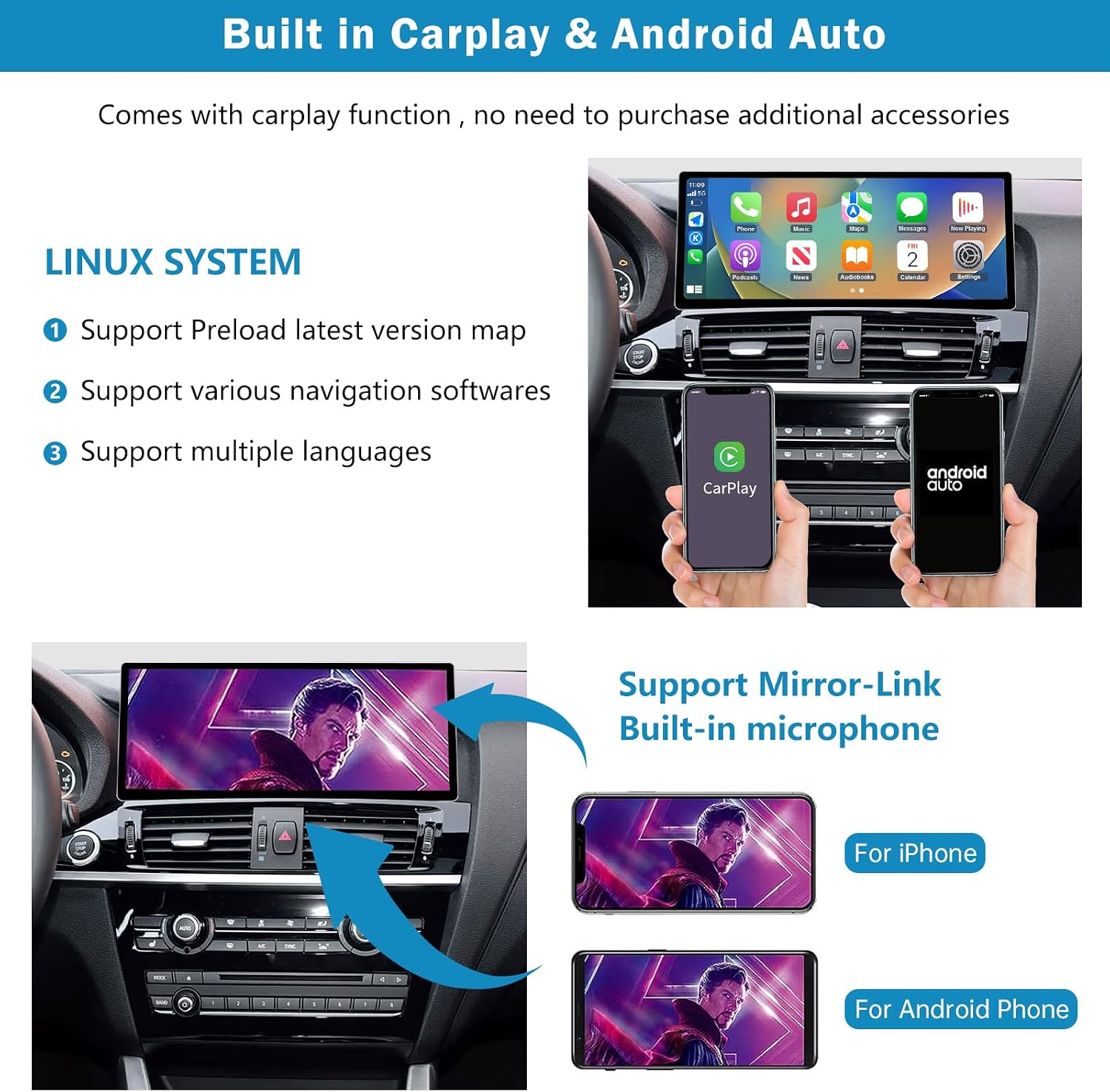
Image: This image highlights the integrated CarPlay and Android Auto features, showing smartphones connected to the car radio and displaying their respective user interfaces.

Image: A collage of screenshots demonstrating the Apple CarPlay interface, showcasing different applications and navigation views on the car's dashboard screen.

Image: The car's dashboard screen showing a comprehensive smartphone integration, with icons for navigation, music, messaging, and phone calls, indicating full functionality.
4.3. Mirrorlink
Mirrorlink allows you to mirror your smartphone's screen directly onto the car radio display. This feature is compatible with both iPhone and Android devices. Connect your phone and follow the on-screen instructions to activate screen mirroring.
4.4. Navegació
The unit supports various navigation software. You can use map applications through CarPlay or Android Auto, or utilize preloaded maps if available. The 1920 x 720 resolution provides a clear and detailed navigation experience.

Image: A graphic depicting a red location pin on a map, representing the navigation capabilities of the car radio.
4.5. Connectivitat Bluetooth
Connect your smartphone via Bluetooth for hands-free calling and music streaming. Pair your device through the system settings. The unit supports Bluetooth music playback and phone calls.
4.6. Original Car Functions
The upgrade screen preserves all original car functions, including:
- Original car radio
- Ampfunció de lifier
- Factory joystick control
- Posteriorview camera and original reverse trajectory
- Comandaments al volant

Image: A collage illustrating the retention of original BMW functions such as the factory radio, rear-view camera display, steering wheel controls, and the iDrive controller, alongside the new touchscreen interface.

Image: A close-up of the vehicle's steering wheel control buttons, confirming their continued functionality with the new radio.

Image: The car's dashboard screen displaying the rear-view camera feed with dynamic guide lines, indicating that this original safety feature is fully preserved.
5. Manteniment
To ensure the longevity and optimal performance of your Ninetom car radio, follow these maintenance guidelines:
- Neteja de la pantalla: Use a soft, lint-free cloth specifically designed for electronic screens. Do not use abrasive cleaners or solvents, as they can damage the display.
- Actualitzacions de programari: Periodically check for available software updates to ensure you have the latest features and performance enhancements. Follow the on-screen instructions for any update procedures.
- Condicions ambientals: Eviteu exposar la unitat a temperatures extremes, a la llum solar directa durant períodes prolongats o a una humitat excessiva.
6. Solució De Problemes
If you encounter any issues with your Ninetom car radio, refer to the following common troubleshooting steps:
| Problema | Possible solució |
|---|---|
| No Power / Screen Off | Comproveu totes les connexions del cable d'alimentació. Assegureu-vos que el contacte del cotxe estigui engegat. |
| Sense so | Verify volume settings. Check AUX cable connection. Ensure the original car's audio system is functioning correctly. |
| CarPlay/Android Auto no es connecta | Ensure your phone's Bluetooth and Wi-Fi are enabled. Try connecting with a different USB cable. Restart your phone and the car radio. |
| La pantalla tàctil no respon | Perform a soft reset of the unit (refer to specific instructions if available). Ensure the screen is clean and free of debris. |
| Original Functions Not Working | Ensure you have switched back to the original car system interface. Check all wiring connections related to the original system. |
If these steps do not resolve the issue, please contact Ninetom customer support for further assistance.
7. Especificacions
| Característica | Detall |
|---|---|
| Número de model | RT-LN-NTG45-12-EC-DE |
| Mida de la pantalla | 12.3 polzades |
| Tipus de visualització | Pantalla tàctil |
| Resolució | 1920 x 720 |
| Sistema operatiu | Linux System (with original car system retention) |
| Compatibilitat | BMW X3 F25 / X4 F26 (2016-2017) with EVO System |
| Connectivitat | Bluetooth, USB, AUX |
| Característiques especials | Apple CarPlay (Wireless/Wired), Android Auto (Wireless/Wired), Mirrorlink, Navigation, Equalizer, Spotify support |
| Tecnologia del sintonitzador | Analog (AM/FM) |
| Font d'alimentació | Elèctric amb cable |
| Dimensions del producte | 39.5l x 18.4w x 17.3h centimeters (approx. 15.55 x 7.24 x 6.81 inches) |
| Pes del producte | 1.7 quilograms (aprox. 3.75 lliures) |
| Fabricant | Zhanjiang Naituo Trading Co., Ltd. |
| País d'origen | Xina |
8. Garantia i Suport
Your Ninetom 12.3-inch Touchscreen Car Radio comes with a 12 mesos de garantia from the date of purchase. This warranty covers manufacturing defects and ensures professional customer service and installation support.
For any questions, technical assistance, or warranty claims, please contact Ninetom customer support. Have your model number (RT-LN-NTG45-12-EC-DE) and purchase details ready when contacting support.
Informació de contacte: Please refer to the contact details provided with your product packaging or visit the official Ninetom weblloc web per obtenir informació de suport.
