
1. Introducció
Thank you for choosing the Qubo TWS-400BK Bluetooth Earbuds. These wireless earbuds are designed to provide a superior audio experience with advanced features such as Active Noise Cancellation (ANC) and Environmental Noise Cancellation (ENC). This manual will guide you through the setup, operation, maintenance, and troubleshooting of your new earbuds.
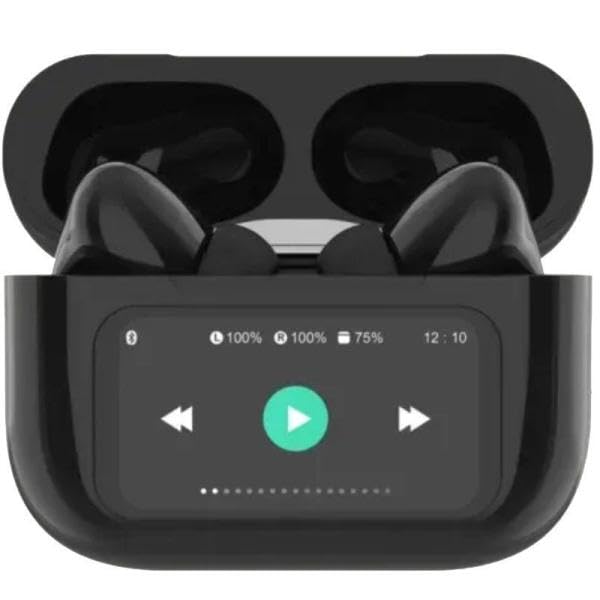
Image 1: Qubo TWS-400BK Bluetooth Earbuds in their open charging case, displaying the digital screen with battery levels and playback controls. The earbuds are black.
2. Contingut del paquet
- Qubo TWS-400BK Bluetooth Earbuds (Left and Right)
- Caixa de càrrega amb pantalla digital
- Cable de càrrega USB
- Manual d'usuari
3. Configuració
3.1 Càrrega dels auriculars i l'estoig
- Col·loca els auriculars a l'estoig de càrrega. Assegura't que estiguin correctament col·locats a les seves ranures respectives.
- Connect the USB charging cable to the charging port on the case and to a compatible USB power source (e.g., computer, wall adapter).
- The digital display on the charging case will indicate the charging status and battery levels. Allow the case and earbuds to fully charge before first use.
3.2 Emparellament amb un dispositiu Bluetooth
- Assegureu-vos que els auriculars estiguin carregats i dins de l'estoig de càrrega.
- Open the charging case lid. The earbuds will automatically enter pairing mode, indicated by a flashing light on the earbuds (refer to specific LED indicators in a separate diagram if available).
- Al dispositiu (telèfon intel·ligent, tauleta, ordinador), activeu el Bluetooth i cerqueu els dispositius disponibles.
- Select "Qubo TWS-400BK" from the list of found devices.
- Un cop connectats, els auriculars indicaran que l'emparellament s'ha realitzat correctament (per exemple, una indicació de veu o un llum LED fix).
- Els auriculars es tornaran a connectar automàticament a l'últim dispositiu emparellat quan es treguin de l'estoig, si el Bluetooth està activat al dispositiu.
3.3 Com posar-se els auriculars
Gently insert each earbud into your ear canal. Rotate them slightly to find a comfortable and secure fit. A proper fit is essential for optimal sound quality and noise cancellation performance.
4. Instruccions de funcionament
4.1 Encès/Apagat
- Encès: Open the charging case lid, or remove the earbuds from the case. They will power on automatically.
- Apagar: Torna a col·locar els auriculars a l'estoig de càrrega i tanca la tapa. S'apagaran automàticament.
4.2 Controls tàctils
The Qubo TWS-400BK earbuds feature touch-sensitive controls on each earbud. Specific functions may vary slightly; refer to the quick start guide for detailed gestures.
- Reproduir/pausa: Un sol toc a qualsevol dels auriculars.
- Pista següent: Toqueu dues vegades l'auricular dret.
- Pista anterior: Toqueu dues vegades l'auricular esquerre.
- Pujar el volum: Toqueu tres vegades l'auricular dret.
- Baixar el volum: Toqueu tres vegades l'auricular esquerre.
- Respondre/Finalitzar la trucada: Un sol toc a qualsevol dels auriculars.
- Rebutja la trucada: Manteniu premut qualsevol dels auriculars durant 2 segons.
- Activa l'Assistent de veu: Prem i mantén premut qualsevol dels auriculars durant 3 segons (quan no estiguis en una trucada).
- ANC/Transparency Mode Toggle: Press and hold the left earbud for 2 seconds (cycles through ANC On, Transparency Mode, ANC Off).
4.3 Active Noise Cancellation (ANC) and Environmental Noise Cancellation (ENC)
- ANC: Reduces external ambient noise, allowing for a more immersive listening experience. Activate/deactivate using the touch controls.
- ENC: Enhances call clarity by reducing background noise during phone conversations. This feature is automatically active during calls.
5. Manteniment
5.1 Neteja
- Netegeu regularment els auriculars i l'estoig de càrrega amb un drap suau, sec i sense borrissol.
- No utilitzeu netejadors abrasius, alcohol ni dissolvents químics.
- Assegura't que els contactes de càrrega dels auriculars i de la funda estiguin nets i lliures de residus per mantenir una càrrega correcta.
5.2 Emmagatzematge
- Quan no els utilitzeu, guardeu sempre els auriculars a la seva funda de càrrega per protegir-los i mantenir-los carregats.
- Emmagatzemar en un lloc fresc i sec, allunyat de temperatures extremes i de la llum solar directa.
6. Solució De Problemes
- Auriculars que no s'emparellan:
- Assegureu-vos que els dos auriculars estiguin carregats.
- Desactiva el Bluetooth del dispositiu i torna'l a activar.
- Forget/delete "Qubo TWS-400BK" from your device's Bluetooth list and try pairing again.
- Torneu a col·locar els auriculars a la funda, tanqueu la tapa, espereu 10 segons i, a continuació, obriu-la per tornar a entrar al mode d'emparellament.
- Només funciona un auricular:
- Assegureu-vos que els dos auriculars estiguin carregats.
- Torneu a col·locar els dos auriculars a l'estoig de càrrega, tanqueu la tapa i torneu-la a obrir per restablir la connexió.
- Auriculars que no es carreguen:
- Comproveu que el cable de càrrega estigui connectat correctament tant a la carcassa com a la font d'alimentació.
- Ensure the charging contacts on the earbuds and inside the case are clean and free of obstructions.
- Prova un cable de càrrega o un adaptador de corrent diferent.
- Mala qualitat del so:
- Assegureu-vos que els auriculars estiguin correctament col·locats a les orelles per a un bon segellat.
- Netegeu qualsevol cerumen o restes de les boquilles dels auriculars.
- Apropa't al dispositiu emparellat per evitar interferències.
7. Especificacions
| Model | TWS-400BK |
| Chipset | JL Bluetrum 5696D |
| Versió Bluetooth | 5.4 |
| Rang de transmissió | Fins a 10 metres |
| Cancel·lació activa de soroll (ANC) | Sí |
| Cancel·lació de soroll ambiental (ENC) | Sí |
| Material de l'habitatge | Plàstic |
| Controlador d’altaveus | 13 mm |
| Impedància | 32 ohms |
| Micròfon | Integrat |
| Earbud Autonomy | Fins a 4 hores |
| Charging Case Display | Digital |
| Product/Package Dimensions | 10 x 150 x 15 cm |

Imatge 2: Lateral view of the Qubo TWS-400BK earbuds nestled within their charging case.
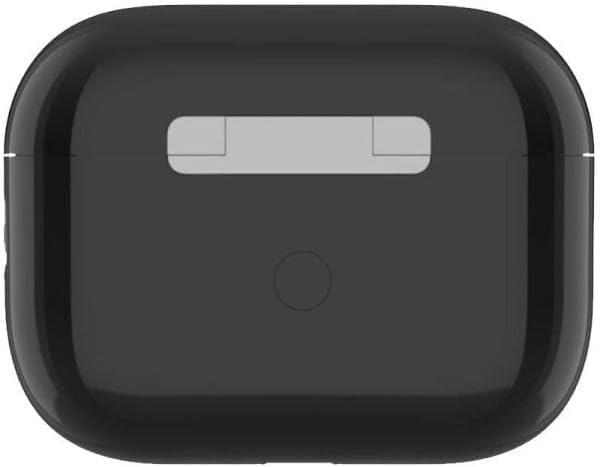
Imatge 3: Part superior view of the Qubo TWS-400BK charging case, showing its sleek black design.
8. Garantia i Suport
8.1 Informació de la garantia
The Qubo TWS-400BK Bluetooth Earbuds come with a garantia de tres anys against manufacturing defects from the date of purchase. This warranty covers defects in materials and workmanship under normal use. It does not cover damage caused by misuse, accidents, unauthorized modifications, or normal wear and tear.
8.2 Fabricant
Fabricat per: QUBO
For warranty claims or technical support, please contact your retailer or the official Qubo support channels.