
1. Introducció
Thank you for choosing the Gawfolk 32-inch 4K 144Hz Gaming Monitor. This monitor is designed to provide an immersive visual experience with its 4K UHD resolution, high refresh rate, and adaptive synchronization technology. This manual provides essential information for setting up, operating, maintaining, and troubleshooting your monitor to ensure optimal performance and longevity.
2. Informació de seguretat
- Read all instructions carefully before using the monitor.
- Mantingueu el monitor allunyat de l'aigua, la humitat i les temperatures extremes.
- No bloquejar les obertures de ventilació.
- Use only the power adapter provided with the monitor.
- Eviteu col·locar objectes pesats al cable d'alimentació.
- Desconnecteu l'endoll de la presa de corrent si no heu d'utilitzar el monitor durant un període prolongat.
- Demaneu tot el servei a personal de servei qualificat.
3. Configuració
3.1 Desembalatge i contingut del paquet
Traieu amb cura tots els components de l'embalatge. Assegureu-vos que hi hagi tots els elements que s'enumeren a continuació:
- Gawfolk 32-inch 4K 144Hz Monitor
- Suport de monitor (base i coll)
- Adaptador d'alimentació
- Cable HDMI
- Cable DisplayPort
- Manual d'usuari
3.2 Muntatge del suport
- Col·loqueu el monitor cara avall sobre una superfície suau i neta per evitar ratllades.
- Fixeu el coll del suport a la part posterior del monitor amb els cargols proporcionats. Assegureu-vos que estigui ben fixat.
- Attach the stand base to the stand neck, tightening the screw at the bottom of the base.
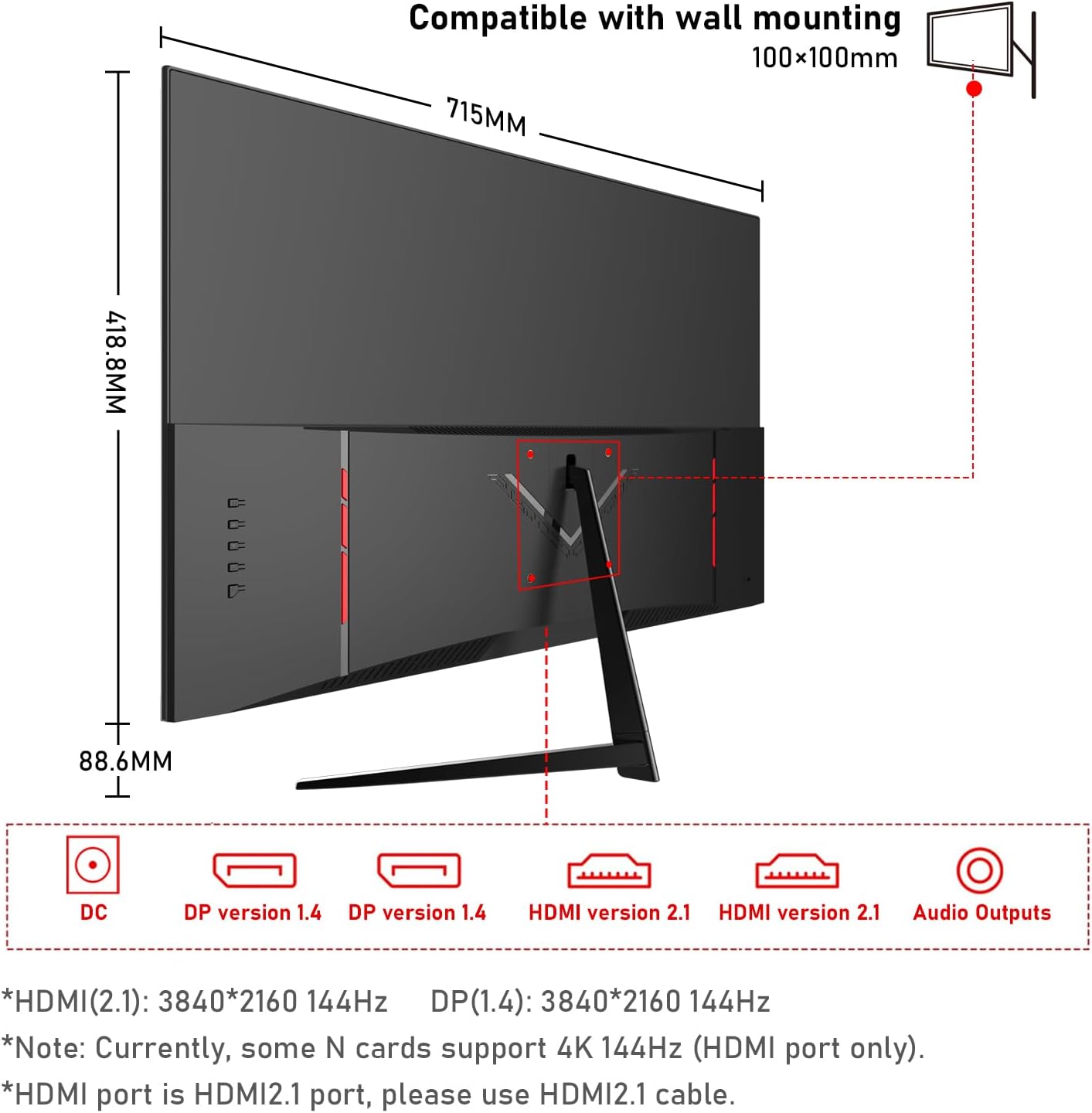
3.3 Connexió del monitor
Connecteu el monitor al vostre ordinador o a altres dispositius mitjançant els cables adequats.
- Connexió d'alimentació: Connect the power adapter to the monitor's DC input port, then plug the adapter into a power outlet.
- Connexió de vídeo:
- For 4K@144Hz, use an HDMI 2.1 cable (if your graphics card supports it) or a DisplayPort 1.4 cable.
- Connect one end of the HDMI or DisplayPort cable to the corresponding port on your monitor and the other end to your computer's graphics card.
- Connexió d'àudio: If you wish to use external speakers or headphones, connect them to the 3.5mm audio output port on the monitor.
3.4 Encès inicial
Press the power button on the monitor. The monitor should display the Gawfolk logo and then your computer's desktop. If no image appears, ensure all cables are securely connected and the correct input source is selected in the monitor's On-Screen Display (OSD) menu.
4. Funcionament del monitor
4.1 Menú de visualització en pantalla (OSD)
The OSD menu allows you to adjust various monitor settings. Typically, buttons are located on the back or bottom edge of the monitor. Use these buttons to navigate the menu and select options.
4.2 Configuració de la pantalla
- Resolució: The monitor supports 4K UHD (3840 x 2160) resolution. Ensure your computer's display settings are configured to this resolution for the sharpest image.
- Freqüència d'actualització: For smooth visuals, especially in gaming, set the refresh rate to 144Hz in your computer's display settings.
- Configuració de color: This monitor offers 100% sRGB coverage and 16.7 million colors for vibrant and accurate color reproduction. Adjust brightness, contrast, and color temperature via the OSD menu to suit your preference.

4.3 Característiques del joc
- Temps de resposta d'1 ms: The monitor features a 1ms response time (GTG), minimizing motion blur and ghosting for a more responsive gaming experience.
- Sincronització adaptativa (FreeSync): This technology synchronizes the monitor's refresh rate with your GPU's frame rate, eliminating screen tearing and stuttering. Enable FreeSync in your graphics card settings and the monitor's OSD menu.

4.4 Tecnologia per a la cura dels ulls
The monitor incorporates low blue light and flicker-free technology to reduce eye strain during prolonged use. These features are designed to enhance viewcomoditat.
4.5 Built-in Dual Speakers
The monitor includes built-in dual speakers, providing convenient audio without the need for external speakers. You can adjust the volume through your computer's audio settings or the monitor's OSD menu.

5. Manteniment
- Neteja de la pantalla: Utilitzeu un drap suau i sense pelusa lleugerament dampNetegeu amb aigua o amb un netejador de pantalles especialitzat. No ruixeu el netejador directament sobre la pantalla.
- Neteja de la Casing: Feu servir un drap suau i sec per netejar el monitor casing. Eviteu utilitzar productes de neteja o dissolvents abrasius.
- Ventilació: Ensure the ventilation openings on the monitor are clear and not obstructed to prevent overheating.
6. Solució De Problemes
- Sense energia: Check if the power cable is securely connected to both the monitor and the power outlet. Ensure the power adapter is functioning.
- Sense imatge: Verify that the video cable (HDMI/DisplayPort) is correctly connected to both the monitor and the computer. Ensure the correct input source is selected in the OSD menu.
- Pantalla parpellejant: Check the video cable connection. Ensure the refresh rate is set correctly in your computer's display settings. Enable Adaptive Sync if supported by your graphics card.
- Mala qualitat d'imatge: Adjust resolution, brightness, contrast, and color settings via the OSD menu. Ensure the video cable is not damaged.
- Sense so: Check the audio cable connection (if using external speakers/headphones). Adjust volume settings on both the monitor and your computer. Ensure the correct audio output device is selected on your computer.
7. Especificacions
| Característica | Especificació |
|---|---|
| Marca | Gawfolk |
| Número de model | GF320L |
| Mida de la pantalla | 32 polzades |
| Resolució | 4K UHD 2160p (3840 x 2160 Pixels) |
| Freqüència d'actualització | 144 Hz |
| Temps de resposta | 1 mil·lisegon (GTG) |
| Relació d'aspecte | 16:9 |
| Tipus de visualització | LED (VA Technology) |
| Descripció de la superfície de la pantalla | brillant |
| Característica especial | Corbat |
| Viewangle ing | 178 graus |
| Brillantor | 320 cd/m² |
| Valor de la gamma de colors | 120% sRGB |
| Millora de la qualitat de la imatge | Eye-Care + Adaptive Sync |
| Connectivitat de maquinari | 2x HDMI, 2x DisplayPort, 3.5mm Audio |
| Adaptive Synchronization | FreeSync |
| Color | Negre |
| Pes de l'article | 6.34 quilos |
| Dimensions de l'article (D x W x H) | 50.7 x 71.5 x 19 centímetres |
8. Garantia i Suport
Gawfolk provides a 12-month after-sales service for this monitor. If you encounter any issues during use, please do not hesitate to contact our customer support for assistance. Our team is dedicated to ensuring your satisfaction.