
1. Introducció
Thank you for choosing the WIWU iPad Case with Keyboard Mk007. This manual provides essential information for setting up, operating, and maintaining your new device. This case is designed to enhance your iPad experience with its versatile features and robust protection.
1.1 Compatibilitat
This keyboard case is specifically designed for:
- iPad Air 13 inch (M4 2026 / M3 2025 / M2 2024)
- iPad Pro 12.9 inch (6th / 5th / 4th / 3rd Generation)
Please verify your iPad model number before installation. Refer to the image below for visual guidance on compatible models.

Imatge: Més deview of compatible iPad models, showing various iPad Pro 12.9 inch and iPad Air 13 inch generations.
2. Contingut del paquet
Assegureu-vos que tots els elements estiguin presents al vostre paquet:
- WIWU iPad Case (Grey)
- Magnetic Detachable Keyboard
- Cable de càrrega USB-C
- Manual d'usuari (aquest document)
- Additional Camera Protector (for specific iPad models)
3. Característiques del producte
The WIWU iPad Case with Keyboard offers a range of features for enhanced productivity and protection:
- Suport ajustable a 360°: Proporciona múltiples viewing angles for typing, watching, or sketching.
- Magnetic Detachable Keyboard: Allows for flexible use, easily switching between laptop mode and tablet mode.
- Tecles retroil·luminades de 7 colors: Customizable backlighting for comfortable typing in various lighting conditions.
- Precision Touchpad: Supports 18 iPadOS gestures for intuitive navigation.
- Hidden Stylus Pen Storage: Secure slot for your stylus and a bonus compartment for spare tips.
- N52 Strong Magnetic Connection: Ensures secure attachment of the keyboard and iPad.
- Connectivitat Bluetooth 5.3: Provides stable and lag-free wireless connection.
- Llarga vida útil de la bateria: Up to 100 hours of use and 3 months standby time on a single charge.

Imatge: Detallada view of the 360° rotating stand, protruding silicone case for lens protection, and stylus pen storage with tip compartment.
4. Configuració
4.1 Installing Your iPad
- Gently align your iPad with the protective case.
- Press firmly around the edges to ensure the iPad is securely seated within the case.
- If your iPad model requires a different camera protector, carefully swap the pre-installed one with the appropriate alternative provided.
4.2 Connecting the Keyboard via Bluetooth
- Ensure the keyboard is charged. Turn on the keyboard using the power switch located on the side.
- Al teu iPad, vés a Configuració > Bluetooth i activa el Bluetooth.
- Al teclat, premeu Fn clau i la Bluetooth icon key (usually 'C' or a dedicated Bluetooth key) simultaneously to enter pairing mode. The Bluetooth indicator light on the keyboard will flash.
- On your iPad, select "MK-007" (or similar name) from the list of available devices.
- Once connected, the Bluetooth indicator light on the keyboard will stop flashing.
4.3 Activating the Touchpad
After successfully connecting the keyboard via Bluetooth, press the Fn clau i la Touchpad icon key (usually a dedicated key near the spacebar) to activate the touchpad function. The touchpad indicator light will illuminate.

Image: Visual guide for Bluetooth pairing and touchpad activation on the keyboard.
5. Instruccions de funcionament
5.1 Using the 360° Adjustable Stand
The integrated stand allows for versatile viewing and typing positions:
- Ajust d'angle: Pull out the kickstand from the back of the case. Adjust it to your desired angle between 0-120°.
- Girant View: The stand base rotates 360°, allowing you to switch between portrait and landscape orientations without removing the iPad from the case.

Image: The 360° rotating stand in various positions, demonstrating flexibility for work and play.
5.2 Ús del teclat
The keyboard provides a laptop-like typing experience:
- Control de la llum de fons: Premeu el botó Fn clau i la tecla d'icona de bombeta to cycle through 7 different backlight colors and adjust brightness levels.
- iPadOS Shortcuts: Utilize the dedicated multimedia shortcut keys for quick access to functions like screenshot, return to desktop, volume control, and more.
- Detaching the Keyboard: The keyboard is magnetically attached. Simply pull it away from the case when you prefer to use your iPad without the keyboard.

Image: The keyboard displaying its 7-color backlit keys, highlighting the customizable typing experience.
5.3 Ús del ratolí tàctil de precisió
The integrated touchpad supports various iPadOS gestures for efficient navigation:
- Dit únic: Click, click and hold, drag and move, wake up iPad, open dock, back to home screen, show side dock, open control center, open notification center.
- Dos dits: Scroll, right-click (secondary click), zoom in/out.
- Tres dits: Swipe up for App Switcher, swipe left/right to switch between apps, swipe down for Home Screen.
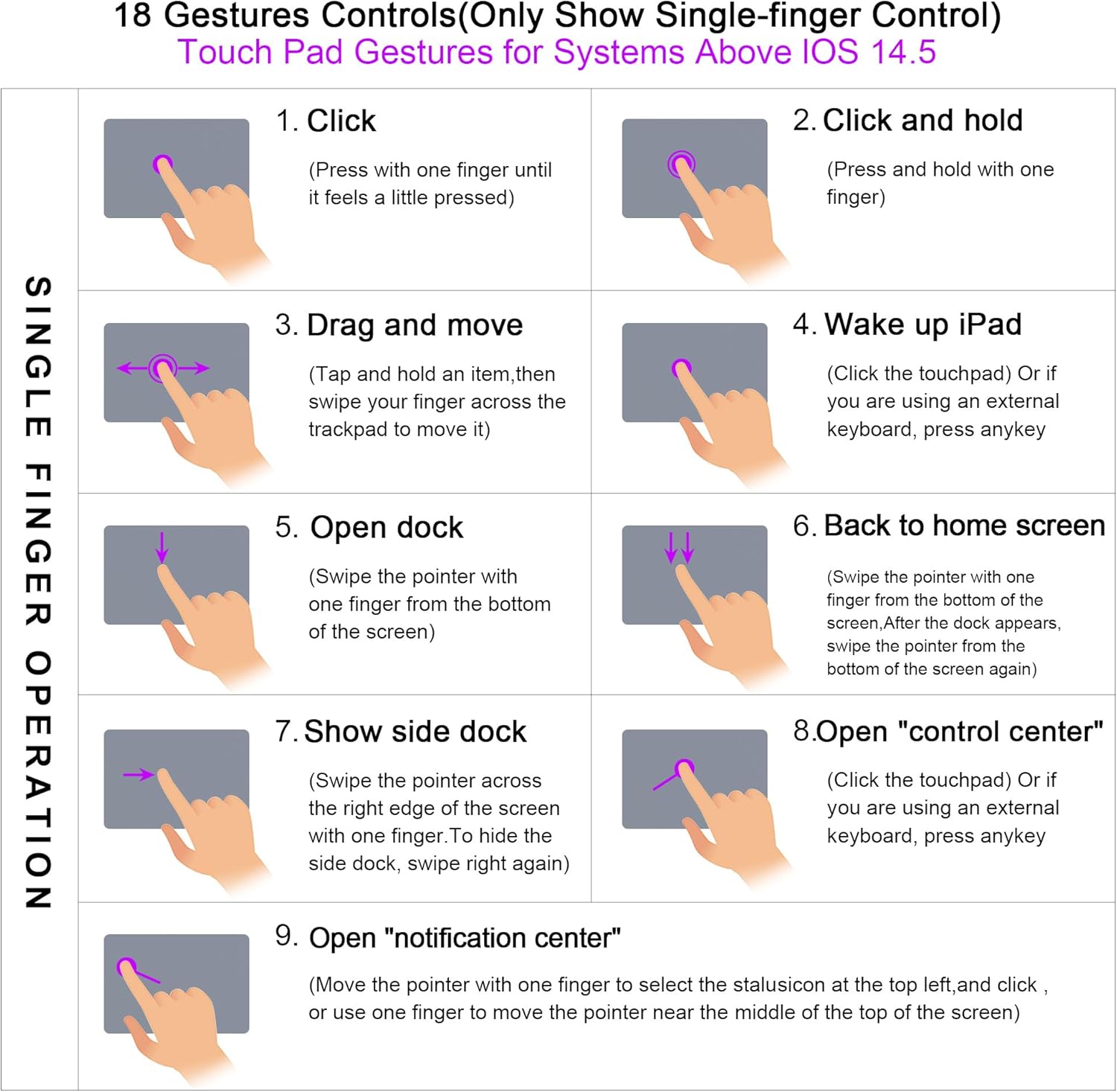
Image: A comprehensive diagram illustrating 18 smart touch gestures for the touchpad, compatible with iPadOS 14.5 and above.
5.4 Stylus Pen Storage
The case includes a dedicated slot for your stylus pen, ensuring it is always secure and charged. A bonus storage compartment is also available for spare pen tips.
6. Càrrega i bateria
The keyboard features a long-lasting battery:
- Durada de la bateria: Fins a 100 hores d'ús continu.
- Temps d'espera: Fins a 3 mesos.
- Temps de càrrega: Aproximadament 2 hores per a una càrrega completa.
- Indicador de càrrega: The keyboard has an indicator light to show charging status and low battery warnings.
To charge the keyboard, connect the provided USB-C cable to the charging port on the side of the keyboard and to a suitable USB power source.

Image: Visual representation of the keyboard's battery performance, including 100 days standby, 100 hours work time, and 2 hours charging time.
7. Manteniment
To ensure the longevity and optimal performance of your WIWU iPad Case with Keyboard, follow these maintenance guidelines:
- Neteja: Utilitzeu un suau, damp cloth to wipe the exterior of the case and keyboard. Avoid harsh chemicals or abrasive materials.
- Emmagatzematge: Quan no l'utilitzeu durant períodes prolongats, guardeu la funda del teclat en un lloc fresc i sec.
- Eviteu líquids: Keep the keyboard away from liquids to prevent damage to electronic components.
- Manejar amb cura: While durable, avoid dropping or subjecting the case to excessive force.
8. Solució De Problemes
If you encounter issues with your WIWU iPad Case with Keyboard, refer to the following common solutions:
- El teclat no es connecta:
- Assegureu-vos que el teclat estigui encès i completament carregat.
- Verify Bluetooth is enabled on your iPad.
- Re-enter pairing mode on the keyboard (Fn + Bluetooth icon key) and re-select it on your iPad.
- Forget the device on your iPad's Bluetooth settings and attempt to pair again.
- Touchpad Not Responding:
- Ensure the touchpad is activated (Fn + Touchpad icon key).
- Comproveu si el teclat està connectat correctament via Bluetooth.
- Reinicia l'iPad i el teclat.
- Les tecles no responen:
- Check keyboard battery level.
- Assegureu-vos que la connexió Bluetooth sigui estable.
- Clean any debris from around the keys.
- La llum de fons no funciona:
- Assegureu-vos que el teclat estigui encès.
- Press Fn + light bulb icon key to cycle through modes and brightness.
- Comproveu el nivell de la bateria.
9. Especificacions
| Característica | Detall |
|---|---|
| Marca | WIWU |
| Número de model | Mk007 |
| Dispositius compatibles | iPad Air 13 inch (M4 2026/M3 2025 /M2 2024), iPad Pro 12.9 inch 6th/5th/4th/3rd Generation |
| Tecnologia de connectivitat | Bluetooth 5.3 |
| Descripció del teclat | Multi Functional, QWERTY Layout |
| Característiques especials | Backlit (7 colors), Case, Silent Keys, Touchpad, Magnetic Detachable, 360° Rotating Stand, Pencil Holder |
| Color | Gris |
| Dimensions del producte | 10 cm de llargada x 1 cm d'amplada x 12.4 cm d'alçada |
| Material | Plàstic |
| Font d'alimentació | Funciona amb bateria |
| Battery Life (Use) | Més de 100 hores |
| Durada de la bateria (mode d'espera) | 3 months (100 days) |
| Temps de càrrega | Aprox. 2 hores |
10. Garantia i Suport
WIWU products are manufactured with high-quality standards. For any warranty claims or technical support, please refer to the retailer where you purchased the product or visit the official WIWU weblloc web per obtenir informació de contacte. Si us plau, conserveu el comprovant de compra per a finalitats de garantia.


