
1. Introducció
Gràcies per la compraasing the Hodozzy 1DIN Car Stereo. This manual provides detailed instructions for the installation, operation, and maintenance of your new car audio system. Please read this manual thoroughly before use to ensure proper functionality and to maximize your user experience. Keep this manual for future reference.
2. Informació de seguretat
- Feu servir sempre el dispositiu de manera segura i responsable. Conduir amb distracció pot provocar accidents.
- No intenteu desmuntar ni modificar la unitat. Això pot causar danys i anul·lar la garantia.
- Ensure all wiring is correctly connected to prevent short circuits or electrical damage. Consult a professional for installation if you are unsure.
- Mantingueu la unitat allunyada de l'aigua, la humitat i les temperatures extremes.
- Clean the screen with a soft, dry cloth. Do not use abrasive cleaners.
3. Contingut del paquet
Verifiqueu que tots els elements siguin presents al paquet:
- 1 x Car MP5 Player Main Unit
- 1 x cable d'alimentació
- 1 x Cable de botzina
- 1 x comandament a distància
- 2 x suports
- 1 x posterior View Càmera
- 1 x Manual d'usuari (aquest document)
4. Producte acabatview
The Hodozzy 1DIN Car Stereo features a 7-inch HD touch screen and supports various multimedia functions. Below are images illustrating the unit's appearance and components.
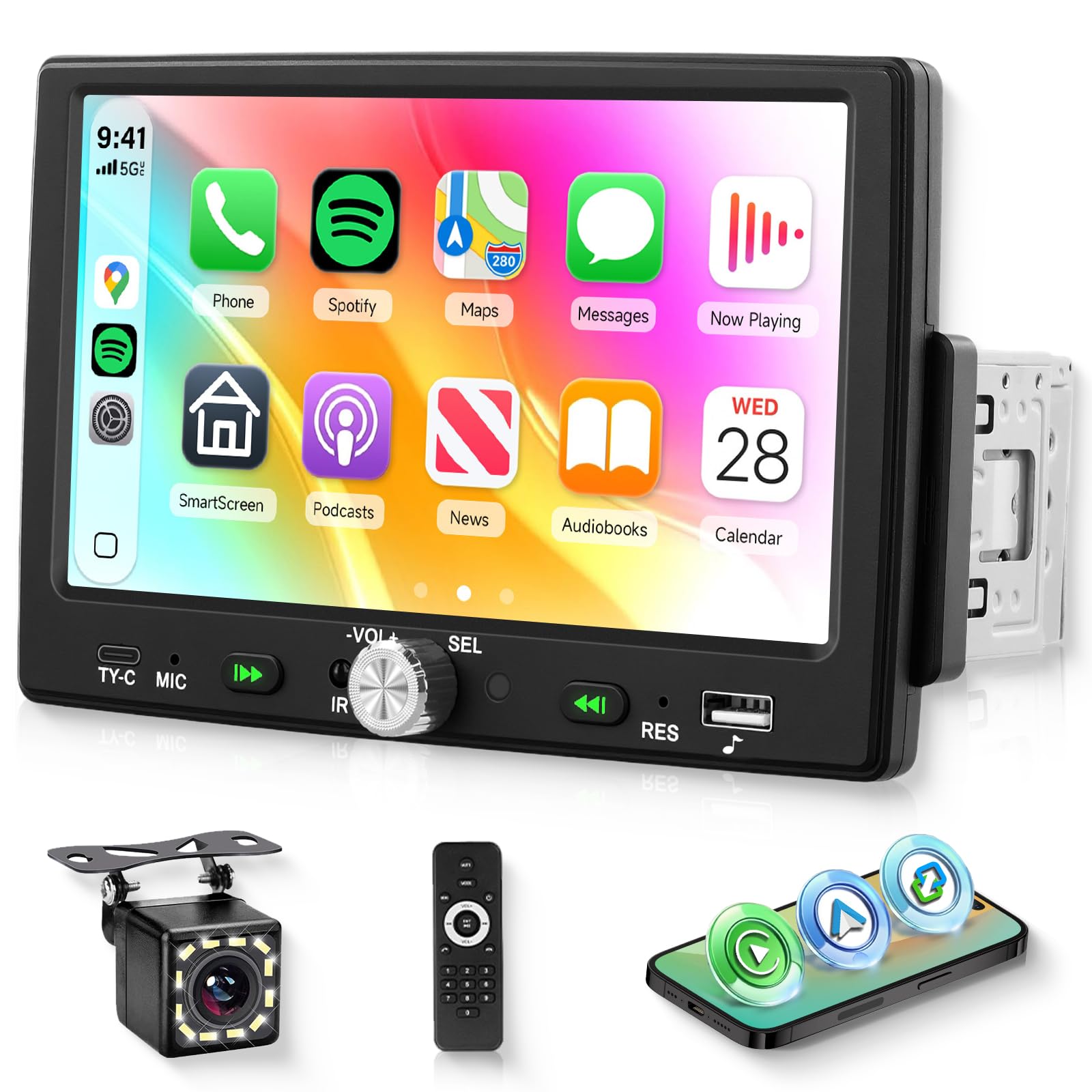
Davant view of the Hodozzy 1DIN Car Stereo, showcasing the 7-inch HD touch screen and physical control buttons.

This detailed diagram provides the physical dimensions of the car stereo unit (18.8cm x 5.7cm x 9.0cm) and illustrates the various input/output ports on the rear panel, including power, horn, video out, audio out, microphone, and camera input, essential for installation.
5. Especificacions
| Característica | Especificació |
|---|---|
| Voltage | DC12V |
| Xip de la CPU | F133 |
| Mida de la pantalla | 7 polzades |
| Material de pantalla | TN |
| Resolució de pantalla | 1024×600 |
| Funcions integrades | CarPlay/Android Auto, Mirror Link, Backup Camera, Steering Wheel Control, Bluetooth Hands-free, 14-band EQ, USB & Type-C Port, 7-color Backlight |
| Funcions opcionals | USB Memory, Subwoofer |
| Banda de ràdio | FM (87.5-108 MHz) |
| Xip de ràdio | QN8035 |
| Potència de sortida | 45W × 4 |
| Temperatura de funcionament | -10 ~ 70 ℃ |
| Versió Bluetooth | 5.0 |
| Colors de contrallum | 7 colors |
| Entrada de càmera de marxa enrere | CVBS |
| Poder AmpXip lificador | TDA7388 |
| Formats d'àudio | MP3 / WMA / WAV / APE / FLAC |
| Formats de vídeo | RM/RMVB/AVI/MP4/MKV/3GP |
| Formats d'imatge | JPG BMP PNG |
| Idiomes admesos | English, Chinese, Spanish, Portuguese, Russian, Italian, German, French, Turkish, Czech, Arabic, Polish, Hebrew |
| Mida de la instal·lació | 178 mm x 50 mm |
6. Configuració
6.1. Instal·lació
This unit is designed for 1DIN car stereo slots. Ensure your vehicle has a compatible slot. Professional installation is recommended. Before installation, disconnect the vehicle's negative battery terminal to prevent electrical shorts.
- Traieu l'estèreo del cotxe existent del tauler de control.
- Mount the provided brackets to the sides of the new Hodozzy unit.
- Connect all necessary wiring harnesses as described in the wiring section.
- Slide the unit into the 1DIN slot until it clicks into place.
- Secure the unit using screws or mounting clips.
- Torneu a connectar el terminal negatiu de la bateria del vehicle.
6.2. Esquema de cablejat
Refer to the diagram below for proper wiring connections. Incorrect wiring can damage the unit or your vehicle's electrical system.
This diagram illustrates the rear panel connections, including the power cable, horn cable, video output (V-OUT1, V-OUT2), audio output (L-OUT, R-OUT), CVBSIN, MIC, and CAMIN (camera input).
- Cable de corrent: Connect to the vehicle's power supply (ACC, B+, Ground).
- Cable de botzina: Connect to vehicle speakers. Ensure correct polarity.
- posterior View Càmera: Connect the camera's video output to the CAMIN port and its power to the reverse light circuit.
- Control del volant (SWC): Connect to your vehicle's SWC wires. Refer to your vehicle's manual for specific wiring.
- USB/Type-C: For media playback and smartphone connection.
7. Instruccions de funcionament
7.1. Funcionament bàsic
- Encès/apagat: Press the power button or turn the vehicle ignition on/off.
- Control de volum: Use the volume knob on the unit or steering wheel controls.
- Pantalla tàctil: Navigate menus and select functions by touching the screen icons.
7.2. CarPlay i Android Auto
Connect your iPhone or Android smartphone via a genuine USB cable to enable CarPlay or Android Auto. This allows you to access navigation, music, calls, and messages directly from the car stereo screen.

This image illustrates the seamless integration of CarPlay, Android Auto, and Mirror Link functionalities, allowing users to access smartphone features directly on the car stereo's 7-inch HD touch screen. A smartphone is shown connected via USB, demonstrating the wired connection for these features.
- Connect your smartphone to the USB port.
- The unit will automatically detect and launch CarPlay or Android Auto.
- Use the touch screen or voice commands to control functions.
7.3. Enllaç de mirall
Mirror Link allows you to display your smartphone's screen directly onto the car stereo. This feature supports both iOS and Android devices via a USB cable.
- Connect your smartphone to the USB port using a genuine cable.
- Select the 'Mirror Link' option on the car stereo.
- Seguiu les instruccions que apareixen a la pantalla per establir la connexió.
7.4. Funcionalitat Bluetooth
Pair your smartphone with the car stereo via Bluetooth for hands-free calling and audio streaming.

This image displays the FM Radio interface for tuning stations, the 14-band equalizer for sound customization, and the Bluetooth hands-free calling screen, highlighting the audio and communication features of the unit.
- Go to the Bluetooth menu on the car stereo.
- Activeu el Bluetooth al vostre telèfon intel·ligent i cerqueu els dispositius disponibles.
- Select 'Hodozzy' (or similar device name) from the list and confirm pairing.
- Once paired, you can make/receive calls and play music wirelessly.
7.5. Ràdio FM
Access FM radio stations with automatic channel search and preset functions.
- Select the 'FM Radio' icon from the main menu.
- Feu servir la funció d'escaneig automàtic per trobar i desar les emissores disponibles.
- Manually tune or select from preset stations.
7.6. Configuració d'EQ
Customize your audio experience with the built-in 14-band equalizer and bass boost function.
- Access the 'EQ' settings from the audio menu.
- Adjust frequency bands, treble, and bass levels to your preference.
- Select from various preset EQ modes.
7.7. USB/Type-C Playback & Charging
The unit supports media playback from USB drives and provides charging for smartphones.

This image highlights the multi-functional aspects of the car stereo, including customizable 7-color LED backlighting, smartphone charging capability via USB and Type-C ports, and data transfer for media playback.
- Insert a USB drive or connect a smartphone to the USB/Type-C port.
- The unit will automatically detect media files per a la reproducció.
- The USB/Type-C ports also provide power for charging connected devices.
7.8. HD Video Playback
Enjoy high-definition video content on the 7-inch screen.

The image shows the 7-inch HD touch screen playing a high-definition video, demonstrating the unit's capability for clear and vibrant video playback with a resolution of 1024x600 pixels.
- Load supported video files (RM/RMVB/AVI/MP4/MKV/3GP) onto a USB drive.
- Select the video player application from the main menu.
- Browse and select your desired video for playback.
7.9. Càmera de marxa enrere
The included waterproof backup camera provides a clear view de la zona que hi ha darrere del vehicle en fer marxa enrere.

The image shows the included waterproof backup camera, which automatically displays the rear view when reversing. Below, the car stereo screen illustrates the steering wheel control settings, allowing users to program and manage audio and call functions directly from their steering wheel.
- When the vehicle is shifted into reverse gear, the screen will automatically switch to the rear view pantalla de càmera.
- Parking guidelines may be displayed to assist with maneuvering.
7.10. Control del volant (SWC)
Program your vehicle's existing steering wheel controls to operate the car stereo, enhancing driving safety.
- Access the 'Steering Wheel Control' settings in the system menu.
- Follow the on-screen instructions to map your steering wheel buttons to specific functions (e.g., volume up/down, next/previous track, answer/end call).
8. Manteniment
- Neteja de la pantalla: Feu servir un drap suau i sense borrissol per netejar suaument la pantalla. Per a taques difícils, fregueu lleugeramentampRenta el drap amb aigua. Evita productes químics agressius o materials abrasius.
- Neteja general: Mantingueu l'exterior de la unitat net de pols i deixalles. Feu servir un drap suau i sec.
- Actualitzacions de programari: Reviseu periòdicament el fabricant weblloc web per a qualsevol actualització de programari disponible per garantir un rendiment òptim i noves funcions.
9. Solució De Problemes
Si teniu problemes amb l'estèreo del vostre cotxe Hodozzy, consulteu els següents problemes i solucions habituals:
| Problema | Causa possible | Solució |
|---|---|---|
| La unitat no s'encén | Cablejat d'alimentació incorrecte, fusible fundit, problema amb la bateria del vehicle. | Check power cable connections (B+, ACC, Ground). Inspect vehicle fuses. Ensure vehicle battery is charged. |
| No hi ha so dels altaveus | Cables d'altaveu connectats incorrectament, volum massa baix, funció de silenci activa. | Verify speaker wiring polarity. Increase volume. Check if the unit is muted. |
| CarPlay/Android Auto no es connecta | Non-genuine USB cable, phone software issue, incorrect settings. | Use a genuine USB cable. Restart your smartphone. Check phone settings for CarPlay/Android Auto permissions. |
| La càmera de marxa enrere no es mostra | Camera wiring issue, camera power issue, reverse trigger wire not connected. | Check camera video input (CAMIN) and power connections. Ensure the reverse trigger wire is correctly connected to the vehicle's reverse light. |
| L'aparellament de Bluetooth falla | Bluetooth not enabled, device too far, incorrect pairing process. | Ensure Bluetooth is enabled on both devices. Place devices closer. Follow pairing instructions carefully. |
Si el problema persisteix després de provar aquestes solucions, poseu-vos en contacte amb el servei d'atenció al client de Hodozzy per obtenir ajuda.
10. Garantia i Suport
This product comes with a warranty. Please refer to the warranty card or documentation included with your purchase for specific terms and conditions. For technical support, troubleshooting assistance, or warranty claims, please contact Hodozzy customer service through the retailer where you purchased the product or visit the official Hodozzy weblloc.