
1. Introducció
Thank you for choosing the Bisofice ZY-Q822 80mm Thermal Receipt Printer. This printer is designed for efficient and reliable receipt printing in various business environments. It features direct thermal printing technology, supports two-color printing, and includes an automatic cutter for convenience. This manual provides essential information for the proper setup, operation, and maintenance of your device.

Image: The Bisofice ZY-Q822 thermal receipt printer in operation, demonstrating its dual-color printing capability with a sampel rebut.
2. Contingut del paquet
Abans de continuar amb la configuració, comproveu que tots els elements siguin presents al paquet:
- 1 x Bisofice ZY-Q822 Thermal Receipt Printer
- 1 x Thermal Paper Roll (for initial use)
- 1 x cable USB
- 1 x adaptador de corrent
- 1 x cable d'alimentació
3. Instruccions de configuració
3.1 Connexió de la impressora
- Connecteu l'adaptador de corrent: Insert the power cable into the power adapter, then connect the adapter to the printer's power port (DC 24V 2.5A). Plug the power cable into a suitable electrical outlet.
- Connecteu el cable de dades: Trieu el mètode de connexió que preferiu:
- Connexió USB: Connecteu un extrem del cable USB al port USB de la impressora i l'altre extrem a l'ordinador.
- Connexió Ethernet (LAN): Connect an Ethernet cable to the printer's LAN port and the other end to your network router or switch.
- Encès: Press the power switch located on the printer to turn it on.

Imatge: Part posterior view of the printer highlighting the USB, LAN, RJ11, and power input ports for connectivity.
3.2 Càrrega de paper tèrmic
- Obriu la coberta: Press the cover open button or latch to open the top cover of the printer.
- Inseriu el rotlle de paper: Place the 80mm thermal paper roll into the paper compartment with the printing surface facing upwards. Ensure the roll is seated correctly. The maximum roll diameter supported is Φ80mm.
- Tanca la coberta: Pull a small amount of paper out past the cutter and close the top cover firmly until it latches.
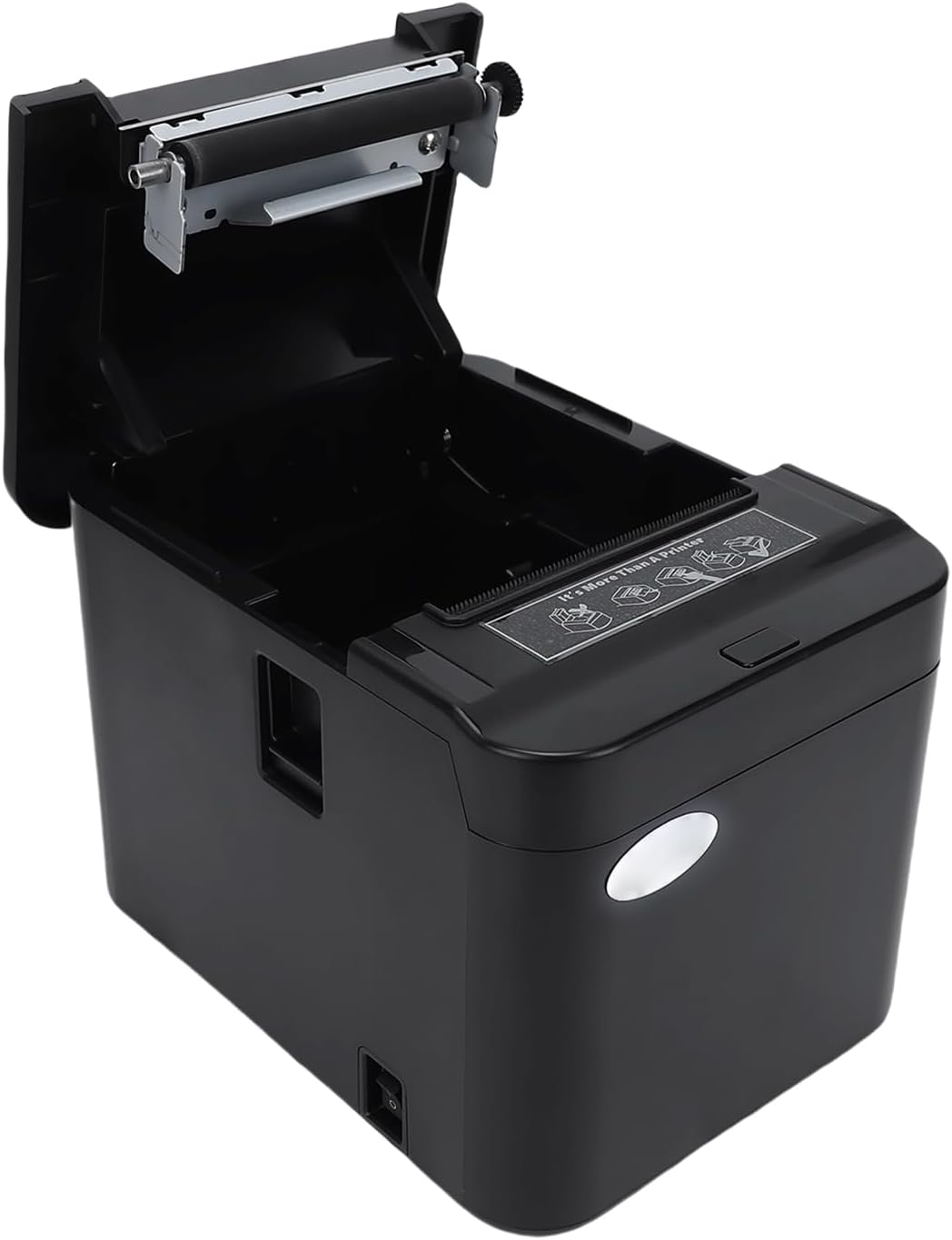
Image: The printer with its top cover open, illustrating the paper loading mechanism and compartment.
3.3 Instal·lació del controlador
To ensure proper communication between your computer and the printer, you must install the appropriate drivers. The Bisofice ZY-Q822 is compatible with Windows XP/VISTA/7/8/10/2000/CE/OPOS/JPOS operating systems. SDKs are available for Win 2000/Win CE/OPOS/JPOS/Android/iOS.
Please download the latest drivers from the official support weblloc: http://8.129.44.110:4400/download_en.htmlSeguiu les instruccions que apareixen a la pantalla per a la instal·lació.
4. Instruccions de funcionament
4.1 Impressió bàsica
Once the printer is connected and drivers are installed, you can send print jobs from your application. The printer operates using direct thermal technology, meaning it does not require ink cartridges or ribbons.

Image: The printer demonstrating its inkless thermal printing technology, highlighting the absence of ink cartridges.
4.2 Two-Color Printing
The ZY-Q822 supports two-color printing using specialized thermal paper. This allows for combinations such as red+black or blue+black, enhancing the visibility of important information on receipts. Ensure you are using compatible two-color thermal paper for this feature.
4.3 Automatic Cutter
The integrated automatic cutter provides clean and efficient paper cuts after each receipt is printed. This feature ensures smooth operation and a professional finish for your receipts.

Imatge: Un primer pla view of the printer's internal auto-cutter mechanism, emphasizing its sharp and efficient cutting capability.
4.4 Supported Barcodes
The printer supports a wide range of 1D and 2D barcode formats:
- Codis de barres 1D: UPC-A, UPC-E, JAN13 (EAN13), JAN8 (EAN8), CODE39, ITF, CODABAR, CODE93, CODE128
- Codis de barres 2D: Codi QR
5. Manteniment
Regular maintenance ensures the longevity and optimal performance of your Bisofice ZY-Q822 printer.
5.1 Neteja del capçal d'impressió
The print head is a critical component. Clean it periodically to prevent print quality issues.
- Apagueu la impressora i desconnecteu el cable d'alimentació.
- Obriu la coberta de la impressora.
- Gently wipe the print head surface with a soft cloth dampened with isopropyl alcohol. Do not use abrasive materials or excessive force.
- Deixeu que el capçal d'impressió s'assequi completament abans de tancar la tapa i engegar la impressora.
5.2 Cleaning the Cutter
Dust and paper debris can accumulate around the auto-cutter. Clean it regularly to prevent paper jams and ensure smooth cuts.
- Apagueu la impressora i desconnecteu el cable d'alimentació.
- Obriu la coberta de la impressora.
- Carefully remove any visible paper dust or debris from the cutter area using a soft brush or compressed air.
- Tanqueu la coberta i engegueu la impressora.
5.3 Neteja general
Wipe the exterior of the printer with a soft, dry cloth to remove dust and dirt.
6. Solució De Problemes
Aquesta secció tracta els problemes habituals que podeu trobar amb la impressora.
| Problema | Causa possible | Solució |
|---|---|---|
| La impressora no imprimeix |
|
|
| Poca qualitat d'impressió |
|
|
| Embús de paper |
|
|
| El tallador automàtic no funciona |
|
|
| Printer not detected by computer |
|
|
7. Especificacions
Detailed technical specifications for the Bisofice ZY-Q822 Thermal Receipt Printer:
| Característica | Especificació |
|---|---|
| Nom del model | ZY-Q822 |
| Mètode d'impressió | Tèrmica directa |
| Resolució | 576 dots/line (203 dpi) |
| Amplada d'impressió | 72 mm |
| Velocitat d'impressió | Up to 200 mm/s (MAX) |
| Tipus de paper | Paper tèrmic |
| Amplada del paper | 80 mm |
| Gruix del paper | 0.06 ~ 0.08 mm |
| Diàmetre del rotllo de paper | Max Φ80 mm |
| Interfície | USB + Ethernet (LAN) |
| Memòria intermèdia d’entrada | 128 KB |
| NV-Flash | 256 KB |
| Emulació | ESC/POS |
| Vida útil del capçal d'impressió | 100 km |
| Cutter Lifespan | 1.0 milió de retallades |
| Entrada de potència | CA 100-240V, 50/60Hz |
| Potència de sortida | DC 24V 2.5A |
| Dimensions (L x A x A) | 17.3 x 12.8 x 12.7 cm |
| Color | Negre |
8. Garantia i Suport
For warranty information, please refer to the documentation provided at the time of purchase or contact your retailer. For technical support, driver downloads, and further assistance, please visit the official Bisofice support weblloc o poseu-vos en contacte amb el seu servei d'atenció al client.
Enllaç de descàrrega del controlador: http://8.129.44.110:4400/download_en.html

