
1. Introducció
The NJTY Digital Inclinometer SZ-08 is a precision tool designed for fast and accurate angle measurement. It is suitable for various applications including construction, woodworking, mechanical setup, and equipment calibration. This device features a high-definition backlit display, a high-sensitivity illuminated bubble level, and a dual magnetic base for stable and versatile use. It supports both absolute and relative angle measurements, data hold, and an auto-rotating display for ease of operation.
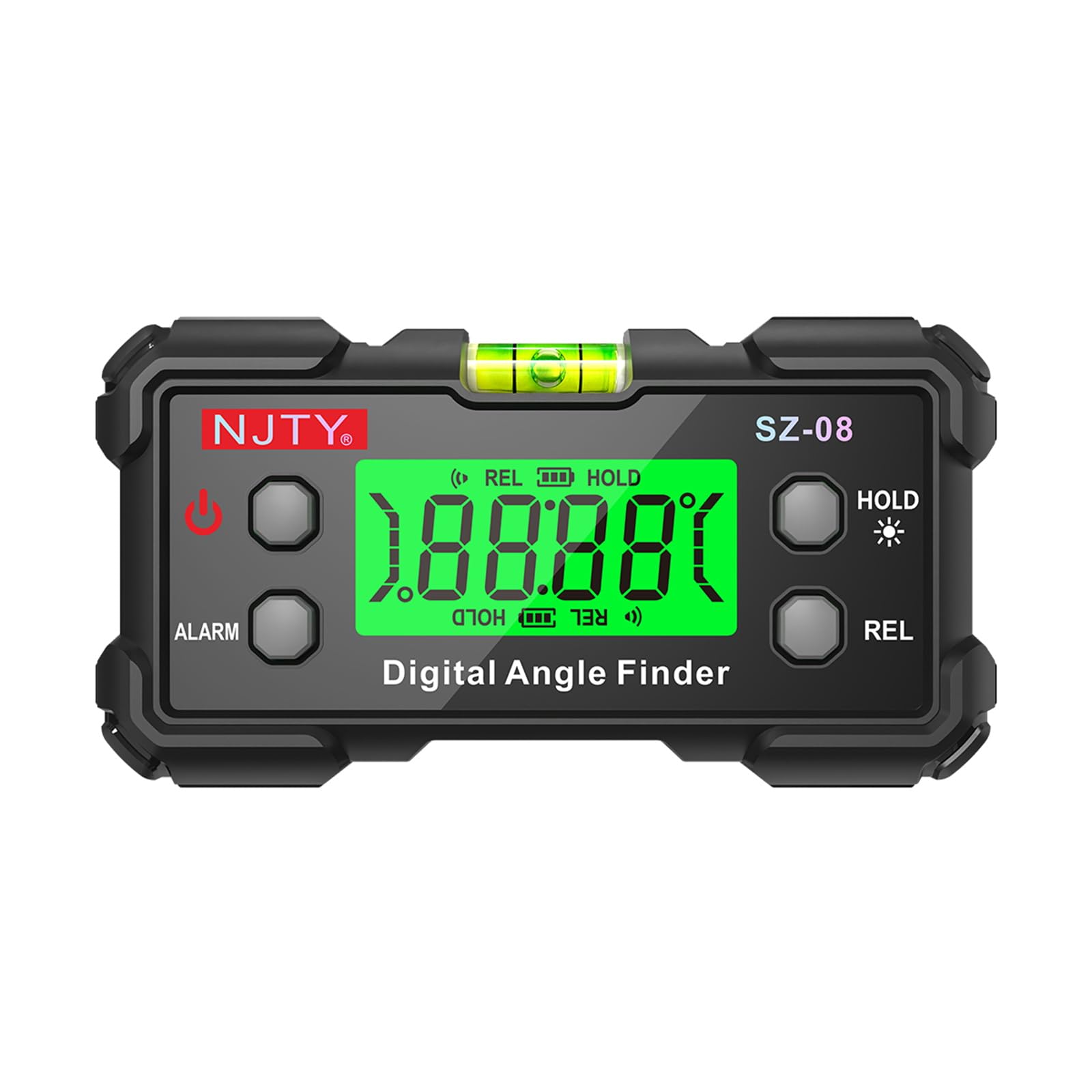
Figura 1: Mésview of the NJTY Digital Inclinometer SZ-08 and its key features.
2. Contingut del paquet
- 1 x NJTY Digital Inclinometer SZ-08
- 2 x AAA Batteries (may be included or require separate purchase)
- 1 x Manual d'usuari (aquest document)
3. Producte acabatview
Familiarize yourself with the components of your Digital Inclinometer:
- Pantalla digital: Backlit LCD for clear angle readings.
- Nivell de bombolla: High-sensitivity illuminated bubble for visual leveling guidance.
- Base magnètica: Dual-sided magnets for secure attachment to metal surfaces.
- Botó d'encesa: Encén/apaga el dispositiu.
- Botó HOLD: Congela la mesura actual a la pantalla.
- Botó REL: Alterna entre els modes de mesurament absolut i relatiu.
- Botó ALARMA: Activates/deactivates the angle alarm function.
- Compartiment de la bateria: Located on the back for AAA battery installation.

Figura 2: Detallada view of the inclinometer's display, bubble level, and battery compartment.
4. Configuració
4.1 Instal·lació de la bateria
- Localitzeu la tapa del compartiment de la bateria a la part posterior del dispositiu.
- Using a small Phillips head screwdriver (not included), unscrew the cover.
- Introduïu dues piles AAA, assegurant-vos de la polaritat correcta (+/-).
- Substituïu la tapa del compartiment de la bateria i fixeu-la amb el cargol.
4.2 Engegada/apagada
- Per encendre, premeu el botó Poder button. The backlit display will illuminate.
- Per apagar-lo, manteniu premut el botó Poder botó durant aproximadament 3 segons.
- The device features an automatic power-off function after 5 minutes of inactivity to conserve battery life. The backlight will turn off after 3 minutes of inactivity.
5. Instruccions de funcionament
5.1 Mesura bàsica d'angles
- Place the inclinometer on the surface you wish to measure.
- The digital display will show the angle relative to the horizontal plane (in Absolute mode) or a set reference (in Relative mode).
- Allow a few seconds for the reading to stabilize.
- For visual confirmation, observe the illuminated bubble level.
5.2 Absolute and Relative Measurement Modes
The inclinometer supports two measurement modes:
- Absolute Measurement Mode: Measures the angle relative to a true horizontal (0°) or vertical (90°) plane. This is the default mode when the device is powered on.
- Relative Measurement (REL) Mode: Allows you to set any surface as a 0° reference point. Subsequent measurements will display the angle difference from this set reference.
Per canviar entre modes, premeu la tecla REL button. When in REL mode, "REL" will be displayed on the screen.
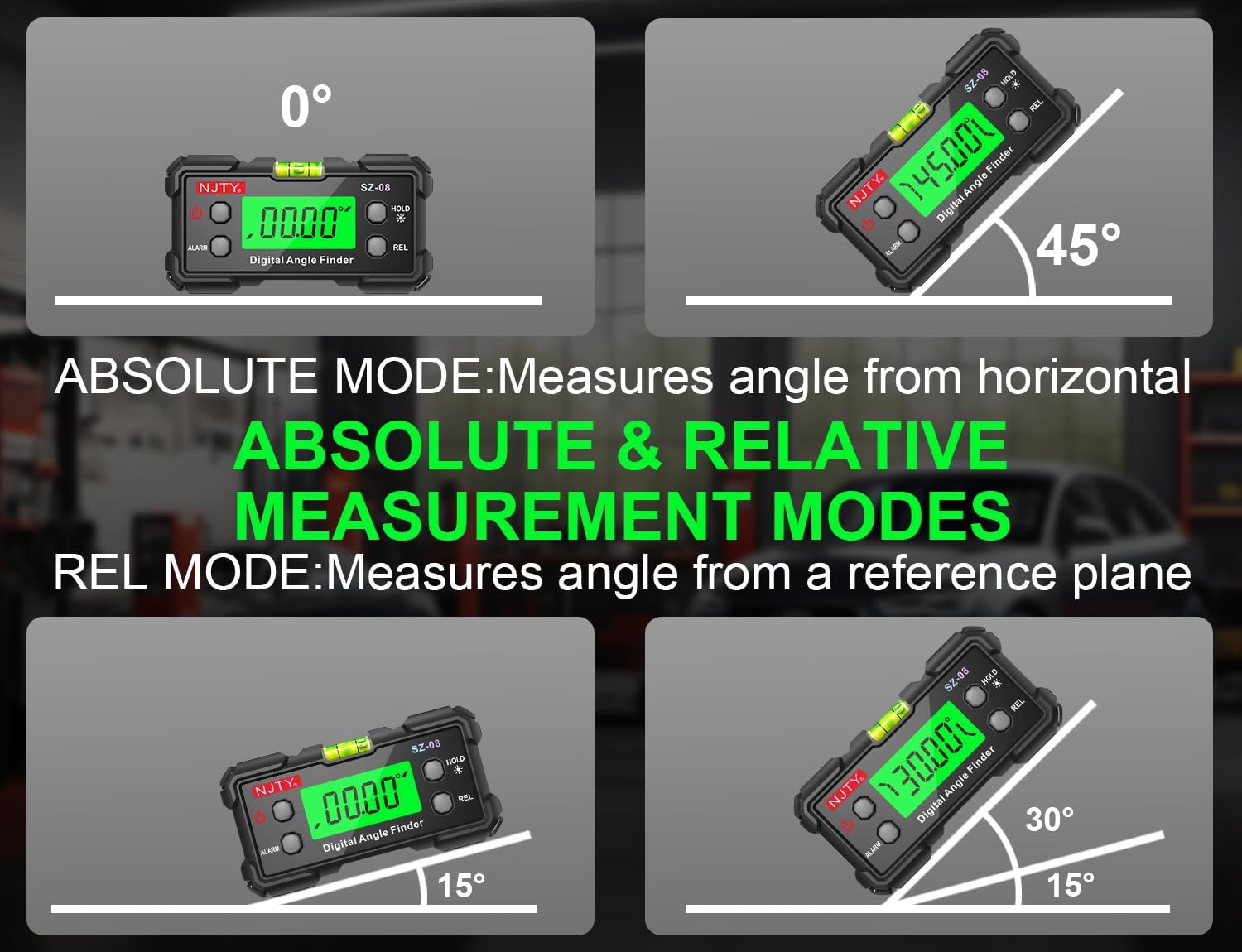
Figure 3: Illustration of Absolute and Relative Measurement Modes.
5.3 Funció de retenció de dades
Per congelar la lectura actual a la pantalla, premeu la tecla MANTENIM button. "HOLD" will appear on the screen. Press the MANTENIM button again to release the reading and resume live measurement.
5.4 Angle Alarm
The device can be set to emit an audible alarm when a specific angle is reached. Refer to the full manual for detailed instructions on setting the angle alarm threshold.
5.5 Automatic Flipping Display
The digital display automatically rotates to remain upright, regardless of the inclinometer's orientation. This ensures easy readability from any angle, including inverted positions.

Figure 4: Automatic Flipping Reading in various orientations.
5.6 Using the Magnetic Base
The inclinometer features strong magnets on its base, allowing it to securely attach to metal surfaces. This enables hands-free operation for tasks such as welding, machine installation, or working on metal frames. Ensure the surface is clean and flat for optimal magnetic adhesion.

Figure 5: Magnetic base for vertical and inverted measurements.
6. Manteniment
- Neteja: Netegeu el dispositiu amb un drap suau i sec. No utilitzeu productes de neteja abrasius ni dissolvents.
- Emmagatzematge: Store the inclinometer in a dry, cool place away from direct sunlight and extreme temperatures. If storing for extended periods, remove the batteries to prevent leakage.
- Substitució de la bateria: Replace batteries when the low battery indicator appears on the display or when the device fails to power on. Follow the battery installation steps in Section 4.1.
7. Solució De Problemes
| Problema | Causa possible | Solució |
|---|---|---|
| El dispositiu no s'encén. | Piles gastades o instal·lades incorrectament. | Comproveu la polaritat de la bateria o substituïu-la per piles AAA noves. |
| Lectures inexactes o inconsistents. | Device not calibrated; unstable surface; magnetic interference. | Ensure the device is on a stable, non-vibrating surface. If persistent, perform a user calibration (refer to advanced manual if available). Avoid strong magnetic fields. |
| La pantalla està tènue o parpelleja. | Bateria baixa. | Substituïu les piles. |
| Auto power-off occurs too quickly. | Normal operation (5 minutes inactivity). | This is a power-saving feature. Ensure you are actively using the device or press a button periodically to reset the timer. |
8. Especificacions
| Número de model | SZ-08 |
| Interval de mesura | 0-90° x 4 (360° total coverage) |
| Precisió | ±0.3° |
| Resolució | 0.05° |
| Mostra | Backlit LCD with auto-flip orientation |
| Font d'alimentació | 2 x piles AAA |
| Apagat automàtic | 5 minutes (backlight auto-off after 3 minutes) |
| Dimensions | Aprox. 10 x 6.6 x 4.3 cm (4 x 2.6 x 1.7 polzades) |
| Pes | Aprox. 142 g (5 unces) |
| Base | Dual-sided magnetic attachment |
9. Garantia i Suport
For warranty information, technical support, or service inquiries, please refer to the documentation provided with your purchase or visit the official NJTY weblloc web. Conserveu el rebut de compra com a comprovant de compra.