
1. Primers passos
Welcome to the world of effortless cleaning with your new ILIFE T20s Ultra Robot Vacuum Cleaner. This manual provides essential information for setup, operation, and maintenance to ensure optimal performance.
1.1 Desembalatge i configuració inicial
Carefully remove all components from the packaging. Ensure all items listed in the 'Included Components' section are present.
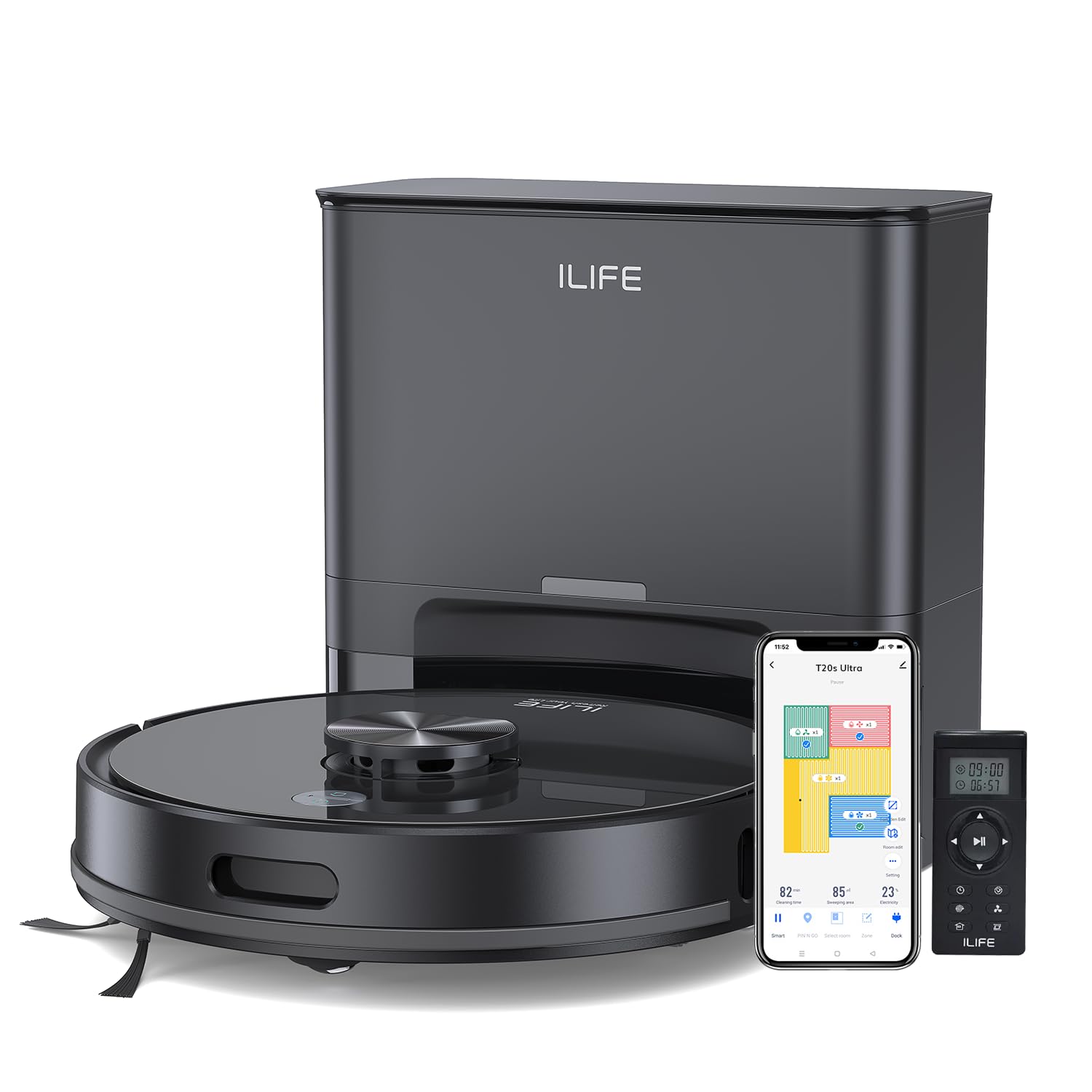
Image: The ILIFE T20s Ultra Robot Vacuum Cleaner and its self-emptying station.
Place the self-emptying station against a wall in an open area, ensuring there are no obstacles within 1.5 meters in front and 0.5 meters on either side. Connect the power cable to the docking station and plug it into a standard wall socket.
1.2 Càrrega inicial
For the very first use, charge your ILIFE T20s Ultra uninterrupted for approximately 4 to 5 hours. This helps condition the battery properly and ensures it performs at its best over time. Simply place the robot onto the charging dock and allow it to fully charge.
2. Producte acabatview
2.1 unitat principal (robot aspirador)
The robot vacuum features a clean, modern finish designed to blend seamlessly into any home. On top, you'll find essential control buttons for power on/off and sending it back to the dock.

Imatge: Superior view of the ILIFE T20s Ultra, highlighting the LiDAR sensor and control buttons.
2.2 Self-Emptying Docking Station
The self-emptying docking station is more than just a charging base. It automatically empties the robot's dustbin after cleaning, allowing for weeks of hands-free cleaning without daily maintenance. It includes a pre-installed 3.5-litre disposable dust bag, with additional bags provided for long-term hygienic maintenance.

Image: The self-emptying station with the robot vacuum and a visual of the disposable dust bags.
2.3 2-in-1 Dust and Water Tank
The robot itself features an onboard 2-in-1 dust and water tank. This hybrid tank allows the T20s Ultra to vacuum and mop simultaneously, making everyday floor cleaning faster and more efficient.

Image: The ILIFE T20s Ultra with its 2-in-1 dust and water tank detached for illustration.
2.4 Accessoris de neteja
- Raspalls laterals: Two side brushes are included (one pre-installed, one extra replacement). These brushes sweep dust and debris from corners and edges directly into the robot's cleaning path for thorough results.
- Raspall de rodet principal: Engineered to work effectively across multiple floor types, from hard floors to carpets, lifting dust, debris, and pet hair with ease.
- Filtres HEPA: Two HEPA filters are included (one pre-installed, one extra replacement). These filters help trap fine dust particles and allergens, keeping the air in your home cleaner.
- Mopping Cloths and Base: The box includes two reusable mopping cloths and the mopping base. The cloth is designed to maintain consistent contact with the floor, helping deliver even and effective wet cleaning.
- Eina de neteja: A cleaning tool is provided to help remove hair and debris from the brush and filters.
2.5 Control remot
The remote control gives you direct and immediate access to the T20s Ultra's core functions. With clearly labeled buttons, you can start or pause cleaning, send the robot back to its dock, and switch between cleaning modes effortlessly. You can adjust suction power (Standard, Strong, Max, Silent) and choose Spot Mode for deep cleaning in spiral areas, or Edge Mode to clean along walls and furniture edges. You can also use the directional buttons to manually guide the robot forward, left, or right when in standby. This is especially useful for quick cleanups or targeted areas.

Image: The ILIFE T20s Ultra with its remote control and a smartphone displaying the app interface.
3. Operating Your ILIFE T20s Ultra
3.1 LiDAR Navigation and Smart Mapping
The T20s Ultra is equipped with Advanced LiDAR Navigation, which allows it to scan and map your home with high accuracy. Using a laser-based system, it measures distances to walls, furniture, and obstacles to create a detailed layout of your space. This enables the robot to plan an efficient cleaning path, clean room by room, and avoid unnecessary overlap or missed areas.
Image: The ILIFE T20s Ultra utilizing its LiDAR navigation system to map its surroundings.
3.2 10,000Pa Ultra-Strong Suction
At the core of the T20s Ultra's performance is its 10,000Pa ultra-strong suction. This high airflow easily lifts fine dust, embedded debris, and pet hair from both hard floors and carpets, delivering a deep, consistent clean throughout your home.

Image: The ILIFE T20s Ultra showcasing its powerful 10,000Pa suction on a hard floor.
3.3 Auto Suction Boost & Multi-Surface Cleaning
The T20s Ultra intelligently detects carpets and automatically increases suction power when needed. This auto suction boost ensures deeper cleaning on carpets while maintaining optimal performance on tiles, wood, and other hard floors. The result is seamless multi-surface cleaning without any manual adjustments.
3.4 'Y' Shaped Cleaning for Deeper Mopping
For tougher stains and sticky spots, the T20s Ultra offers a 'Y' shaped cleaning mode. This back-and-forth motion mimics manual mopping, allowing the robot to pass over the same area multiple times for a deeper and more effective clean.

Image: The ILIFE T20s Ultra performing Y-shaped mopping for enhanced cleaning.
3.5 70 Days of Continuous Cleaning with Self-Emptying Station
After each cleaning session, the T20s Ultra returns to its self-emptying docking station, where collected dust is automatically transferred into a large 3.5-litre dust bag. This allows for up to 70 days of hands-free cleaning, significantly reducing the need for frequent maintenance and dust handling.
3.6 Automatic Recharge and Resume
When the battery level runs low during a cleaning session, the ILIFE T20s Ultra doesn't stop abruptly or leave the job half done. It intelligently tracks its remaining power and at the right moment, automatically returns to its charging dock to recharge. Once the battery is sufficiently charged, the robot resumes cleaning from the exact spot where it paused. It continues following the same mop path, ensuring every area is cleaned completely without repeating or skipping sections. This makes the T20s Ultra especially reliable for larger homes, where a single cleaning cycle may require multiple charges, while still delivering a seamless, uninterrupted cleaning experience.

Image: The robot vacuum automatically returning to its charging station.
3.7 Smart App Control for Personalized Cleaning
The ILIFE Clean App takes the robot's performance even further. It allows you to fine-tune settings, manage schedules, and personalize every cleaning session. You can create precise no-go zones to block off delicate areas like pet bowls or cables, and define no-mop zones to protect carpets and rugs during wet cleaning. The robot follows these boundaries accurately without crossing them. Room-wise cleaning allows you to select specific rooms, adjust suction and water levels individually, and even set different cleaning modes for each space. You can also schedule cleaning based on your routine, whether it's daily kitchen cleaning, weekend deep cleaning, or automatic runs while you're away. With support for up to five saved maps for multi-floor homes, the T20s Ultra adapts intelligently to different layouts, giving you fully personalized and flexible cleaning control at any time.
3.8 Hands-Free Voice Control
For added convenience, the T20s Ultra supports voice control via Alexa and Google Home. With a simple voice command, you can start, stop, or send the robot back to its dock without touching your phone.
3.9 Extended 300-Minutes Runtime with 5200mAh Battery
Powered by a high-capacity 5200mAh battery, the T20s Ultra delivers up to 300 minutes of continuous cleaning on a single charge. This makes it well-suited for larger homes and extended cleaning sessions.
4. Manteniment i cura
The ILIFE T20s Ultra is designed to stay clean with minimal effort from you. However, like any smart appliance, a little routine care keeps it performing at its best.
4.1 Mopping Function Care
After mopping, the cloth can be easily removed and rinsed under running water. For regular use, this keeps it fresh and ready for the next clean. Always make sure the cloth is properly attached before starting a mopping cycle for even and effective results.
4.2 Cleaning the HEPA Filter and Roller Brush
The onboard dustbin and HEPA filter are simple to access and clean. Gently tap the filter to remove fine dust, or use a soft brush for deeper cleaning. The floating roller brush is designed to handle hair and debris efficiently. Periodically remove any tangled hair to maintain strong suction and smooth operation.
4.3 Replacing the Dust Bag in the Self-Empty Station
The large-capacity dust bag inside the station collects debris for up to 70 days of hands-free cleaning. When it's full, simply lift it out and replace it with a new bag. The sealed design helps keep the process clean and hygienic.
4.4 Important Precautions for Long-Term Performance
- Keep the sensors clean to ensure accurate navigation and safe movement around your home.
- Clean charging points regularly to maintain reliable docking and charging.
- Avoid adding detergents, disinfectants, or harsh cleaning solutions directly into the water tank, as this may affect performance. If you prefer using a mild cleaning solution, apply a small amount directly onto the mopping cloth instead before attaching the mop base, ensure the cloth is properly aligned and secured.
5. Solució De Problemes
If you encounter any issues with your ILIFE T20s Ultra, please refer to the following common troubleshooting steps:
- El robot no es carrega: Ensure the charging pins on both the robot and the docking station are clean and free of debris. Verify the power cable is securely plugged into the wall socket and the docking station.
- Robot que es queda encallat: Clear any loose cables, small objects, or thick rugs that might obstruct the robot's path. Use the app to set up no-go zones around problematic areas.
- Mal rendiment de neteja: Check if the dustbin is full and empty it if necessary. Clean the main roller brush and side brushes for tangled hair or debris. Ensure the HEPA filter is clean.
- Problemes de connectivitat de l'aplicació: Ensure your phone is connected to a 2.4 GHz Wi-Fi network. Restart the robot and your phone, then try pairing again.
- Sorolls inusuals: Inspect the main brush, side brushes, and wheels for any foreign objects or debris that might be causing the noise.
Per a més ajuda, poseu-vos en contacte amb l'atenció al client.
6. Especificacions
| Característica | Detall |
|---|---|
| Marca | ILIFE |
| Nom del model | T20s Ultra |
| Succió màxima | 10,000 Pa |
| Durada de la bateria | 300 minuts |
| Tipus de bateria | Ió de liti (5200 mAh) |
| Self-Emptying Dust Bag Capacity | 3.5 Litres (up to 70 days) |
| Tipus de navegació | LiDAR |
| Modes de neteja | Vacuum & Mop Combo, 'Y' Shape Cleaning |
| Mètodes de control | App Control, Remote Control, Voice Control (Alexa, Google Assistant) |
| Tipus de filtre | Filtre de 4 capes, filtre d'alta eficiència, HEPA, microfiltre |
| Dimensions de l'article (L x A x A) | 33L x 33W x 9H centímetres |
| Pes de l'article | 7 quilos |
| Components inclosos | 1x Vacuum Cleaner, 1x Self-emptying Station, 1x 2-in-1 Dust and Water Tank, 5x Dust Bag, 2x HEPA Filter, 2x Side Brush, 1x Cleaning Brush, 2x Mopping Pad, 1x Mop Holder, 1x Remote Control, 1x Instruction Manual |
7. Garantia i Suport
7.1 Garantia del fabricant
The ILIFE T20s Ultra comes with a 1-year manufacturer warranty.
7.2 Atenció al client
For any queries, technical support, or service requests, please contact ILIFE Customer Support:
- Telèfon: 1800-274-5433
- Contacte de l'importador: ILIFE Innovations | Shariden Pvt. Ltd. B-37, Devasandra Industrial Estate, Mahadevapura, Bengaluru, Karnataka 560048
8. Guia de vídeo del producte
Vídeo: Una anàlisi completaview of the ILIFE T20s Ultra, demonstrating its features, unboxing, setup, and various cleaning modes. This video provides visual guidance for understanding and operating your robot vacuum cleaner.