
MiBOXER SPIR5
MiBOXER SPIR5 5-in-1 SPI LED Controller User Manual
Model: SPIR5
Introducció
The MiBOXER SPIR5 5-in-1 SPI LED Controller is designed for controlling addressable LED strip lighting systems. This controller offers versatile compatibility with various LED strip types and features 2.4GHz wireless control for stable signal transmission. This manual provides instructions for the proper installation, operation, and maintenance of your SPIR5 controller.
Producte acabatview i contingut del paquet
The SPIR5 controller is a compact device enabling advanced control over your LED lighting. Please verify that all components are present in your package.
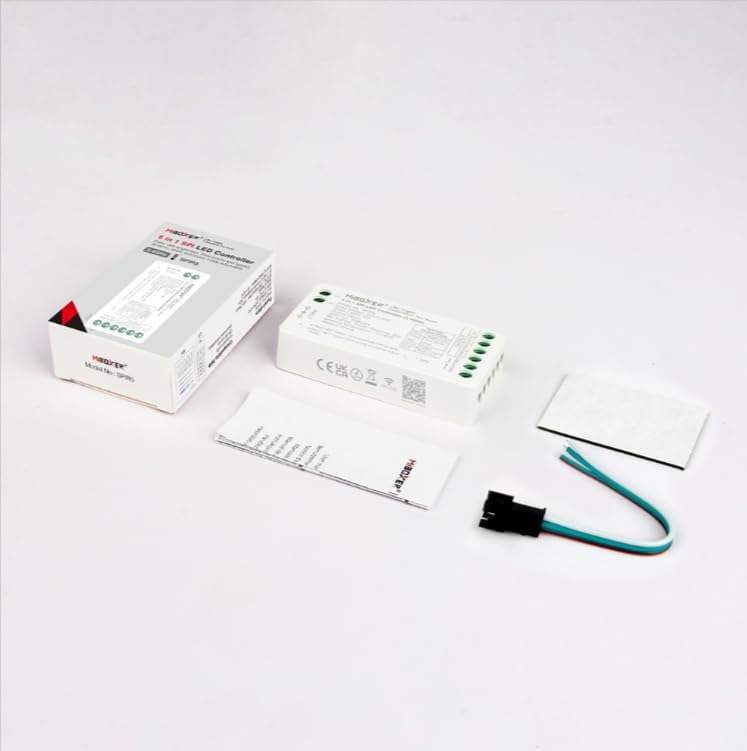
Imatge: Package contents of the MiBOXER SPIR5 controller. Shown are the SPIR5 controller unit, a small instruction manual, a wire harness for connections, and an adhesive mounting pad.
- MiBOXER SPIR5 5-in-1 SPI LED Controller
- Arnès de filferro
- Manual d'instruccions (aquest document)
- Coixinet de muntatge adhesiu
Especificacions
| Model | SPIR5 |
| Entrada Voltage | DC5V-24V |
| Senyal de sortida | SPI (TTL) |
| Distància de control | 30m (2.4GHz RF) |
| Max Pixels Supported | 1024 píxels |
| Velocitat de dades | 800Kbps |
| Temperatura de funcionament | -20 °C a 60 °C |
| Material | Plàstic |

Imatge: Dimensional drawing of the MiBOXER SPIR5 controller. The diagram indicates a length of 74.5mm, a width of 36mm, and a height of 17mm for the controller unit. Packaging dimensions are also shown.
Configuració i instal·lació
Follow these steps for proper installation of your MiBOXER SPIR5 controller.
1. Connexions de cablejat
Ensure all power is disconnected before making any wiring connections. Refer to the connection diagram below for correct wiring.
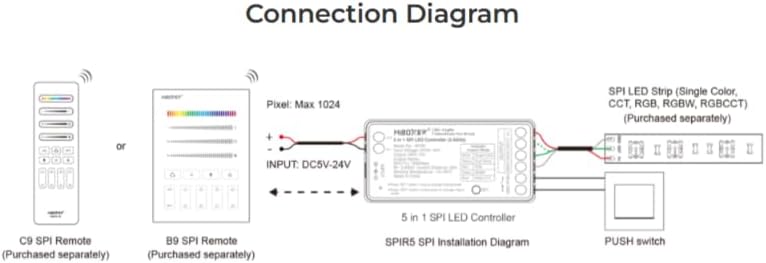
Imatge: Connection diagram for the SPIR5 controller. It illustrates how to connect the DC5V-24V power input, the controller to an SPI LED strip (Single Color, CCT, RGB, RGBW, RGBCCT), and optional C9/B9 SPI remotes or a PUSH switch for control.
- Entrada d'alimentació: Connect a DC5V-24V power supply to the ENTRADA terminals of the controller. Ensure the polarity is correct (+ and -).
- LED Strip Output: Connect your SPI LED strip to the SORTIDA terminals. The controller supports various SPI LED strip types (Single Color, CCT, RGB, RGBW, RGBCCT). Match the data (DAT), clock (CLK), and ground (GND) lines from the controller to your LED strip.
- Control opcional:
- 2.4GHz Remote: The controller can be paired with MiBOXER C9 or B9 SPI remotes (purchased separately) for wireless control.
- PUSH Switch: An external PUSH switch can be connected for basic on/off control.
2. Pairing with a Remote (if applicable)
To pair the controller with a MiBOXER 2.4GHz remote:
- Power on the SPIR5 controller.
- Within 3 seconds of powering on, press the "Link" button on your MiBOXER remote control.
- The LED strip connected to the controller will flash to indicate successful pairing.
Per desvincular:
- Power on the SPIR5 controller.
- Within 3 seconds of powering on, press the "Unlink" button on your MiBOXER remote control.
- The LED strip will flash to indicate successful unpairing.
Instruccions de funcionament
The SPIR5 controller offers flexible operation modes for your addressable LED strips.
1. Output Mode Selection
The SPIR5 is a 5-in-1 controller, meaning it can adapt to different types of SPI LED strips. The output mode is typically auto-detected or can be set via a compatible remote. Ensure your LED strip type matches the controller's output mode for optimal performance.
- Color únic: For basic monochrome LED strips.
- CCT (Temperatura de color correlacionada): For LED strips with adjustable white light tones (warm to cool white).
- RGB: For LED strips with red, green, and blue color mixing.
- RGBW: For RGB LED strips with an additional dedicated white LED.
- RGBCCT: For RGB LED strips with adjustable white light tones.
2. DND (Do Not Disturb) Function
The DND function is designed to reduce power consumption, especially useful in scenarios where power failures might occur or energy efficiency is critical. When activated, the controller minimizes standby power usage.
Specific activation/deactivation methods for the DND function may vary depending on the paired remote control. Refer to your remote's manual for details.
3. Control sense fil
Utilize a compatible MiBOXER 2.4GHz remote control (e.g., C9, B9) to adjust brightness, color, modes, and other settings of your connected LED strip. The 2.4GHz frequency provides stable and responsive control within a 30-meter range.
Manteniment
To ensure the longevity and optimal performance of your MiBOXER SPIR5 controller, follow these maintenance guidelines:
- Neteja: Use a soft, dry cloth to clean the surface of the controller. Do not use harsh chemicals or abrasive cleaners.
- Medi ambient: Keep the controller in a dry environment, away from direct sunlight, high temperatures, and excessive humidity.
- Ventilació: Ensure adequate airflow around the controller to prevent overheating, especially during prolonged operation.
- Connexions: Reviseu periòdicament totes les connexions del cablejat per assegurar-vos que estiguin ben fixades i que no presentin corrosió.
Resolució de problemes
If you encounter issues with your SPIR5 controller, refer to the following common problems and solutions:
| Problema | Causa possible | Solució |
|---|---|---|
| La tira LED no s'il·lumina. | No power, incorrect wiring, faulty LED strip. |
|
| El comandament a distància no funciona. | Remote not paired, low remote battery, interference. |
|
| Incorrect colors or flickering. | Incorrect LED strip type setting, poor data signal, faulty strip. |
|
Garantia
MiBOXER products are designed for reliability and performance. This product comes with a limited warranty against defects in materials and workmanship for a period of 2 anys from the date of purchase. This warranty does not cover damage caused by improper installation, misuse, unauthorized modifications, or acts of nature. Please retain your proof of purchase for warranty claims.
Suport
For technical assistance, troubleshooting, or further inquiries regarding your MiBOXER SPIR5 controller, please contact your retailer or visit the official MiBOXER weblloc de recursos de suport.
Note: Specific contact information may vary by region.
Ask a question about this manual
Ask about setup, troubleshooting, compatibility, parts, safety, or missing instructions. Manuals+ will review the question and use this page’s manual context to help answer it.