
1. Introducció
Welcome to the OPPO Reno15c 5G user manual. This guide provides essential information to help you set up, operate, maintain, and troubleshoot your new smartphone. The OPPO Reno15c 5G combines advanced technology with a durable design, offering a seamless user experience.

Figura 1.1: Frontal view of the OPPO Reno15c 5G smartphone.

Figura 1.2: Esquena view of the OPPO Reno15c 5G smartphone, showcasing the camera module and 'Dancing Aurora Design'.
2. Què hi ha a la caixa
Upon unboxing your OPPO Reno15c 5G, please ensure all the following items are present:
- OPPO Reno15c 5G Smartphone
- Power Adapter (80W SuperVOOC)
- Cable USB (tipus C)
- Funda de telèfon
- Expulsor de la safata SIM
- Guia d'inici ràpid (aquest document)
- Informació de seguretat
3. Configuració
3.1. Inserció de la targeta SIM
- Localitza la safata de la targeta SIM al lateral del dispositiu.
- Introduïu l'eina d'expulsió de la safata de la SIM al forat petit que hi ha al costat de la safata i premeu suaument fins que la safata surti.
- Place your Nano-SIM card(s) into the designated slots on the tray. Ensure the gold contacts face downwards. The device supports Dual SIM.
- Torneu a inserir amb cura la safata de la targeta SIM al telèfon fins que encaixi al seu lloc.

Figura 3.1: lateral view of the OPPO Reno15c 5G, showing the SIM card tray location.
3.2. Engegada inicial i configuració bàsica
- Premeu i manteniu premut el botó d'engegada (situat al costat dret) fins que aparegui el logotip d'OPPO.
- Segueix les instruccions que apareixen a la pantalla per seleccionar l'idioma i la regió i connectar-te a una xarxa Wi-Fi.
- Inicia la sessió amb el teu compte de Google o crea'n un de nou per accedir als serveis de Google i a Play Store.
- Set up your preferred security methods, such as fingerprint recognition, face unlock, PIN, or pattern.
3.3. Càrrega del dispositiu
Before first use, it is recommended to fully charge your device. Use the provided 80W SuperVOOC Power Adapter and USB Cable for optimal charging speed.
- Connecteu el cable USB a l'adaptador de corrent.
- Connecteu l'adaptador de corrent a una presa de corrent.
- Connect the USB Type-C end of the cable to the charging port at the bottom of your phone.
- L'indicador de càrrega apareixerà a la pantalla.

Figure 3.2: Visual representation of the 7000mAh battery and 80W SuperVOOC Flash Charge capabilities.
4. Funcionament del vostre dispositiu
4.1. Pantalla i interfície d'usuari
The OPPO Reno15c 5G features a 120Hz Smart Adaptive OLED screen, providing a smooth and vibrant visual experience. The display also incorporates 2160Hz PWM dimming for eye protection.

Figure 4.1: The 120Hz Smart Adaptive OLED display of the OPPO Reno15c 5G.
The device runs on ColorOS 16, based on Android 15, offering a smooth, smart, and secure user interface. The All-New Trinity Engine optimizes performance for lasting fluidity.

Figure 4.2: ColorOS 16 interface highlighting smooth performance.
4.2. Característiques de la càmera
The OPPO Reno15c 5G is equipped with an advanced camera system for vivid photography and videography.
- 50MP Ultra-Clear Main Camera: Capture detailed images in various lighting conditions.
- 50MP Ultra Wide Selfie Camera: Features a 100° FOV, ideal for group selfies.
- AI Flash Photography 2.0: Utilizes a dual flash system for clear shots in low light.
- AI Portrait Glow: Allows professional relighting of photos after capture.
- 4K Ultra-Clear Video: Record high-resolution videos with stability.
- Dual-View Vídeo: Record simultaneously with both front and rear cameras.

Figura 4.3: Example of a wide-angle selfie captured with the 50MP Ultra Wide Selfie Camera.
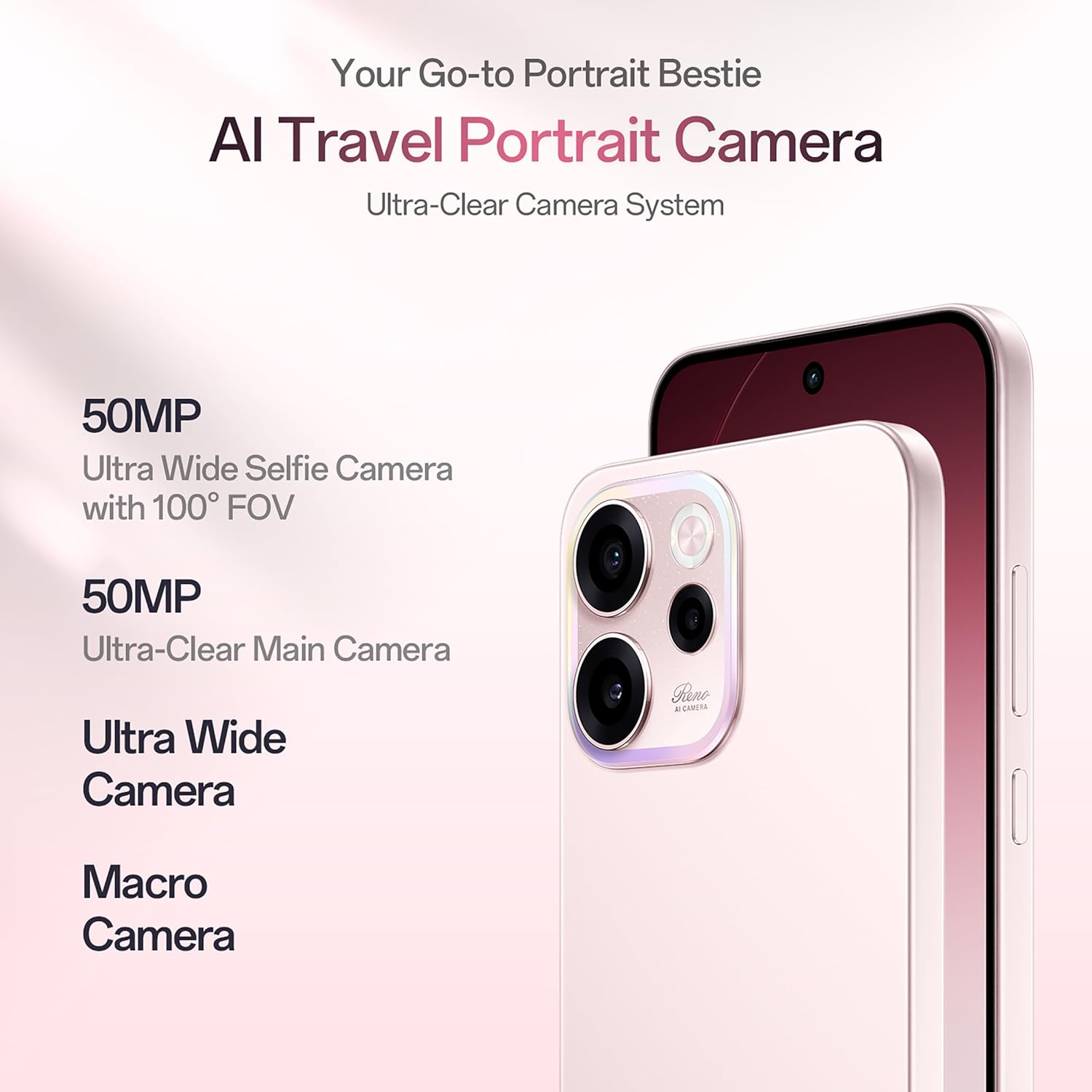
Figure 4.4: Demonstrating 4K Ultra-Clear Video recording on the OPPO Reno15c 5G.
4.3. Rendiment i bateria
Powered by the 4nm Snapdragon 6 Gen 1 platform and AI HyperBoost 2.0, the Reno15c 5G ensures stable and cool performance for gaming and multitasking. The 7000mAh battery, combined with 80W SuperVOOC flash charge, provides extended usage and rapid recharging.

Figura 4.5: Mésview of the Snapdragon 6 Gen 1 Mobile Platform and its performance enhancements.
4.4. Connectivity and AI Features
The device supports 5G connectivity and features AI LinkBoost 3.0 for enhanced network performance, including AI Gaming Antenna System Acceleration, AI Super Wi-Fi Booster, and AI Network Booster for Teamfights.

Figure 4.6: Explanation of AI LinkBoost 3.0 for optimized connectivity.
Integrated AI Super Tools include real-time AI Translate for conversations and photos, AI Call Summary, VoiceScribe for notes, and AI Mind Space for organizing digital content. Deep Gemini integration and Circle to Search further enhance AI capabilities.

Figure 4.7: AI Mind Space for intelligent organization and recall of screen content.
4.5. Security and Durability
The Reno15c 5G is built with IP69 All-Weather Armour, providing resistance against hot water jets and submersion up to 2 meters. Its All-Round Armour architecture offers superior drop protection. Security features include OPPO Lock for anti-theft and military-grade Private Computing Cloud (PCC) with end-to-end hardware encryption.

Figure 4.8: The OPPO Reno15c 5G demonstrating its IP69 water and dust resistance.
5. Manteniment
5.1. Neteja del dispositiu
- Feu servir un drap suau i sense borrissol per netejar suaument la pantalla i la carcassa del telèfon.
- Eviteu l'ús de productes químics agressius, materials abrasius o aerosols.
- Per a taques persistents, lleugerament dampNetegeu el drap amb aigua o un netejador de pantalles dissenyat específicament per a electrònica.
5.2. Actualitzacions de programari
Comproveu i instal·leu regularment si hi ha actualitzacions de programari per assegurar-vos que el dispositiu tingui les darreres funcions, pegats de seguretat i millores de rendiment.
- Vés a Configuració > Sobre el dispositiu > ColorOS version.
- Toqueu Comproveu si hi ha actualitzacions.
- If an update is available, follow the on-screen instructions to download and install it. Ensure your device has sufficient battery and a stable internet connection.
5.3. Gestió de l'emmagatzematge
Per mantenir un rendiment òptim, gestiona regularment l'emmagatzematge del dispositiu.
- Elimineu-les innecessàries files, aplicacions i mitjans de comunicació.
- Esborra les dades de la memòria cau de les aplicacions a Configuració > Aplicacions > Gestió d'aplicacions > [Selecciona l'aplicació] > Ús d'emmagatzematge > Esborra la memòria cau.
- Utilize cloud storage services for backups of photos and videos.
6. Solució De Problemes
This section addresses common issues you might encounter with your OPPO Reno15c 5G.
| Problema | Possible solució |
|---|---|
| El dispositiu no s'encén | Ensure the battery is charged. Connect the charger and wait a few minutes before attempting to power on. If it still doesn't turn on, perform a force restart by holding the Power button and Volume Up button simultaneously for about 10 seconds. |
| La bateria s'esgota ràpidament | Check for background apps consuming power. Reduce screen brightness, disable unnecessary features like GPS or Bluetooth when not in use. Review battery usage in Settings to identify power-hungry apps. |
| Les aplicacions es bloquegen o es bloquegen | Clear the app's cache (Settings > Apps > App management > [App Name] > Storage usage > Clear cache). If the issue persists, try reinstalling the app. Ensure your device software is up to date. |
| No es pot connectar a la Wi-Fi/dades mòbils | Restart your phone and the Wi-Fi router. Check if Airplane Mode is off. Verify SIM card insertion and mobile data settings. Reset network settings (Settings > System settings > Back up and reset > Reset phone > Reset network settings). |
| El sensor d'empremtes dactilars no funciona | Ensure your finger is clean and dry. Re-register your fingerprints in Settings > Password & security > Fingerprint. If the issue persists, ensure the screen is clean and free from damage. |
If you encounter issues not listed here or if the suggested solutions do not resolve your problem, please contact OPPO customer support.
7. Especificacions
Key technical specifications for the OPPO Reno15c 5G:
| Característica | Detall |
|---|---|
| Marca | OPPO |
| Model | Reno15c 5G |
| Sistema operatiu | Android 15 (ColorOS 16) |
| Memòria RAM | 12 GB |
| Capacitat d'emmagatzematge | 256 GB |
| Mida de la pantalla | 6.57 polzades |
| Tipus de visualització | AMOLED, 120Hz Smart Adaptive |
| Color | Afterglow Pink |
| Ranura per a targeta SIM | Doble SIM |
| Tipus de connector | USB tipus C |
| Seguretat biomètrica | Reconeixement d'empremtes digitals |
| Nivell de resistència a l'aigua | Resistent a l'aigua IP69 |
| Potència de la bateria | 7000 mAh |
| Pes de l'article | 196 grams |
| Dimensions de l'article | 15.8 x 7.5 x 0.7 centímetres |
| Tecnologia cel·lular | 5G |
| Proveïdor de sense fil | Desbloquejat per a tots els transportistes |
| Any model | 2026 |
8. Garantia i Suport
8.1. Informació de la garantia
Your OPPO Reno15c 5G comes with a limited warranty:
- Auricular: 12 mesos
- Adapter & Cable: 6 mesos
Si us plau, conserveu el comprovant de compra per a reclamacions de garantia. La garantia cobreix els defectes de fabricació i no cobreix els danys causats per mal ús, accidents o reparacions no autoritzades.
8.2. Atenció al client
For technical assistance, service, or further inquiries, please contact OPPO customer support:
- Fabricant: OPPO MOBILES INDIA PVT LTD.
- Adreça: 5a PLANTA, Torre B, EDIFICI, N-8, DLF Cyber City, DLF Fase 2, Gurugram, Haryana 122002
- Número gratuït: 18001032777
També podeu visitar la pàgina oficial d'OPPO website for more support resources, FAQs, and service center locations.