
Introducció
Welcome to your new Memorex 11-inch Android 14 Tablet Bundle. This comprehensive guide provides detailed instructions to help you set up, operate, maintain, and troubleshoot your device and its included accessories. Please read this manual thoroughly to ensure optimal performance and longevity of your product.
Què hi ha a la caixa
Upon unboxing, please verify that all the following items are present:
- Memorex 11-inch Tablet
- Teclat Bluetooth
- Auriculars sense fil
- Funda protectora amb suport
- AC Adapter Charger & Cable
- Manual d'instruccions (aquest document)
- Guia d'inici ràpid

Image: The Memorex 11-inch tablet with its accompanying Bluetooth keyboard and wireless headphones, set up on a table in a living room environment.
Configuració
1. Càrrega inicial
Before first use, fully charge your tablet. Connect the provided AC adapter and cable to the tablet's charging port and plug it into a power outlet. The battery indicator on the screen will show charging status.
2. Encès / apagat
- Per encendre: Press and hold the Power button located on the side of the tablet until the Memorex logo appears.
- Per apagar: Mantingueu premut el botó d'engegada i, a continuació, seleccioneu "Apagar" de les opcions que apareixen a la pantalla.
- Per reiniciar: Mantingueu premut el botó d'engegada i, a continuació, seleccioneu "Reiniciar" de les opcions.
3. Initial Android Setup
Follow the on-screen prompts to complete the initial setup of your Android 14 operating system. This typically includes selecting your language, connecting to a Wi-Fi network, and signing in with or creating a Google account.
4. Connecting Bluetooth Accessories
Your tablet bundle includes a Bluetooth Keyboard and Wireless Headphones. To connect them:
- Ensure the accessory (keyboard or headphones) is charged and in pairing mode (refer to the accessory's specific instructions if needed).
- A la tauleta, vés a Configuració > Dispositius connectats > Bluetooth.
- Turn Bluetooth On.
- The tablet will scan for available devices. Select the name of your Bluetooth Keyboard or Wireless Headphones from the list.
- Seguiu les indicacions de la pantalla per completar el procés de vinculació.
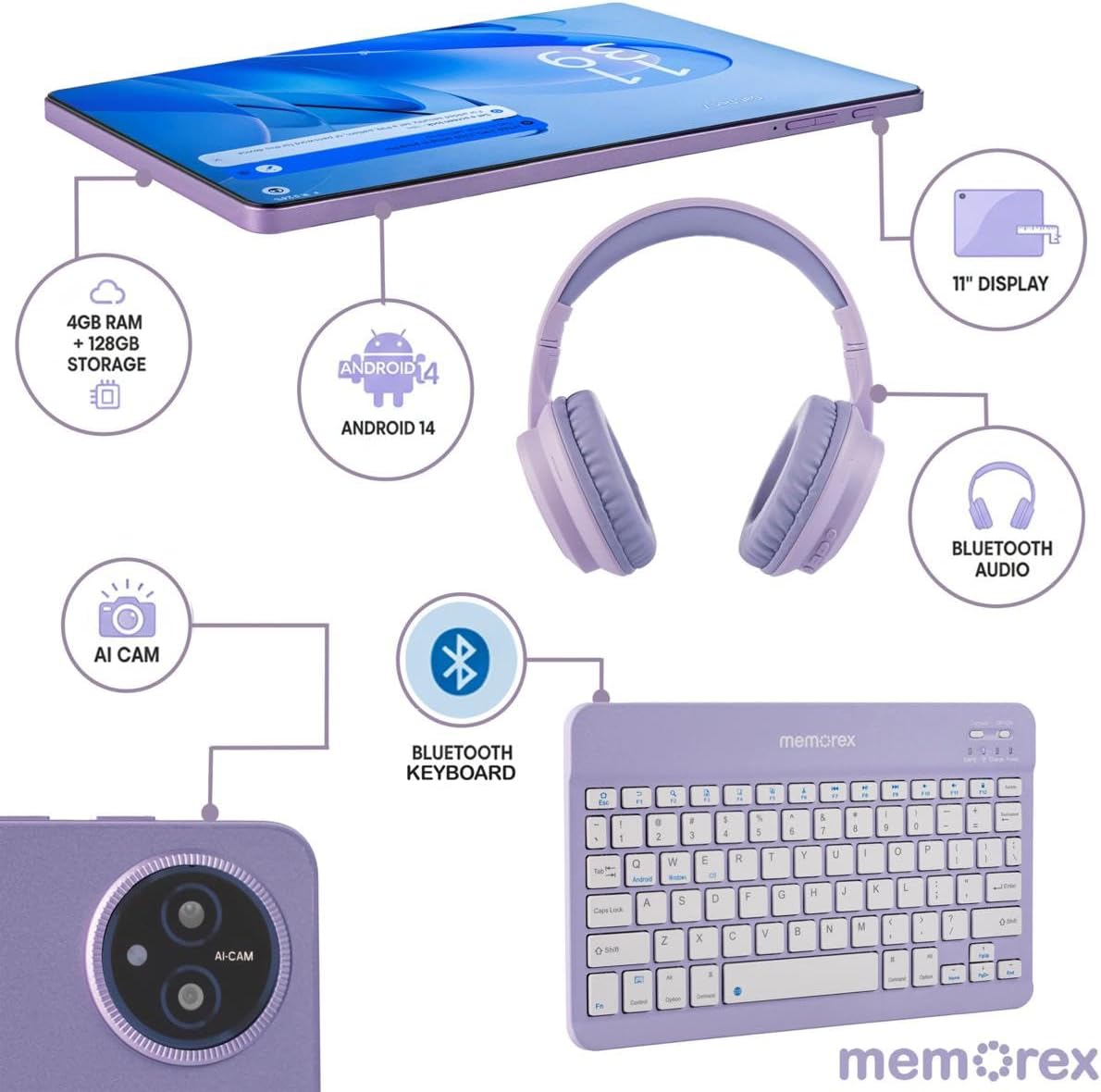
Image: A visual representation of the Memorex tablet and its accessories, including the Bluetooth keyboard and headphones, illustrating their connection points and features.
Instruccions de funcionament
1. Navegació bàsica
Your tablet features an 11-inch FHD IPS touchscreen. Navigate by tapping, swiping, pinching, and spreading fingers on the display. The Android 14 interface is intuitive, allowing you to access apps, settings, and notifications easily.
2. Using the Bluetooth Keyboard
Once paired, the Bluetooth keyboard functions like a standard computer keyboard. It can be used for typing documents, emails, and navigating the tablet's interface more efficiently. Ensure the keyboard is powered on and connected via Bluetooth.
3. Funcionament de la càmera
The tablet is equipped with an 8MP front camera and a 13MP rear camera. To use the camera:
- Obre l'aplicació Càmera des de la pantalla d'inici o des del calaix d'aplicacions.
- Toqueu la icona de la càmera per canviar entre la càmera frontal i la posterior.
- Tap the shutter button to take photos or start/stop video recording.
4. Gestió de l'emmagatzematge
Your tablet comes with 128GB of internal storage. If more storage is needed, you can expand it using a microSD card (sold separately). Insert the microSD card into the designated slot on the tablet.
5. Consells d'ús de la bateria
La bateria de 6000 mAh proporciona un ús prolongat. Per maximitzar la durada de la bateria:
- Ajusteu la brillantor de la pantalla a un nivell còmode.
- Tanca les aplicacions que no s'utilitzen i que s'executen en segon pla.
- Desactiva el Wi-Fi i el Bluetooth quan no els utilitzis.
- Activa el mode d'estalvi de bateria a la configuració.

Image: A user comfortably operating the Memorex tablet with its keyboard and headphones, demonstrating its use for work or entertainment.
Manteniment
1. Neteja del dispositiu
Feu servir un drap suau i sense borrissol per netejar la pantalla i el cos de la tauleta. Per a taques difícils, fregueu lleugerament.ampNetegeu el drap amb aigua o una solució de neteja segura per a pantalles. Eviteu productes químics agressius o materials abrasius.
2. Actualitzacions de programari
Comproveu i instal·leu regularment si hi ha actualitzacions del sistema per assegurar-vos que la tauleta tingui les darreres funcions, pegats de seguretat i millores de rendiment. Aneu a Configuració > Sistema > Actualització del sistema.
3. Cura de la bateria
To prolong battery lifespan, avoid extreme temperatures and do not leave the tablet fully discharged for extended periods. It is recommended to keep the battery charge between 20% and 80% for optimal health.
4. Storage Optimization
Periòdicament review i eliminar innecessaris files, apps, and media to free up storage space and maintain tablet performance. Utilize cloud storage services for backups of important data.
Resolució de problemes
This section addresses common issues you might encounter with your Memorex tablet.
| Problema | Solució |
|---|---|
| La tauleta no s'encén | Ensure the tablet is charged. Connect to the AC adapter and wait a few minutes before attempting to power on again. If still unresponsive, perform a forced restart by holding the power button for 10-15 seconds. |
| Problemes de connectivitat Wi-Fi | Comprova si el Wi-Fi està activat a la configuració. Reinicia el teu encaminador Wi-Fi. Oblida't de la xarxa i torna a connectar-te. Assegura't que estàs dins de l'abast del senyal Wi-Fi. |
| El dispositiu Bluetooth no està vinculat | Ensure the Bluetooth accessory is in pairing mode and fully charged. Turn Bluetooth off and on again on the tablet. Make sure no other devices are connected to the accessory. |
| Rendiment lent | Close unused apps. Clear cache for frequently used apps. Check available storage space and delete unnecessary files. Restart the tablet. |
| Esgotament ràpid de la bateria | Reduce screen brightness. Disable Wi-Fi/Bluetooth when not in use. Identify and close power-intensive apps. Check battery usage in settings to pinpoint culprits. |
Especificacions
Key technical specifications for your Memorex MXTAB11 Tablet Bundle:
- Marca: Memorex
- Nom del model: 11-inch Tablet PC
- Número de model: MXTAB11
- Sistema operatiu: Android 14
- Processador: ARM Cortex-A523 Octa-Core Processor, 2 GHz
- RAM: 4 GB
- Emmagatzematge intern: 128 GB
- Emmagatzematge ampliable: Compatible amb microSD
- Mida de la pantalla: 11 polzades
- Resolució de visualització: 1200 x 1920 pixels (FHD IPS)
- Càmera posterior: 13 MP
- Càmera frontal: 8 MP
- Capacitat de la bateria: 6000 milionsamp Hores
- Connectivitat: Wi-Fi (802.11ac, 802.11ax), Bluetooth, USB
- Human-Interface Input: Pantalla tàctil
- Color: Negre

Image: An infographic detailing the core specifications of the Memorex tablet, including storage, RAM, build material, connectivity, and battery capacity.
Garantia i Suport
1. Informació de la garantia
Your Memorex MXTAB11 Tablet Bundle is covered by a Garantia limitada de 1 anys. This warranty covers manufacturing defects and workmanship under normal use. Please retain your proof of purchase for warranty claims. The warranty does not cover damage caused by misuse, accidents, unauthorized repairs, or normal wear and tear.
2. Atenció al client
For technical assistance, troubleshooting beyond this manual, or warranty inquiries, please contact Memorex customer support. Refer to the contact information provided in your product packaging or visit the official Memorex weblloc de recursos de suport.