
Introducció
This manual provides essential information for the proper setup, operation, maintenance, and troubleshooting of your Ulefone Rugking Pad 2 Pro. Please read it thoroughly before using your device to ensure optimal performance and longevity.
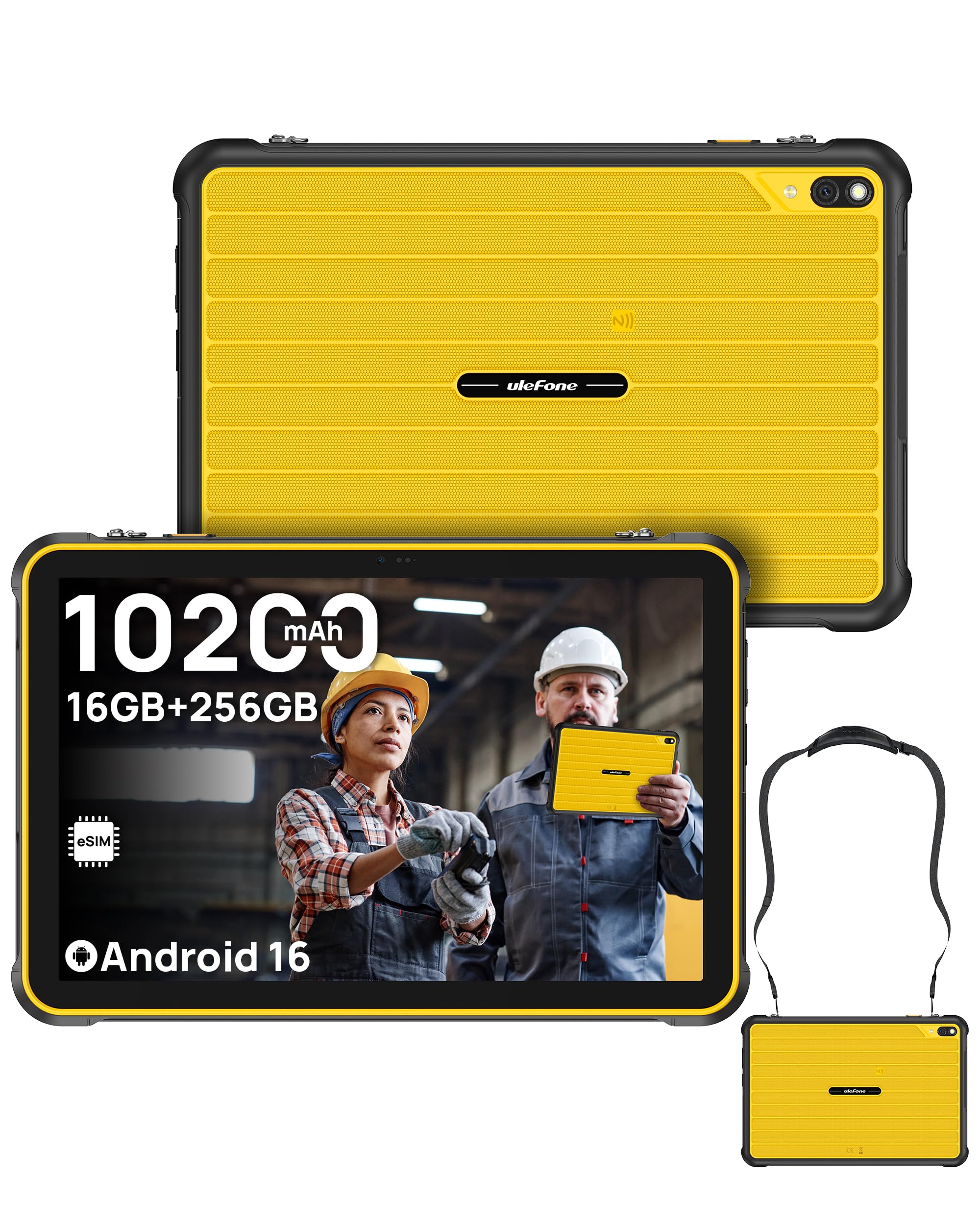
The Ulefone Rugking Pad 2 Pro, a rugged tablet designed for durability and performance.
Contingut del paquet
Verifiqueu que tots els elements siguin presents al vostre paquet:
- Ulefone Rugking Pad 2 Pro Tablet
- Carregador de corrent altern (18 W)
- Cable de dades de tipus C a tipus C (100 cm)
- Corretja per portar
- Cargols (x2)
- Pel·lícula protectora (preinstal·lada)
- Metal Pry Opener
- Manual d'usuari en diversos idiomes
- Charging Instruction Card
- Safety Prompt Statement

Illustration of the Ulefone Rugking Pad 2 Pro and its included accessories.
Configuració
1. Instal·lació de la targeta SIM i la targeta MicroSD
The Rugking Pad 2 Pro supports dual Nano SIM cards and one MicroSD card for expanded storage. Use the provided metal pry opener to access the card slot.
Official Ulefone Rugking Pad 2 Pro Unboxing Video, demonstrating SIM and MicroSD card installation.
2. Activació d'eSIM
The device features a built-in eSIM for convenient global connectivity. To activate, navigate to the network settings on your tablet and follow the on-screen instructions to download a local data plan. Nota: Confirm eSIM support and eligibility with your cellular carrier before activation, as service varies by region. This device is not compatible with AT&T or Cricket.

Visual representation of eSIM technology for instant setup and worldwide access.
3. Engegada inicial i configuració bàsica
- Premeu i manteniu premut el botó d'engegada fins que aparegui el logotip d'Ulefone.
- Segueix les instruccions que apareixen a la pantalla per seleccionar l'idioma, connectar-te a una xarxa Wi-Fi i configurar el teu compte de Google.
- Review i accepta els termes i condicions per completar la configuració inicial.
Instruccions de funcionament
1. Sistema operatiu Android 16
Your tablet runs on the Android 16 operating system, offering a seamless and intuitive user experience. Navigate through apps, customize settings, and access various features with ease.

The Android 16 OS provides a smart, safe, and seamless user interface.
2. Rendiment i emmagatzematge
Equipped with a Unisoc T7250 Octa-core Processor, 16GB RAM (8GB physical + 8GB adjustable virtual RAM), and 256GB internal storage (expandable up to 2TB via MicroSD), the tablet delivers responsive performance for multitasking and ampl'espai per al teu files.

Details on the Octa-Core Processor, 16GB RAM, and 256GB ROM with 2TB expandability.
3. Display and Durability
The 10.1-inch HD+ display (1280 x 800 resolution) offers clear visuals with a 90Hz refresh rate and 600 nits maximum brightness. The screen is protected by Corning Gorilla Glass 3, providing enhanced resistance against drops and scratches.

The 10.1-inch HD+ display with 90Hz refresh rate and 600 nits brightness.

Corning Gorilla Glass 3 and in-depth wear resistance features for enhanced durability.
4. Robustesa i protecció
The Rugking Pad 2 Pro is certified IP68, IP69K, and MIL-STD-810H, ensuring protection against dust, water submersion, high-pressure water jets, shocks, vibrations, and extreme temperatures. This makes it suitable for demanding environments.

The tablet's certifications for extreme durability against water, dust, and drops.
5. Camera and Lighting
Capture moments with the 48MP rear camera and 8MP front camera. The integrated 120LM Super Torch provides powerful illumination for low-light conditions.

Details on the 48MP rear camera and 8MP front camera capabilities.

The 120 Lumens Super Torch provides powerful light for various situations.
6. Àudio i connectivitat
Experience rich sound with dual stereo speakers. Connectivity options include Dual 4G, Wi-Fi, Bluetooth, NFC, and GPS (GPS + GLONASS + Galileo + BeiDou + QZSS). A 3.5mm headphone jack and headset-free FM radio are also available.

The tablet features dual stereo speakers for enhanced audio experience.

NFC-enabled for contactless payments, 4G LTE for constant connectivity, and a 3-card slot.
7. Bateria i càrrega
The tablet is equipped with a large 10200mAh battery, providing extended usage times. It supports 18W dock charging (dock sold separately) and can reverse charge other devices.

The 10,200mAh massive battery ensures long-lasting power.

The tablet supports Pogo Pin Dock Charging for instant power (dock sold separately).
8. Característiques addicionals
- Connector d'expansió uSmart: Integrated connector for stable connection with uSmart accessories like endoscopes (E01/E02) and microscopes (C01), sold separately.
- Corretja portàtil: Features metal connection loops for the included wearable strap, allowing for secure and effortless carrying.
- Water-Lock Mode: Disables the touchscreen in wet conditions to prevent accidental touches.
- Mode guant: Enhances touchscreen sensitivity for use with gloves.
- Clau personalitzada: Botó programable per a un accés ràpid a les funcions.
- Face Unlock & Fingerprint ID: Autenticació biomètrica segura i convenient.
- Widevine L1: Supports high-definition streaming from platforms like Netflix and Hulu.
- Caixa d'eines per a exteriors: Un conjunt d'aplicacions úniques per a activitats a l'aire lliure.

The uSmart Expansion Connector allows for stable integration with peripherals like endoscopes and microscopes (sold separately).

The exclusive portable strap provides secure and effortless carrying.

Acabatview of additional features including Widevine L1, Custom Key, Face Unlock, Fingerprint ID, Outdoor Toolbox, Gloves Mode, 3.5mm Headphone Jack, Headset-free FM Radio, and GPS.
Official Ulefone Rugking Pad 2 Pro Product Overview video, highlighting key features and design.
Manteniment
1. Neteja de la tauleta
Due to its rugged design and IP68/IP69K ratings, the tablet can be cleaned with water. Ensure all port covers are securely closed before exposing the device to liquids. Use a soft, damp cloth to wipe the screen and body. Avoid harsh chemicals or abrasive materials.
2. Cura de la bateria
- Eviteu descarregar completament la bateria amb freqüència.
- Do not expose the tablet to extreme temperatures (hot or cold) for prolonged periods, as this can degrade battery life.
- Use only the provided charger or a compatible 18W charger.
3. Actualitzacions de programari
Regularly check for and install software updates to ensure your device has the latest features, security patches, and performance improvements. You can usually find this option in the tablet's settings under "System" or "About tablet".
Resolució de problemes
If you encounter issues with your Ulefone Rugking Pad 2 Pro, refer to the following common solutions:
- El dispositiu no s'encén: Assegureu-vos que la bateria estigui carregada. Connecteu la tauleta al carregador i espereu uns minuts abans d'intentar engegar-la de nou.
- La pantalla tàctil no respon: Restart the device by holding the Power button. If the issue persists in wet conditions, ensure Water-Lock Mode is not active or try cleaning the screen.
- Connectivity issues (Wi-Fi/4G): Check network settings. For 4G, ensure your SIM/eSIM is active and has a valid data plan. For Wi-Fi, try restarting your router.
- Les aplicacions es bloquegen o tenen un rendiment lent: Close background applications. Clear app caches or reinstall problematic apps. If performance remains slow, consider a factory reset (back up your data first).
- La càmera no funciona: Ensure the camera app has necessary permissions. Restart the device.
For more complex issues or if the problem persists, please contact Ulefone customer support.
Especificacions
| Característica | Detall |
|---|---|
| Marca | Ulefone |
| Nom del model | Ulefone Rugking Pad 2 Pro 256GB |
| Sistema operatiu | Android 16 |
| Processador | Unisoc T7250 Octa-nucli, 1.8 GHz |
| Memòria RAM | 16 GB (8 GB físic + 8 GB virtual) |
| Capacitat d'emmagatzematge | 256 GB (ampliable fins a 2 TB) |
| Mida de la pantalla | 10.1 polzades |
| Resolució de visualització | 1280 x 800 HD+ Pixels |
| Mostra la taxa d'actualització | 90 Hz |
| Max Display Brightness | 600 nits |
| Tipus de visualització | LCD |
| Càmera posterior | 48 MP |
| Càmera frontal | 8 MP |
| Resolució de captura de vídeo | FHD 1080p |
| Capacitat de la bateria | 10200 mAh |
| Carregant | 18W (Dock Charging supported, dock sold separately) |
| Connectivitat | 4G LTE, Wi-Fi, Bluetooth, NFC, USB, Built-in eSIM |
| Navegació | GPS, GLONASS, Galileo, BeiDou, QZSS |
| Durabilitat | IP68, IP69K, MIL-STD-810H |
| Àudio | Dual Speakers, 3.5mm Headphone Jack, Headset-free FM Radio |
| Dimensions (L x W x Thickness) | 9.69" x 6.44" x 0.5" (12.65mm thickness) |
| Característiques especials | 120LM Super Torch, Water-Lock Mode, Glove Mode, Custom Key, Face Unlock, Fingerprint ID, Widevine L1, uSmart Expansion Connector |
Informació de la garantia
The Ulefone Rugking Pad 2 Pro comes with a 1 anys de garantia from the date of purchase. This warranty covers manufacturing defects and malfunctions under normal use. It does not cover damage caused by misuse, accidents, unauthorized repairs, or modifications.
Please retain your proof of purchase for warranty claims. For detailed terms and conditions, refer to the warranty card included in your package or visit the official Ulefone weblloc.
Suport
For technical assistance, product inquiries, or warranty service, please contact Ulefone customer support through the following channels:
- Oficial Weblloc: Visita el lloc web oficial d'Ulefone weblloc web per a preguntes freqüents, descàrregues de programari i informació de contacte.
- Suport per correu electrònic: Consulteu la targeta de garantia o el formulari oficial weblloc web per a l'adreça de correu electrònic del servei d'atenció al client.
- Recursos en línia: Check for updated manuals or troubleshooting guides on the Ulefone support page.