
Introducció
Thank you for choosing the MEETION C9990 Wireless Bluetooth Keyboard and Mouse combo. This product offers versatile connectivity options (2.4GHz USB and dual Bluetooth channels), an ergonomic design for comfort, and rechargeable batteries for extended use. This manual will guide you through the setup, operation, and maintenance of your new device.
Contingut del paquet
- MEETION C9990 Wireless Keyboard
- MEETION Wireless Mouse
- Receptor USB (emmagatzemat al compartiment de la bateria del ratolí)
- Cable de càrrega USB-C
- Manual d'usuari
Producte acabatview
Característiques del teclat
- Disseny a mida completa: Includes a numeric pad for comprehensive data entry.
- Low-Noise Scissor-Switch Keys: Provides a quiet and comfortable typing experience.
- Tecles multimèdia: Dedicated function keys for quick access to media controls and system functions.
- Fixed Anti-Slip Stand: Ensures stability and an ergonomic typing angle.
- Disseny ultra prim: Estèticament agradableasing and space-efficient.

Image: Close-up of the keyboard keys, illustrating the low-noise scissor-switch design for quiet and comfortable typing.

Image: The keyboard features a fixed-angle anti-slip stand for enhanced stability and typing comfort.
Funcions del ratolí
- Ergonomic Sculpted Design: Contoured shape supports natural wrist and hand posture.
- DPI ajustable: Four DPI settings (800-2400) for precise cursor control.
- Tilt-Scroll Wheel: Allows for horizontal and vertical scrolling.
- Interruptor de mode: Easily switch between 2.4GHz and Bluetooth modes.

Image: The mouse features an ergonomic sculpted design to provide comfort during extended use.

Image: Detailed diagram of the mouse highlighting its various components and functions, including buttons, scroll wheel, and switches.
Instruccions de configuració
1. Càrrega dels dispositius
Both the keyboard and mouse are equipped with built-in rechargeable batteries. Before first use, or when the battery indicator shows low power, charge both devices using the provided USB-C cable.
- Connecteu l'extrem USB-C del cable de càrrega al port de càrrega del teclat i del ratolí.
- Connecteu l'extrem USB-A del cable de càrrega a una font d'alimentació USB (per exemple, un port USB de l'ordinador o un adaptador de paret USB).
- El llum indicador de càrrega s'il·luminarà durant la càrrega i s'apagarà quan estigui completament carregat.
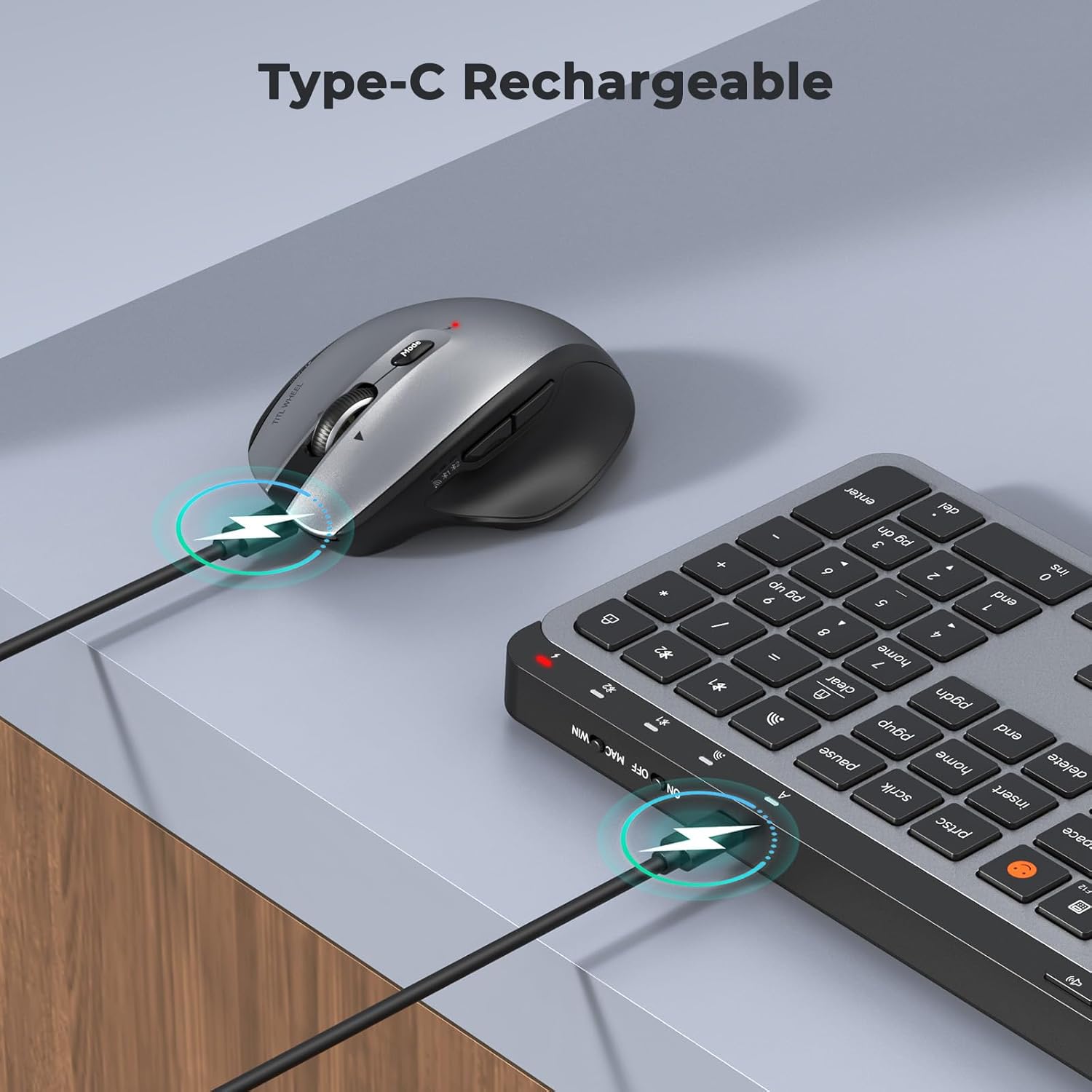
Image: Both the keyboard and mouse are rechargeable via USB-C, ensuring convenience and eliminating the need for disposable batteries.
2. Connexió a dispositius
The C9990 combo supports three connection modes: 2.4GHz wireless (via USB receiver) and two Bluetooth channels (BT1, BT2).
2.1. Connexió sense fil de 2.4 GHz
- Localitza el receptor USB, que normalment es guarda al compartiment de la bateria del ratolí.
- Connecteu el receptor USB a un port USB disponible de l'ordinador.
- Engegueu el teclat i el ratolí utilitzant els seus respectius interruptors d'alimentació.
- Per al teclat, premeu la tecla 2.4G button (usually indicated by a USB icon) to switch to 2.4GHz mode.
- For the mouse, switch the mode selector to the 2.4G posició.
- The devices should connect automatically.
2.2. Connexió Bluetooth (BT1 / BT2)
- Enceneu el teclat i el ratolí.
- Per al teclat: Manteniu premut el botó BT1 or BT2 button for 3-5 seconds until the indicator light flashes rapidly, indicating pairing mode.
- Per al ratolí: Switch the mode selector to the BT1 or BT2 position, then press and hold the Bluetooth pairing button (often located on the underside) until the indicator light flashes.
- Al dispositiu (portàtil, tauleta, telèfon intel·ligent), aneu a la configuració de Bluetooth i cerqueu dispositius nous.
- Select "MEETION Keyboard" and "MEETION Mouse" from the list to pair.
- Repeat for the second Bluetooth channel (BT2) if connecting to another device.
3. Canviar entre dispositius
The C9990 allows seamless switching between up to three connected devices (one 2.4GHz and two Bluetooth).
- Per al teclat: Premeu el botó dedicat 2.4G, BT1, o BT2 button to switch to the desired connected device.
- Per al ratolí: Use the mode switch on the underside of the mouse to select 2.4G, BT1, o BT2.

Image: The keyboard and mouse can switch between three devices (PC, tablet, phone) with a single click, indicated by the Bluetooth and 2.4G icons.
Instruccions de funcionament
Funcions del teclat
- Multimedia Keys (F1-F12): These keys provide quick access to functions like brightness control, display window, home, dictation, sleep, app switcher, screen mirroring, screen capture, music player, email, and calculator. Functions may vary slightly depending on the operating system.
- Clau d'emojis: The dedicated emoji key supports Windows, macOS, iPad (iPadOS), and Android Samsung devices. It does not support iPhone (iOS).

Image: The keyboard features a row of multimedia keys (F1-F12) for quick access to various system functions.
Funcions del ratolí
- Ajust de DPI: Press the DPI switch button (usually located near the scroll wheel) to cycle through the available DPI settings (800, 1200, 1600, 2400). Adjust to your preference for cursor speed and precision.
- Tilt-Scroll Wheel: In addition to vertical scrolling, tilt the scroll wheel left or right for horizontal scrolling in applications that support it (e.g., spreadsheets).
- Botons Endavant/Enrere: Feu servir els botons laterals per a una navegació ràpida web navegadors i file exploradors.
Manteniment
- Neteja: Feu servir un drap suau i sec per netejar les superfícies del teclat i el ratolí. Per a la brutícia persistent, netegeu lleugerament.ampNetegeu el drap amb aigua o una solució de neteja suau. Eviteu productes químics agressius o materials abrasius.
- Cura de la bateria: To prolong battery life, avoid fully discharging the devices frequently. Charge them when the low battery indicator appears. If storing for an extended period, charge them to about 50% and recharge every few months.
- Emmagatzematge: Guardeu els dispositius en un lloc fresc i sec, allunyat de la llum solar directa i de temperatures extremes.
Resolució de problemes
Problemes de connexió
- El dispositiu no es connecta: Ensure both the keyboard and mouse are powered on and fully charged. Check that the correct connection mode (2.4G, BT1, or BT2) is selected on both devices. For Bluetooth, ensure your host device's Bluetooth is enabled and the devices are in pairing mode.
- Connexió intermitent: Move the devices closer to your computer. Avoid using them near strong electromagnetic interference sources (e.g., Wi-Fi routers, other wireless devices).
- 2.4GHz receiver not recognized: Try plugging the USB receiver into a different USB port. Ensure the receiver is fully inserted.
Problemes de funcionalitat
- Keys or mouse unresponsive: Recharge the devices. Restart your computer or device. Re-pair the devices if using Bluetooth or re-insert the USB receiver for 2.4GHz.
- Cursor del ratolí erràtic: Clean the mouse sensor. Ensure you are using the mouse on a suitable surface (not highly reflective or transparent). Adjust DPI settings.
Especificacions
| Número de model | C9990 |
| Tecnologia de connectivitat | Bluetooth, USB (2.4GHz Wireless) |
| Disposició del teclat | QWERTY, Full Size |
| Detecció de moviment del ratolí | Òptic |
| Configuració de DPI del ratolí | 800, 1200, 1600, 2400 |
| Font d'alimentació | Alimentat per bateria (recarregable mitjançant USB-C) |
| Sistemes operatius compatibles | Windows, macOS, Linux, Chrome OS, Android |
| Pes de l'article | 1.16 Kilograms (combined) |
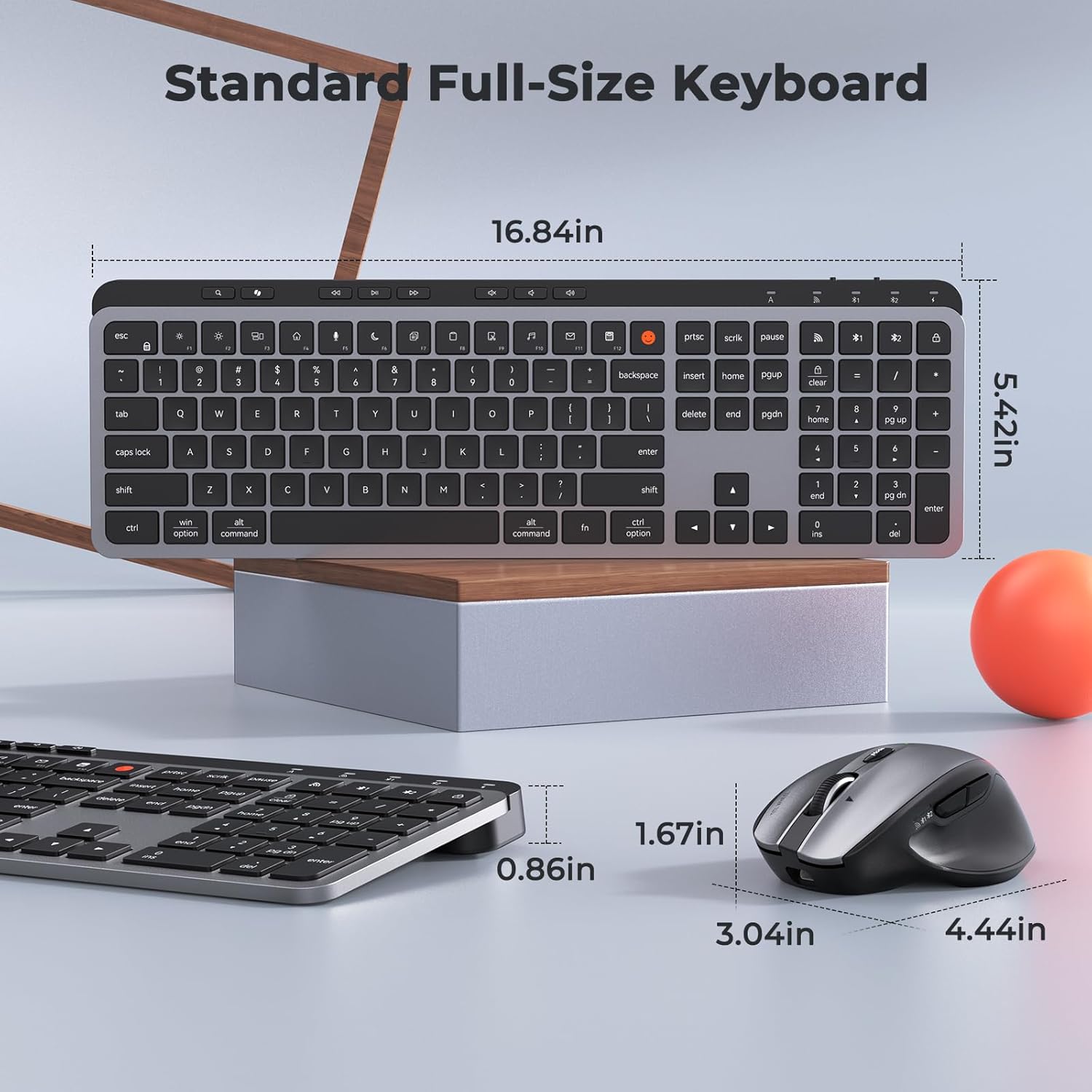
Image: Dimensions of the MEETION C9990 keyboard and mouse for reference.
Garantia i Suport
The MEETION C9990 Wireless Bluetooth Keyboard and Mouse comes with a 1 anys de garantia des de la data de compra. Aquesta garantia cobreix els defectes de fabricació en condicions d'ús normal.
For technical support, troubleshooting assistance, or warranty claims, please contact MEETION customer service through the retailer where you purchased the product or visit the official MEETION weblloc per obtenir informació de contacte.
Informació de seguretat
- No exposeu els dispositius a l'aigua, la humitat ni a temperatures extremes.
- Eviteu deixar caure els dispositius ni sotmetre'ls a impactes forts.
- Do not attempt to disassemble or repair the devices yourself. Refer to qualified service personnel.
- Mantenir fora de l'abast dels nens.
- Elimineu les piles i els components electrònics de manera responsable d'acord amb la normativa local.