
1. Introducció
Thank you for choosing the TOPTRO TP3 4K Google TV Portable Projector. This manual provides essential information for setting up, operating, and maintaining your projector. Please read it thoroughly before use to ensure optimal performance and safety.
The TOPTRO TP3 is designed to deliver a versatile and immersive viewing experience, featuring integrated Google TV, AI-powered image adjustments, and comprehensive connectivity options. Enjoy your content at home, outdoors, or on the go.
2. Producte acabatview
2.1 Característiques clau
- Integrated Google TV: Access over 10,000 official streaming applications, including Netflix, Prime Video, and YouTube, without additional devices.
- Google Voice Control: Use the remote control's voice assistant button to search for content, adjust settings, and control playback hands-free.
- AI-Powered Image Adjustment: Features automatic focus, automatic keystone correction, obstacle avoidance, and automatic screen adjustment for a perfectly aligned and clear image within seconds.
- Native 1080P Resolution with 4K Decoding: Delivers sharp, detailed images and natural colors, supporting 4K video decoding.
- Relació de tir curt (0.8:1): Projects a 60-inch image from just one meter distance, ideal for small spaces.
- 90-Degree Rotating Stand: Allows for flexible projection angles, including ceiling projection.
- Connectivitat avançada: Equipped with dual-band WiFi 6, Bluetooth 5.3, HDMI ARC, USB, and a 3.5mm audio jack for wide device compatibility.
- Disseny portàtil: Weighing only 1.2 kg (2.6 lbs) with a hidden carry handle, making it easy to transport.
2.2 Contingut del paquet
Assegureu-vos que tots els elements siguin presents al paquet:
- Projector TOPTRO TP3
- Control remot
- Cable HDMI
- Adaptador d'alimentació
- Manual d'usuari
3. Configuració
3.1 Col·locació inicial
Place the projector on a stable, flat surface. The 90-degree rotating stand allows for various projection angles, including wall, ceiling, or tabletop. For optimal image quality, ensure the projection surface is smooth and light-colored.

Image: The TOPTRO TP3 projector can be used in diverse environments, from living rooms to outdoor camping, showcasing la seva adaptabilitat.
3.2 Connexió d'alimentació
- Connect the power adapter to the projector's power input.
- Plug the power adapter into a suitable electrical outlet (220V).
- Premeu el botó d'engegada del projector o del comandament a distància per encendre'l.
3.3 Connexió de xarxa
Upon first startup, follow the on-screen prompts to connect to your Wi-Fi network. The projector supports dual-band WiFi 6 for a fast and stable connection.
3.4 Configuració de Google TV
After connecting to Wi-Fi, sign in with your Google account to access Google TV and download applications from the Google Play Store. This step is crucial for utilizing the integrated streaming services.

Image: The projector's interface showing integrated Google TV with direct access to popular streaming applications.
4. Instruccions de funcionament
4.1 Funcionament bàsic
- Encès/apagat: Press the power button on the remote or projector.
- Navegació: Use the directional buttons on the remote to navigate menus.
- Selecció: Premeu el botó "D'acord" per confirmar les seleccions.
- Control de volum: Feu servir els botons de volum del comandament a distància.
4.2 Ajust de la imatge
The TOPTRO TP3 features AI-powered automatic image adjustments:
- Enfocament automàtic: El projector ajusta automàticament la claredat de la imatge.
- Correcció trapezoidal automàtica: Automatically corrects distorted images to a rectangular shape.
- Evitació d'obstacles: Detects and adjusts the image to avoid objects on the projection surface.
- Auto Screen Adjustment: Optimizes the image to fit the screen area.
These adjustments occur automatically within seconds of powering on or repositioning the projector. Manual digital zoom (80-100%) is also available for fine-tuning image size.

Image: Visual representation of the projector's AI-powered automatic image adjustment features, ensuring a clear and aligned picture.
4.3 Google Voice Control
Press the dedicated voice assistant button on your remote control and speak your command. For example, say "Open YouTube" or "Play music." The projector will respond to your voice commands for quick access to functions and content.
4.4 Screen Mirroring (Google Cast)
Utilize Google Cast technology to wirelessly mirror content from your smartphone or tablet to the projector. For iPhone users, download the "AirScreen" application from the Google Play Store on the projector for wireless screen mirroring.
4.5 Rotating Stand Usage
The integrated 90-degree rotating stand allows you to easily adjust the projection angle. Simply pivot the projector to direct the image onto a wall, screen, or ceiling. This feature is particularly useful for bedroom viewing or creative setups.
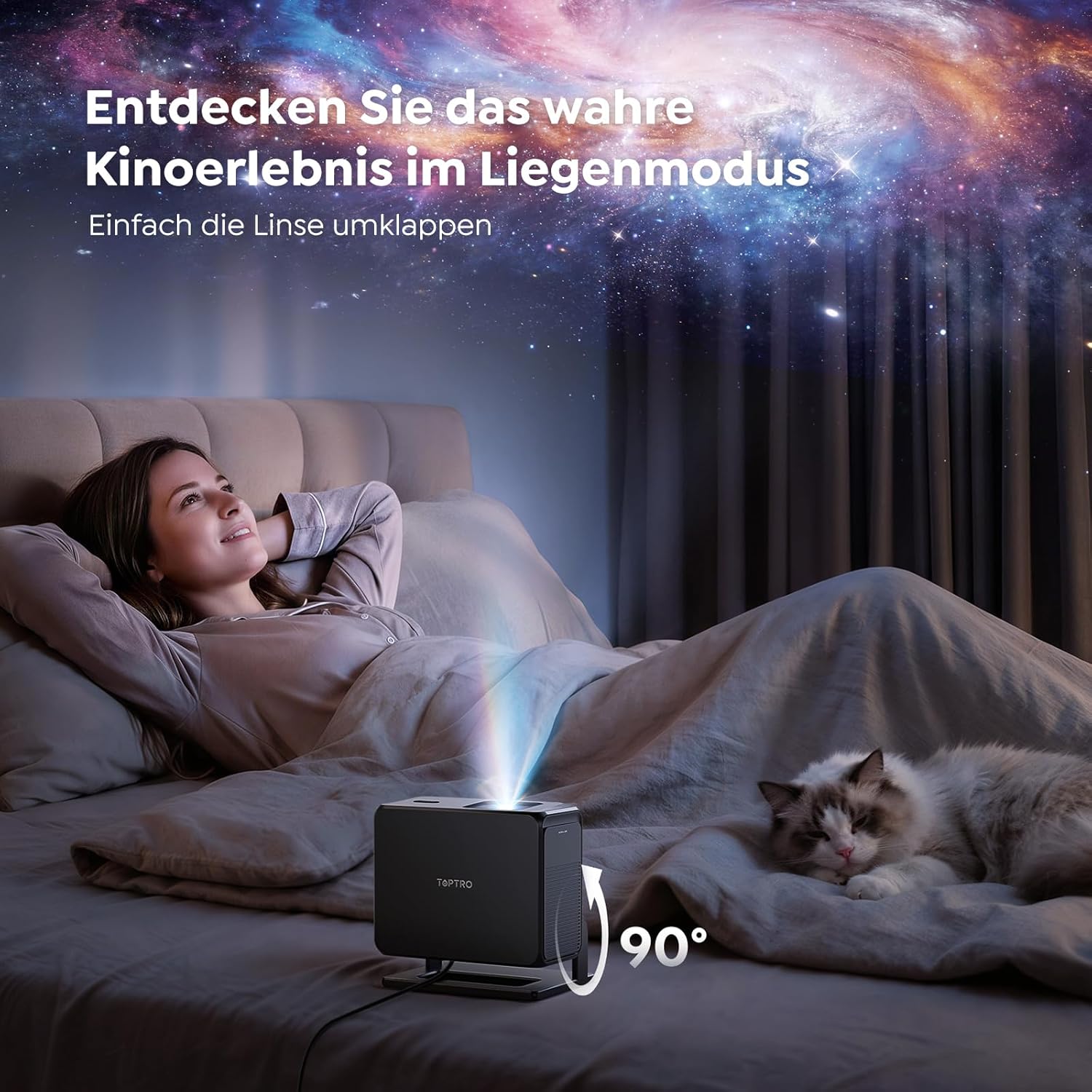
Image: The TOPTRO TP3 projector rotated 90 degrees to project content onto a bedroom ceiling, offering a unique viewexperiència.
5. Connectivitat
5.1 Connexions per cable
- HDMI ARC/CEC: Connect external devices like laptops, gaming consoles (Xbox/PlayStation 5), or Blu-ray players. The ARC feature allows audio to be sent back to a compatible sound system.
- USB: Connecteu unitats USB per a la reproducció de contingut multimèdia.
- Conector d'àudio de 3.5 mm: Connecteu altaveus amb cable o auriculars externs.
5.2 Connexions sense fil
- Wi-Fi 6: Provides faster and more stable wireless connectivity for streaming and online content.
- Bluetooth 5.3: Connect Bluetooth headphones or speakers for an enhanced audio experience.
6. Manteniment
6.1 Neteja de la lent
Gently clean the projector lens with a soft, lint-free cloth designed for optical surfaces. Avoid using abrasive cleaners or excessive force, as this can scratch the lens.
6.2 Neteja general
Netegeu l'exterior del projector amb un drap suau i sec. No utilitzeu productes de neteja líquids directament sobre el dispositiu.
6.3 Emmagatzematge
Quan no l'utilitzeu, guardeu el projector en un lloc fresc i sec, allunyat de la llum solar directa i de temperatures extremes. Feu servir l'embalatge original o una funda protectora per evitar l'acumulació de pols i els danys.
7. Solució De Problemes
7.1 No es mostra cap imatge
- Ensure the projector is powered on and connected to a power source.
- Check all cable connections (HDMI, USB) to external devices.
- Verify the input source selected on the projector matches the connected device.
- Confirm the lens cap is removed.
7.2 Imatge borrosa
- Allow the auto-focus function to complete its adjustment.
- Assegureu-vos que la superfície de projecció sigui plana i que el projector estigui estable.
- Clean the projector lens if smudges or dust are visible.
7.3 Sense so
- Comproveu el nivell de volum tant del projector com del dispositiu font connectat.
- Ensure external speakers or headphones are properly connected (wired or Bluetooth).
- If using HDMI ARC, verify your sound system is compatible and correctly configured.
7.4 El comandament a distància no funciona
- Substituïu les piles del comandament a distància.
- Assegureu-vos que no hi hagi obstacles entre el comandament a distància i el receptor d'infrarojos del projector.
For further assistance, refer to the detailed troubleshooting section in the full user manual or contact customer support.
8. Especificacions
| Característica | Especificació |
|---|---|
| Marca | TOPTRO |
| Nom del model | TP3 |
| Resolució nativa | 1920 x 1080 (1080 P) |
| Video Decoding Support | 4K |
| Tipus de visualització | LED |
| Característiques especials | Auto Focus, Auto Keystone Correction, Obstacle Avoidance, Auto Screen Adjustment, Google TV, Google Voice Control |
| Tecnologia de connectivitat | HDMI, USB, Bluetooth 5.3, Wi-Fi 6 |
| Interfície del maquinari | HDMI ARC/CEC, USB, 3.5mm Audio |
| Dimensions del producte (LxWxH) | 19.4 x 15.8 x 14.1 cm |
| Pes de l'article | 1.2 kg |
| Factor de forma | Portàtil |
| Tipus de muntatge | Ceiling Mount, Tabletop, Wall |
| Mida mínima de la imatge | 40 polzades |
| Mida màxima de la imatge | 120 polzades |
| Distància màxima de llançament | 2.13 metres |
| Voltage | 220 Volts |
| Components inclosos | Cable HDMI |
| Color | Negre |
| Tipus de controlador | Control remot |
| Dispositius compatibles | Xbox/PlayStation 5, Smartphone, Tablet, Laptop, Speaker, Notebook |
| Usos recomanats | Gaming, Business, Home Cinema, Education |
9. Garantia i Suport
9.1 Informació de la garantia
Please refer to the warranty card included with your product for specific warranty terms and conditions. Keep your proof of purchase for warranty claims.
9.2 Atenció al client
If you encounter any issues or have questions regarding your TOPTRO TP3 projector, please contact our customer service team. We provide prompt, professional, and effective support to ensure a smooth user experience.
Contact details can typically be found on our official weblloc web o a la targeta de garantia.