
1. Introducció
Gràcies per la compraasing the Sharp PS-916 Bluetooth Party Speaker System. This system includes two identical portable Bluetooth speakers designed to deliver powerful audio with versatile connectivity options. Please read this manual carefully before using the product to ensure proper operation and to maximize your listening experience.
Contingut del paquet:
- 2 x Sharp PS-916 Party Speakers
- 1 x cable de càrrega
- 1 x comandament a distància
- 1 x Manual d'usuari

Image: The Sharp PS-916 system includes two speakers for a complete stereo experience.
2. Configuració
2.1 Càrrega dels altaveus
The PS-916 speakers are equipped with rechargeable batteries, providing up to 12 hours of playback. Before initial use, fully charge both speakers.
- Connect the charging cable to the DC IN port on the rear of each speaker.
- Plug the other end of the charging cable into a suitable power adapter (not included) or USB power source.
- El llum indicador de càrrega s'il·luminarà. Canviarà de color o s'apagarà un cop finalitzada la càrrega.
2.2 Engegada/apagada
To power on or off each speaker, press and hold the ON/STAND BY INPUT botó situat al tauler de control.
2.3 Emparellament Bluetooth (altaveu únic)
- Ensure the speaker is powered on and in Bluetooth mode. The Bluetooth indicator will flash, indicating it is ready for pairing.
- Al dispositiu mòbil, activeu el Bluetooth i cerqueu els dispositius disponibles.
- Select "Sharp PS-916" from the list of devices.
- Un cop connectat, l'indicador Bluetooth deixarà de parpellejar i romandrà fix.
Emparellatge estèreo sense fil 2.4 (TWS) (dos altaveus)
TWS allows you to connect two PS-916 speakers wirelessly for a stereo sound experience.
- Power on both PS-916 speakers.
- Ensure neither speaker is currently connected to a Bluetooth device.
- En un dels altaveus (aquest serà l'altaveu principal), premeu el botó TWS button. The speaker will enter TWS pairing mode.
- The primary speaker will automatically search for the secondary speaker. Once connected, you will hear an audible confirmation, and the TWS indicator lights on both speakers will illuminate.
- Ara, connecteu el dispositiu mòbil a l'altaveu principal mitjançant Bluetooth, tal com es descriu a la secció 2.3. L'àudio es reproduirà a través dels dos altaveus en estèreo.
3. Funcionament
3.1 Tauler de control acabatview

Image: Main control panel for the Sharp PS-916 speaker.
- ON/STAND BY INPUT: Power on/off, switch input modes (Bluetooth, USB, TF, AUX, FM).
- PLAY/PAUSE (►/∕∕): Reprodueix o pausa la reproducció d'àudio.
- PREVIOUS (◀◀): Saltar a la pista anterior.
- NEXT (▶▶): Saltar a la pista següent.
- POM DE VOLUM: Rotate to adjust the master volume.
- TWS: Initiate or disconnect True Wireless Stereo pairing.
- EQUALITZACIÓ: Cycle through preset equalizer modes.
- BAIX: Activate or deactivate bass boost.
- LLUM: Change or turn off the LED light effects.
- MIC CONTROL: Adjust microphone volume or echo (if applicable).
3.2 Ports d'entrada
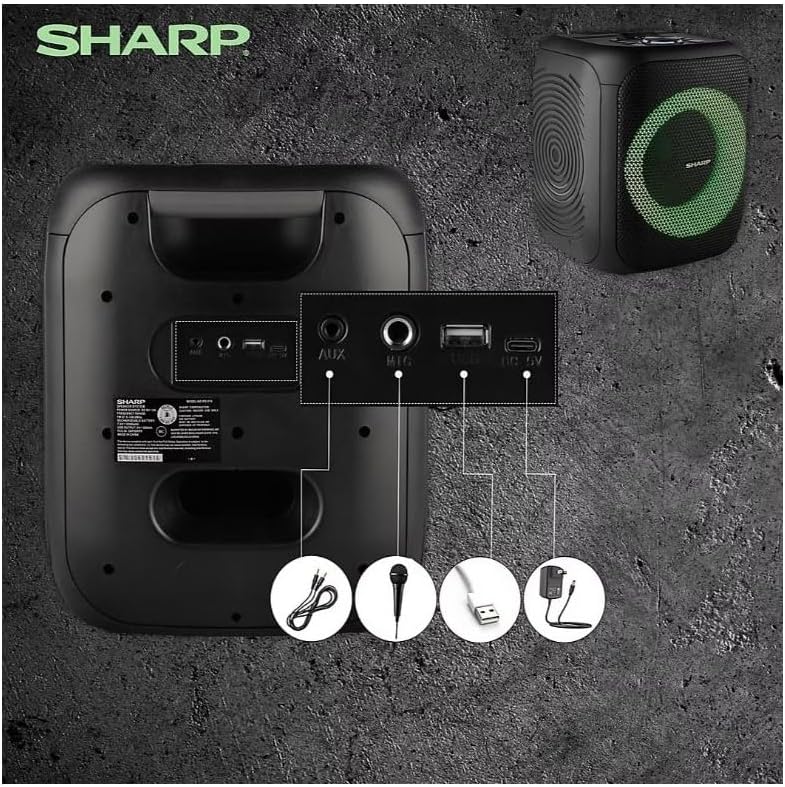
Image: Rear panel with various input and charging ports.
- AUX IN: Connecteu dispositius d'àudio externs amb un cable d'àudio de 3.5 mm.
- MIC IN: Connect a microphone (sold separately) for karaoke or announcements.
- USB: Inseriu una unitat flash USB per reproduir àudio.
- TARGETA TF: Inseriu una targeta TF (microSD) per reproduir àudio.
- DC IN: Connect the charging cable to power and charge the speaker.
3.3 Playing Audio from USB/TF Card
- Insert a USB flash drive or TF card into the corresponding port.
- Premeu el botó ON/STAND BY INPUT button repeatedly until the display shows the USB or TF mode.
- La reproducció començarà automàticament. Feu servir el REPRODUCCIÓ/PAUSA, ANTERIOR, i SEGÜENT botons per controlar la reproducció.
3.4 Ús de l'entrada AUX
- Connect one end of a 3.5mm audio cable to the AUX IN port on the speaker.
- Connecteu l'altre extrem a la presa d'auriculars o a la sortida d'àudio del dispositiu extern.
- Premeu el botó ON/STAND BY INPUT button repeatedly until the display shows AUX mode.
- Controla la reproducció i el volum des del teu dispositiu extern.
3.5 Funcionament de la ràdio FM

Image: The PS-916 features an integrated FM Tuner.
- Premeu el botó ON/STAND BY INPUT button repeatedly until the display shows FM mode.
- Manteniu premut el botó REPRODUCCIÓ/PAUSA per escanejar i desar automàticament les emissores de FM disponibles.
- Utilitza el ANTERIOR i SEGÜENT botons per navegar per les estacions desades.
3.6 Efectes de llum LED
Premeu el botó LLUM button to cycle through different LED light modes or to turn the lights off.
4. Manteniment
4.1 Neteja
- Always power off the speaker and disconnect it from the power source before cleaning.
- Feu servir un drap suau i sec per netejar les superfícies exteriors.
- No utilitzeu netejadors líquids, aerosols ni dissolvents, ja que poden danyar l'acabat o els components interns.
4.2 Emmagatzematge
- Guardeu els altaveus en un lloc fresc i sec, allunyat de la llum solar directa i de temperatures extremes.
- Si l'emmagatzemeu durant un període prolongat, carregueu la bateria aproximadament al 50% cada pocs mesos per mantenir-la en bon estat.
5. Solució De Problemes
If you encounter issues with your Sharp PS-916 speakers, please refer to the following common problems and solutions:
| Problema | Possible solució |
|---|---|
| L'altaveu no s'encén. | Assegureu-vos que la bateria estigui carregada. Connecteu el cable de càrrega i torneu-ho a provar. |
| No hi ha so de l’altaveu. | Comproveu el nivell de volum tant a l'altaveu com al dispositiu connectat. Assegureu-vos que esteu seleccionat el mode d'entrada correcte. |
| El dispositiu Bluetooth no es pot emparellar. | Ensure the speaker is in Bluetooth pairing mode (indicator flashing). Move your device closer to the speaker. Disconnect from other Bluetooth devices. |
| L'emparellament TWS falla. | Ensure both speakers are powered on and not connected to any other Bluetooth devices. Try initiating TWS pairing again. |
| So distorsionat. | Reduce the volume on both the speaker and your connected device. Ensure the audio source is not distorted. |
6. Especificacions
| Característica | Detall |
|---|---|
| Marca | Afilat |
| Nom del model | PS-916 |
| Configuració dels altaveus | 8" Woofer, 1" Tweeter (per speaker) |
| Potència màxima de sortida | 400 watts (per altaveu) |
| Potència de sortida RMS | 40 watts (per altaveu) |
| Tecnologia de connectivitat | Bluetooth |
| Entrades addicionals | USB, TF Card, 3.5mm AUX, Microphone Input |
| Durada de la bateria | Fins a 12 hores |
| Característiques especials | True Wireless Stereo (TWS) Pairing, Bass Boost, LED Light Effects, FM Tuner |
| Color | Negre |
| Pes de l'article | 6.5 lliures (per altaveu) |
| UPC | 728434122111 |
| GTIN | 728434122111 |
7. Garantia i assistència
7.1 Informació de la garantia
This Sharp PS-916 product comes with a 90-day limited warranty. This warranty covers manufacturing defects under normal use. It does not cover damage caused by misuse, accidents, unauthorized modifications, or normal wear and tear.
7.2 Atenció al client
For technical assistance, warranty claims, or further inquiries, please refer to the contact information provided with your purchase documentation or visit the official Sharp support weblloc.


