
1. Introducció
The Heckler Design H660-BG Stand is engineered to enhance the usability of your Logitech Tap or Tap IP device. By elevating the device to a 30-degree angle, this stand optimizes the viewing and interaction experience, effectively reducing reflections and glare in various meeting room environments. Constructed from robust steel, it ensures durability and stability. The base is equipped with rubber padding to protect your table surface and prevent unwanted sliding. This package also includes a braided Cat 6 Ethernet cable for seamless connectivity with the Tap IP.
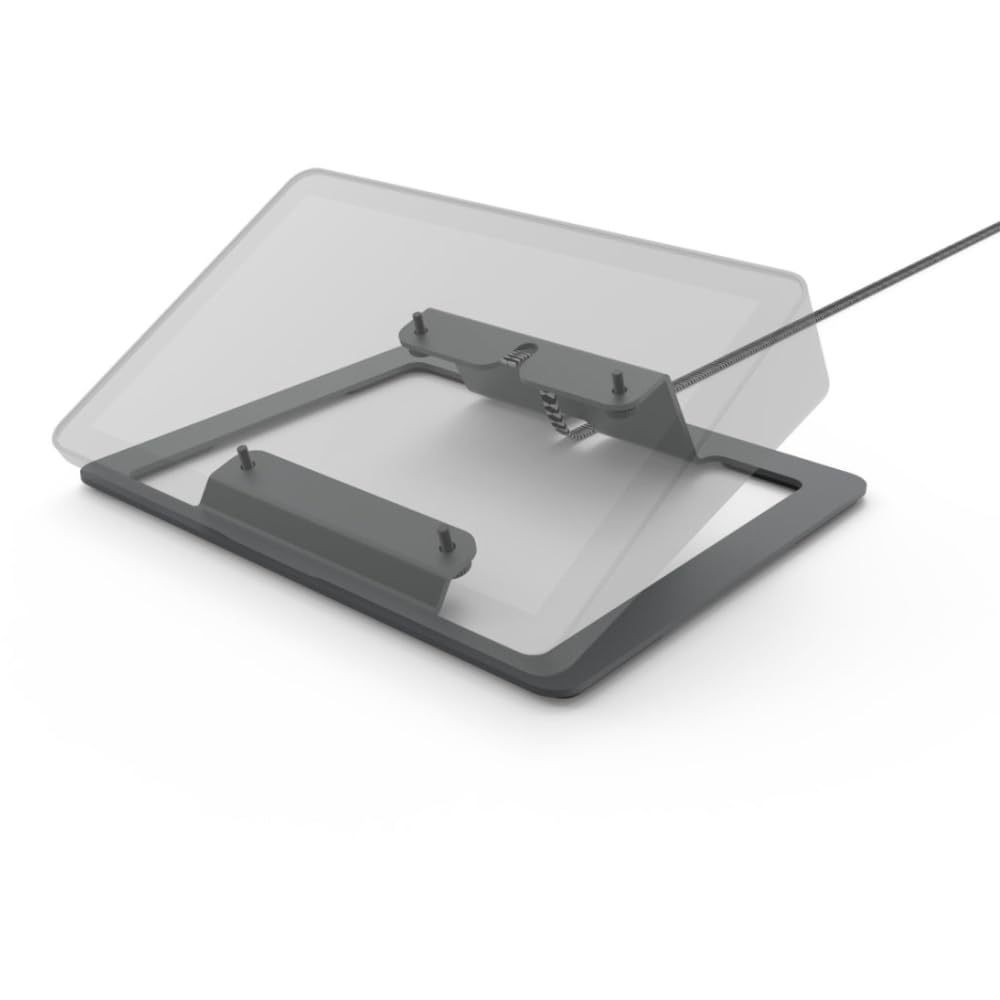
Figure 1: The Heckler Design H660-BG Stand, designed to hold a Logitech Tap or Tap IP device at an ergonomic angle. The stand is black and grey.
2. Contingut del paquet
Si us plau, verifiqueu que tots els elements que s'enumeren a continuació siguin presents al vostre paquet:
- Heckler Design H660-BG Stand
- Mounting Screws (for attaching the stand to your Logitech Tap/Tap IP)
- Braided Cat 6 Ethernet Cable (16.4 ft / 5 meters)
3. Instruccions de configuració
Follow these steps to properly install your Heckler Design H660-BG Stand:
- Prepare your Logitech Tap/Tap IP: Ensure your Logitech Tap or Tap IP device is powered off and disconnected from any cables.
- Col·loca el suport: Align the mounting holes on the bottom of your Logitech Tap or Tap IP with the corresponding holes on the Heckler Design H660-BG Stand.
- Assegura el dispositiu: Using the included mounting screws, carefully attach the stand to the bottom of your Logitech Tap or Tap IP. Ensure the screws are tightened securely but do not overtighten.
- Connect Ethernet Cable (for Tap IP): If you are using a Logitech Tap IP, connect one end of the provided braided Cat 6 Ethernet cable to the Ethernet port on the Tap IP and the other end to your network.
- Lloc a la superfície: Position the assembled unit on your desired table or desk. The rubber padding on the stand's base will help prevent movement and protect the surface.
- Encès: Reconnect any other necessary cables to your Logitech Tap/Tap IP and power on the device.
4. Funcionament de l'estand
The Heckler Design H660-BG Stand is designed for passive operation, providing a fixed 30-degree angle for your Logitech Tap or Tap IP. Once installed, no further adjustments are typically required for the stand itself.
- Òptima Viewangle: The 30-degree tilt is engineered to provide an ergonomic viewing angle, reducing neck strain and improving visibility during use.
- Reducció de l'enlluernament: The angled position helps to minimize reflections and glare from overhead lighting or windows, ensuring a clearer display.
- Protecció superficial: The integrated rubber padding on the base protects your furniture from scratches and ensures the device remains stable during interaction.
5. Manteniment
To ensure the longevity and appearance of your Heckler Design H660-BG Stand, follow these simple maintenance guidelines:
- Neteja: Netegeu el suport amb un drap suau, sec o lleugerament sec.amp cloth. Avoid using abrasive cleaners, solvents, or harsh chemicals, as these can damage the powder-coated finish.
- Inspecció: Periodically check the mounting screws to ensure they remain tight. If the stand feels loose, gently retighten the screws.
- Medi ambient: Keep the stand in a dry environment and avoid exposure to extreme temperatures or direct sunlight for prolonged periods.
6. Solució De Problemes
If you encounter any issues with your Heckler Design H660-BG Stand, consider the following common solutions:
- La posició de suport es nota inestable:
- Ensure all mounting screws are securely tightened to the Logitech Tap/Tap IP.
- Verify that the stand is placed on a flat, stable surface.
- Check the rubber padding on the base for any damage or displacement.
- Glare or reflections are still present:
- While the stand reduces glare, extreme lighting conditions may still cause reflections. Try adjusting the room lighting or the position of the stand relative to light sources.
- Ethernet cable not connecting (Tap IP):
- Ensure the Cat 6 Ethernet cable is firmly plugged into both the Tap IP and the network port.
- Verify that your network connection is active and functioning correctly.
- Test with a different Ethernet cable if available to rule out a cable fault.
7. Especificacions
| Número de model | H660-BG |
| Color | Negre i gris |
| Material | Steel, Rubber |
| Pes | 2 lliures (0.91 kg) |
| Dimensions del producte (L x A x A) | 2 x 10 x 8 polzades (5.08 x 25.4 x 20.32 cm) |
| Fabricant | HECKLER DESIGN |
8. Garantia i Suport
Specific warranty information for the Heckler Design H660-BG Stand is not provided within this document. For details regarding warranty coverage, terms, and conditions, please refer to the official Heckler Design weblloc web o contacteu directament amb el seu servei d'atenció al client.
For technical assistance, troubleshooting beyond the scope of this manual, or to inquire about replacement parts, please visit the Heckler Design official weblloc o contactar amb el seu departament d'atenció al client.