
1. Introducció
Gràcies per la compraasing the FreeWolf G6 Wireless Gaming Mouse. This manual provides detailed instructions for setting up, operating, and maintaining your device. Please read this manual carefully before use to ensure optimal performance and longevity of your mouse.
2. Informació de seguretat
- Mantingueu el dispositiu allunyat de l'aigua i altres líquids per evitar descàrregues elèctriques o danys.
- Do not attempt to disassemble or repair the mouse yourself. Refer all servicing to qualified personnel.
- Eviteu exposar el ratolí a temperatures extremes o a la llum solar directa.
- Desfeu-vos de la bateria d'acord amb la normativa local. No la incinereu.
3. Contingut del paquet
- FreeWolf G6 Wireless Gaming Mouse
- Cable de càrrega USB
- 2.4G USB Receiver (stored in the mouse)
- Manual d'usuari
4. Producte acabatview
Familiarize yourself with the various components and buttons of your FreeWolf G6 mouse:

Image: Diagram illustrating the button layout and features of the FreeWolf G6 Wireless Gaming Mouse. Key components include the Left Button, Right Button, Middle Button (scroll wheel), CPI Cycle button, Light Switch, Webpage Button, Backward button, Forward button, Desktop Button, Fire Button, Receiver Storage Compartment, BT Connection Button, and Power Switch Button (2.4G-OFF-BT).
- Botó esquerre: Funció estàndard del clic esquerre.
- Botó dret: Funció estàndard del clic dret.
- Botó central (roda de desplaçament): Scroll and middle-click function.
- CPI Cycle Button: Adjusts the mouse's DPI sensitivity.
- Interruptor de llum: Controls the mouse's LED lighting.
- Webpage Button: Navigates to a webpage (functionality may vary by software).
- Botó enrere: Navega enrere web navegadors o file exploradors.
- Botó Endavant: Navega cap endavant web navegadors o file exploradors.
- Botó d'escriptori: One-click return to desktop.
- Botó de foc: Programmable button, often used for rapid-fire actions in games.
- Compartiment d'emmagatzematge del receptor: Stores the 2.4G USB receiver when not in use.
- BT Connection Button: Inicia el mode d'emparellament Bluetooth.
- Power Switch Button (2.4G-OFF-BT): Selects connection mode or turns off the mouse.
5. Configuració
5.1 Càrrega del ratolí
The FreeWolf G6 mouse features a built-in rechargeable lithium battery. Before first use, or when the battery is low, connect the mouse to a power source using the provided USB charging cable.

Image: The FreeWolf G6 mouse connected via its USB cable to a laptop, indicating the charging process. The mouse features a built-in rechargeable battery for extended use.
- Connecteu l'extrem petit del cable de càrrega USB al port de càrrega de la part frontal del ratolí.
- Connect the larger end of the USB cable to a USB port on your computer or a USB wall adapter.
- The mouse's indicator light will show charging status (e.g., breathing light, solid light, or off when fully charged).
5.2 Connexió sense fil 2.4G
- Locate the 2.4G USB receiver stored in the compartment on the bottom of the mouse.
- Connecteu el receptor USB a un port USB disponible de l'ordinador.
- Slide the Power Switch Button on the bottom of the mouse to the '2.4G' position.
- L'ordinador hauria de detectar i instal·lar automàticament els controladors necessaris. El ratolí està llest per al seu ús.
5.3 Connexió Bluetooth
- Slide the Power Switch Button on the bottom of the mouse to the 'BT' position.
- Press and hold the BT Connection Button on the bottom of the mouse for 3-5 seconds until the indicator light starts flashing, indicating pairing mode.
- A l'ordinador o dispositiu, vés a la configuració de Bluetooth i cerca dispositius nous.
- Select 'FreeWolf G6' (or similar name) from the list of available devices to pair.
- Once paired, the indicator light on the mouse will stop flashing and remain solid or turn off. The mouse is now connected via Bluetooth.
6. Instruccions de funcionament
6.1 Encès/Apagat
Use the Power Switch Button on the bottom of the mouse to turn it on or off, or to select the desired connection mode (2.4G or BT).
6.2 Ajust de DPI
The mouse features 5 adjustable DPI levels, allowing you to customize cursor sensitivity for different tasks or games. Press the CPI Cycle Button (refer to Product Overview, item 4) to cycle through the available DPI settings.
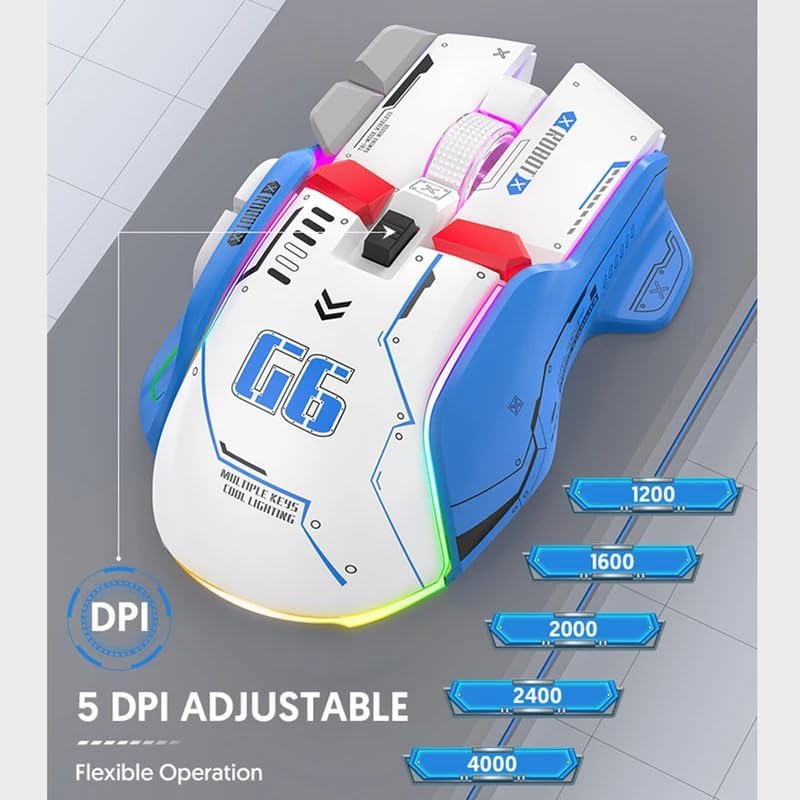
Image: The FreeWolf G6 mouse displaying its 5 adjustable DPI settings: 1200, 1600, 2000, 2400, and 4000 DPI. This allows for flexible operation and sensitivity control.
- Available DPI levels: 1200, 1600, 2000, 2400, 4000.
- Each press of the CPI Cycle Button will switch to the next DPI level.
6.3 Funcions dels botons
Beyond the standard left, right, and middle clicks, the FreeWolf G6 offers several additional buttons for enhanced functionality. Refer to the Product Overview section (Section 4) for the location of each button.
- Webpage Button: Typically used for specific browser functions or can be customized.
- Backward/Forward Buttons: Navega web pàgines o carpetes.
- Botó d'escriptori: Instantly minimizes all open windows to show the desktop.
- Botó de foc: Often used in gaming for rapid, repeated clicks.
6.4 Disseny ergonòmic
The FreeWolf G6 features a symmetrical design with a high curve back, engineered to provide a comfortable grip for various hand positions and reduce strain during extended use.

Image: A hand gripping the FreeWolf G6 mouse, illustrating its symmetrical design, high curve back, and slip-resistant surface for comfortable and secure handling.
6.5 Funcionament silenciós
The FreeWolf G6 is designed for silent clicking, minimizing noise during use, which is beneficial in quiet environments or during late-night gaming sessions.
7. Manteniment
- Neteja: Feu servir un drap suau i sec per netejar la superfície del ratolí. Per a la brutícia persistent, netegeu lleugerament.amp Es pot fer servir un drap, però assegureu-vos que no entri humitat a l'aparell.
- Emmagatzematge: When not in use for extended periods, turn off the mouse and store it in a cool, dry place.
- Cura de la bateria: Avoid fully discharging the battery frequently. Charge the mouse regularly to maintain battery health.
8. Solució De Problemes
- El ratolí no respon:
- Ensure the mouse is powered on and the correct connection mode (2.4G or BT) is selected.
- Comproveu el nivell de la bateria i carregueu-la si cal.
- For 2.4G connection, ensure the USB receiver is securely plugged into a working USB port.
- For Bluetooth connection, ensure Bluetooth is enabled on your device and the mouse is properly paired. Try re-pairing if necessary.
- El moviment del cursor és erràtic o lent:
- Netegeu el sensor òptic de la part inferior del ratolí.
- Adjust the DPI setting using the CPI Cycle Button.
- Assegureu-vos que feu servir el ratolí sobre una superfície adequada (no gaire reflectant ni transparent).
- La connexió cau amb freqüència:
- Move the mouse closer to the receiver/device to reduce interference.
- Avoid using the mouse near other wireless devices that may cause interference.
- Assegureu-vos que la bateria estigui prou carregada.
9. Especificacions
| Característica | Detall |
|---|---|
| Model | G6 |
| Tecnologia de connectivitat | Bluetooth, 2.4G Wireless (Tri-Mode) |
| Tipus de potència | Rechargeable (Built-in Lithium Battery) |
| Nombre de botons | 9 |
| Nombre de rodets | 1 (Scroll Wheel) |
| Nivells de DPI | 1200, 1600, 2000, 2400, 4000 (Adjustable) |
| Mode d'operació | Optoelectrònica |
| Característiques especials | Silent Operation, One-Click Return Desktop, Backlight, Portable |
| Orientació de la mà | D'acord |
| Dispositius compatibles | Ordinador personal |
| Pes brut | 195 g |
10. Garantia i Suport
This product comes with a standard manufacturer's warranty. For detailed warranty information or technical support, please refer to the documentation included with your purchase or contact the retailer. Keep your proof of purchase for warranty claims.