
1. Introducció
This manual provides detailed instructions for the installation, operation, and maintenance of your Loddery Android 14 2 DIN Car Radio. This unit is designed for VW Caddy models from 2003 to 2020, offering advanced features such as wireless CarPlay, Android Auto, GPS navigation, Bluetooth connectivity, FM/RDS radio, and support for a rear view càmera.
The system runs on Android 14 with 2GB RAM and 32GB ROM, providing a responsive and versatile user experience. Please read this manual thoroughly before use to ensure proper installation and optimal performance.
2. Producte acabatview
The Loddery Android 14 Car Radio features a 7-inch 1024x600 IPS capacitive touchscreen with a 178° viewing angle. It is powered by a Cortex A7 1.5 GHz x4 processor. Key functionalities include:
- CarPlay sense fil / Android Auto: Seamless integration with your smartphone for navigation, calls, messages, and music.
- Navegació GPS: Built-in module supporting online and offline maps (GPS/Beidou/Galileo/Glonass).
- Connectivitat WiFi: Access to online apps and browsing.
- Bluetooth 5.0: Trucades de mans lliures i transmissió d'àudio sense fil.
- Ràdio FM/RDS: Real-time traffic, news, and weather information.
- Control del volant (SWC): Convenient control of radio functions without touching the screen.
- posterior View Suport de càmera: Automatic display when parking for enhanced safety.
- Mirror Link & Split Screen: Sync smartphone screen and run two apps simultaneously.
- Sortida d'àudio: MOSFET amplifier 4 x 45W, EQ adjustment.
3. Configuració i instal·lació
3.1 Compatibilitat
This car radio is designed for VW Caddy models from 2003-2020. Installation is plug-and-play for compatible vehicles. Please verify your vehicle's compatibility before installation.
Incompatibility List: Aquesta unitat és no apte for the following VW models:
- VW Passat: 2004, 2007 2.0L M/T; 2004, 2005 2.8L V6; 2005 1.8T M/T, A/T; 2007 2.0L A/T
- VW CC: 2012 3.0FSI V6
- VW Lavida: 2008 1.6L/2.0L A/T; 2010, 2011 1.4TSI; 2008 1.6L/2.0L M/T; 2009, 2011 2.0L A/T; 2013 1.6L M/T, A/T; 2011 1.4TSI M/T, 1.6L A/T; 2011 1.4TSI DSG
- VW Tiguan: 2016 2.0TSI/GTE
- VW Golf V: 2004 1.6; 2005 1.8; 2004 1.6 A/T; 2008 1.6 A/T, M/T

Figure 3.1: Visual guide for checking compatibility by examining the center console and existing connectors.
3.2 Contingut del paquet
Assegureu-vos que tots els elements siguin presents al paquet:
- 1x Car Radio Unit
- 1x càmera
- 2x cables d'alimentació
- 1 x Antena GPS
- 1x Cable d'entrada de càmera
- 1 x manual d'usuari
- 1x RCA Input/Output Cable
- 2x cables USB
- 1x Canbus Box
- 1x Radio Adapter
3.3 Configuració inicial
After physical installation, power on the unit. The Android 14 system will boot up. Follow the on-screen prompts for initial setup, including language selection and time zone. The unit comes with 2GB RAM and 32GB ROM for system operations and app storage.
4. Instruccions de funcionament
CarPlay sense fil 4.1 / Android Auto
The car radio supports both wireless CarPlay and Android Auto. Connect your smartphone via USB cable or Bluetooth. Once connected, you can access navigation apps (e.g., Waze), make calls, send messages, and stream music (e.g., Spotify). Voice control via Siri or Google Assistant is also supported for safer driving.

Figure 4.1: Wireless CarPlay and Android Auto functionality with voice control examples.
4.2 Navegació GPS
The unit has a built-in GPS module. You can use pre-installed navigation software or download your preferred navigation apps from the app store. It supports both online and offline maps, utilizing GPS, Beidou, Galileo, and Glonass for fast and accurate positioning.

Figure 4.2: GPS Navigation interface showing route details and map applications.
4.3 Connexió WiFi
Connect the car radio to a WiFi network or a mobile hotspot to browse the internet, access web pages, and download various applications from the app store (e.g., Waze, YouTube, TikTok).
Figure 4.3: WiFi connectivity enabling access to online applications.
4.4 Bluetooth i ràdio FM/RDS
Utilize Bluetooth 5.0 for wireless audio streaming and hands-free calling. The FM radio with RDS (Radio Data System) provides station information, real-time traffic updates, news broadcasts, and weather forecasts.
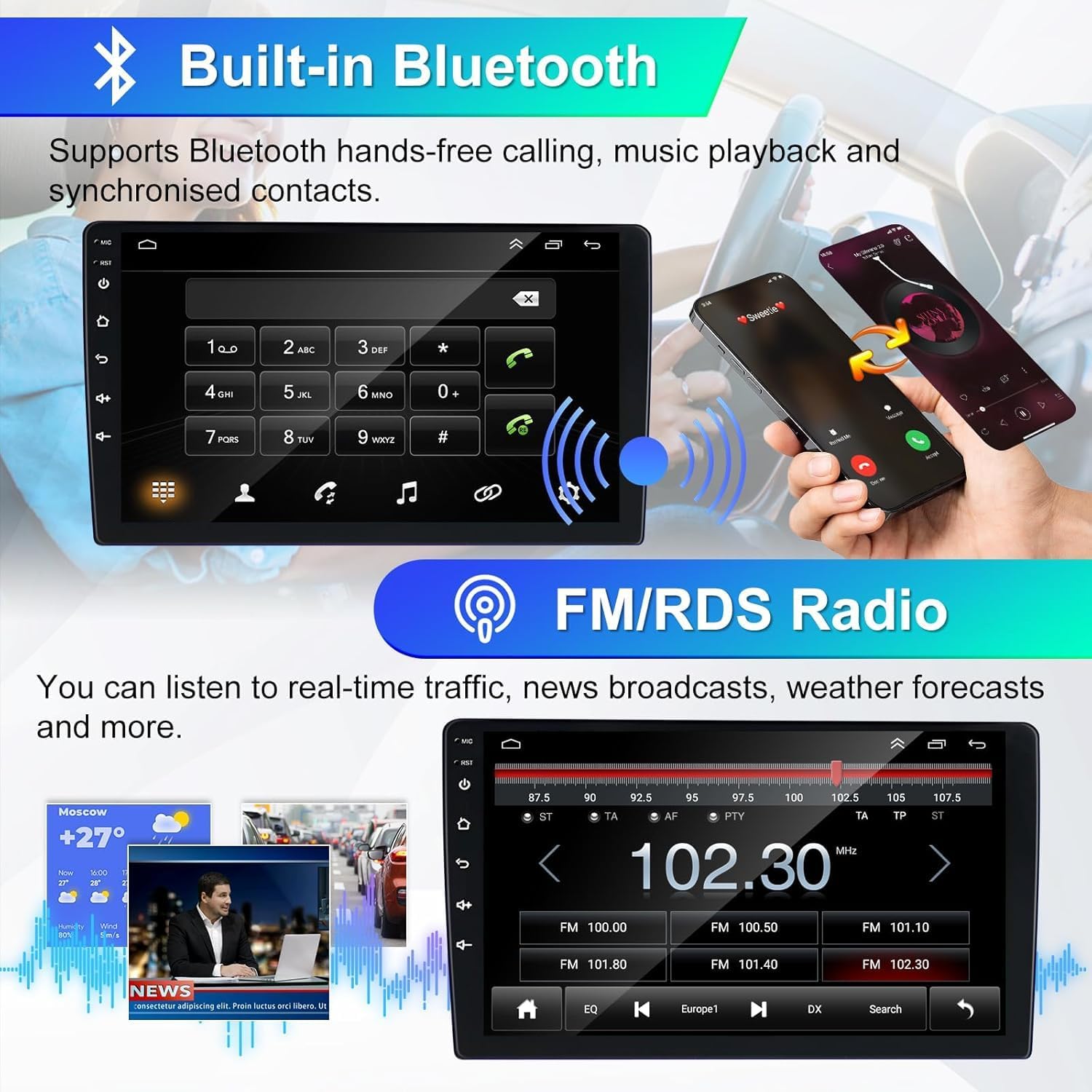
Figure 4.4: Bluetooth hands-free calling and FM/RDS radio interface.
4.5 Control del volant (SWC)
Control the car radio directly from your steering wheel. This feature allows you to manage navigation, music, and calls, enhancing driving safety and convenience by minimizing screen interaction.

Figure 4.5: Steering Wheel Control functionality and setup options.
4.6 Darrera View Càmera
When reversing, the car radio automatically displays the feed from the connected rear view camera, providing increased visibility and making parking safer and easier.
Figura 4.6: posterior View Camera display with parking assistance.
4.7 Enllaç de mirall i pantalla dividida
Mirror Link allows you to sync your smartphone screen to the car radio, enabling you to enjoy navigation maps, videos, and other content directly on the larger display. The Split Screen function allows you to operate two applications simultaneously, such as listening to music while navigating.

Figure 4.7: Mirror Link and Split Screen capabilities for enhanced multitasking.
5. Manteniment
Per garantir la longevitat i el rendiment òptim de la ràdio del vostre cotxe, seguiu aquestes pautes de manteniment:
- Neteja: Feu servir un drap suau i sec per netejar la pantalla i l'exterior. Eviteu productes de neteja o dissolvents abrasius.
- Temperatura: Eviteu exposar la unitat a temperatures extremes, a la llum solar directa durant períodes prolongats o a una humitat elevada.
- Actualitzacions de programari: Periodically check for and install available software updates to ensure system stability and access to new features.
- Connexions: Assegureu-vos que tots els cables i connexions estiguin ben fixats i no estiguin danyats.
6. Solució De Problemes
Si teniu problemes amb la ràdio del cotxe, consulteu els passos habituals següents per resoldre problemes:
- Sense energia: Check power cable connections and vehicle's fuse box. Ensure the ignition is on.
- Sense so: Verify volume settings, audio source selection, and speaker connections. Check if the mute function is active.
- Pantalla tàctil que no respon: Try restarting the unit. If the issue persists, a factory reset might be necessary (refer to system settings).
- Pèrdua de senyal GPS: Assegureu-vos que l'antena GPS estigui instal·lada correctament i que tingui una vista clara view del cel.
- Problemes de vinculació de Bluetooth: Ensure Bluetooth is enabled on both the car radio and your device. Delete previous pairings and try again.
- CarPlay/Android Auto Connection Failure: Check USB cable integrity or Bluetooth connection. Ensure your phone's software is up to date.
Per a problemes persistents, poseu-vos en contacte amb l'atenció al client.
7. Especificacions
| Marca | Loddery |
| Número de model | YI-EU-01-QA1524X-CX41 |
| Sistema | Android 14 |
| RAM | 2 GB |
| ROM | 32 GB |
| Pantalla | 7-inch IPS Capacitive Touchscreen, 1024 x 600 resolution, 178° viewangle de ing |
| Processador | Cortex A7 1.5 GHz x4 |
| Bluetooth | Versió 5.0 |
| Banda de ràdio | FM (87.5 M-108 M) with RDS (RT, AF, TA) |
| Ampmés viu | MOSFET 4 x 45 W Max Power |
| Formats d'àudio | MP3, FLAC, APE, WMA, WAV, AAC, AMR |
| Formats de vídeo | AVI, ASF, MP4, MOV, MPG, MPEG1/2/4, VOB, MKV, FLV, TS, WMV, RMVB, 3GP |
| Ports USB | 2 (one for CarPlay, one for data transfer/USB input) |
| Característiques especials | Wireless Apple CarPlay/Android Auto/Mirror Link, Wi-Fi, GPS Navigation (online/offline), EQ Audio Adjustment, DSP, Steering Wheel Control, Rear View Camera Support, Voice Control |
8. Garantia i Suport
Your Loddery car radio comes with comprehensive support:
- 1 Year After-Sales Support: Assistance with product issues and inquiries for one year from the date of purchase.
- 30-Day Refund Service: Eligibility for a refund within 30 days of purchase, subject to terms and conditions.
- 7*24 Hours Technical Support: Round-the-clock technical assistance for any operational or technical difficulties you may encounter.
Figura 8.1: Mésview of available support and warranty services.
For support, please refer to the contact information provided with your purchase or on the Loddery official weblloc.