
1. Introducció
Thank you for choosing the ASHATA 15.6" Smart Digital Calendar Planner. This device is designed to streamline family scheduling, task management, and meal planning through an intuitive full HD touchscreen interface. It also functions as a digital photo frame, enhancing your home decor. This manual provides essential information for setup, operation, and maintenance to ensure optimal performance and longevity of your device.
2. Informació de seguretat
- Llegiu atentament totes les instruccions abans d'utilitzar el dispositiu.
- Use only the provided power adapter. Using an unauthorized adapter may damage the device and void the warranty.
- No exposeu el dispositiu a l'aigua, la humitat ni a temperatures extremes.
- Eviteu deixar caure o sotmetre el dispositiu a forts impactes.
- No intenteu desmuntar o reparar el dispositiu vosaltres mateixos. Contacteu amb l'assistència al client per obtenir assistència.
- Mantingueu el dispositiu allunyat de la llum solar directa i de les fonts de calor.
- Assegureu-vos que hi hagi una ventilació adequada quan feu servir el dispositiu.
3. Contingut del paquet
Verifiqueu que tots els elements siguin presents al paquet:
- 1 x ASHATA 15.6 Inch Smart Digital Calendar
- 1 x suport
- 1 x adaptador d'alimentació (endoll dels EUA)
- 1 x manual d'instruccions
4. Producte acabatview
The ASHATA Smart Digital Calendar features a 15.6-inch IPS touchscreen display with a 1920x1080 resolution, providing a clear and interactive experience for managing your family's activities.

Figura 4.1: Davant view of the ASHATA 15.6 Inch Smart Family Calendar, highlighting its multi-functional display.
4.1. Components del dispositiu
Familiarize yourself with the various ports and components of your device:

Figura 4.2: Rear ports of the device, including DC power, USB 2.0, SD/MMC slot, Audio, and Type-C.
- Port DC: Per connectar l'adaptador de corrent.
- Port USB 2.0: Per connectar dispositius USB.
- Ranura SD/MMC: For inserting SD or MMC memory cards (card not included).
- Port d'àudio: Per connectar dispositius d'àudio externs.
- Port de tipus C: Per a opcions de connectivitat addicionals.
5. Configuració
5.1. Muntatge del suport
- Carefully unpack the Smart Digital Calendar and its stand.
- Attach the stand to the back of the device according to the stand's design. Ensure it is securely fastened for stability.
5.2. Encendre el dispositiu
- Connect the provided power adapter to the DC port on the back of the device.
- Connecteu l'adaptador d'alimentació a una presa de corrent estàndard.
- The device will automatically power on or prompt you to press the power button (if available).
- Seguiu les instruccions a la pantalla per a la configuració inicial.
5.3. Connexió Wi-Fi
- During the initial setup or via the settings menu, navigate to the Wi-Fi settings.
- Seleccioneu la xarxa Wi-Fi desitjada de la llista de xarxes disponibles.
- Introduïu la contrasenya del Wi-Fi si se us demana.
- Once connected, the device will be able to sync with online calendars and access app features.
5.4. Calendar Sync
The Digital Calendar syncs effortlessly with iOS and other compatible calendars via Wi-Fi.
- After establishing a Wi-Fi connection, access the calendar synchronization settings on the device.
- Follow the on-screen prompts to link your preferred calendar accounts (e.g., Google Calendar, Apple Calendar).
- Once linked, the device will consolidate multiple schedules into a single view. Authorized devices can then access and update events remotely.
6. Instruccions de funcionament
The 15.6-inch full HD touchscreen allows for seamless interaction with the device's features.
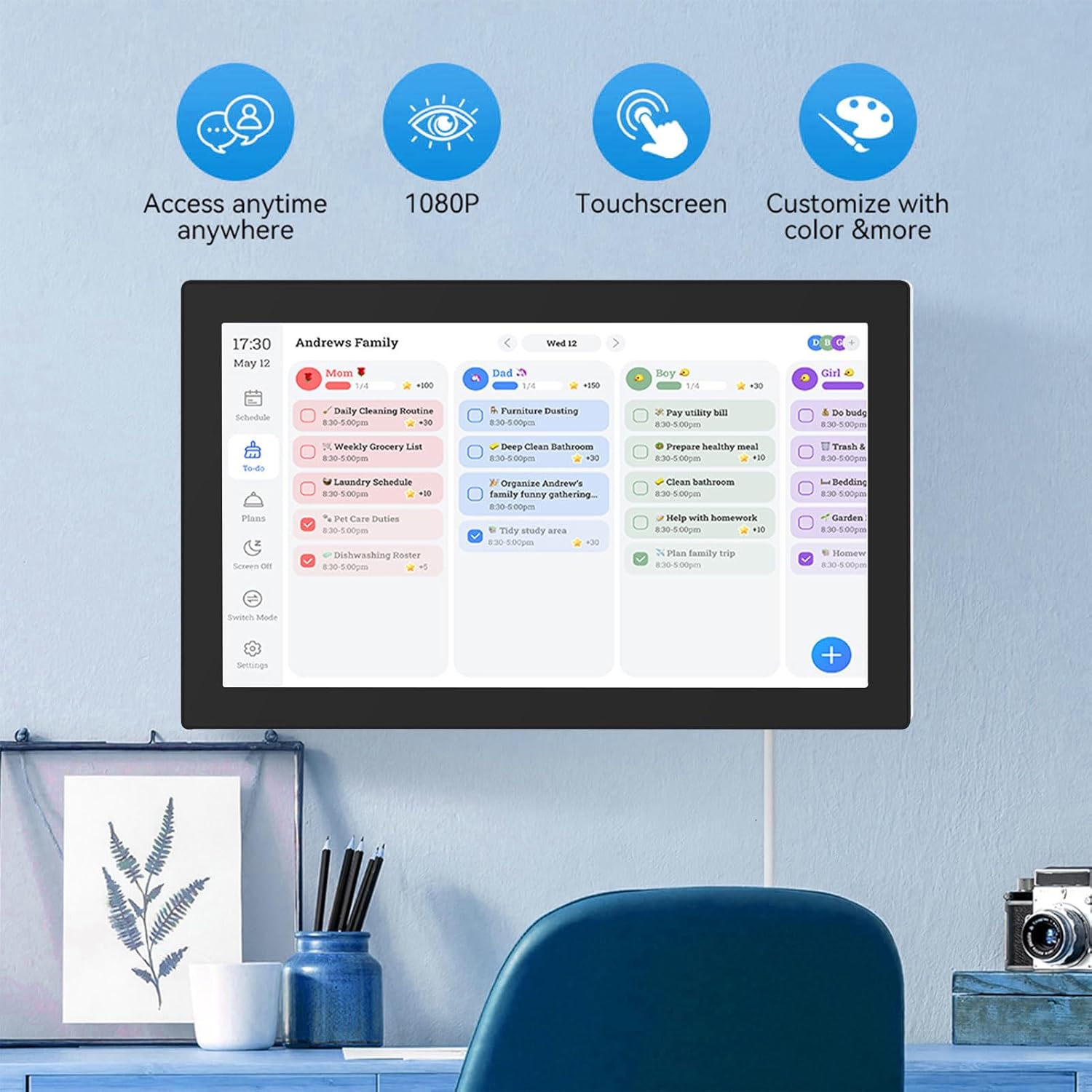
Figura 6.1: The interactive display showing family scheduling and task management.
6.1. Smart Family Planner
The Smart Family Planner allows you to manage schedules and tasks for each family member.
- Assigning Tasks: Tap on the 'Schedule' or 'To-Do' section. You can create new tasks and assign them to specific family members.
- Codificació de colors: Assign different colors to family members or task categories for easy visual identification.
- Tracking Progress: Mark tasks as complete directly on the touchscreen.
6.2. Interactive Chore Chart
Motivate children and manage household responsibilities with the interactive chore chart.

Figura 6.2: Family members engaging with the customizable chore chart.

Figura 6.3: Interactive chore chart in use, showing task selection.

Figura 6.4: Chore chart with visual rewards to encourage task completion.
- Creació de tasques: Add daily, weekly, or one-time chores.
- Sistema de recompensa: Utilize the built-in reward system to make tasks engaging for children.
- Collaborative Planning: Involve family members in planning chores and responsibilities.
6.3. Meal Planning
Plan your weekly meals directly on the device to simplify dinner decisions.

Figura 6.5: Weekly meal planning interface.
- Add Meals: Input breakfast, lunch, and dinner plans for each day of the week.
- Recipe Integration: (If available) Link to recipes or add notes for meal preparation.
6.4. Digital Photo Frame Mode
When not actively using the calendar features, transform your device into a digital photo frame.
- Accessing Photos: Navigate to the 'Photos' or 'Digital Frame' section.
- Carregant fotos: Upload family photos via a connected USB drive, SD card, or through the companion app.
- Configuració de la presentació de diapositives: Customize slideshow intervals, transitions, and display order.
6.5. Aplicació acompanyant
Manage schedules and access additional features from anywhere using the Smart Digital Calendar Planner app.
- Descarrega: Download the official app from your device's app store (iOS/Android).
- Gestió remota: Update schedules, tasks, and meal plans remotely.
- Free Features: Access shopping lists and meal plans.
- Característiques premium: Consider upgrading for advanced tools like automated event imports (subscription may be required).
7. Manteniment
- Neteja de la pantalla: Use a soft, lint-free cloth to gently wipe the touchscreen. Do not use abrasive cleaners or sprays directly on the screen.
- Neteja del cos del dispositiu: Wipe the device body with a dry or slightly damp tela.
- Actualitzacions de programari: Comproveu i instal·leu periòdicament si hi ha actualitzacions de programari per garantir un rendiment òptim i l'accés a les noves funcions.
- Emmagatzematge: Quan no l'utilitzeu durant períodes prolongats, guardeu el dispositiu en un lloc fresc i sec.
8. Solució De Problemes
| Problema | Causa possible | Solució |
|---|---|---|
| El dispositiu no s'encén. | L'adaptador de corrent no està connectat o està defectuós. | Assegureu-vos que l'adaptador de corrent estigui connectat correctament al dispositiu i a una presa de corrent que funcioni. Proveu una altra presa de corrent. |
| No es pot connectar a la Wi-Fi. | Incorrect password, out of range, or network issue. | Verify the Wi-Fi password. Move closer to the router. Restart your router and the device. |
| La pantalla tàctil no respon. | Temporary software glitch or screen obstruction. | Restart the device. Ensure the screen is clean and free of debris. |
| Calendar not syncing. | No internet connection or incorrect account settings. | Check Wi-Fi connection. Re-verify your linked calendar account settings in the device's settings. |
| Images not displaying in photo frame mode. | No images loaded or incorrect file format. | Ensure images are loaded onto the device or connected storage. Check that images are in supported formats (e.g., JPEG/JPG). |
9. Especificacions

Figura 9.1: Device dimensions.
| Característica | Detall |
|---|---|
| Chipset | RK3326 |
| RAM | 2 GB |
| ROM | 32 GB |
| Material | ABS |
| Mostra | Pantalla tàctil IPS de 15.6 polzades |
| Resolució de pantalla | 1920 x 1080 píxels |
| Ràtio de pantalla | 16:9 |
| Connexió WiFi | 802.11a/b/g/n |
| Pantalla tàctil | Support (Dual Touch) |
| Interfície | DC, USB 2.0, SD/MMC, Audio, Type-C |
| Format de vídeo | MPEG1/2/4, AVI, VOB, MOV, MP4 |
| Format d'àudio | MP3/WMA/AAC, etc. |
| Format d'imatge | JPEG/JPG |
| Certificacions | CE, ROHS, FCC |
| Número de model | ASHATAh7k1fms24y-14 |
10. Garantia i Suport
This ASHATA product comes with a standard manufacturer's warranty. Please refer to the warranty card included in your package or visit the official ASHATA weblloc web per obtenir informació detallada sobre els termes i condicions de la garantia.
For technical support, troubleshooting assistance, or any inquiries regarding your device, please contact ASHATA customer service through the contact information provided on the official weblloc web o la documentació de la compra.