
1. Producte acabatview
The ATK N9 Tri-Mode Gaming Headset is designed for gamers requiring flexible connectivity, clear audio, and reliable communication across multiple devices. It supports 3.5 mm wired, 2.4G wireless, and Bluetooth connections, allowing seamless switching between gaming consoles, PC, and mobile devices. Stereo-tuned dynamic drivers deliver balanced sound, enhancing in-game audio cues such as footsteps, gunfire, and environmental effects. The detachable noise-canceling microphone improves voice clarity for team communication, online gaming, and voice calls. Its over-ear design, with soft ear cushions and an adjustable headband, ensures a comfortable fit for extended gaming sessions. The headset is compatible with PS5, PS4, PC, Nintendo Switch, and mobile devices. For Xbox Series X|S, audio and microphone functions are supported via the 3.5 mm wired connection.

2. Contingut del paquet
Verifiqueu que tots els elements que s'enumeren a continuació s'inclouen al vostre paquet:
- ATK N9 Pro/White Gaming Headset
- Micròfon desmuntable amb cancel·lació de soroll
- Cable de càrrega USB-C
- Cable d'àudio de 3.5 mm
- 2.4G Wireless USB Adapter
- Manual d'usuari (aquest document)

3. Configuració inicial
3.1. Càrrega dels auriculars
Before first use, fully charge the headset using the provided USB-C charging cable. Connect the USB-C end to the headset's charging port and the USB-A end to a compatible USB power source (e.g., PC, wall adapter). The LED indicator will show charging status.
3.2. Connectar el micròfon
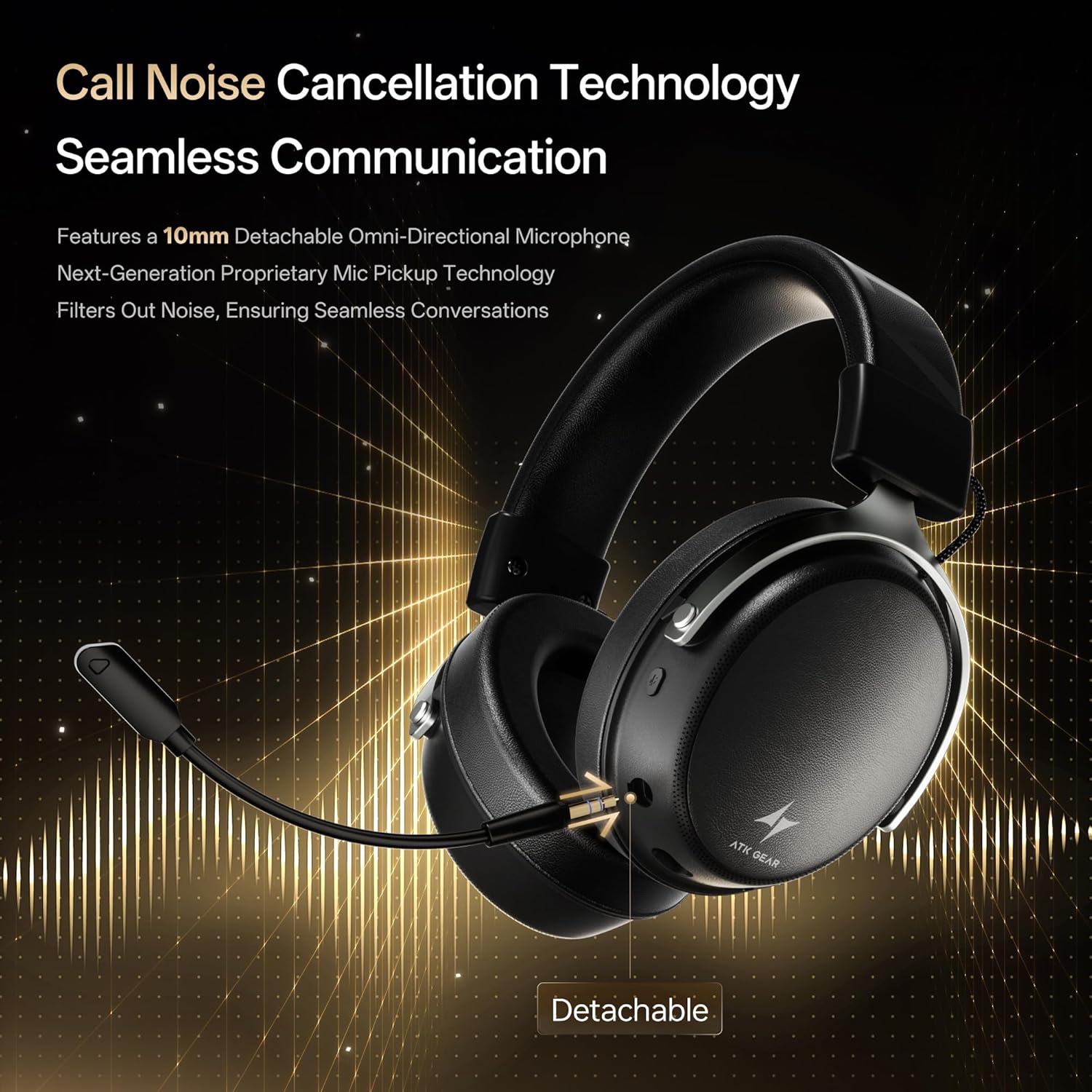
Insert the detachable boom microphone into the microphone port on the left earcup until it clicks into place. Ensure it is securely connected for optimal voice pickup.
3.3. Opcions de connectivitat
The ATK N9 Pro/White headset offers three connectivity modes:
- Mode sense fil 2.4G: For PC, PS4, PS5, and Nintendo Switch (docked mode).
- Plug the 2.4G wireless USB adapter into an available USB port on your device.
- Encendre els auriculars.
- Switch the headset to 2.4G mode using the mode switch. The headset will automatically pair with the adapter.
- Adjust audio output settings on your device if necessary to select the headset.
- Mode Bluetooth: For mobile devices, PC, and Nintendo Switch (handheld mode).
- Power on the headset and switch to Bluetooth mode. The LED indicator will flash, indicating pairing mode.
- On your device, go to Bluetooth settings and select "ATK N9 Pro" from the list of available devices.
- Un cop connectat, l'indicador LED es mostrarà fix.
- Mode de cable de 3.5 mm: For Xbox Series X|S, PS4, PS5, PC, Nintendo Switch, and mobile devices.
- Connecteu un extrem del cable d'àudio de 3.5 mm al connector de 3.5 mm dels auriculars.
- Connect the other end to the 3.5mm audio port on your device (e.g., controller, PC audio jack).
- Els auriculars funcionaran en mode amb cable, ignorant les funcions sense fil.

4. Instruccions de funcionament
4.1. Controls dels auriculars
The ATK N9 Pro/White headset features intuitive controls located on the earcups:
- Botó d'encesa: Press and hold to power on/off. Short press for play/pause (in 2.4G/Bluetooth mode).
- Interruptor de mode: Toggle between 2.4G wireless, Bluetooth, and wired modes.
- Volume Up/Down Wheel: Rotate to adjust audio volume.
- Botó de silenci del micròfon: Premeu per silenciar/reactivar el micròfon.
- Spatial Audio Button: Press to activate/deactivate 3D Spatial Audio.
- Mic Monitoring Button: Press to enable/disable microphone monitoring (sidetone).
4.2. Ús del micròfon
The detachable noise-canceling microphone is designed for clear communication. Position the microphone approximately 1-2 inches from your mouth for optimal voice pickup. Use the microphone mute button on the headset to quickly mute your voice when needed.
4.3. Ajust d'ajust
The headset features an adjustable headband and soft ear cushions for comfort. Extend or retract the headband to achieve a snug yet comfortable fit. The earcups are designed to fully enclose your ears for passive noise isolation and comfort during long gaming sessions.
5. Especificacions tècniques
| Característica | Especificació |
|---|---|
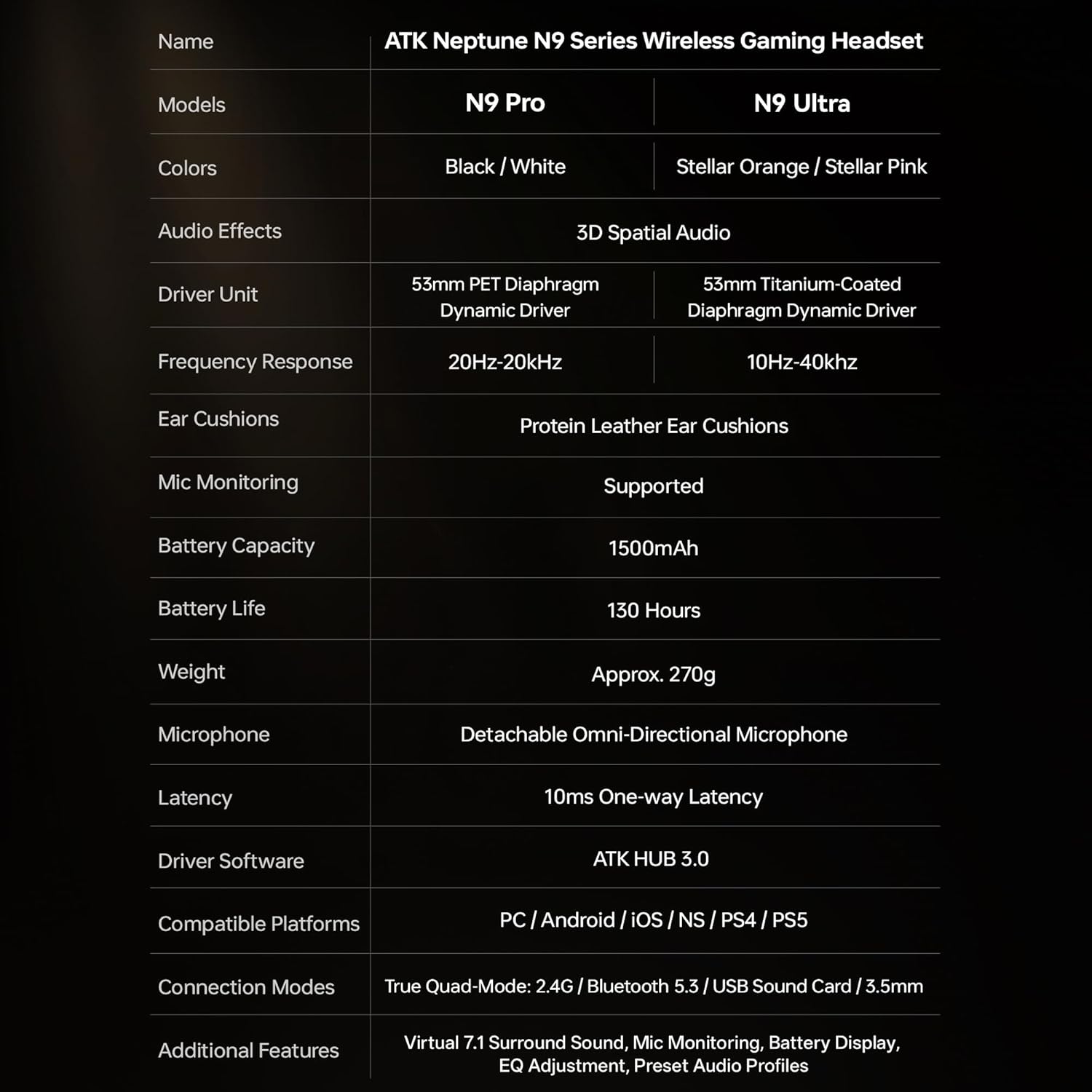
| Nom del model | ATK N9 Pro |
| Connectivitat | 3.5mm Wired, 2.4G Wireless, Bluetooth 5.3 |
| Tipus de conductor | Conductor dinàmic |
| Mida del controlador | 53 mm |
| Interval de freqüència | 20 Hz - 20,000 Hz |
| Impedància | 64 ohms |
| Micròfon | Detachable Noise-Canceling Omni-Directional |
| Capacitat de la bateria | 1500 mAh |
| Durada de la bateria | Fins a 130 hores |
| Latency (2.4G) | 10 Milliseconds (one-way) |
| Pes | 270 grams |
| Col·locació de l'orella | Sobre l'orella |
| Dispositius compatibles | PS5, PS4, PC, Nintendo Switch, Mobile Devices, Xbox Series X|S (wired) |
| Característiques addicionals | 3D Spatial Audio, Mic Monitoring, Volume Control |

6. Cura i Manteniment
- Neteja: Feu servir un drap suau i sec per netejar els auriculars. Eviteu utilitzar productes químics agressius o materials abrasius.
- Emmagatzematge: Guardeu els auriculars en un lloc fresc i sec, allunyat de la llum solar directa i de temperatures extremes.
- Cura de la bateria: Per allargar la durada de la bateria, eviteu descarregar completament els auriculars amb freqüència. Carregueu-los regularment, fins i tot si no els feu servir durant períodes prolongats.
- Resistència a l'aigua: Els auriculars no són resistents a l'aigua. Eviteu l'exposició a líquids.
7. Solució De Problemes
7.1. No Audio / Low Volume
- Ensure the headset is powered on and connected in the correct mode (2.4G, Bluetooth, or 3.5mm wired).
- Check the volume wheel on the headset and your device's volume settings.
- For wireless modes, ensure the headset is paired correctly and selected as the audio output device in your system settings.
- If using 3.5mm wired, ensure the cable is fully inserted into both the headset and the device.
7.2. El micròfon no funciona
- Assegureu-vos que el micròfon estigui ben connectat als auriculars.
- Comproveu si el botó de silenciar el micròfon dels auriculars està activat.
- Verify that the headset microphone is selected as the input device in your device's sound settings.
- For Xbox Series X|S, ensure you are using the 3.5mm wired connection for microphone support.
7.3. Problemes de connectivitat
- Sense fil 2.4G: Ensure the USB adapter is firmly plugged in. Try a different USB port.
- Bluetooth: Ensure the headset is in pairing mode. Forget the device on your phone/PC and re-pair. Keep the headset within the 5-meter Bluetooth range.
- General: Power cycle both the headset and your connected device.
8. Garantia i Suport
8.1. Informació de la garantia
The ATK N9 Pro/White Gaming Headset comes with a 6 mesos de garantia des de la data de compra. Aquesta garantia cobreix els defectes de fabricació i la mà d'obra en condicions d'ús normal. No cobreix els danys causats per un mal ús, accidents, modificacions no autoritzades o desgast normal.
8.2. Atenció al client
For further assistance, technical support, or warranty claims, please contact ATK customer service through the retailer where the product was purchased or visit the official ATK weblloc per obtenir informació de contacte d'assistència.