
1. Introducció
This manual provides instructions for the proper setup, operation, and maintenance of your Yoidesu CW Keyer. Please read this manual thoroughly before using the device to ensure optimal performance and longevity. The Yoidesu CW Keyer is a double paddle automatic Morse code key designed for HAM radio enthusiasts, offering responsive and stable operation.
2. Característiques del producte
The Yoidesu CW Keyer incorporates several key features designed for enhanced user experience:
- Responsive Double Paddle Design: Crafted with high-quality PCB materials and mechanical switches, this keyer provides a highly sensitive touch and quick bounce-back for precise Morse code transmission.
- Disseny compacte i portàtil: Its lightweight and mini design makes it easy to transport and store, ideal for field operations and portable setups.
- Base magnètica: Equipped with four powerful Nd magnets, the base securely attaches to metal surfaces, ensuring stability during use and preventing accidental movement.
- Connectivitat universal: Features a universal 3.5mm sound jack and a Type C interface for effortless connection to smartphones, computers, and HAM radio equipment.
- Advanced Circuit Board Materials: Built with excellent circuit board materials, ensuring durability and a modern aesthetic.

Image: The Yoidesu CW Keyer displaying its universal 3.5mm sound jack and Type C interface for broad compatibility.

Image: The underside of the Yoidesu CW Keyer, highlighting the four powerful Nd magnets on its base for secure attachment.

Imatge: A view of the Yoidesu CW Keyer, illustrating its compact and portable design suitable for on-the-go use.
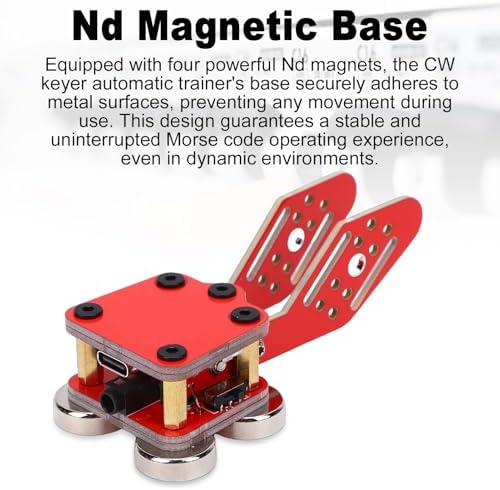
Image: The Yoidesu CW Keyer from an angle, emphasizing its responsive double paddle mechanism for accurate Morse code input.
3. Configuració
The Yoidesu CW Keyer is designed for direct installation and use. Follow these steps to set up your device:
- Desembalar: Carefully remove the CW Keyer and all accessories from the storage box.
- Connectar: Use the provided 3.5mm sound cable or a compatible Type C cable to connect the keyer to your desired device (e.g., smartphone, computer, HAM radio). Ensure the connection is secure.
- Col·locació: For stable operation, place the keyer on a flat, metallic surface. The integrated Nd magnets will secure the device in place, preventing movement during use.
- Configuració del dispositiu: Ensure your connected device is properly configured to recognize and receive input from the CW Keyer. Refer to your device's manual for specific input settings.
4. Instruccions de funcionament
Once connected and configured, the Yoidesu CW Keyer functions as an input device for sending Morse code signals. The double paddle design allows for intuitive and efficient transmission.
- Sending Morse Code: Use the left and right paddles to generate 'dit' and 'dah' signals, respectively. The responsive mechanical switches provide tactile feedback for precise control.
- Pràctica: For new users, practice is recommended to become proficient with the double paddle operation and Morse code rhythm.
- Compatibilitat: The keyer is compatible with various software and applications on smartphones and computers that support external Morse code input.
5. Manteniment
Proper maintenance will extend the life of your Yoidesu CW Keyer:
- Neteja: Use a soft, dry cloth to wipe the surface of the keyer. Avoid using abrasive cleaners or solvents.
- Emmagatzematge: When not in use, store the keyer in its original storage box to protect it from dust and physical damage.
- Medi ambient: Mantingueu el dispositiu allunyat de temperatures extremes, llum solar directa i humitat elevada.
- Manipulació: Avoid dropping the keyer or subjecting it to strong impacts, which could damage the internal components or mechanical paddles.
6. Solució De Problemes
If you encounter issues with your Yoidesu CW Keyer, refer to the following common troubleshooting steps:
- Keyer Not Responding:
- Ensure all cables (3.5mm sound cable, Type C cable) are securely connected to both the keyer and your device.
- Verify that your connected device (smartphone, computer, HAM radio) is powered on and functioning correctly.
- Check your device's audio input or USB settings to ensure the keyer is recognized and selected as the input source.
- Funcionament inestable:
- Ensure the keyer is placed on a flat, stable metallic surface to allow the magnetic base to function effectively.
- Avoid placing the keyer near strong electromagnetic interference sources.
- Paddles Feel Stiff or Loose:
- Inspect the paddles for any obstructions or debris.
- If the issue persists, contact customer support for assistance. Do not attempt to disassemble the unit.
Si aquests passos no resolen el problema, consulteu la secció de garantia i assistència per obtenir més ajuda.
7. Especificacions
| Característica | Detall |
|---|---|
| Tipus d'element | Double Paddle Morse Code Key |
| Material | PCB |
| Mètode de connexió | USB (Type C), 3.5mm Sound Jack |
| Número de canal | 2 |
| Dimensions del paquet | 3.94 x 2.36 x 1.57 polzades (10 x 6 x 4 cm) |
| Pes de l'article | 3.77 unces (107 g) |
| Número de model | Yoidesu37cfa41zj2 |
| ASIN | B0GFPFJ2WC |
| Fabricant | Yoidesu |

Image: Diagram showing the dimensions of the Yoidesu CW Keyer: 8.5cm (3.34in) length, 4cm (1.57in) width, and 3.1cm (1.22in) height.
8. Contingut del paquet
The following items are included in your Yoidesu CW Keyer package:
- 1 x CW Keyer
- 1 x 3.5mm Sound Cable
- 1 x Manual d'usuari (aquest document)
- 1 x Caixa d'emmagatzematge
9. Garantia i Suport
No specific warranty information is provided in the product details. For warranty inquiries, technical support, or any questions regarding your Yoidesu CW Keyer, please contact Yoidesu customer service directly or refer to the product's purchase platform for seller contact information.