
1. Introducció
This manual provides detailed instructions for the setup, operation, and maintenance of your LEFFOT H618 Plus Android 14.0 TV Box. This device transforms your television into a smart entertainment hub, offering access to streaming services, apps, and media content. Please read this manual thoroughly before using the device to ensure proper functionality and safety.
2. Contingut del paquet
Verifiqueu que tots els elements que s'enumeren a continuació s'inclouen al vostre paquet:
- LEFFOT H618 Plus Android 14.0 TV Box
- Adaptador d'alimentació
- HD Cable (HDMI Cable)
- Control remot
- Manual d'usuari (aquest document)
3. Producte acabatview
The LEFFOT H618 Plus is a 4K UHD streaming device powered by Android 14.0. It features an Allwinner H618 Quad-core ARM Cortex-A53 CPU and Mali G31 GPU, providing smooth performance for streaming and applications. This model includes 2GB RAM and 16GB ROM for system operations and app storage.
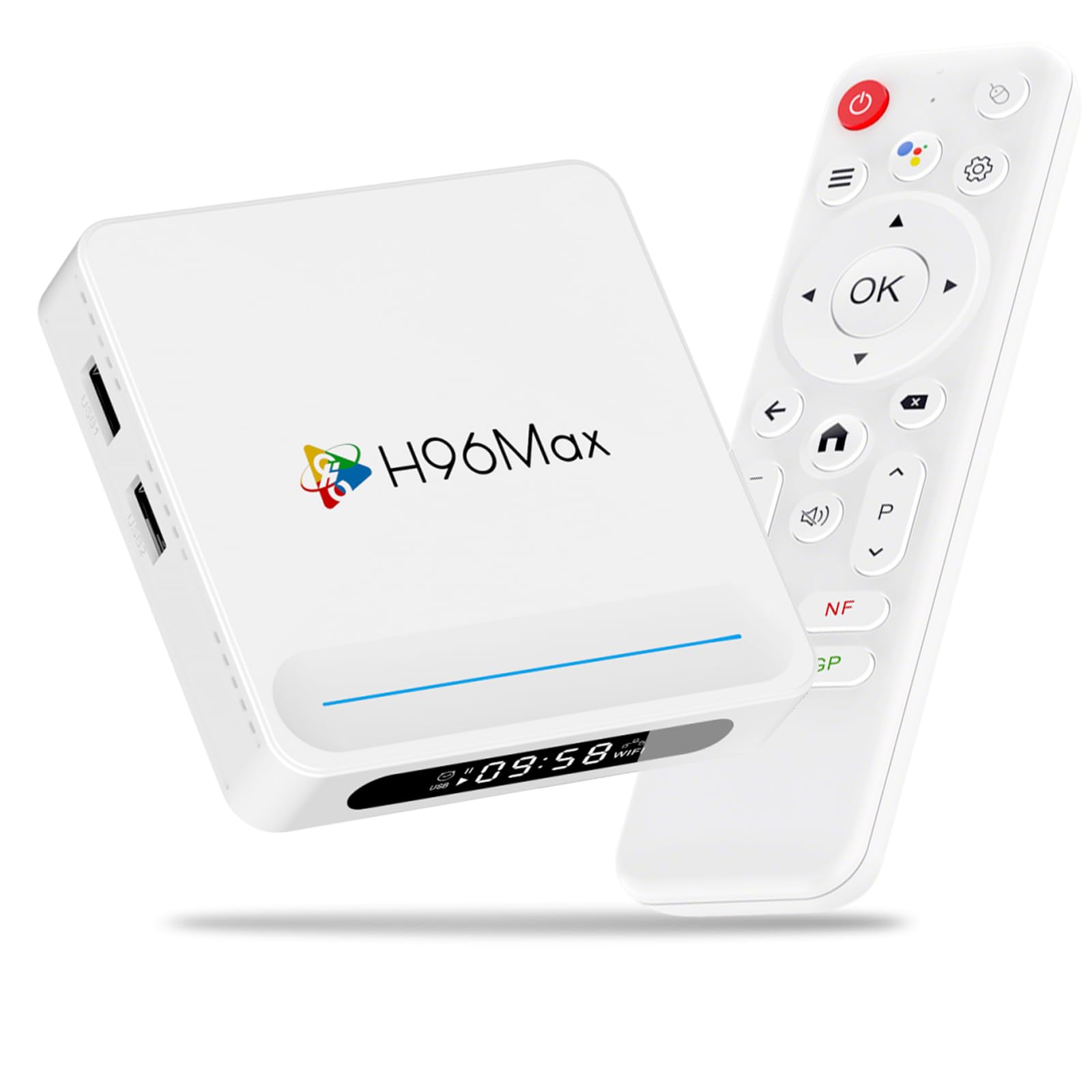
Figura 3.1: Davant view of the LEFFOT H618 Plus Android TV Box, showcasing its compact design and various ports for connectivity. The included remote control is also visible.
Ports i connexions
- HDMI 2.0a Output: Connects to your TV or display for 4K video output.
- Ports USB 2.0 (x2): For connecting external storage devices, keyboards, mice, or other USB peripherals.
- Sortida AV: For connecting to older televisions using an analog cable.
- Entrada d'alimentació de CC: Connects the power adapter to the device.
- Ethernet Port (100M): Per a una connexió de xarxa per cable estable.
4. Guia de configuració
Follow these steps to set up your LEFFOT H618 Plus TV Box:
- Connectar-se al televisor: Connect one end of the provided HD cable (HDMI) to the HDMI port on the TV Box and the other end to an available HDMI input on your television.
- Connectar l'alimentació: Plug the power adapter into the DC power input port on the TV Box, then plug the adapter into a wall outlet.
- Encès: El dispositiu s'hauria d'encendre automàticament. Si no, premeu el botó d'engegada del comandament a distància.
- Seleccioneu l'entrada: On your television, select the correct HDMI input source using your TV's remote control.
- Configuració inicial: Follow the on-screen instructions to complete the initial setup, which typically includes selecting your language, connecting to a Wi-Fi network (or using Ethernet), and signing in with your Google account.
5. Instruccions de funcionament
Navegació amb control remot
Use the included remote control to navigate the Android interface:
- Coixinet direccional: Use the up, down, left, and right arrows to move between menu items and options.
- Botó D'acord: Press to select an item or confirm an action.
- Botó enrere: Torna a la pantalla o menú anterior.
- Botó d'inici: Torna a la pantalla d'inici principal.
- Botons de volum: Ajusta el volum de sortida d'àudio.
- Botó d'encesa: Turns the device on or off (standby mode).
Accés a les aplicacions
From the home screen, you can access pre-installed applications or download new ones from the Google Play Store. Navigate to the 'Apps' section or the Google Play Store icon and select it to browse and install applications.
6. Connectivitat
Connexió Wi-Fi
The device supports 2.4G/5G Dual-Band Wi-Fi 6 for fast and stable wireless internet access. To connect:
- Vés a Configuració > Xarxa i Internet.
- Seleccioneu Wi-Fi i enceneu-lo.
- Trieu la xarxa Wi-Fi que vulgueu de la llista.
- Enter the Wi-Fi password if prompted and select Connecta't.
Connexió Ethernet
For a more stable connection, connect an Ethernet cable from your router to the Ethernet port on the TV Box. The device will automatically detect and use the wired connection.
Bluetooth 5.0
The TV Box features Bluetooth 5.0, allowing you to connect compatible wireless accessories such as headphones, game controllers, or keyboards.
- Vés a Configuració > Dispositius connectats > Vincula un dispositiu nou.
- Poseu l'accessori Bluetooth en mode d'emparellament.
- Select the accessory from the list on your TV screen to pair.
7. Control per veu
The LEFFOT H618 Plus integrates with Google Assistant for convenient voice control. If your remote control has a dedicated microphone button, press it to activate voice commands.
- Search Content: Say "Find action movies" or "Play [Movie Title]".
- Inicia aplicacions: Say "Open YouTube" or "Launch Netflix".
- Control de reproducció: Say "Pause", "Play", "Fast forward", or "Rewind".
- Ajustar el volum: Say "Volume up" or "Volume down".
8. Mirall de pantalla
The device supports AirPlay and Miracast, allowing you to wirelessly cast content from your iOS or Android devices to your television.
Using AirPlay (for iOS devices)
- Ensure your iOS device and the TV Box are connected to the same Wi-Fi network.
- On your iOS device, open the Control Center (swipe down from the top-right corner on newer iPhones/iPads, or swipe up from the bottom on older models).
- Toqueu Mirall de pantalla or AirPlay.
- Select the LEFFOT H618 Plus from the list of available devices.
Using Miracast (for Android devices)
- Ensure your Android device and the TV Box are connected to the same Wi-Fi network.
- On your Android device, look for a feature like Cast, Mirall de pantalla, Intel·ligent View, o Pantalla sense fils in your quick settings or display settings.
- Activate the feature and select the LEFFOT H618 Plus from the list of available devices.
9. Especificacions
Detailed technical specifications for the LEFFOT H618 Plus Android 14.0 TV Box (2GB-16GB model):
| Marca | LEFFOT |
| Número de model | 2 GB-16 GB |
| Sistema operatiu | Android 14.0 |
| CPU | Allwinner H618 Quad-core ARM Cortex-A53 |
| GPU | Mali G31 |
| RAM | 2 GB |
| ROM | 16 GB |
| Resolució | 4K UHD |
| Wi-Fi | 2.4G/5G Dual-Band Wi-Fi 6 |
| Bluetooth | Bluetooth 5.0 |
| Ethernet | 100M |
| Ports | HDMI 2.0a, 2x USB 2.0, AV Out, DC In, Ethernet |
| Característiques especials | HDR10, AirPlay, Miracast, Voice Control (Google Assistant) |
| Dimensions | 3.93 x 3.93 x 0.76 polzades |
| Pes | 4.1 unces (115 grams) |
10. Solució De Problemes
If you encounter issues with your LEFFOT H618 Plus TV Box, refer to the following common problems and solutions:
- Sense energia:
- Assegureu-vos que l'adaptador de corrent estigui connectat correctament al dispositiu i a una presa de corrent que funcioni.
- Proveu una presa de corrent diferent.
- Sense senyal a la televisió:
- Verifiqueu que el cable HDMI estigui connectat correctament tant al descodificador com al televisor.
- Assegureu-vos que el televisor estigui configurat a la font d'entrada HDMI correcta.
- Prova un altre cable HDMI o port HDMI al televisor.
- Wi-Fi Connection Issues / Spotty Wi-Fi:
- Comproveu si el vostre encaminador Wi-Fi funciona correctament.
- Ensure the TV Box is within range of your Wi-Fi router.
- Try restarting both the TV Box and your Wi-Fi router.
- Consider using a wired Ethernet connection for better stability.
- Slow Performance / Buffering:
- Tanca les aplicacions de fons innecessàries.
- Clear the cache of frequently used apps (Settings > Apps > [App Name] > Clear Cache).
- Assegureu-vos de tenir una connexió a Internet estable i ràpida.
- Reinicieu el dispositiu.
- El control remot no respon:
- Reviseu i substituïu les piles del comandament a distància.
- Assegureu-vos que no hi hagi obstacles entre el comandament a distància i el televisor.
- Problemes de compatibilitat de l'aplicació:
- Some applications may not be fully optimized for Android TV Box environments. Check the app's requirements or look for alternative versions.
11. Manteniment
To ensure the longevity and optimal performance of your TV Box:
- Neteja: Feu servir un drap suau i sec per netejar el dispositiu. No utilitzeu netejadors líquids ni aerosols.
- Col·locació: Place the device on a stable, flat surface with adequate ventilation. Avoid placing it near heat sources or in direct sunlight.
- Apagar: If not in use for an extended period, disconnect the power adapter.
- Actualitzacions de programari: Comproveu periòdicament si hi ha actualitzacions del sistema a la configuració del dispositiu per assegurar-vos que teniu les funcions i els pegats de seguretat més recents.
12. Informació de seguretat
Si us plau, observeu les precaucions de seguretat següents:
- No exposeu el dispositiu a l'aigua, la humitat ni a temperatures extremes.
- No intenteu obrir ni reparar el dispositiu vosaltres mateixos. Encarregueu totes les tasques de manteniment a personal qualificat.
- Feu servir només l'adaptador de corrent proporcionat. L'ús d'adaptadors no autoritzats pot fer malbé el dispositiu i anul·lar la garantia.
- Mantingueu el dispositiu allunyat dels nens i de les mascotes.
13. Garantia i Suport
For warranty information or technical support, please refer to the documentation provided with your purchase or contact LEFFOT customer service through their official website or the retailer where the product was purchased. Please have your model number (2GB-16GB) and purchase details ready when contacting support.