
1. Introducció i finalview
This manual provides essential instructions for setting up, operating, maintaining, and troubleshooting your iiyama SENSE INFINITY SENSE-15FH127-i7-UH1X-M laptop. This high-performance notebook features a 15.6-inch Full HD anti-glare display, an Intel Core i7-12650H processor, 16GB of DDR4 RAM, and a 1TB NVMe SSD, running on Windows 11 Home.
Please read this manual thoroughly before using your new laptop to ensure proper operation and to maximize its lifespan.

Figura 1.1: Frontal view of the iiyama SENSE INFINITY laptop with the screen open.
2. Configuració
2.1 Desembalatge i inspecció inicial
Traieu amb cura tots els components de l'embalatge. Verifiqueu que hi hagi els elements següents:
- iiyama SENSE INFINITY Laptop
- AC Adapter Set (AC adapter and power cord)
- Various Manuals
- Targeta de garantia
Inspeccioneu el portàtil i els accessoris per detectar qualsevol signe de dany. Si falta algun element o hi ha algun dany, poseu-vos en contacte immediatament amb el vostre distribuïdor.
2.2 Connexió de l'adaptador de corrent
Before first use, ensure the laptop battery is fully charged. Connect the AC adapter to the power input port on the laptop and then plug the power cord into a wall outlet.

Figura 2.1: lateral view illustrating the power input port and other external terminals.
2.3 Arrencada inicial i configuració de Windows
Press the power button to turn on the laptop. Follow the on-screen instructions to complete the Windows 11 Home setup process. This includes selecting your region, language, connecting to a network, and creating a user account.

Figure 2.2: Laptop displaying the Windows 11 operating system interface.
3. Instruccions de funcionament
3.1 Engegada/Apagada i Mode de repòs
- Encès: Premeu el botó d'engegada que es troba a la plataforma del teclat.
- Apagar: Feu clic al botó Inici del Windows i, a continuació, seleccioneu Energia > Apagar.
- Mode de repòs: Tanqueu la tapa del portàtil o seleccioneu Energia > Suspensió al menú Inici.
3.2 Ús del teclat i del touchpad
The laptop features a Japanese keyboard layout and a multi-touch compatible touchpad. Refer to the Windows operating system documentation for specific gestures and keyboard shortcuts.
3.3 Connexió de dispositius externs
El vostre portàtil està equipat amb diversos ports per connectar dispositius externs:
- Ports USB: 2x USB 3.1 (Type-C), 1x USB 3.0, 1x USB 2.0 for connecting peripherals like mice, keyboards, and external storage.
- Sortides de visualització: 1x HDMI, 1x Mini DisplayPort for connecting external monitors or projectors.
- Preses d'àudio: 1x Headphone/Speaker Output, 1x Microphone Input for audio devices.
- Lector de targetes Micro SD: Insert a micro SD card to access stored data.
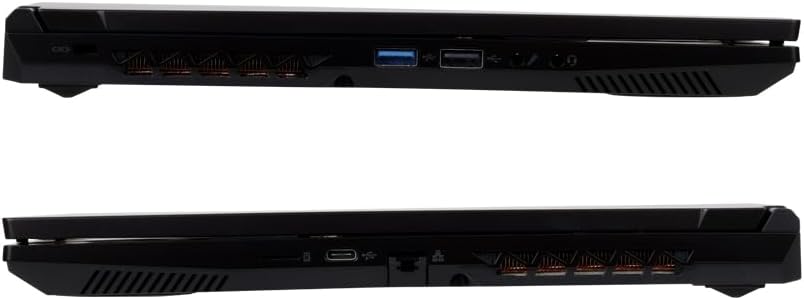
Figura 3.1: Detallada view of the laptop's external ports on both sides.
3.4 Connectivitat de xarxa
- Wi-Fi: The laptop supports Wi-Fi 6E (IEEE802.11 ax/ac/n/g/b/a). To connect, click the network icon in the taskbar, select your desired Wi-Fi network, and enter the password if prompted.
- LAN per cable: Connect an Ethernet cable to the 1000BASE-T LAN port for a stable wired network connection.
- Bluetooth: The laptop includes Bluetooth 5 for connecting wireless peripherals such as headphones or speakers.
4. Manteniment
4.1 Neteja del portàtil
- Pantalla: Utilitzeu un drap suau i sense pelusa lleugerament dampNetegeu amb aigua o un netejador de pantalles. No ruixeu líquid directament sobre la pantalla.
- Xassís i teclat: Feu servir un drap suau i sec. Per a la brutícia persistent, feu servir un drap lleugerament sec.amp cloth can be used, ensuring no liquid enters the ports or vents.
- Reixetes: Feu servir aire comprimit periòdicament per eliminar la pols de les reixetes de refrigeració per mantenir un flux d'aire òptim.
4.2 Cura de la bateria
Per allargar la durada de la bateria:
- Eviteu descarregar completament la bateria amb freqüència.
- No exposeu el portàtil a temperatures extremes.
- Si guardeu el portàtil durant un període prolongat, carregueu la bateria aproximadament al 50-60% abans d'apagar-lo.
4.3 Actualitzacions de programari
Regularly update your Windows operating system and drivers to ensure optimal performance, security, and compatibility. Windows Update can be accessed via the Settings menu.
5. Solució De Problemes
This section addresses common issues you might encounter. For more complex problems, refer to the official iiyama support weblloc o contacteu amb el servei d'atenció al client.
5.1 Sense alimentació / El portàtil no s'encén
- Assegureu-vos que l'adaptador de CA estigui connectat correctament tant al portàtil com a una presa de corrent que funcioni.
- Comproveu si la presa de corrent funciona connectant-hi un altre dispositiu.
- Si la bateria està completament esgotada, el portàtil pot trigar uns minuts a carregar-se abans que es pugui engegar.
5.2 Problemes de visualització
- Pantalla en blanc: Try pressing the function key combination (e.g., Fn + F5 or F7, depending on the model) to toggle the display output.
- Monitor extern no detectat: Ensure the cable is securely connected. Try restarting the laptop.
5.3 Problemes de connectivitat de xarxa
- Wi-Fi: Verifiqueu que el Wi-Fi estigui habilitat a la configuració de Windows. Reinicieu l'encaminador i el mòdem.
- LAN per cable: Check the Ethernet cable connection. Ensure your network adapter drivers are up to date.
5.4 Rendiment lent
- Tanca les aplicacions innecessàries que s'executen en segon pla.
- Ensure your operating system and drivers are updated.
- Comproveu si hi ha programari maliciós o virus amb un programari antivirus de bona reputació.
- Ensure adequate free space on your 1TB SSD.
6. Especificacions
The following table details the technical specifications of the iiyama SENSE INFINITY SENSE-15FH127-i7-UH1X-M laptop:
| Característica | Especificació |
|---|---|
| Marca | iiyama |
| Número de model | SENSE-15FH127-i7-UH1X-M |
| Sistema operatiu | Windows 11 Home |
| Mida de la pantalla | 15.6 polzades |
| Resolució nativa | Full HD (1920 x 1080 píxels) |
| Tipus de visualització | Anti-glare Color LCD |
| Model de CPU | Intel Core i7-12650H Processor |
| Velocitat de la CPU | Fins a 4.70 GHz |
| Gràfics | Gràfics Intel UHD (integrats) |
| Installed RAM Memory | 16GB DDR4-3200 S.O.DIMM (8GBx2) |
| Ranures de memòria | 2 |
| Emmagatzematge | 1TB NVMe M.2 SSD (PCIe 4.0x4) |
| Unitat òptica | No equipat |
| Lector de targetes | Lector de targetes Micro SD |
| Àudio | High Definition Audio subsystem, Built-in Stereo Speakers, Built-in Microphone |
| Weblleva | 1 de milions de píxels |
| LAN per cable | 1000BASE-T LAN Port |
| Connectivitat sense fil | Wi-Fi 6E (IEEE802.11 ax/ac/n/g/b/a), Bluetooth 5 |
| Teclat | Japanese Keyboard |
| Dispositiu apuntador | Multi-touch compatible Touchpad |
| Ports Externs | Headphone/Speaker Output x1, Microphone Input x1, USB 3.1 (Type-C) x2, USB 3.0 x1, USB 2.0 x1, HDMI x1, Mini DisplayPort x1 |
| TPM | TPM2.0 compatible |
| Durada de la bateria (reproducció de vídeo) | Approx. 4.3 hours (JEITA3.0) |
| Durada de la bateria (inactiva) | Approx. 6.0 hours (JEITA3.0) |
| Pes | Approx. 2.03 kg (including battery) |
| Dimensions (AxPxA) | Approx. 360mm x 240mm x 27.7mm (including rubber feet) |
7. Garantia i Suport
7.1 Garantia estàndard
This iiyama SENSE INFINITY laptop comes with a standard 1 any de garantia from the date of purchase. Please retain your proof of purchase and the warranty card for any warranty claims.
The warranty covers manufacturing defects and hardware failures under normal use. It does not cover damage caused by misuse, accidents, unauthorized modifications, or natural disasters.
7.2 Suport tècnic
For technical assistance, driver downloads, or further troubleshooting, please refer to the official iiyama support website. You can also find contact information for customer service on your warranty card or the official product page.
When contacting support, please have your laptop's model number (SENSE-15FH127-i7-UH1X-M) and serial number ready.


