
Introducció
This manual provides essential information for the safe and effective use of your BORGUSI CTM5521L Smart Treadmill. Please read all instructions carefully before assembly and operation. Retain this manual for future reference.
Informació important de seguretat
- Consulteu un metge abans de començar qualsevol programa d'exercici.
- Mantingueu els nens i les mascotes lluny de la cinta de córrer durant el funcionament.
- Col·loqueu la cinta de córrer sobre una superfície plana i estable amb un espai lliure suficient al seu voltant.
- Enganxeu sempre el clip de la clau de seguretat a la roba abans d'engegar la cinta de córrer.
- No feu servir la cinta de córrer si està danyada o no funciona correctament.
- Porteu calçat esportiu adequat.
- Maximum user weight capacity: 300 lbs.
Muntatge i muntatge
The BORGUSI CTM5521L treadmill features a space-saving design and requires minimal assembly. Follow these steps for proper setup:
1. Desembalatge i col·locació
- Traieu amb cura tots els components de l'embalatge.
- Place the treadmill on a level surface, ensuring at least 2 feet of clearance on the sides and 6 feet at the rear for safety.
2. Muntatge del manillar
Attach the handlebars to the main frame using the provided screws and tools. Ensure all connections are secure.

Image: The BORGUSI CTM5521L Smart Treadmill with its handlebars and console fully assembled, ready for use. This image shows the overall structure and design of the treadmill.
3. Adjunt de la consola
Secure the console to the top of the handlebars. Connect any necessary cables as indicated in the detailed assembly instructions provided in the box.

Imatge: Una imatge detallada view of the treadmill's multi-functional console, highlighting the iPad holder, cup holders, and control buttons for speed, incline, and programs.
4. Connexió d'alimentació
Plug the power cord into a grounded electrical outlet. Ensure the power switch on the treadmill is in the "ON" position.
Vídeo d'instal·lació
Video: This official BORGUSI video demonstrates the step-by-step installation process for the CTM5521L Treadmill, covering assembly of the frame, console, and final checks.
Instruccions de funcionament
1. Tauler de control acabatview
The LED display shows key metrics such as time, speed, distance, calories burned, and incline. The console includes buttons for starting/stopping, adjusting speed and incline, and selecting preset programs.

Image: The multi-functional control panel displaying various workout metrics including speed, distance, time, calories, incline, and heart rate. It also shows the safety key placement.
2. Començar un entrenament
- Assegureu-vos que la clau de seguretat estigui correctament col·locada a la consola i enganxada a la roba.
- Press the "START" button. The belt will begin moving at a low speed.
- Adjust speed using the "+" and "-" buttons or quick-speed buttons (e.g., 2, 5, 8 MPH). The treadmill supports speeds from 0.6 to 10 MPH.
- Adjust incline using the "INCLINE +" and "INCLINE -" buttons. The treadmill offers 15 levels of automatic incline.

Image: Demonstrates the treadmill's versatility for different workout intensities, showing a user in walking (0.6-3 MPH), jogging (3-6.5 MPH), and running (6.5-10 MPH) modes.
3. Programes predefinits
The treadmill includes 40 built-in workout programs. Press the "PROGRAM" button to cycle through the available programs. Each program offers varying speed and incline profiles to challenge different fitness levels.

Image: A visual representation of the 40 preset workout programs, each with a unique profile of speed and incline changes over time.
4. Connectivitat de l'aplicació Bluetooth
Connect your treadmill to compatible fitness apps like KINOMAP, Zwift, and Fitshow via Bluetooth. This allows for personalized workouts, progress tracking, and interactive training experiences.

Image: A user exercising on the treadmill, with various fitness app interfaces shown in the background, illustrating the Bluetooth connectivity feature.
Video: This official BORGUSI video highlights the auto-incline feature and the spacious 47.3" x 17.5" running deck of the treadmill, demonstrating its functionality during a workout.
Manteniment
Un manteniment regular garanteix la longevitat i el rendiment òptim de la cinta de córrer.
1. Neteja
- Netegeu la consola i altres superfícies amb anuncisamp drap després de cada ús. Eviteu productes de neteja abrasius.
- Vacuum underneath the treadmill regularly to prevent dust and debris buildup.
2. Running Belt Lubrication
Lubricate the running belt every 3-6 months, or after approximately 100 hours of use, using the provided lubricant. Refer to the detailed instructions in your physical user manual for the correct procedure.
3. Ajust del cinturó de running
If the running belt slips or drifts to one side, it may need adjustment. Use the included Allen wrench to adjust the tension bolts at the rear of the treadmill. Adjust in small increments (quarter turns) and test the belt after each adjustment.

Imatge: Una explosió view illustrating the 7-layer construction of the treadmill's running belt, designed for wear resistance, shock absorption, and sound insulation.
Resolució de problemes
| Problema | Causa possible | Solució |
|---|---|---|
| La cinta de córrer no s'encén. | Cable d'alimentació no connectat, interruptor apagat, interruptor automàtic saltat. | Check power cord connection, ensure switch is ON, reset circuit breaker. |
| El cinturó de running rellisca. | Belt too loose, worn belt. | Adjust belt tension (refer to manual), contact support if belt is worn. |
| Soroll inusual durant el funcionament. | Loose components, lack of lubrication, motor issue. | Check for loose screws, lubricate belt, contact support for motor issues. |
| La inclinació no s'ajusta. | Incline motor malfunction, obstruction. | Check for obstructions, contact support. |
Especificacions
| Característica | Detall |
|---|---|
| Marca | BORGUSI |
| Nom del model | CTM5521L |
| Color | Negre |
| Dimensions del producte (P x A x A) | 55.1 "P x 27.2" W x 46.1" H |
| Mida plegada (L x W x H) | 32.2 cm de llargada x 27.2 cm d'amplada x 46.9 cm d'alçada |
| Pes de l'article | 93.5 lliures |
| Material | Acer d'aliatge, plàstic |
| Velocitat màxima | 10 milles per hora |
| Velocitat mínima | 0.6 milles per hora |
| Potència màxima | 3.5 cavalls de potència |
| Percentatge d'inclinació màximatage | 15 Levels (Automatic) |
| Nombre de programes | 40 programes preestablerts |
| Mostra | LED |
| Tecnologia de connectivitat | Bluetooth (KINOMAP, Zwift, Fitshow App Connectivity) |
| Mètriques mesurades | Distance, Speed, Incline, Time, Calories Burned |
| Recomanació de pes màxim | 300 lliures |
| Característiques especials | Shock Absorbent, Heavy Duty, Foldable, Heart Rate Monitor, Water Bottle Holder, Wheeled |
| Components inclosos | Lubricant, cable d'alimentació, clau de seguretat, kit d'eines, manual d'usuari |
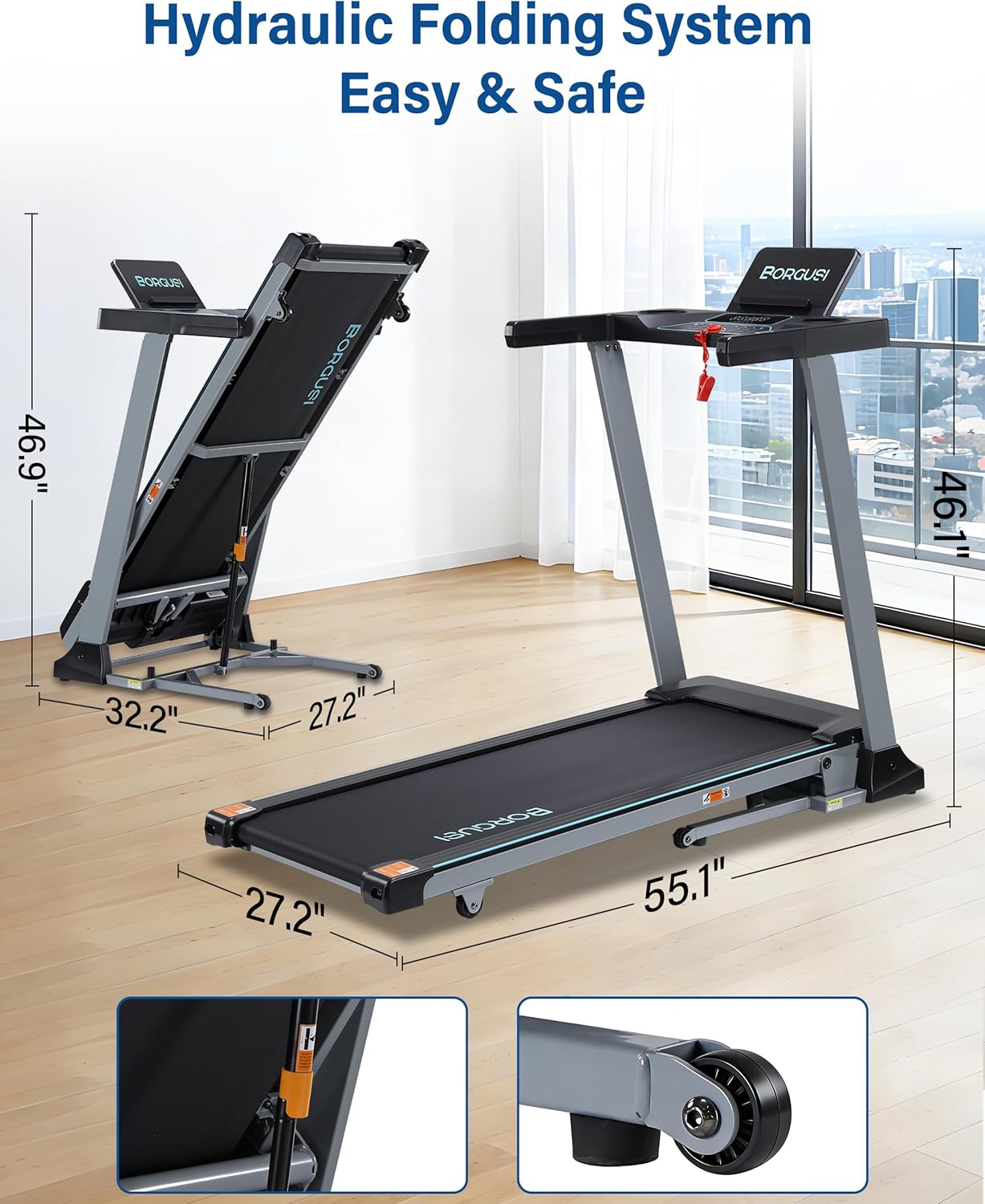
Image: The treadmill in both its unfolded and folded states, with dimensions clearly marked, demonstrating its space-saving hydraulic folding system.
Garantia i Suport
Informació de la garantia
The BORGUSI CTM5521L Smart Treadmill comes with a 1-year parts protection plan. This warranty covers manufacturing defects and component failures under normal use. Please retain your proof of purchase for warranty claims.
Atenció al client
For any questions, assistance, or warranty inquiries, please contact BORGUSI customer support. You can reach us via email through the Amazon platform, and we aim to respond within 12 business hours.
Please refer to the contact information provided with your product packaging or on the official BORGUSI store page on Amazon for the most current support details.