
Introducció
The UGREEN USB 3.0 Switch with Gigabit Ethernet (Model 95623) allows two computers to share up to four USB 3.0 devices and a single Gigabit Ethernet connection simultaneously. This device is designed to enhance productivity by enabling seamless switching of peripherals like keyboards, mice, printers, and USB cameras between two systems without the need to constantly unplug and replug cables. It also integrates a high-performance Gigabit network adapter, providing stable and fast internet access for both connected PCs.
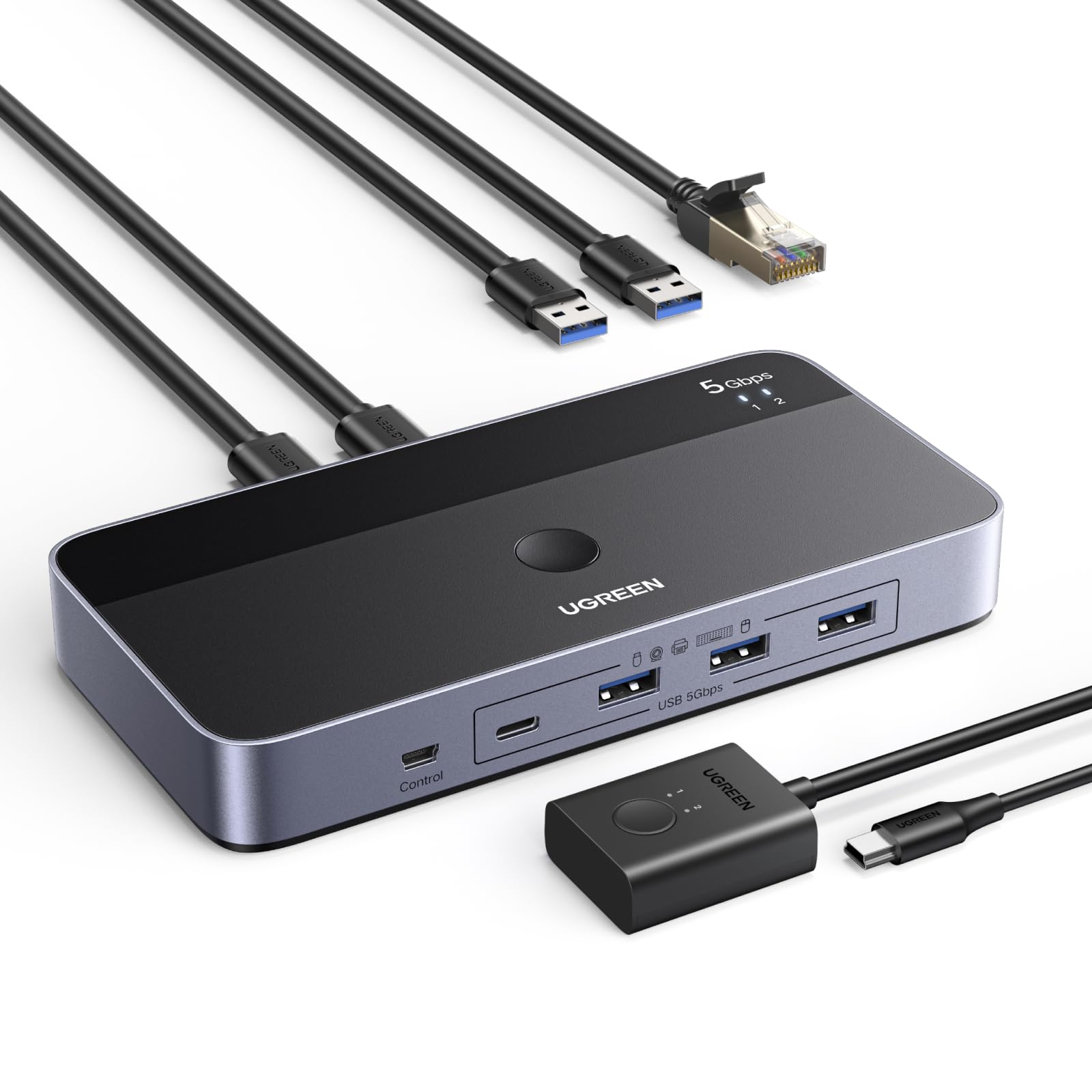
Image: The UGREEN USB 3.0 Switch connected to two laptops, demonstrating its primary function of sharing resources.
Contingut del paquet
Verifiqueu que tots els elements que s'enumeren a continuació s'inclouen al vostre paquet:
- 1 x UGREEN USB 3.0 Switcher (L 164 x W 81 mm)
- 2 x USB-A to USB-A 3.0 Cables (5FT / 1.5M each)
- 1 x Remote Control (1.5M / 5FT cable)
- 1 x Manual d'usuari

Imatge: Representació visual dels elements inclosos a l'embalatge del producte.
Producte acabatview i Característiques
The UGREEN USB 3.0 Switch is designed for efficiency and convenience, featuring a robust aluminum shell for heat dissipation and durability. It offers multiple connectivity options and dual switching methods.
Distribució del port

Imatge: Davant i darrere view of the UGREEN USB 3.0 Switch, highlighting all input and output ports.
- Ports d'entrada: 2 x USB-A 3.0 ports (for connecting to two PCs).
- Ports de sortida: 3 x USB-A 3.0 ports, 1 x USB-C 3.0 port (for connecting shared peripherals).
- Port de xarxa: 1 x Gigabit Ethernet port (RJ45) for simultaneous internet access.
- Entrada d'alimentació: 1 x USB-C 5V port (for optional external power supply).
- Port de control: 1 x Port for external remote control.
Característiques clau
- Simultaneous Internet Access: Built-in Gigabit Ethernet adapter allows two computers to share a single wired internet connection without manual switching.
- Transferència de dades d'alta velocitat: USB 3.0 ports support data transfer speeds up to 5Gbps, backward compatible with USB 2.0.
- Versatile Device Sharing: Share keyboards, mice, printers, headphones, USB cameras, and other USB devices between two PCs.
- Dual Switching Modes: Switch between connected computers using either the button on the main unit or the included wired remote control.
- Plug & Play: No drivers required for Windows, macOS, Chrome OS, and Linux operating systems.
- Font d'alimentació opcional: USB-C power input for stable operation with high-power devices like external hard drives.

Image: The switch highlighting its Gigabit Ethernet capability, allowing two PCs to be online simultaneously.
Instruccions de configuració
Segueix aquests passos per configurar el teu commutador USB 3.0 UGREEN:
- Connect to Computers: Use the two provided USB-A to USB-A 3.0 cables. Connect one end of each cable to the "PC Input 1" and "PC Input 2" ports on the rear of the UGREEN switch. Connect the other end of each cable to an available USB-A port on your respective computers (PC1 and PC2).
- Connecteu els perifèrics: Plug your USB devices (keyboard, mouse, printer, USB camera, etc.) into the USB-A 3.0 and USB-C 3.0 output ports on the front of the switch.
- Connexió Ethernet (opcional): If you wish to share a wired internet connection, connect an Ethernet cable from your router or modem to the Gigabit Ethernet port on the rear of the switch. Both connected PCs will then have simultaneous internet access through this connection.
- Connect External Power (Recommended for High-Power Devices): For stable operation, especially when connecting power-hungry devices like external hard drives or multiple peripherals, connect a 5V USB-C power adapter (not included) to the "IN 5V" USB-C port on the front of the switch.
- Connect Remote Control (Optional): Plug the wired remote control into the dedicated "Control" port on the front of the switch. This allows you to switch between computers from a convenient location on your desk.
The switch is plug-and-play, and your operating system should automatically detect and install any necessary drivers.
Instruccions de funcionament
The UGREEN USB 3.0 Switch offers two methods for switching between your connected computers:
1. Button Switch on Main Unit
- Press the large circular button located on the top surface of the UGREEN switch.
- Each press will toggle the shared USB devices and Ethernet connection between PC1 and PC2.
- LED indicators (1 and 2) on the switch will illuminate to show which computer is currently active.
2. Comandament a distància amb cable
- If you have connected the wired remote control, press the button on the remote.
- The remote control also features LED indicators (1 and 2) to display the active computer.
- This method is ideal for keeping the main switch unit out of sight for a tidier desk.

Image: Demonstrating the two available methods for switching between connected computers.
Manteniment
Per garantir la longevitat i el rendiment òptim del vostre commutador USB 3.0 UGREEN, seguiu aquestes pautes de manteniment:
- Neteja: Feu servir un drap suau i sec per netejar l'exterior del dispositiu. Eviteu utilitzar netejadors líquids o materials abrasius.
- Emmagatzematge: Guardeu l'interruptor en un lloc fresc i sec, allunyat de la llum solar directa i de temperatures extremes.
- Manipulació: Eviteu deixar caure el dispositiu ni sotmetre'l a impactes forts. No intenteu desmuntar la unitat, ja que això anul·larà la garantia.
- Gestió de cables: Assegureu-vos que els cables no estiguin excessivament doblegats o tensats, ja que això pot fer-los malbé amb el temps.
Resolució de problemes
If you encounter issues with your UGREEN USB 3.0 Switch, refer to the following common problems and solutions:
- Devices Not Detected or Disconnecting:
- Ensure all cables are securely connected to both the switch and your computers/peripherals.
- If using high-power devices (e.g., external hard drives), connect an external 5V USB-C power adapter to the switch. Insufficient power is a common cause of disconnections.
- Try connecting the problematic device directly to your computer to rule out the device itself as the issue.
- Test with different USB cables, especially the ones connecting the switch to your computers.
- Velocitats de transferència de dades lentes:
- Ensure both your computer's USB ports and your connected devices support USB 3.0 for optimal speeds.
- Verify that you are using USB 3.0 compatible cables.
- Problemes de connexió Ethernet:
- Check that the Ethernet cable is firmly connected to both the switch and your network source.
- Confirm that your computer's network settings are configured for DHCP (automatic IP address assignment).
- Note that while the port is Gigabit, actual speeds may vary depending on your network infrastructure and the USB bandwidth available.
- Switching Not Responding:
- Ensure the remote control cable (if used) is properly plugged into the switch.
- Try pressing the button on the main unit directly.
- Disconnect and reconnect the USB cables from the computers to reset the switch.
- Sense sortida de vídeo:
- This device is a USB switch and does not support video transmission. It is not a KVM switch for monitors.
Especificacions
| Marca | UGREEN |
| Número de model | 95623 |
| Interfície del maquinari | Ethernet, USB, USB 3.0, USB Type C |
| Velocitat de transferència de dades | 5 Gigabits per second |
| Ports USB totals | 4 (3 x USB-A 3.0, 1 x USB-C 3.0) |
| Ports d'entrada | 2 x USB-A 3.0 (for PC connection) |
| Port de xarxa | 1 x Gigabit Ethernet (RJ45) |
| Entrada de potència | USB-C 5V (optional) |
| Dispositius compatibles | Keyboards, Mice, Printers, Headphones, USB Cameras, Computers (PCs), Hard Disk Drives, Network Devices |
| Sistema operatiu | Windows, macOS, Chrome OS, Linux |
| Característica especial | Plug and Play |
Garantia i Suport
UGREEN products are designed for reliability and performance. This product comes with a standard manufacturer's warranty. For specific warranty terms and conditions, please refer to the warranty card included in your package or visit the official UGREEN weblloc.
If you require technical assistance, have questions about product functionality, or need to report a defect, please contact UGREEN customer support through their official website or the contact information provided in your product documentation. Please have your model number (95623) and purchase details ready when contacting support.
Per a més informació, visiteu el Botiga UGREEN a Amazon.