
Introducció
This manual provides essential instructions for setting up, operating, maintaining, and troubleshooting your OPPO Reno15 F 5G AI Smartphone. Please read this manual thoroughly to ensure proper use and to maximize the device's performance and longevity.
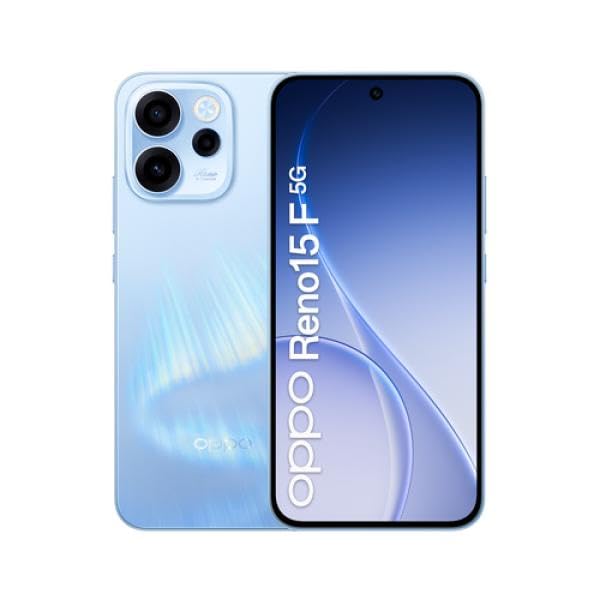
Image: The OPPO Reno15 F 5G AI Smartphone, showcasing its design. This image illustrates the general appearance of the device.
1. Configuració
1.1 Desembalatge i inspecció inicial
Traieu amb cura tots els elements de l'embalatge. Verifiqueu que hi hagi els components següents:
- OPPO Reno15 F 5G AI Smartphone
- Cable USB
- Eina expulsora de SIM
- Guia d'inici ràpid (pot variar segons la regió)
- Informació de seguretat (pot variar segons la regió)
Inspect the device for any visible damage. If any components are missing or damaged, contact your retailer.
1.2 Instal·lació de la targeta SIM
The OPPO Reno15 F supports Dual SIM functionality. Follow these steps to install your SIM card(s):
- Localitza la safata de la targeta SIM al lateral del dispositiu.
- Introduïu l'eina d'expulsió de la SIM al forat petit que hi ha al costat de la safata i premeu fermament fins que la safata surti.
- Col·loqueu la targeta o targetes nano-SIM a les ranures designades de la safata. Assegureu-vos que els contactes daurats estiguin mirant cap avall.
- Torneu a inserir amb cura la safata de la targeta SIM al telèfon fins que encaixi al seu lloc.
1.3 Engegada i configuració inicials
Per encendre el dispositiu per primera vegada:
- Press and hold the Power button (usually on the right side) until the OPPO logo appears.
- Follow the on-screen instructions to complete the initial setup, including language selection, Wi-Fi connection, Google account login, and security settings.
1.4 Càrrega de la bateria
Before first use, it is recommended to fully charge the device. The OPPO Reno15 F is equipped with a 6500mAh battery.
- Connect the USB cable to the phone's charging port and the other end to a compatible power adapter.
- Connecteu l'adaptador de corrent a una presa de corrent.
- L'indicador de càrrega apareixerà a la pantalla.
2. Com fer servir el telèfon intel·ligent
2.1 Pantalla i navegació
The device features a 6.57-inch 120Hz AMOLED FHD+ display. Navigate the interface using touch gestures:
- Toca: Seleccioneu un element o obriu una aplicació.
- Llisca: Desplaçar-se per pantalles o llistes.
- Pessigar: Apropar o allunyar les imatges i web pàgines.
- Premsa llarga: Accedir a menús contextuals o moure icones.
2.2 Funcions de la càmera
The OPPO Reno15 F is equipped with a triple rear camera system (50MP main, 8MP, 2MP) and a 50MP front camera.
- Obriu l'aplicació Càmera des de la pantalla d'inici o des del calaix d'aplicacions.
- Seleccioneu el mode desitjat (per exemple, Foto, Vídeo, Retrat, Nit).
- Toqueu el botó de l'obturador per capturar una foto o iniciar/aturar la gravació d'un vídeo.
- Use the front/rear camera switch icon to change cameras.
2.3 Connectivitat
Your smartphone supports 5G and LTE cellular networks, Wi-Fi, Bluetooth, and GPS.
- Wi-Fi: Ves a Configuració > Wi-Fi per connectar-te a les xarxes disponibles.
- Bluetooth: Ves a Configuració > Bluetooth per emparellar-lo amb altres dispositius Bluetooth.
- Dades mòbils: Ensure your SIM card is active and mobile data is enabled in Settings > Mobile Network.
2.4 Fer trucades i enviar missatges
To make a call, open the Phone app, enter the number, and tap the call icon. To send a message, open the Messages app, start a new conversation, enter the recipient and your message, then tap send.
3. Manteniment
3.1 Neteja del vostre dispositiu
To clean your OPPO Reno15 F:
- Feu servir un drap suau i sense borrissol per netejar la pantalla i la carcassa.
- Eviteu utilitzar productes químics agressius, netejadors abrasius o aire comprimit.
- Per a taques persistents, lleugerament dampen el drap amb aigua.
3.2 Actualitzacions de programari
Les actualitzacions periòdiques de programari proporcionen noves funcions, millores de seguretat i correcció d'errors. Per comprovar si hi ha actualitzacions:
- Go to Settings > About device > Software update.
- Follow the on-screen prompts to download and install any available updates. Ensure your device is sufficiently charged and connected to Wi-Fi before updating.
3.3 Cura de la bateria
Per allargar la durada de la bateria:
- Eviteu temperatures extremes.
- No deixeu que la bateria es descarregui completament amb freqüència.
- Feu servir el carregador i el cable originals.
3.4 Resistència a l'aigua
The OPPO Reno15 F is resistant to water. However, water resistance is not a permanent condition and may decrease over time with normal wear. Avoid submerging the device in water or exposing it to high-pressure water jets. If the device gets wet, dry it thoroughly before charging or using ports.
4. Solució De Problemes
4.1 El dispositiu no s'encén
- Assegureu-vos que la bateria estigui carregada. Connecteu el carregador i espereu uns minuts abans d'intentar engegar-lo.
- Perform a forced restart: Press and hold the Power button and Volume Up button simultaneously for about 10-15 seconds until the device restarts.
4.2 Problemes de connectivitat de xarxa
- Comproveu si la targeta SIM està inserida correctament.
- Verify that mobile data is enabled in Settings.
- Proveu de reiniciar el dispositiu.
- Reset network settings: Go to Settings > System settings > Backup and reset > Reset phone > Reset network settings.
4.3 La càmera no funciona
- Close and reopen the Camera app.
- Clear the Camera app's cache and data: Go to Settings > Apps > App management > Camera > Storage usage > Clear data and Clear cache.
- Reinicieu el telèfon.
4.4 Problemes d'àudio
- Comproveu els nivells de volum.
- Ensure no headphones are connected.
- Clean the speaker and microphone grilles.
- Reinicieu el dispositiu.
4.5 Realització d'un restabliment de fàbrica
Un restabliment de fàbrica esborrarà totes les dades del telèfon i el restaurarà a la configuració original de fàbrica. Back up your data before proceeding.
- Go to Settings > System settings > Backup and reset > Reset phone > Erase all data.
- Confirm your decision and enter your password/PIN if prompted.
5. Especificacions
Key technical specifications for the OPPO Reno15 F 5G AI Smartphone:
| Característica | Detall |
|---|---|
| Marca | OPPO |
| Nom del model | Reno15 F |
| RAM | 8 GB |
| Capacitat d'emmagatzematge | 256 GB |
| Mida de la pantalla | 6.57 polzades |
| Tipus de visualització | AMOLED |
| Freqüència d'actualització | 120 Hz |
| Tecnologia cel·lular | 5G |
| Tecnologia de connectivitat | 5G, LTE |
| Resolució de la càmera posterior | 50MP (Main), 8MP, 2MP |
| Resolució de la càmera frontal | 50 MP |
| Capacitat de la bateria | 6500 mAh |
| Ranures per a targetes SIM | Doble SIM |
| Resistència a l'aigua | Resistent a l’aigua |
| Dimensions | 25 x 1850 x 100 mm |
| Temps de conversa | 150 hores |
Note: Some specifications, such as dimensions, may contain discrepancies in the source data. The most common and realistic values have been prioritized where applicable.
6. Garantia i Suport
6.1 Garantia del producte
The OPPO Reno15 F 5G AI Smartphone comes with a three-year official warranty against manufacturing defects. This warranty covers defects in materials and workmanship under normal use. For warranty claims, please retain your proof of purchase and contact OPPO customer service or your retailer.
Note: The warranty period and terms may vary by region. Please refer to the specific warranty information provided with your product or on the official OPPO weblloc per obtenir més informació.
6.2 Atenció al client
Per a més ajuda, assistència tècnica o consultes de servei, visiteu el lloc web oficial d'assistència d'OPPO. website or contact their customer service hotline in your region. You can often find support contact details on the OPPO official website or in the documentation included with your device.
Recursos en línia:
- OPPO oficial Weblloc: www.oppo.com
- OPPO Support Page: (Check official website for regional support links)